Creating while Loop Statements
There are other
while ( condition ){ code } For example, here's how you write the example we used in the discussion of for loops as a while loop: Listing ch06_09.html
<HTML>
<HEAD>
<TITLE>
Using the while Statement
</TITLE>
</HEAD>
<BODY>
<CENTER>
<H1>
Using the while Statement
</H1>
</CENTER>
<SCRIPT LANGUAGE = "JavaScript">
var loopIndex = 0
while(loopIndex < 10){
loopIndex++
document.writeln("The loop index value is " +
loopIndex + "<BR>")
}
</SCRIPT>
</BODY>
</HTML>
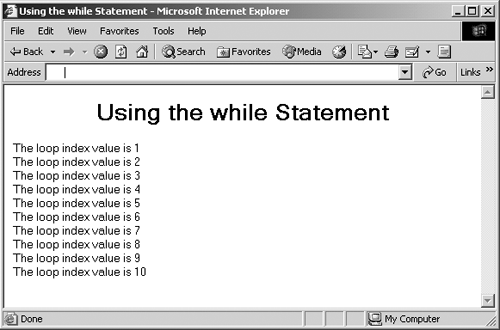
You can see the results of this code in Figure 6-9. Figure 6-9. Using a JavaScript while loop in Internet Explorer.
|
Creating
do while
|
Creating Functions in JavaScriptFunctions are a crucial part of JavaScript programming. With a function, you can wrap some code into a programming construct, a function, and you then call that function to execute that code. You create functions with the function statement. Here's how that statement looks in outline:
function functionname([argument1 [, argument2 [, ...argumentn]]])
{
code
}
In this case, I'm passing the values argument1 , argument2 , and so on to this function. The code in the function has access to these values. A function can also return a value; to do that, you use the return statement.
Here's an example. In this case, I'm creating a function named
getTime
, which will return the current time. Notice the
syntax of the
function
statement hereI'm adding an empty
set of parentheses after the
function getTime()
{
var now = new Date
var returnValue = now.getHours() + ":"
+ now.getMinutes()
return(returnValue)
}
In this case, we're using the JavaScript
Date
class and
creating a new object of that class named
now
using the
new
operator. I can use the
getHours
and
getMinutes
methods of this new object (these
In fact, methods are just functions built into objects. If you continue on in JavaScript to creating your own classes and objects, the functions you add to a class will be called methods. In this example, I place the current time into a string named returnValue . That string is what I return from the function, using the return statement. After creating this function, you're free to use it in your code. Here's how I place that function in a <SCRIPT> element. Note that the code in functions is not run automatically when the page loads; it's run only when the function is actually called: Listing ch06_10.html
<HTML>
<HEAD>
<TITLE>
Using JavaScript Functions
</TITLE>
</HEAD>
<BODY>
<CENTER>
<H1>
Using JavaScript Functions
</H1>
</CENTER>
<SCRIPT LANGUAGE = "JavaScript">
document.writeln("The time is " + getTime()
+ " right now.")
function getTime()
{
var now = new Date
var returnValue = now.getHours() + ":"
+ now.getMinutes()
return(returnValue)
}
</SCRIPT>
</BODY>
</HTML>
You can see this page in Internet Explorer in Figure 6-10. As you can see there, things have worked out as we expected. When the page is loaded, the document.writeln statement is executed, which means that the call to the getTime function is also executed. The getTime function returns the current time as a string, which is incorporated into the text that's displayed in the page. Figure 6-10. Using a JavaScript function in Internet Explorer.
We've seen how to write a function that returns a value now, but
what about passing values to functions so they can work on them?
I'll take a look at how that works
|