Deployment Extensions
|
There are a number of WebSphere-specific extensions to the J2EE specifications, which provide enhanced functionality and control over the runtime behavior. These extensions all have defaults, and are not required to be configured in order to execute the application – but the optimal use of WebSphere is only available by utilizing these extensions. The extensions may be configured during any stage of development and deployment; WebSphere Studio provides editing capability for the extensions, and you can also use the standalone Application Assembly Tool to complete the details.
The extension information is all stored in the module archives as extension documents (which are separate files) to the base deployment descriptors, meaning that the data will remain associated with the module even if it is exported and re-imported into a different application. Despite this separation, the version 5.0 Studio editor provides a single consolidated view of both the specification and extension information. The fact that the settings are an extension to the specification is labeled for clarity, but you do not need to use a separate editor. In this section, we discuss the extensions that are available for web applications, enterprise beans, and other resource types.
Web Application Extensions
When editing the deployment descriptor of a web application, the following extensions are available, each of which will be discussed in more detail below:
-
Web application reloading options
-
Error page selection
-
Additional classpath settings
-
Enablement of directory browsing
-
Whether servlets should be served by class name
-
JSP pre-compilation support
-
Automatic request and response encoding
-
Enablement of automatic filter loading
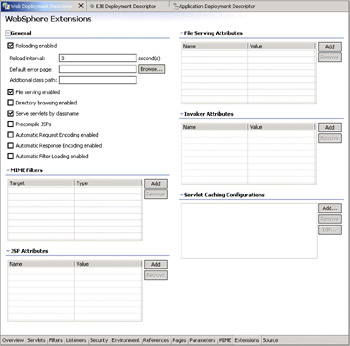
These options are accessible via the web application Deployment Descriptor editor, on the Extensions tab. The extension information is saved as a separate file in the WAR. Although the extensions are edited via the same editor as the standard deployment descriptor settings, the extension information is saved in the file WEB-INF/ibm-web-ext.xmi:
Reloading Options
The reloading options allow you to define if, and how often WebSphere should check the timestamp of the files on the disk, to see if they have been changed. If they have changed, then WebSphere will automatically reload the web application, reloading the changed files in the process. Despite the fact that all the classes in the web application will be reloaded, this is a much faster operation than restarting the entire server. This reload interval is typically set to a low value during development, but can be set to a higher value or even disabled for production use. As we're still developing the Plants-By-WebSphere application, we'll enable this option, with an interval of 3 seconds.
Error Pages
The error page is used as a default setting for the error page to be used, in case of a run-time problem. The standard web deployment descriptor (web.xml) defines a standard set of error pages to be used in response to specific errors, but does not indicate a page to display in case of other errors; this extension provides that. This is an important function that can allow your application to recover gracefully in case of trouble.
File Serving and Directory Browsing
The indication of whether file serving is enabled is another setting that must be reviewed carefully for its use at run time. This capability allows the application server to serve files, such as HTML and GIF file types. The ability to do so is very useful during development of the application, as you do not need to run a separate HTML server (such as the IBM Apache Web Server) in order to test your complete application. During production use however, you may prefer to disable this ability in WebSphere and use a separate web server for file serving, for both performance and security reasons. Directory browsing is a similar setting; its enablement during development can be quite beneficial, but you typically do not want to enable it for a production server.
For the Plants-By-WebSphere application, we do not need the scalability offered by a separate web server, so we will instead serve all files directly from the web container.
Serving Servlets by Class Name
The option to serve servlets by class name enables access of the servlets by a URL listing the implementing class name of the servlets. The alternative to this option is to define aliases for the servlets on the Servlets page; you can create URL mappings from any URL to a specific servlet. Defining the mappings is additional configuration work, but is beneficial to the use of the class names, as it gives you additional flexibility for future development of your application. Surfacing the class names via external URLs means that any changes to the implementation of your application that result in changes to the servlet classes used immediately become visible (as changed URLs) to users of the application. Restricting access to the servlet name also provides greater security, as it does not allow direct access to the class names. We do not need to serve by class name for the Plants-By-WebSphere application, so leave this option unselected.
Pre-compiling a JSP page is a way to avoid making the first user wait for the JSP compilation, by paying the compilation cost on server startup. If you have a lot of JSP files in your application, the delay to the first user may be substantial, and this option provides a mechanism to avoid that. The cost is increased server startup time; something that you may be willing to accept for a production server, but less desirable during development when the JSP files may be changing frequently. We don't need to pre-compile the JSP files for Plants-By-WebSphere during development, so leave the option unselected.
Request and Response Encodings
In WebSphere version 5, the web container no longer automatically sets request and response encodings, and response content types – you are expected to set these values using available methods as defined in the Servlet 2.3 specification. If you choose not to use the character encoding methods, they can enable the automatic request or automatic response encoding. If these options are selected, the encoding is selected by examining the header of the request or response. If these options are not set, the Servlet specification calls for a default encoding of ISO 8859-1. We do not specifically set the encoding in Plants-By-WebSphere, so we need to have the automatic encoding enabled. Select both checkboxes.
Filters
Filters are an important part of the Servlet 2.3 specification. Servlet filtering provides a new type of object called a filter that can transform a request or modify a response. They are normally loaded when they are executed, but selecting the automatic filter loading option will pre-load the filters to optimize run-time performance. We can leave this unselected for Plants-By-WebSphere.
EJB Extensions
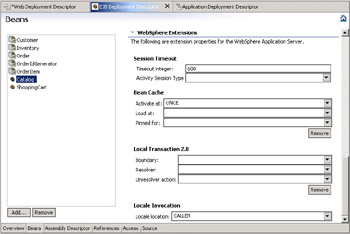
There are also WebSphere-specific extensions available for EJBs, which allow you to configure the behavioral characteristics of the bean in the server. These options are all applicable on a per-bean basis, and are visible under the WebSphere Extensions heading of the Beans page in the EJB Deployment Descriptor editor once you have selected a bean. As with other metadata, the extension information is saved as a separate file in the JAR. Although the extensions are edited via the same editor as the standard deployment descriptor settings, the extensions information is saved in the file META-INF/ibm-ejb-jar-ext.xmi. Each option will be discussed in more detail below:
-
Session timeout settings
-
Activity session type
-
Bean cache settings
-
Local transaction settings
-
Locale invocation selection
-
Data cache settings
Session Timeout
The Timeout integer option only applies to stateful session beans, and allows you to configure the duration in seconds before the session bean times out. This is used to prevent system resources from being exhausted. For each of the Plants-By-WebSphere session beans (Catalog, Login, Mailer, ReportGenerator, and ShoppingCart), we'll set the timeout to 600 seconds (10 minutes).
Activity Session Type
The Activity Session Type option also only applies to session beans. This can be set to Bean or Container, and allows you to declare who is responsible for starting the activity session; Bean means that the application code will start it, and Container means the container will do so. Activity sessions are described in more detail in Chapter 9.
Bean Cache Settings
These options apply to entity and stateful session beans, and allow you to configure the local caching of the bean instances within the EJB container – which in turn governs the commit options that are used.
The valid settings for Activate at control when the bean is activated and placed in the cache:
-
ONCE
The bean is activated when it is first accessed in the server process, and that instance is then saved in the cache; it will be passivated and removed from the cache at the discretion of the container – such as when the cache becomes full. -
TRANSACTION
The bean is activated at the start of the transaction, and passivated and removed from the cache at the end of the transaction -
ACTIVITY_SESSION
The bean is activated and passivated at the start and end of the activity session. Activity sessions are discussed in more detail in Chapter 9.
The Load at setting specifies when the bean loads its state from the database. The value of this setting implies whether the container has exclusive or shared access to the database:
-
ACTIVATION
Indicates that the bean is loaded when it is activated (regardless of the Activate at setting) and implies that the container has exclusive access to the database. -
TRANSACTION
Indicates that the bean is loaded at the start of a transaction and implies that the container has shared access to the database.
The settings of Activate at and Load at govern which commit options are used. The commit options themselves are described in the Enterprise JavaBeans specification, but the mapping of those options to the WebSphere bean cache settings is:
| EJB Commit Option | Activate At | Load at | Description |
|---|---|---|---|
| Commit Option A (implies exclusive DB access) | ONCE | ACTIVATION | This option reduces database I/O (avoids calls to the ejbLoad() function) but serializes all transactions accessing the bean instance. Option A can increase memory usage by maintaining more objects in the cache, but could provide better response time if bean instances are not generally accessed concurrently by multiple transactions. |
| Commit Option B (implies shared DB access) | ONCE | TRANSACTION | Option B can increase memory usage by maintaining more objects in the cache. However, because each transaction creates its own copy of an object, there can be multiple copies of an instance in memory at any given time (one per transaction), requiring that the database be accessed at each transaction. |
| Commit Option C (implies shared DB access) | TRANSACTION | TRANSACTION | This option can reduce memory usage by maintaining fewer objects in the cache; however, there can be multiple copies of an instance in memory at any given time (one per transaction). This option can reduce transaction contention for enterprise bean instances that are accessed concurrently but not updated. |
The Pinned for option defines how long the bean should be maintained in the cache. The options are ACTIVATION_PERIOD, ACTIVITY_SESSION, TRANSACTION,or BUSINESS_METHOD_ONLY.
The majority of the Plants-By-WebSphere EJBs can use the default activation setting of ONCE for the session beans (Catalog, Login, Mailer, ReportGenerator, and ShoppingCart), as we wish to optimize the response time for these beans by leaving them active (and cached) as much as possible. The entity beans (Customer, Inventory, Order, OrderIdGenerator, and OrderItem) use a setting of TRANSACTION for both Activate at and Load at, which provides for reduced transactional contention – the bean instances are passivated at the conclusion of each transaction. The Mailer bean is the only exception; we need to activate the mailer only once, so set the Load at setting to ACTIVATION, and the Pinned for setting to ACTIVATION_PERIOD.
Local Transaction Settings
The local transaction settings define the behavior when a method runs in what the EJB specification refers to as an "unspecified transaction context". The use of local transactions can provide significant performance benefits in some situations over global transactions. Local transactions are discussed in detail in Chapter 9. There are three local transaction options, Boundary, Resolver, and Unresolver action.
The Boundary setting specifies when a local transaction begins. The options are BeanMethod and ActivitySession. The default behavior is BeanMethod, meaning that the local transaction begins when the method begins and ends when the method ends.
The Resolver options define how the local transaction is to be resolved before the local transaction context ends: by the application through user code or by the EJB container. If this is set to Application, it means your code must either commit or roll back the local transaction. If this does not occur, the run-time environment logs a warning and automatically commits or rolls back the connection as specified by the Unresolved action setting. If the Resolver option is set to ContainerAtBoundary, it means the container takes responsibility for resolving each local transaction. This provides you with a programming model similar to global transactions in which your code simply gets a connection and performs work within it.
The Unresolver action options are Commit or Rollback, and specify the action the container will take if the resources are uncommitted by an application in a local transaction. As described in Chapter 5, The Plants-By-WebSphere application uses only Required as its only transaction policy. This means we do not need to worry about the local transaction behavior for Plants-By-WebSphere. Additional discussion on the transactional semantics is provided in Chapter 9.
Locale Invocation
The locale invocation property allows you to define the locale to be used when executing the bean; the options are CALLER or SERVER, and allow you to influence if the locale-specific settings (such as sorting order, time and date formatting, etc.) of the server or the calling process are to be used. For Plants-By-WebSphere, we will use the caller's locale for every bean.
Data Cache Settings
The data cache settings apply only to entity beans, and allow you to control the lifetime of cached data for an instance of this bean type. This is different from the Bean Cache settings, which control caching of the bean instance itself (not the data). There are two data cache settings: Lifetime in cache, and Lifetime in cache usage.
The Lifetime in cache property defines the duration in seconds for which the data will be cached, but the meaning is determined by the Lifetime in cache usage setting. The minimum value (0) indicates that cached data for a bean instance will not exist beyond the end of the transaction in which it was retrieved. Any non-zero value indicates that the cached data will exist beyond the end of the transaction; this might avoid another retrieval from persistent storage if this same bean instance is used in later transactions. A non-zero value is typically used for beans that are meant to be read-only. Usually, such beans are updated only at predictable intervals, such as every hour or every day at 3 a.m.
The Lifetime in cache usage options are:
-
CLOCK_TIME
The value of Lifetime in cache represents a particular time of day, in seconds. The value is added to the immediately preceding or following midnight to calculate a future time value, which is then treated as for ELAPSED_TIME. Using CLOCK_TIME enables you to specify that all instances of this bean type are to have their cached data invalidated at, for example, 3 a.m., no matter when they were retrieved. This is important if, for example, the data underlying this bean type is batch-updated at 3 a.m. every day. The selection of midnight (preceding or following) depends on the value of Lifetime in cache. If Lifetime in cache plus the value that represents the preceding midnight is earlier than the current time, the following midnight is used. When you use CLOCK_TIME, the value of Lifetime in cache is not supposed to represent more than 24 hours. If it does, the cache manager subtracts 24 hour increments from it until a value less than or equal to 24 hours is achieved. To invalidate data at midnight, set Lifetime in cache to 0. -
WEEK_TIME
The same as for CLOCK_TIME, except that the value of Lifetime in cache is added to the preceding or following Sunday midnight (11:59 PM Saturday plus 1 minute). When WEEK_TIME is used, the value of Lifetime in cache can represent more than 24 hours but not more than 7 days. -
ELAPSED_TIME
The value of Lifetime in cache is added to the time at which the transaction in which the bean instance was retrieved is completed. The resulting value becomes the time at which the cached data expires. The value of Lifetime in cache can add up to minutes, hours, days, and so on. -
OFF
The value of Lifetime in cache is ignored. Beans of this type are cached only in a transaction-scoped cache. The cached data for this instance expires after the transaction in which it was retrieved is completed.
These options can be summarized like this:
| Lifetime in Cache Usage | Sample Lifetime in cache | Description |
|---|---|---|
| OFF | n/a | Data is not cached |
| CLOCK_TIME | 10,800 | Data cache is invalidated at 3 a.m. (3 * 60 * 60) |
| WEEK_TIME | 270,000 | Data cache is invalidated on Wednesday morning at 3 a.m. (3 * 60 * 60) + (3 * 24 * 60 * 60) |
| ELAPSED_TIME | 18,000 | Data cache is invalidated 5 hours after the transaction completes (5 * 60 * 60) |
The Plants by WebSphere entity beans are not read-only, and because they may have their data updated at any time the data cache settings are left blank (meaning the data is not cached). For example, if reloading the Inventory bean was measured to be an expensive operation, one option would be to split the Inventory bean into two distinct beans, separating the dynamic part of the Inventory bean (such as the quantity field, indicating quantity on hand) from the more static parts of the Inventory bean (such as the description). The new bean containing only static information could then be cached, and the cache invalidated only when the inventory descriptions were likely to be updated (such as once a day).
Deployment Time Binding Information
Having completed the deployment extensions, the only remaining configuration of the application is to complete the binding information. The bindings specify how the actual resource (such as a database) is bound to (or associated with) the logical representation of the resource (such as a data source).
Typically the bindings consist of defining JNDI names for each resource. The JNDI names can then be looked up at run time and used to access the concrete implementation of the resource. Before the application can be executed, the binding information defined in the application must be reconciled with the resources defined in the server configuration, and so changes may need to be made in both those areas. If you want to unit test the application, then the binding information can be defined within Studio as part of the unit test server configuration. Alternatively you can install the application into the server using the web-based administration console, and define the information that way. We'll describe both techniques here, although we'll focus on the Studio path.
Define JNDI Names for the Enterprise Beans
The first action is to ensure a JNDI name has been provided for each enterprise bean. The JNDI name is bound to the bean at install time, and used in the implementation of the lookup from the InitialContext factory. In Studio the name is entered in the EJB Deployment Descriptor editor, on the Beans tab. Any name can be used here, as long as it is consistent with that used in your application – but it's convention to qualify all the names for a related application into a similar structure; the format used for Plants by WebSphere is "plantsby/Homename". The JNDI names we're using are therefore:
| Enterprise bean | JNDI name |
|---|---|
| Customer | plantsby/CustomerHome |
| Inventory | plantsby/InventoryHome |
| Order | plantsby/OrderHome |
| OrderIdGenerator | plantsby/OrderIdGeneratorHome |
| OrderItem | plantsby/OrderItemHome |
| Catalog | plantsby/CatalogHome |
| ShoppingCart | plantsby/ShoppingCartHome |
Define the Data Sources Used
Next you need to ensure the data sources and database tables have been defined in order to execute the entity beans. The definition of a data source is specific to the database installation that will be used, and we'll describe the use of CloudScape initially. CloudScape is a pure Java, lightweight database that is shipped with WebSphere Application Server; so it is ideal for unit testing purposes. WebSphere has support for multiple database mappings to be defined for each CMP bean; see Chapter 9 for a complete discussion of this support.
| Note | A pre-populated CloudScape database for Plants-By-WebSphere is included on the CD with this book, as a zip file. To run the sample you need to unzip the file, and then later define the location in the server configuration. We shall be assuming it is unzipped in the C:/Wrox/5814/ directory but it can be anywhere you like. |
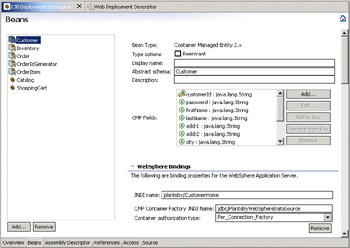
Enterprise beans use a data source to access the database; the data source to be used needs to be specified in the entity bean deployment descriptor editor, and later declared and associated with an actual database in the server configuration. Session beans, and beans with bean-managed persistence need to use the JNDI name at run time to look up the data source, but beans with CMP persistence require special configuration. They use a connection factory, which provides access to the data source at run time. You can specify the connection factory on the overview page of the EJB Deployment Descriptor editor, at the bottom of the page. The CMP connection factory binding section allows you to enter the JNDI name that will be a default for all CMP beans in the JAR. It's also possible to override this default for each bean on the Beans page of the editor, but the JAR default will suffice for Plants-By-WebSphere.
You also need to select a container authorization type – this defines who is responsible for authenticating access to the database, the container or the connection factory. We want the authentication to be completed by the connection factory, so select Per_Connection_Factory for each bean.
The following screenshot shows both the JNDI name and data source setting for the Customer bean:
|

EAN: N/A
Pages: 135