Section 5.3. Backup Classifications

5.3 Backup Classifications
Various types of backup schemes exist, and they can be categorized in different ways. In an actual data center, one typically uses multiple types of backups. In short, the categorization of backups should not be taken to be mutually exclusive. Backups can be classified on the basis of
-
Architecture
-
Functionality
-
Network infrastructure
Sections 5.3.1 through 5.3.3 take a look at each of these types of classification.
5.3.1 Backup Classifications Based on Architecture
One way of classifying backups is based on the architecture. That is, backups are classified in terms of the objects they deal with and the amount of awareness the backup application has of these objects. The available types of architecture-based backups, described in Sections 5.3.1.1 through 5.3.1.3, are
-
Image- or block-level backup
-
File-level backup
-
Application-level backup
5.3.1.1 Image- or Block-Level Backup
The backup application in this case deals with blocks of data. Typically, this kind of backup scheme needs all applications on the server to cease accessing the data that is being backed up. The application opens the disk to be backed up as a raw disk (ignoring the file locations) and literally does logical block-level read and write operations.
The advantages of this kind of backup are that the backup and restore operations are very fast, and it can be a good disaster recovery solution. One disadvantage is that applications and even the operating system cannot access the disk while the backup or restore is happening. Another disadvantage is that image-level backups of a sparsely populated volume can result in a lot of unused logical blocks being copied for the backup. Some backup applications provide the logic necessary to detect and skip unused logical blocks. These are called sparse image backups .
Finally, it is hard to retrieve just a particular file or a few files rather than restore all the data to a disk. To do so, the restore software must understand the file system metadata as it exists on the tape, retrieve this metadata, and from there, compute the location on the tape where the data for the particular file resides. Some vendors provide the ability to restore a particular file from an image-level backup, but these offerings are available on only certain operating system platforms and not others. Some restore applications do attempt to optimize restoring a file from an image-level backup. These applications write file metadata such as the file allocation table for FAT16 to the tape.
The version of NTFS included with Windows 2000 already keeps all metadata in files ”for example, the bit map that represents logical block allocation. The restore application locates the required metadata. From this the software calculates the positions on tape of each of the required logical data blocks for the file being restored. The tape is then spooled in one direction, and all the relevant portions of the tape are read while the tape is moving in a single direction, thus providing the file data for restoration. The tape is not moved forward and backward at all, so not only is the restore time reduced, but the life of the tape is extended as well. Legato Celestra is one example of such a backup application.
Note that sometimes the choice of backup is limited. Consider the case in which a database uses a raw disk volume (without any kind of file system on that volume). In this case the only two choices are an image-level backup or an application-level backup (the latter is described in Section 5.3.1.3).
5.3.1.2 File-Level Backup
With this type of backup, the backup software makes use of the server operating system and file system to back up files. One advantage is that a particular file or set of files can be restored relatively easily. Another is that the operating system and applications can continue to access files while the backup is being performed.
There are several disadvantages as well. The backup can take longer, especially compared to an image-level backup. If a lot of small files are backed up, the overhead of the operating system and file and directory metadata access can be high. Also the problem of open files described earlier exists and needs to be solved .
Another disadvantage is related to security. This issue arises irrespective of whether the backup is made via a file-level backup or an image backup. The problem is that the restore is typically done through an administrator account or backup operator account rather than a user account. This is the only way to ensure that multiple files belonging to different users can be restored in a single restore operation. The key is that the file metadata, such as access control and file ownership information, must be properly set. Addressing the problem requires some API support from the operating system and file system involved (NTFS) to allow the information to be set properly on a restore operation. In addition, of course, the restore application must make proper use of the facility provided.
5.3.1.3 Application-Level Backup
In this case, backup and restore are done at the application level, typically an enterprise application level ”for example, Microsoft SQL Server or Microsoft Exchange. The backup is accomplished via APIs provided by the application. Here the backup consists of a set of files and objects that together constitute a point-in-time view as determined by the application. The main problem is that the backup and restore operations are tightly associated with the application. If a new version of the application changes some APIs or functionality of an existing API, one must be careful to get a new version of the backup/restore application.
Applications either use a raw disk that has no file system associated with the volume/partition or simply have a huge file allocated on disk and then lay down their own metadata within this file. A good example of an application that takes this approach is Microsoft Exchange. Windows XP and Windows Server 2003 introduce an important feature in NTFS to facilitate restore operations for such files. The file can be restored via logical blocks, and then the end of the file is marked by a new Win32 API called SetFileValidData.
5.3.2 Backup Classifications Based on Functionality
Yet another way of classifying backup applications is based on the functionality that is achieved in the backup process. Note that a data center typically uses at least two and very often all types of the backups described in Sections 5.3.2.1 through 5.3.2.3: full, differential, and incremental.
5.3.2.1 Full Backup
In a full backup , the complete set of files or objects and associated metadata is copied to the backup media. The advantage of having a full backup is that only one media set is needed to recover everything in a disaster situation. The disadvantage is that the backup operation takes a long time because everything needs to be copied. Full backups are very often accomplished with the image- or block-level backup architecture.
5.3.2.2 Differential Backup
A differential backup archives all changes since the last full backup . Because differential backups can be either image block based or file based, this set of changes would represent either the set of changed disk blocks (for image-based backup) or the set of changed files (for file-based backup). The main advantage of differential backup is that the backup takes a lot less time than a full backup. On the other hand, the disadvantage is that recovering from a disaster takes longer. A disaster recovery operation involves running at least two restore operations, one corresponding to a full backup and one corresponding to a differential backup.
With low-end storage deployed, file-based differential backups are used when the applications by nature tend to create multiple small files and change or create just a few of them since the last full backup. In addition, when low-end storage is deployed, file-based differential backups are not typically used with database applications, because database applications, by their very nature, tend to make changes in small parts of a huge database file. Hence a file-based backup would still have to copy the whole file. A good example here is Microsoft Exchange, which tends to make changes in small parts of a huge database file.
With high-end storage deployed, image-based differential backup can be used in any situation, including with database applications. The reason for this flexibility is that the high-end storage units can track a lot of metadata and thus quickly identify which disk blocks have changed since the last full backup. Thus, only this small number of disk blocks needs be archived, and the large number of unchanged disk blocks that are present in the same database file can be ignored. Even though the backup with high-end storage is more efficient, APIs that start the backup at a consistent point and allow the I/O to resume after the backup has been accomplished are still needed. The efficiency of high-end storage simply minimizes the time during which all I/O must be frozen while the backup is being made.
5.3.2.3 Incremental Backup
An incremental backup archives only the changes since the last full or incremental backup . Again, the obvious advantage is that this backup takes less time because items not modified since the last full or incremental backup do not need to be copied to the backup media. The disadvantage is that a disaster recovery operation will take longer because restore operations must be done from multiple media sets, corresponding to the last full backup followed by the various incremental backups.
In the absence of high-end storage, file-based incremental backup is used only when a different set of files is typically created or modified. With high-end storage that can provide the required metadata tracking, block-based incremental backup may be used.
5.3.3 Backup Classifications Based on Network Infrastructure
One way of classifying a backup scenario is based on the network topology used, and how that topology lends itself to achieving the best method for backing up the attached hosts . The network infrastructure “based backup types ”direct-attached backup, network-attached backup, LAN-free backup, and server-free backup ”are described in detail in Sections 5.3.3.1 through 5.3.3.4.
5.3.3.1 Direct-Attached Backup
Direct-attached backup was the first form of backup used, simply because it emerged in the era when storage devices were typically attached directly to servers. Despite the advent of network storage, direct-attached backup remains a very popular topology for backing up Windows-based servers. Direct-attached backup is illustrated in Figure 5.3.
Figure 5.3. Direct-Attached Backup
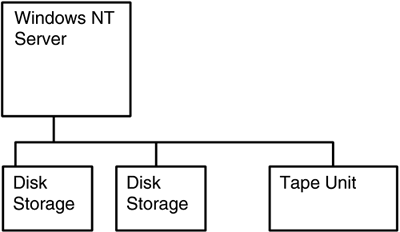
The advantage of direct-attached backup is that it is fairly simple. An application running on the server reads data from the appropriate disk volume and writes it to the tape device. The biggest problems with direct-attached backup are these:
-
Tape devices are duplicated (one per server that needs backup), which is expensive. To put it differently, sharing the tape device between servers is difficult.
-
The total cost of ownership is high because you need more administrators doing tape backups using multiple tape devices.
-
Storing multiple tapes can be confusing.
-
Because the data on different servers is often duplicated, but slightly out of sync, the tape media reflects duplication of data with enough seemingly similar data to cause confusion.
-
Last, but not least, the server must be able to handle the load of the read/write operations that it performs to stream the data from disk to tape.
5.3.3.2 Network-Attached Backup
As Chapter 3 discussed, the era of direct-attached storage was followed by the client/server era with a lot of clients and servers sharing resources on a LAN. This LAN environment facilitated the possibility of having a server on the LAN with a tape backup device that could be shared by all the servers on the LAN.
Figure 5.4 shows a typical deployment scenario for network-attached backup. The left side of the diagram shows a couple of servers. These could be application or file-and-print servers, and there may be more than just a couple. The right side of Figure 5.4 shows a backup server with a tape unit attached. This tape device can be used for backing up multiple file-and-print or application servers. Thus, network-attached backup allows a tape device to be shared for backing up multiple servers, which can reduce costs.
Figure 5.4. Network-Attached Backup
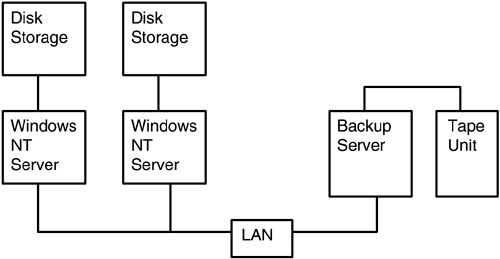
The problems that network-attached backup introduced are these:
-
The backup operation consumes LAN bandwidth, often requiring careful segmentation of the LAN to put the backup traffic on a separate LAN segment.
-
Host online hours (i.e., operating hours) increased; that is, the amount of time servers needed to be available for transactions and user access grew. In addition, the amount of data on the servers (that needed to be backed up) started increasing as well.
Increasingly, these problems led to the use of backup requirements as the sole basis for network design, determining the exact number of backup devices needed, and the selection and placement of backup devices.
5.3.3.3 LAN-Free Backup
The advent of storage area networks introduced new concepts for backup operations. The new functionality is based on the fact that a storage area network (SAN) can provide a high bandwidth between any two devices and also, depending on the topology, can offer multiple simultaneous bandwidth capability between multiple pairs of devices with very low latencies. In contrast, using Fibre Channel loop topology with many devices ”that is, more than approximately 30 ”cannot offer multiple simultaneous high-bandwidth connections with low latencies, because the total bandwidth of the loop must be shared among all attached devices.
Figure 5.5 shows a typical SAN-based backup application. Note the FC bridge device in the figure. Most tape devices are still non-FC based (using parallel SCSI), so a bridge device is typically used. In this figure, the Windows NT servers have a presence on both the LAN as well as the SAN.
Figure 5.5. SAN-Based Backup
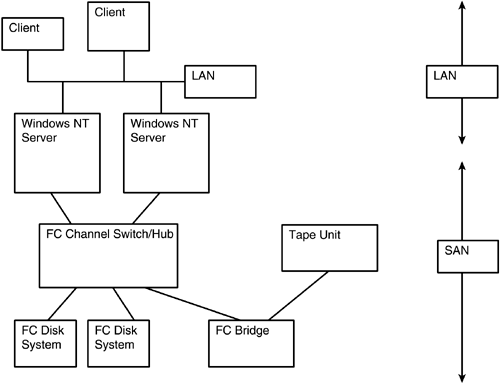
The backup topology in Figure 5.5 has the following advantages:
-
The tape device can be located farther from the server being backed up. Tape devices are typically SCSI devices, although FC tape devices are now more readily available. This means that they can be attached to only a single SCSI bus and are not shared easily among servers. The FC SAN, with its connectivity capability, neatly solves this problem. Note that one still needs a solution to ensure that the tape device is accessed properly and with appropriate permissions. Here are some possibilities:
-
One solution is to use zoning, allowing one server at a time to access the tape device. The problem with this solution is that zoning depends on good citizen behavior; that is, it cannot ensure compliance. Another problem with zoning is that it will not ensure proper utilization of a tape changer or multitape device.
-
Another solution is to use the SCSI Reserve and Release commands.
-
Yet another solution is to have the tape device connected to a server, allowing for sharing of the tape pool by having special software on this server. Sharing of a tape pool is highly attractive because tape devices are fairly costly. IBM's Tivoli is one example of a vendor that provides solutions allowing the sharing of tape resources.
-
-
The backup is now what is often referred to as a LAN-free backup because the backup data transfer load is placed on the SAN, lightening the load on the LAN. Thus, applications do not get bogged down with network bandwidth problems while a backup is happening.
-
LAN-free backup provides more efficient use of resources by allowing tape drives to be shared.
-
LAN-free backup and restore are more resilient to errors because backups can now be done to multiple devices if one device has problems. By the same token, restores can be done from multiple devices, allowing more flexibility in resource scheduling.
-
Finally, the backup and restore operations typically complete a lot more quickly, simply because of the SAN's higher network speed.
5.3.3.4 Server-Free Backup
Server-free backup is also sometimes referred to as serverless backup or even third-party copy . Note that server-free backup is also usually LAN-free backup ”LAN-free backup that also removes the responsibility of file movement from the host that owns the data. The idea is fairly simple, consisting of leveraging the Extended Copy SCSI commands.
Server-free backup began as an initiative placed before the Storage Networking Industry Association (SNIA) that evolved into the SCSI Extended Copy commands ratified by the International Committee for Information Technology Standards (INCITS) T10 Technical Committee (ANSI INCITS.351:2001, SCSI Primary Commands-2). Note that SCSI already supported a copy command, but the problem was that all SCSI devices required attachment to the same SCSI bus to use this command (the Copy command has since been made obsolete in the SCSI standards; see http://www.t10.org). The Extended Copy command adds features such that the data source and data destination may be on different SCSI buses and yet still be addressable because the syntax of the command allows for this.
In server-free backup, the backup server can remain relatively free to handle other work while the actual backup is accomplished by the data mover agent. The data is moved directly from the data source to the destination (backup media) (instead of being moved from the source to the backup server to the destination).
While appreciating the advantages of server-free backup, one should not forget that server-free restore is a very different issue. Server-free restore operations are still relatively rare; that is, backups made using server-free backup technology are very often restored via traditional restore technology that involves the use of a backup software server.
Server-free backup is illustrated in Figure 5.6. In the interest of simplicity, the figure shows the minimum number of elements needed to discuss server-free backup. In practice, however, SANs are much more complex. The figure shows a Windows server connected to an FC switch via an FC HBA. An FC-to-SCSI router is also present, to which are connected a SCSI tape subsystem and a disk device. The disk and tape devices need not be connected to the same router.
Figure 5.6. Server-Free Backup
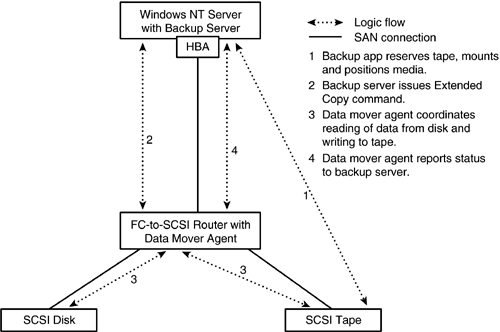
A backup server application on the Windows server discovers the data mover agent on the router, through Plug and Play. The backup application determines the details of the backup needs to be accomplished (disk device identifier, starting logical block, amount of data to be backed up, and so on). The backup server software first issues a series of commands to the tape device to reserve the tape device and ensure that the correct media is mounted and properly positioned. When that is done, the backup server software issues an Extended Copy command to the data mover, resident in the router, which then coordinates the movement of the required data. When the operation has been accomplished, the data mover agent reports the status back to the backup software on the Windows server.
Several different entities play a role in server-free backup architecture, including the data source, data destination, data mover agent, and backup server.
The data source is the device containing the data that needs to be backed up. Typically a whole volume or disk partition needs to be backed up. The data source needs to be directly addressable by the data mover agent (described shortly). This means that storage devices connected directly to a server (or cases in which the server and the storage device have exclusive visibility) cannot be data sources for server-free backup because they cannot be addressed directly from outside the server.
The data destination is typically a tape device where the data is to be written. The device may also be a disk if one is backing up to disk instead of tape. Tape devices are typically connected to a fabric port to avoid disruption of the tape data traffic upon error conditions in other parts of the SAN. For example, if the tape were connected to an FC arbitrated loop, an error in another device or, for that matter, the occurrence of a device joining or leaving the loop, would cause loop reinitialization, resulting in disruption to the tape data traffic.
A data mover agent typically is implemented in the firmware of a storage router because the data mover agent must be able to act on the SCSI Extended Copy command, which is sent to the router in an FC packet. Switches and hubs that examine only the FC frame header are not readily suited to house data mover agents , though this may change in the future.
The data mover agent is passive until it receives instructions from a backup server. Most tapes connected to SANs are SCSI devices, so a storage router (that converts between FC and SCSI) is typically required and provides a good location for housing the data mover agent. Fibre Channel tapes are now appearing on the scene, and some vendors, such as Exabyte, are including data mover agent firmware in the FC tape device itself. In addition, native FC tape libraries are usually built with embedded FC-to-SCSI routers, installed in the library, providing the ability for the library to have a data mover built in. Note that the data mover agent can also be implemented as software in a low-end workstation or even a server. Crossroads, Pathlight (now ADIC), and Chaparral are some examples of vendors that have shipped storage routers with data mover agents embedded in the firmware. A SAN can have multiple data mover agents from different vendors, and they can all coexist.
Of course, to be usable, a data mover agent needs to be locatable (via the SCSI Report LUNs command) and addressable (the WWN is used for addressing) from the backup server software. The data mover agent can also make two simultaneous backups ”for example, one to a geographically remote mirror to provide a disaster recovery solution ”but the two commands must be built by the server that issued the third-party copy command.
The backup server is responsible for all command and control operations. At the risk of being repetitious, it is worthwhile noting all the duties of the backup server. The backup server software first ensures availability of the tape device, using appropriate SCSI Reserve and Release commands as appropriate. The backup server software then ensures that the correct tape media is mounted and positioned. It is also responsible for identifying the exact address of the data source and the data's location in logical blocks, as well as the amount of data that needs to be backed up. Once the backup server has all this information, it sends an Extended Copy command to the data mover agent. The data mover agent then issues a series of Read commands to the data source device and writes the data to the data destination.
Computer Associates, CommVault, LEGATO, and VERITAS are some examples of vendors that ship a server-free backup software solution. Storage router vendors that ship server-free functionality routinely work with backup independent software vendors (ISVs) to coordinate support because many of the implementations use vendor-unique commands to supplement the basic SCSI Extended Copy commands.
Note that although server-free backup has been around for a while, there is very little support for server-free restore.
5.3.3.5 The Windows Server Family and Server-Free Backup
A lot of the trade press and vendor marketing literature claims that a particular server-free backup solution is Windows 2000 compatible. It is worthwhile examining this claim in more detail to understand what it means. The following discussion examines each of the four components that constitute the elements of a server-free backup solution: data source, data destination, backup software server, and data mover agent.
In most cases a data mover agent outside a Windows NT server will not be able to directly address data sources internal to the Windows NT server. The HBAs attached to servers usually work only as initiators, so they will not respond to the Report LUNs command. If the Windows NT server is using a storage device outside the server ”say, a RAID array connected to an FC switch ”it will be visible to the data mover agent. So rather than saying that storage used by a Windows NT server cannot constitute the data source for a server-free backup, one needs to state that storage internal to a Windows NT server cannot constitute the data source.
Having the data destination internal to the Windows server is also not possible, because the data destination also needs to be directly addressable from outside the Windows box (by the data mover agent).
Having the backup software run on the Windows server is certainly feasible . The HBA attached to the Windows server can issue a series of Report LUNs commands to each initial LUN (LUN 0) that it discovers. The backup software then enumerates the list of visible devices and LUNs, and checks which ones are capable of being third-party copy agents. The backup software would have to deal with some minor idiosyncrasies; for example, some products report extra LUNs that need to be used when Extended Copy commands are being issued. Many backup applications that use these devices go through an additional discovery process to verify the data mover's functionality.
The Windows NT SCSI pass-through (IOCTL) interface is capable of conveying the Extended Copy command to the data mover agent (from the Windows NT backup server). Windows NT does not have native support for data movers; Plug and Play can discover them, but drivers are required to log the data mover into the registry.
That leaves the last case ”that is, whether a Windows NT server or workstation can be used to run the data mover agent software. One advantage is that such an agent would be able to address and access the storage devices visible to the Windows server. The backup server, however, which might be outside the Windows NT box, would not be able to see these storage devices inside the Windows NT server. The data mover agent needs to be capable of acting as an initiator and target for SCSI commands. Because the HBA connected to the Windows NT server rarely acts as a target, the Extended Copy command may not get through to the data mover agent.
Note that in Windows NT, an application uses the SCSI pass-through interface (DeviceIoControl with an IoControlCode of IOCTL_SCSI_PASS_THROUGH or IOCTL_SCSI_PASS_THROUGH_DIRECT) to issue SCSI commands.
 |
| |
| Top |

EAN: 2147483647
Pages: 111