|
IBM WebSphere Portal V5 A Guide for Portlet Application Development Authors: Rodriguez J.R., Chan S., Gonzalez B. Published year: 2004 Pages: 33-34/148 |
| < Day Day Up > |
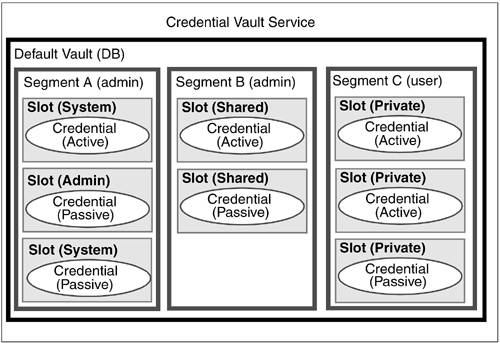
2.18 Credential VaultWebSphere Portal can be configured to exist in a single sign-on environment using a number of different approaches. If the various systems participating in the SSO realm all authenticate to Domino , WebSEAL can provide the SSO functionality. Third-party authentication mechanisms such as Tivoli Access Manager can also be used to create a unified environment for the user . However, on the portlet level, there may be systems outside the current SSO realm or applications that simply require an explicit login. To facilitate the storage, retrieval and usage of the credentials necessary to access these back-end systems, WebSphere Portal provides the Credentials Vault Service. This service is based on the Portlet Service architecture discussed in 2.17, "Portlet services" on page 108. The CredentialsVaultService allows you to easily and securely persist user IDs and passwords without concerning yourself with database access code. Figure 2-14. Credential Vault objects
|
| < Day Day Up > |

| < Day Day Up > |
2.19 Core Credential Vault objectsThere are several key objects used when working with or administering the Credential Vault. 2.19.1 VaultThis is a persistent store where credentials are actually stored. WebSphere Portal provides the default database vault. The Tivoli Access Manager lock box could also be registered and used as a vault. You can create and register your own custom vault implementations that may store credentials in some database, in memory or even a simple file system. 2.19.2 SegmentA vault can be separated into segments to distinguish the access control portlets have when working with the credentials stored in the vault. Portlets can retrieve credentials from any type of segment. A vault can only be segmented by the administrator.
2.19.3 SlotA slot is " drawer " in a segment that actually contains the credential. A slot can only contain a single credential. When retrieving credentials, a portlet searches the vault for a slot based on the slot ID. This ID is usually persisted in the PortletData object. The definition and implementation of slots is dependent on the vault containing the slot. The default vault implementation provided by WebSphere Portal provides four types of slots.
2.19.4 CredentialThis object actually contains the user ID/password pair. There are two base types of credentials.
WebSphere Portal ships with several predefined types of credentials.
Example 2-42 illustrates sample code that can be used to store credentials using the Credential Vault Service provided by WebSphere Portal. Example 2-42. Storing credentials
PortletContext context = getPortletConfig().getContext();
CredentialVaultService vault = (CredentialVaultService)
context.getService(CredentialVaultService.class);
ObjectID defaultSegmentId = vault.getDefaultUserVaultSegmentId();
Map descripMap = new HashMap();
descripMap.put("en", "A simple test slot");
CredentialSlotConfig slot = vault.createSlot(
"",
defaultSegmentId,
descripMap,
null,
CredentialVaultService.SECRET_TYPE_USERID_STRING_PASSWORD_STRING,
false,
true,
request);
request.setAttribute("Test_SlotID", slot.getSlotId());
int passLength = password.length();
char[] passChars = new char[passLength];
password.getChars(0, passLength, passChars, 0);
vault.setCredentialSecretUserPassword(
slot.getSlotId(),
userid,
passChars,
request);
CredentialVaultService methods
|
| < Day Day Up > |
|
IBM WebSphere Portal V5 A Guide for Portlet Application Development Authors: Rodriguez J.R., Chan S., Gonzalez B. Published year: 2004 Pages: 33-34/148 |