Section 7.7. Supplemental Navigation Systems
7.7. Supplemental Navigation SystemsSupplemental navigation systems (shown back in Figure 7-2) include sitemaps, indexes, and guides. These are external to the basic hierarchy of a web site and provide complementary ways of finding content and completing tasks. Search also belongs to the supplemental navigation family but is so important that we've dedicated all of Chapter 8 to it. Supplemental navigation systems can be critical factors for ensuring usability and findability within large web sites. However, they're often not given the care and feeding they deserve. Many site owners still labor under the misconception that if they could only get the taxonomy right, all users and all user needs would be addressed. Usability pundits feed this fantasy by preaching the gospel of simplicity: users don't want to make choices, and they resort to sitemaps, indexes, guides, and search only when the taxonomy fails them. Both statements are theoretically true but miss the point that the taxonomy and the embedded navigation systems will always fail for a significant percentage of users and tasks. You can count on this like death and taxes. Supplemental navigation systems give users an emergency backup. Do you really want to drive without a seatbelt? 7.7.1. SitemapsIn a book or magazine, the table of contents presents the top few levels of the information hierarchy. It shows the organization structure for the printed work and supports random as well as linear access to the content through the use of chapter and page numbers. In contrast, a print map helps us navigate through physical space, whether we're driving through a network of streets and highways or trying to find our terminal in a busy airport. In the early days of the Web, the terms "sitemap" and "table of contents" were used interchangeably. Of course, we librarians thought the TOC was a better metaphor, but sitemap sounds sexier and less hierarchical, so it has become the de facto standard. A typical sitemap (Figure 7-17) presents the top few levels of the information hierarchy. It provides a broad view of the content in the web site and facilitates random access to segmented portions of that content. A sitemap can employ graphical or text-based links to provide the user with direct access to pages of the site. Figure 7-17. Intel's sitemap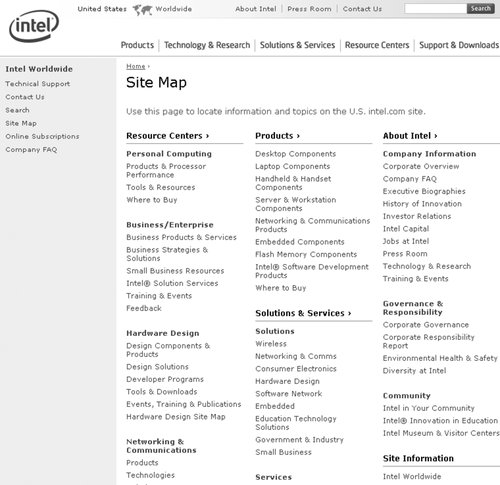 A sitemap is most natural for web sites that lend themselves to hierarchical organization. If the architecture is not strongly hierarchical, an index or alternate visual representation may be better. You should also consider the web site's size when deciding whether to employ a sitemap. For a small site with only two or three hierarchical levels, a sitemap may be unnecessary. The design of a sitemap significantly affects its usability. When working with a graphic designer, make sure he understands the following rules of thumb:
Finally, it's worth noting that sitemaps are also useful from a search engine optimization perspective, since they point search engine spiders directly to important pages throughout the web site. 7.7.2. Site IndexesSimilar to the back-of-book index found in many print materials, a web-based index presents keywords or phrases alphabetically, without representing the hierarchy. Unlike a table of contents, indexes are relatively flat, presenting only one or two levels of depth. Therefore, indexes work well for users who already know the name of the item they are looking for. A quick scan of the alphabetical listing will get them where they want to go; there's no need for them to understand where you've placed that item within your hierarchy. In Figure 7-18, AOL presents a simple but useful alphabetical site index. Handcrafted links within the index lead directly to destination pages. Figure 7-18. AOL's simple but useful alphabetical site index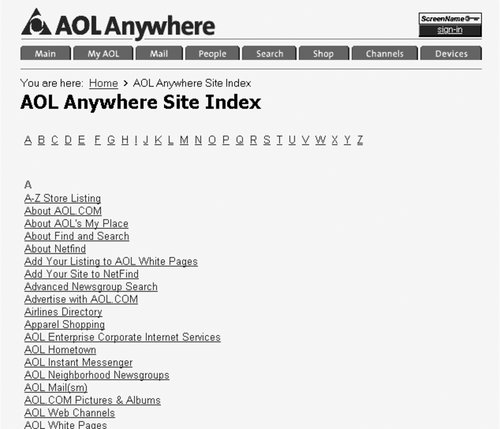 Large, complex web sites often require both a sitemap and a site index (and a search capability, for that matter). The sitemap reinforces the hierarchy and encourages exploration, while the site index bypasses the hierarchy and facilitates known-item finding. For small web sites, a site index alone may be sufficient. On Usable Web (see Figure 7-19), Keith Instone has made his site index even more useful by indicating the number of items behind each link. Figure 7-19. Usable Web's highly usable site index A major challenge in indexing a web site involves the level of granularity. Do you index web pages? Do you index individual paragraphs or concepts that are presented on web pages? Or do you index collections of web pages? In many cases, the answer may be all of the above. Perhaps a more valuable question is: what terms are users going to look for? The answers should guide the index design. To find those answers, you need to know your audience and understand their needs. You can learn more about the terms people will look for by analyzing search logs and conducting user research. There are two very different ways to create a site index. For small web sites, you can simply create the index manually, using your knowledge of the full collection of content to inform decisions about which links to include. This centralized, manual approach results in a one-step index such as the one in Figure 7-18. Another example is shown in Figure 7-20, where Vanguard's dynamically generated two-step site index features term rotation and see/see-also references. In contrast, on a large site with distributed content management, it may make sense to use controlled vocabulary indexing at the document level to drive automatic generation of the site index. Since many controlled vocabulary terms will be applied to more than one document, this type of index must allow for a two-step process. First the user selects the term from the index, and then selects from a list of documents indexed with that term. Figure 7-20. Vanguard's dynamically generated site index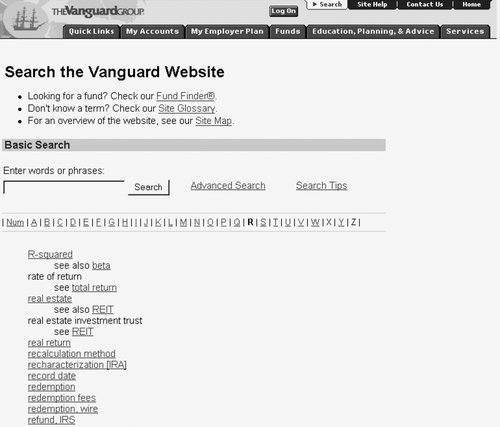 A useful trick in designing an index involves term rotation, also known as permutation. A permuted index rotates the words in a phrase so that users can find the phrase in two places in the alphabetical sequence. For example, in the Vanguard index, users will find listings for both "refund, IRS" and "IRS refund." This supports the varied ways in which people look for information. Term rotation should be applied selectively. You need to balance the probability of users seeking a particular term with the annoyance of cluttering the index with too many permutations. For example, it would probably not make sense in an event calendar to present Sunday (Schedule) as well as Schedule (Sunday). If you have the time and budget to conduct focus groups or user testing, that's great. If not, you'll have to fall back on common sense. 7.7.3. GuidesGuides can take several forms, including guided tours, tutorials, and micro-portals focused around a specific audience, topic, or task. In each case, guides supplement the existing means of navigating and understanding site content. Guides often serve as useful tools for introducing new users to the content and functionality of a web site. They can also be valuable marketing tools for restricted-access web sites (such as online publications that charge subscription fees), enabling you to show potential customers what they will get for their money. And, they can be valuable internally, providing an opportunity to showcase key features of a redesigned site to colleagues, managers, and venture capitalists. Guides typically feature linear navigation (new users want to be guided, not thrown in), but hypertextual navigation should also be available to provide additional flexibility. Screenshots of major pages should be combined with narrative text that explains what can be found in each area of the web site. The Wall Street Journal, shown in Figure 7-21, uses a guided tour to showcase navigation and editorial features of the web site that, for the most part, are accessible only to subscribers. Figure 7-21. The Wall Street Journal's guided tour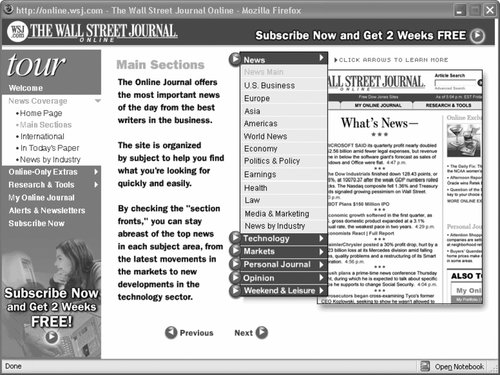 Rules of thumb for designing guides include:
Remember that a guide is intended as an introduction for new users and as a marketing opportunity for the web site. Many people may never use it, and few people will use it more than once. You should balance the inevitable big ideas about how to create an exciting, dynamic, interactive guide with the fact that it will not play a central role in the day-to-day use of the web site. 7.7.4. Wizards and ConfiguratorsThough they could be considered a special class of guide, wizards that help users to configure products or navigate complex decision trees deserve separate highlighting. Sophisticated configurators, like the Mini Cooper example shown in Figure 7-22, blur the lines between software application and web site. Figure 7-22. The Mini Cooper configurator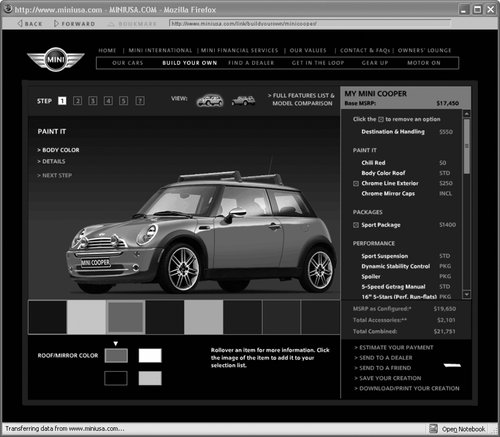 Mini successfully combines a rich suite of navigation options without causing confusion. The user can move through a linear process or jump back and forth between steps, and the site's global navigation is always present, providing context and possible next steps. 7.7.5. SearchAs we noted earlier, the searching system is a central part of supplemental navigation. Search is a favorite tool of users because it puts them in the driver's seat, allowing them to use their own keyword terms to look for information. Search also enables a tremendous level of specificity. Users can search the content for a particular phrase (e.g., "socially translucent systems failure") that is unlikely to be represented in a sitemap or site index. However, the ambiguity of language causes huge problems with most search experiences. Users, authors, and information architects all use different words for the same things. Because the design of effective search systems is so important and so complex, we've devoted all of the following chapter to the topic. |

EAN: 2147483647
Pages: 194