Section 22.3. Borders
22.3. BordersThere are two models for handling borders in CSS 2.1. In one, the borders around cells are separated from each other. In the other, borders are said to "collapse" and are continuous from one cell to the next. The border-collapse property allows authors to choose which model the table should follow.
Values:collapse | separate | inherit Initial value:collapse Applies to:table and inline-table elements Inherited:Yes 22.3.1. The Separated Borders ModelIn the separated borders model , the border is drawn on all four sides of each cell (or as specified by the border properties), and an amount of space can be added between cells with the border-spacing property.
Values:<length> <length>? | inherit Initial value:0 Applies to:table and inline-table elements Inherited:Yes The values for border-spacing are two length measurements. The horizontal spacing value comes first and is applied between the cells in each row of the table. The vertical value always comes second and is applied between cells in each column. If you provide just one value, it will be applied both horizontally and vertically. The table in Figure 22-4 uses the separated border model. table {border-collapse: separate; border-spacing: 10px 3px; border: none;} td { border: 1px solid black; } Figure 22-4. A table with border-spacing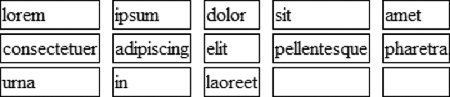 The default value for border-spacing is 0, which causes adjacent borders to touch, essentially "doubling up" the borders on the inside grid of the table. When using the separated border model, rows, row groups, columns, and column groups cannot have borders. If you have a few years of web design experience, you may remember how Netscape 4 required every cell in a table to have content in it or the cell would collapse and the background wouldn't display. In the CSS separated borders model, you get to decide whether you want empty cells to display their backgrounds and borders or whether they should be hidden using the empty-cells property.
Values:show | hide | inherit Initial value:show Applies to:Table cell elements Inherited:Yes The default value for empty-cells is show, which shows the background and borders for cells that do not contain any content. The hide value hides the cell's background and borders and is equivalent to visibility: hidden. For a cell to be "empty," it may not contain any text or replaced elements, non-breaking spaces ( ) or whitespace. It may contain carriage returns (CR), line feeds (LF), and space characters. Figure 22-5 shows the previous table border example, this time with empty elements set to hide. table {border-collapse: separate; border-spacing: 10px 3px; empty-cells: hide; border: none;} td { border: 1px solid black; } Figure 22-5. Empty cells hidden with the empty-cells property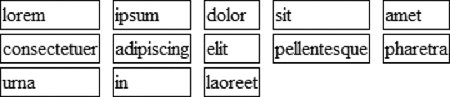
22.3.2. The Collapsing Border ModelIn the collapsing border model , the borders of adjacent borders "collapse" so that only one of the borders is visible and extra space between borders is removed. Figure 22-6 shows the table from the previous examples, only this time, the border-collapse property has been set to collapse. table {border-collapse: collapse; border: none;} td { border: 1px solid black; } Figure 22-6. A table with collapsed borders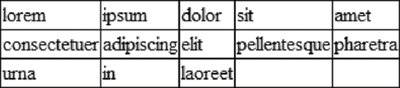 Borders between cells are centered on the grid lines between cells. Therefore, if two adjacent cells have a border that is eight pixels wide, four pixels will fall in one cell and four pixels will fall in the other. If a border has an odd number of pixels, it is left to the user agent to decide where the extra pixel goes. Wide borders on the outside edge of the table may extend into the table's margin.
22.3.2.1. Border pecking orderIf there can only be one border between each pair of cells, what happens when neighboring cells have conflicting border styles? The authors of CSS anticipated this problem and devised a system for resolving border conflicts.
|


EAN: 2147483647
Pages: 325