Assigning Fixed Costs and Fixed Contract Fees
| < Day Day Up > |
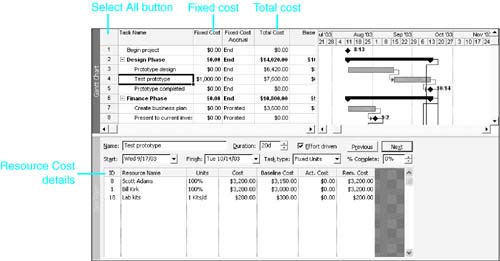
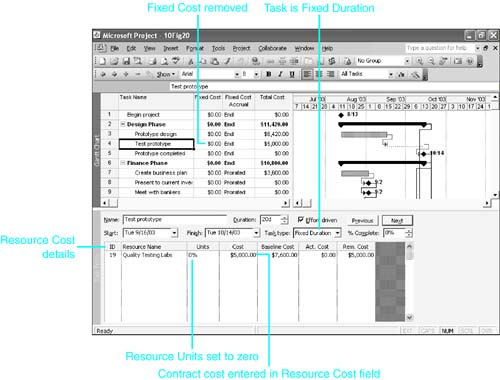
| Some tasks might have costs that aren't linked to a particular resource that you have named and aren't affected by the task duration. This type of cost is treated as a fixed cost in Project, and it is entered in the Fixed Cost column of the Cost table on a task view such as the Gantt Chart view. Project adds the fixed cost amount to the total of the resource costs and displays the sum in the Cost (Total Cost) columns of various views. NOTE You can associate fixed costs with summary tasks as well as with normal tasks. Because the field might be used for summary task fixed costs, Project doesn't roll up the Fixed Cost field to summary tasks. In other words, although the fixed cost is included in the Total Cost column, you cannot see a total for all fixed costs. You can also have a cost that is associated with a resource but that is not affected by the task duration or any variations in work for the resource. For instance, the resource might be a contractor or vendor who is to deliver the completed task at a fixed cost. In these cases, the contractor or vendor should be listed as a resource, and the cost should be entered as part of the assignment information on the Task Form view. If you were to simply add this cost to the task fixed cost, you would lose the identification with the resource. To display the Fixed Cost field, display a task view such as the Gantt Chart view in the top pane. To display the Cost table, right-click over the Select All button (the blank area just above the row numbers ) and choose Cost (see Figure 10.19). Figure 10.19. You can enter costs that are not associated with a particular resource and that do not change with the task duration in the Fixed Cost column of the task Cost table. TIP You should document any fixed cost amounts in the task Notes field so that you and others will always know what the cost represents. In Figure 10.19, the resource cost details for the Test Prototype task are displayed in the Task Form view in the bottom pane. The sum of those costs is $6,600. In the top pane, the $1,000 entry in the Fixed Cost column is added to the resource costs, to create the value in the Total Cost column. TIP If you enter an amount in the Total Cost (Cost) field to overwrite the calculated value that is displayed there, Project treats this as the sum of the calculated resource costs and a new fixed cost amount. It then changes the entry in the Fixed Cost column to support this interpretation. If a resource that is assigned to a task is working for a fixed fee (for example, a contractor or vendor on an outsourced task), you want that cost to remain fixed no matter what happens to the task duration. In this case, you do not need Project to track the hours of work for the resource because those hours are important to the contractor or vendor but not to you. Your cost isn't affected if the job takes more work or money than estimated, as long as it is completed on time. To record fixed resource costs for an outsourced task, make the task a fixed-duration task and assign the contractor or vendor as a resource to the task; however, enter in the Units field for the assignment. The work amount is calculated as zero; therefore, the hourly resource cost value for this resource is also zero. After you click OK to complete the assignment, Project allows you to enter the contract amount in the resource Cost field, and that entry is not overwritten by Project's calculations. Suppose that we decide to outsource the Test Prototype task and that Quality Testing Labs has offered to do the work in 20 days as scheduled for a fixed cost of $5,000. That's less than the $7,600 we estimated for doing it in our own testing lab (see Figure 10.19). To record this in Project, follow these steps:
|
| < Day Day Up > |

EAN: 2147483647
Pages: 283
- Enterprise Application Integration: New Solutions for a Solved Problem or a Challenging Research Field?
- Context Management of ERP Processes in Virtual Communities
- Data Mining for Business Process Reengineering
- Healthcare Information: From Administrative to Practice Databases
- Development of Interactive Web Sites to Enhance Police/Community Relations