Hierarchical Queries
You ll quite often encounter data that is organized into a hierarchy, such as the people who work in a company, a family tree, or the parts that make up an engine. In this section, you ll learn how to perform queries against a table that stores the employees who work for the example store.
The Example Data
You ll see the use of a table named more_employees , which is created by the store_schema.sql script as follows :
CREATE TABLE more_employees (employee_id INTEGER CONSTRAINT more_employees_pk PRIMARY KEY, manager_id INTEGER CONSTRAINT more_empl_fk_fk_more_empl REFERENCES more_employees(employee_id), first_name VARCHAR2(10) NOT NULL, last_name VARCHAR2(10) NOT NULL, title VARCHAR2(20), salary NUMBER(6, 0));
The manager_id column is a self-reference back to the employee_id column of the more_employees table; manager_id indicates the manager of an employee (if any). The more _employees table contains the following rows:
EMPLOYEE_ID MANAGER_ID FIRST_NAME LAST_NAME TITLE SALARY ----------- ---------- ---------- ---------- ------------- ---------- 1 James Smith CEO 800000 2 1 Ron Johnson Sales Manager 600000 3 2 Fred Hobbs Sales Person 200000 4 1 Susan Jones Support Manager 500000 5 2 Rob Green Sales Person 40000 6 4 Jane Brown Support Person 45000 7 4 John Grey Support Manager 30000 8 7 Jean Blue Support Person 29000 9 6 Henry Heyson Support Person 30000 10 1 Kevin Black Ops Manager 100000 11 10 Keith Long Ops Person 50000 12 10 Frank Howard Ops Person 45000 13 10 Doreen Penn Ops Person 47000
As you can see, it is a little difficult to pick out the various employee relationships from this data. Figure 7-1 shows the relationships in a graphical form.
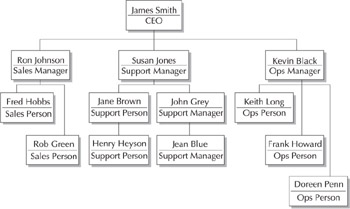
Figure 7-1: Employee relationships
As you can see from Figure 7-1, the elements ”or nodes ”form a tree. Trees of nodes have some technical terms associated with them, as follows:
-
Root node The root is the node at the top of the tree. In the example shown in Figure 7-1, the root node is James Smith, the CEO.
-
Parent node A parent is a node that has one or more nodes beneath it. For example, James Smith is the parent to the following nodes: Ron Johnson, Susan Jones, and Kevin Black.
-
Child node A child is a node that has one parent node above it. For example, Ron Johnson s parent is James Smith.
-
Leaf node A leaf is a node that has no children. For example, Fred Hobbs and Rob Green are leaf nodes.
You can use the CONNECT BY and START WITH clauses of a SELECT statement to perform hierarchical queries.
Using the CONNECT BY and START WITH Clauses
The syntax for the CONNECT BY and START WITH clauses of a SELECT statement is as follows:
SELECT [LEVEL], column , expression , ... FROM table [WHERE where_clause ] [[START WITH start_condition ] [CONNECT BY PRIOR prior_condition ]];
where
-
LEVEL is a pseudo-column that tells you how far into a tree you are. LEVEL returns 1 for a root node, 2 for a child of the root, and so on.
-
start_condition specifies where to start the hierarchical query from. You must specify a START WITH clause when writing a hierarchical query. An example start_condition is employee_id = 1 , which specifies the query starts from employee #1.
-
prior_condition specifies the relationship between the parent and child rows. You must specify a CONNECT BY PRIOR clause when writing a hierarchical query. An example prior_condition is employee_id = manager_id , which specifies the relationship is between the parent employee_id and the child manager_id ”that is, the child s manager_id points to the parent s employee_id .
The following query illustrates the use of the START WITH and CONNECT BY PRIOR clauses. Notice the first row contains the details of James Smith (employee #1), the second row contains the details of Ron Johnson, whose manager_id is 1, and so on down the tree:
SELECT employee_id, manager_id, first_name, last_name FROM more_employees START WITH employee_id = 1 CONNECT BY PRIOR employee_id = manager_id; EMPLOYEE_ID MANAGER_ID FIRST_NAME LAST_NAME ----------- ---------- ---------- --------- 1 James Smith 2 1 Ron Johnson 3 2 Fred Hobbs 5 2 Rob Green 4 1 Susan Jones 6 4 Jane Brown 9 6 Henry Heyson 7 4 John Grey 8 7 Jean Blue 10 1 Kevin Black 11 10 Keith Long 12 10 Frank Howard 13 10 Doreen Penn
Using the LEVEL Pseudo-Column
The next query illustrates the use of the LEVEL pseudo-column to display the level in the tree:
SELECT LEVEL, employee_id, manager_id, first_name, last_name FROM more_employees START WITH employee_id = 1 CONNECT BY PRIOR employee_id = manager_id ORDER BY LEVEL; LEVEL EMPLOYEE_ID MANAGER_ID FIRST_NAME LAST_NAME ---------- ----------- ---------- ---------- --------- 1 1 James Smith 2 2 1 Ron Johnson 2 4 1 Susan Jones 2 10 1 Kevin Black 3 3 2 Fred Hobbs 3 7 4 John Grey 3 12 10 Frank Howard 3 13 10 Doreen Penn 3 11 10 Keith Long 3 5 2 Rob Green 3 6 4 Jane Brown 4 9 6 Henry Heyson 4 8 7 Jean Blue
The next query uses the COUNT() function and LEVEL to get the number of levels in the tree:
SELECT COUNT(DISTINCT LEVEL) FROM more_employees START WITH employee_id = 1 CONNECT BY PRIOR employee_id = manager_id; COUNT(DISTINCTLEVEL) -------------------- 4
Formatting the Results from a Hierarchical Query
You can format the results from a hierarchical query using LEVEL and the LPAD() function, which left-pads values with characters . The following query uses LPAD(' ', 2 * LEVEL - 1) to left-pad with 2 * LEVEL - 1 spaces. This is used to indent an employee s name with spaces based on their LEVEL ( LEVEL 1 isn t padded , LEVEL 2 is padded by two spaces, LEVEL 3 by four spaces, and so on).
SET PAGESIZE 999 COLUMN employee FORMAT A25 SELECT LEVEL, LPAD(' ', 2 * LEVEL - 1) first_name ' ' last_name AS employee FROM more_employees START WITH employee_id = 1 CONNECT BY PRIOR employee_id = manager_id; LEVEL EMPLOYEE ---------- ------------------ 1 James Smith 2 Ron Johnson 3 Fred Hobbs 3 Rob Green 2 Susan Jones 3 Jane Brown 4 Henry Heyson 3 John Grey 4 Jean Blue 2 Kevin Black 3 Keith Long 3 Frank Howard 3 Doreen Penn Starting at a Node Other than the Root
You don t have to start at the root node when traversing a tree: you can start at any node using the START WITH clause. The following query starts with Susan Jones; notice LEVEL returns 1 for Susan Jones, 2 for Jane Brown, and so on:
SELECT LEVEL, LPAD(' ', 2 * LEVEL - 1) first_name ' ' last_name AS employee FROM more_employees START WITH last_name = 'Jones' CONNECT BY PRIOR employee_id = manager_id; LEVEL EMPLOYEE ---------- ----------------- 1 Susan Jones 2 Jane Brown 3 Henry Heyson 2 John Grey 3 Jean Blue If the store had more than one employee with the same name, you could simply use the employee_id in the query s START WITH clause. The following query uses Susan Jones employee_id of 4:
SELECT LEVEL, LPAD(' ', 2 * LEVEL - 1) first_name ' ' last_name AS employee FROM more_employees START WITH employee_id = 4 CONNECT BY PRIOR employee_id = manager_id; This query returns the same rows as the previous one.
Using a Subquery in a START WITH Clause
You can use a subquery in a START WITH clause. For example, the following query uses a subquery to select the employee_id whose name is Kevin Black. This employee_id is passed to the START WITH clause:
SELECT LEVEL, LPAD(' ', 2 * LEVEL - 1) first_name ' ' last_name AS employee FROM more_employees START WITH employee_id = ( SELECT employee_id FROM more_employees WHERE first_name = 'Kevin' AND last_name = 'Black' ) CONNECT BY PRIOR employee_id = manager_id; LEVEL EMPLOYEE ---------- --------------- 1 Kevin Black 2 Keith Long 2 Frank Howard 2 Doreen Penn Traversing Upward Through the Tree
You don t have to traverse a tree downward from parents to children: you can start at a child and traverse upward. You do this by switching child and parent columns in the CONNECT BY PRIOR clause. For example, CONNECT BY PRIOR manager_id = employee_id connects the child s manager_id to the parent s employee_id .
The following query starts with Jean Blue and traverses upward all the way to James Smith; notice LEVEL returns 1 for Jean Blue, 2 for John Grey, and so on:
SELECT LEVEL, LPAD(' ', 2 * LEVEL - 1) first_name ' ' last_name AS employee FROM more_employees START WITH last_name = 'Blue' CONNECT BY PRIOR manager_id = employee_id; LEVEL EMPLOYEE ---------- ------------------ 1 Jean Blue 2 John Grey 3 Susan Jones 4 James Smith Eliminating Nodes and Branches from a Hierarchical Query
You can eliminate a particular node from a query tree using a WHERE clause. The following query eliminates Ron Johnson from the results using WHERE last_name != 'Johnson' :
SELECT LEVEL, LPAD(' ', 2 * LEVEL - 1) first_name ' ' last_name AS employee FROM more_employees WHERE last_name != 'Johnson' START WITH employee_id = 1 CONNECT BY PRIOR employee_id = manager_id; LEVEL EMPLOYEE ---------- ------------------ 1 James Smith 3 Fred Hobbs 3 Rob Green 2 Susan Jones 3 Jane Brown 4 Henry Heyson 3 John Grey 4 Jean Blue 2 Kevin Black 3 Keith Long 3 Frank Howard 3 Doreen Penn You ll notice although Ron Johnson is eliminated from the results, his employees Fred Hobbs and Rob Green are still included. To eliminate an entire branch of nodes from the results of a query, you add an AND clause to your CONNECT BY PRIOR clause. The following query uses AND last_name != 'Johnson' to eliminate Ron Johnson and all his employees from the results:
SELECT LEVEL, LPAD(' ', 2 * LEVEL - 1) first_name ' ' last_name AS employee FROM more_employees START WITH employee_id = 1 CONNECT BY PRIOR employee_id = manager_id AND last_name != 'Johnson'; LEVEL EMPLOYEE ---------- ------------------- 1 James Smith 2 Susan Jones 3 Jane Brown 4 Henry Heyson 3 John Grey 4 Jean Blue 2 Kevin Black 3 Keith Long 3 Frank Howard 3 Doreen Penn Including Other Conditions in a Hierarchical Query
You can include other conditions in a hierarchical query using a WHERE clause. The following example uses a WHERE clause to only show employees whose salaries are less than or equal to $50,000:
SELECT LEVEL, LPAD(' ', 2 * LEVEL - 1) first_name ' ' last_name AS employee, salary FROM more_employees WHERE salary < = 50000 START WITH employee_id = 1 CONNECT BY PRIOR employee_id = manager_id; LEVEL EMPLOYEE SALARY ---------- ------------------------- ---------- 3 Rob Green 40000 3 Jane Brown 45000 4 Henry Heyson 30000 3 John Grey 30000 4 Jean Blue 29000 3 Keith Long 50000 3 Frank Howard 45000 3 Doreen Penn 47000 This concludes the discussion of hierarchical queries. In the next section, you ll learn about advanced group clauses.

EAN: 2147483647
Pages: 217