JavaScript Security Models
The modern JavaScript security model is based upon Java. In theory, downloaded scripts are run by default in a restricted sandbox environment that isolates them from the rest of the operating system. Scripts are permitted access only to data in the current document or closely related documents ( generally those from the same site as the current document). No access is granted to the local file system, the memory space of other running programs, or the operating system s networking layer. Containment of this kind is designed to prevent malfunctioning or malicious scripts from wreaking havoc in the user s environment. The reality of the situation, however, is that often scripts are not contained as neatly as one would hope. There are numerous ways that a script can exercise power beyond what you might expect, both by design and by accident .
The fundamental premise of browsers security models is that there is no reason to trust randomly encountered code such as that found on Web pages, so JavaScript should be executed as if it were hostile . Exceptions are made for certain kinds of code, such as that which comes from a trusted source. Such code is allowed extended capabilities, sometimes with the consent of the user but often without requiring explicit consent . In addition, scripts can gain access to otherwise privileged information in other browser windows when the pages come from related domains.
The Same-Origin Policy
The primary JavaScript security policy is the same-origin policy. The same-origin policy prevents scripts loaded from one Web site from getting or setting properties of a document loaded from a different site. This policy prevents hostile code from one site from taking over or manipulating documents from another. Without it, JavaScript from a hostile site could do any number of undesirable things such as snoop keypresses while you re logging in to a site in a different window, wait for you to go to your online banking site and insert spurious transactions, steal login cookies from other domains, and so on.
The Same-Origin Check
When a script attempts to access properties or methods in a different window ”for example, using the handle returned by window. open () ”the browser performs a same-origin check on the URLs of the documents in question. If the URLs of the documents pass this check, the property can be accessed. If they don t, an error is thrown. The same-origin check consists of verifying that the URL of the document in the target window has the same origin as the document containing the calling script. Two documents have the same origin if they were loaded from the same server using the same protocol and port. For example, a script loaded from http://www.example.com/dir/page.html can gain access to any objects loaded from www.example.com using HTTP. Table 22-1 shows the result of attempting to access windows containing various URLs, assuming that the accessing script was loaded from http://www.example.com/dir/page.html.
| URL of Target Window | Result of Same Origin Check with www.example.com | Reason |
|---|---|---|
| http://www.example.com/index.html | Passes | Same domain and protocol |
| http://www.example.com/other1/other2/index.html | Passes | Same domain and protocol |
| http://www.example.com:8080/dir/page.html | Does not pass | Different port |
| http://www2.example.com/dir/page.html | Does not pass | Different server |
| http://otherdomain.com/ | Does not pass | Different domain |
| ftp://www.example.com/ | Does not pass | Different protocol |
Consider the following example:
var w = window.open("http://www.google.com"); // Now wait a while, hoping they'll start using the newly opened window. // After 10 seconds, let's try to see what URL they're looking at! var snoopedURL; setTimeout("snoopedURL = w.location.href)", 10 * 1000); Because of the same-origin policy, the only way this script will work is if it s loaded from www.google.com . If you load it from your own server, the attempt to access the Location object will fail because your domain doesn t match www.google.com (or whatever domain the user happens to be visiting). The attempt to access the Location object will similarly fail if you save the script to your local disk and open it from there, but this time because the protocol doesn t match (file:// versus http://). Internet Explorer 6 silently fails for this example, but the output in the JavaScript Console for Mozilla-based browsers is
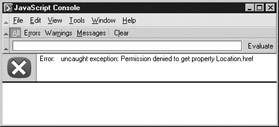
Sometimes browsers don t fail at all but instead pretend the violating call worked, and return undefined if the violation was trying to get a value. The bottom line is that violations of the same-origin policy result in unpredictable behavior.
Embedded Documents The same-origin check is performed when trying to access the properties or methods of another Window object. Since each frame in a framed page has its own Window object, the same-origin policy applies to scripts attempting to access the content of frames. If two frames haven t been loaded from the same site using the same protocol, scripts cannot cross the framed boundary.
The policy additionally applies to << iframe >>s, as well as << layer >>s and << ilayer >>s in Netscape 4, and documents included with the << object >> tag.
External Scripts Externally linked scripts are considered part of the page they are embedded in, and thus can be linked in from other domains. That is, the same-origin policy applies only when scripts attempt to cross a Window boundary; you can link a script into a page with confidence that it will work even if loaded from some other site. For example, the page at http://www.somesite.com/index.html could include the following script:
<<script type="text/javascript" src="http://www.example.com/scripts/somescript.js">><</script>>
This script will load and work as expected.
Be careful, since linked scripts are considered part of the page they re linked into, if JavaScript in the file http://www.example.com/scripts/somescript.js tries to access another window, it will be subject to a same-origin check for the document it is a part of. That is, it is considered to have come from http://www.somesite.com/index.html, even though the script itself resides elsewhere.
Exceptions to the Same-Origin Policy
Modern browsers enforce the same-origin policy on nearly all the properties and methods available to JavaScript. The few useful unprotected methods and properties are listed in Table 22-2. The fact that these are unprotected means that you can access them in another window even if the page in that window was loaded from a different domain. As you can see, none of the unprotected methods or properties permit manipulation of page content or snooping of the sort users should be worried about; they re primarily navigational.
| Method/Property | Exception |
|---|---|
| window.focus(), window.blur(), window.close() | Not subject to same origin policy in most browsers. |
| window.location | Setting this property is not subject to same origin policy in most browsers. |
| window.open() | Not subject to same origin policy in Internet Explorer. |
| history.forward(), history.back(), history.go() | Not subject to same origin policy in Mozilla and Netscape browsers. |
| Note | Old browsers often have significantly more exceptions to the same-origin policy than do modern browsers. This is sometimes by design, but more often by mistake. You can find information about same-origin policy enforcement in older Netscape 4.x browsers at http://developer.netscape.com/docs/manuals/communicator/jssec/contents.htm . |
You have a bit of leeway with the same-origin policy if you re working with documents loaded from different servers within the same domain. Setting the domain property of the Document in which a script resides to a more general domain allows scripts to access that domain without violating the same-origin policy. For example, a script in a document loaded from www.myhost.example.com could set the domain property to myhost.example.com or example.com . Doing so enables the script to pass origin checks when accessing windows loaded from myhost.example.com or example.com , respectively. The script from www.myhost.example.com could not, however, set the domain to a totally different domain such as google.com or moveon.org.
Problems with the Same-Origin Policy
The same-origin policy is very important from a user-privacy perspective. Without it, scripts in active documents from arbitrary domains could snoop not only the URLs you visit, but the cookies for these sites and any form entries you make. Most modern browsers do a good job of enforcing this policy, but older browsers did not.
Aside from poor enforcement by early browsers, the same-origin policy has another problem. Consider that one Web server often hosts numerous sites for unrelated parties. Typically, a URL might look like this:
http://www.example.com/account/
But by the rules of the same-origin policy, a script loaded from
http://www.example.com/otheraccount/
would be granted full access to the http://www.domain.com/account pages if they are present in accessible windows. This occurrence might be rare, but it is a serious shortcoming. There s really not much one can do to protect against this problem.
Another issue with the same-origin policy is that you can t, in general, turn off its enforcement. You might wish to do this if you re developing a Web-based application for use on your company s intranet, and you d like application windows from different internal domains to be able to cooperate. To work around this restriction in Internet Explorer, you generally have to install a custom ActiveX control in the browser. In Netscape and Mozilla-based browsers, you can configure custom security policies or use signed scripts, the topic of our next section.
| Note | Internet Explorer 5 allowed sites in the Trusted security zone to ignore the same-origin policy. However, Internet Explorer 6 does not provide this feature, so you shouldn t rely on it. |
Signed Scripts in Mozilla Browsers
Object signing technology was introduced in Netscape 4, and continues to be supported by modern-day Mozilla-based browsers (and, to some extent, by Internet Explorer). Object signing provides a digital guarantee of the origin of active content, such as Java applets and JavaScripts. While Java and JavaScript are normally confined to the Java sandbox, signed objects are permitted to request specific extended capabilities, such as access to the local file system and full control over the browser. The idea is that because the origins of the code can be verified , users can grant the program extra capabilities not normally made available to code of questionable origin encountered while browsing.
As with all things Web-related, the major browser vendors took two different and incompatible approaches to the same idea and gave these approaches different names . Netscape and Mozilla call their code signing technology object signing, whereas Microsoft calls its similar technology Authenticode . One major difference is that Netscape and Mozilla support signed JavaScript code, while Microsoft does not. In Internet Explorer, you can only sign ActiveX controls. However, Microsoft s HTA (HyperText Applications), as discussed in the last chapter, do have increased capabilities and could be used to provide a similar set of capabilities to signed code, though without some of their identity guarantees !
The creation of signed scripts for Netscape and Mozilla browsers involves acquiring a digital certification of your identity as a developer or an organization. You can get such a certificate from the same sources from which you might acquire an SSL certificate certifying your hostname for use with HTTPS, for example, at www.thawte.com or www.verisign.com .
The certificate of identity is used in conjunction with a signing tool to create a digital signature on your script. The signing tool packages your pages and the scripts they contain into a .jar file and then signs this file. The signature on the file guarantees to anyone who checks it that the owner of the certificate is the author of the file. Presumably, users are more likely to trust script that is signed because, in the event that the script does something malicious, they could track down the signer and hold them legally responsible.
When a Netscape or Mozilla browser encounters a .jar file (i.e., a page containing signed script), it checks the signature and allows the scripts the file contains to request extended privileges. Such privileges range from access to local files to the ability to set users browser preferences. The exact mechanics of this process are beyond the scope of this book, but there is plenty of information available online. For information about signed scripts in Netscape 4 browsers, good places to start are
-
http://developer.netscape.com/docs/manuals/communicator/jssec/contents.htm
-
http://developer.netscape.com/viewsource/goodman_sscripts.html
For modern Mozilla-based browsers, good starting points are
-
http://www.mozilla.org/projects/security/ components /signed-scripts.html
-
http://www.mozilla.org/projects/security/components/jssec.html
Signed Script Practicalities
Signed scripts are primarily useful in an intranet environment; they re not so useful on the Web in general. To see why this is, consider that even though you can authenticate the origin of a signed script on the Web, there s still no reason to trust the creator. If you encounter a script signed by your company s IT department, you can probably trust it without much risk. However, you d have no reason to think that a party you don t know ”for example, a random company on the Web ”is at all trustworthy. So they signed their JavaScript ”that doesn t mean it doesn t try to do something malicious! And if it did, most users would have no way of knowing.
Another problem with signed scripts is that what it takes to acquire a certificate of identity can vary wildly from provider to provider. Personal certificates sometimes require only the submission of a valid e-mail address. Other types of certificates require the submission of proof of incorporation, domain name ownership, or official state and country identification cards. But the user has no easy way of knowing how the identity of the certificate holder was verified. It could be that the author just submitted his/her name , e-mail address, and $100. Would you let someone whose identity was thusly verified take control of your computer?
Developers should realize that for these reasons some users may be unwilling to grant privileges to signed code, no matter whose signature it bears. Defensive programming tactics should be employed to accommodate this possibility.
In general, it s best to use signed scripts only when users have enough information about the signer to be able to make informed decisions about trustworthiness . In practical terms, this limits the usefulness of signed scripts to groups of users you know personally , such as your friends and co-workers .

EAN: 2147483647
Pages: 209