57 Synch Your Titles and DVD Menus
#57 Synch Your Titles and DVD MenusOne great way to make your productions look more professional is to create a common look for DVD menus and the titles used in your movies. While Premiere Pro has some outstanding titles, Encore has some awesome menu templates that you can easily customize for your own use. For many projects, you should peruse and choose DVD templates before creating your titles.
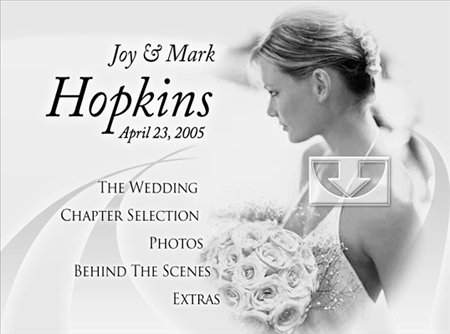
For example, consider the wedding template in Figure 57a, which is the NTSC_Bride Menu.psd from Encore's menu library. If you bring that into Photoshop, you can easily strip away all the layers of text and button highlights and create a perfect menu background for your wedding titles. Figure 57a. What a beautiful DVD menu template! The arrow symbol is a "drop zone" you can customize with your own image. For a recent project, I created the background images for all Premiere Pro titles in Encore, removing the text in this title and dragging in images for each major section in the project (Figure 57b). Then I captured each screen and added it to Premiere Pro, using the same font as Encore to create a neat, consistent appearance. The other way to go, of course, is to borrow backgrounds and other design elements from Premiere Pro title templates to build your DVD menus. Figure 57b. Look familiar? This is a title (with faces blurred out) used in the actual wedding video.
Whether you crib Encore's menus, base your DVD menus on Premiere Pro title templates, or create your own from scratch, if you're producing a DVD, consider designing your titles so that they appear similar to your DVD menus. |


EAN: 2147483647
Pages: 148
- Chapter VI Web Site Quality and Usability in E-Commerce
- Chapter IX Extrinsic Plus Intrinsic Human Factors Influencing the Web Usage
- Chapter XI User Satisfaction with Web Portals: An Empirical Study
- Chapter XIII Shopping Agent Web Sites: A Comparative Shopping Environment
- Chapter XVII Internet Markets and E-Loyalty