Database Creation
| An absolute necessity of building databases that interact with SQL Server 2000 is using the appropriate database objects to obtain a usable database system while improving response times and maintaining data integrity. There are considerations and trade-offs for choosing one technique over the other. The selection of the most appropriate method to obtain the desired result requires that you know where each technique is best implemented. The exam will test on the appropriate application of each of these objects. Creating and altering databases involves selecting the physical volume type for each database file, setting the appropriate file properties, placing the objects into the files/filegroups, and ensuring that appropriate adjustments are made as the database matures. The type of business needs that the database is being designed to meet helps to indicate the measures needed to ensure adequate performance. Try to place onto separate volumes any files that might tend to compete with each other for read cycles during a single operation. Place log files away from the data to ensure adequate recovery, and make sure that database properties have been set in such a way as to ensure that maintenance tasks can be performed. When you create a database for the first time, that database initially takes most of its attributes from the Model database. The Model database is a system database that SQL Server uses as a kind of template for database creations. It is a good and common practice to set the properties and contents of the Model database based on the majority of new databases that are to be created. In practice, many objects are stored in the Model database to minimize the need to re-create these objects every time a database is created. Common elements placed in the Model often include specialized user-defined functions and data types that are present and frequently used by the development staff in their coding. In theory, objects are created for use in a single database, but all developers realize that object and code reuse is an important facet of easing the development process. Often an object, such as a user-defined function, standard security role, or corporate information table, can be found in most if not all databases within a company. A property value, such as recovery level, might also have a standard implementation across all servers in the enterprise. If an object or a property value will be present in most of the user databases, placing the object into the Model database or setting a property accordingly can save you the work of performing the activity as a post-creation task. All files needed for a database can be created through a single activity using SQL Server's Enterprise Manager (as shown in Figure 3.1) or with a single CREATE DATABASE transact SQL statement. Either of these methods can be used to initialize all files and create the database and logs in a single step. Figure 3.1. Database creation from the Enterprise Manager.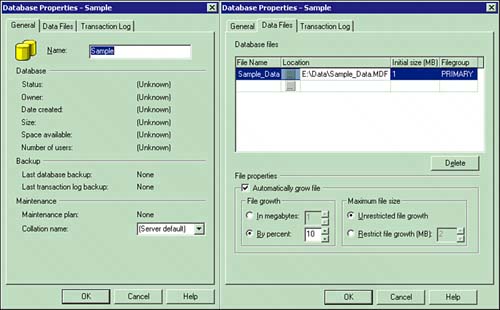 SQL Server 2000 enables you to set database files so that they expand and shrink automatically, eliminating the need for additional administration. By default, SQL Server enables data files to increase in size as needed for data storage. Therefore, a file can grow to the point where all disk space is exhausted. You can specify that a file is not to grow beyond its creation size or implement a maximum size for file growth. Ensure that disk space is not exhausted by using the MAXSIZE option of the CREATE DATABASE or ALTER DATABASE statements to indicate the largest size to which a file can grow. The default names for the primary database and transaction log files are created using the database name you specified as the prefixfor example, NewDatabase_Data.mdf and NewDatabase_Log.ldf. These names and locations can be changed, if desired, from the default values provided for the new database file. The T-SQL syntax for creating a simple database is as follows: CREATE DATABASE MyDatabase ON (NAME = 'DataStore', FILENAME = 'd:\data directory\DataStore_MyDatabase.mdf', SIZE = 1MB, MAXSIZE = 5MB, FILEGROWTH = 1MB) LOG ON (NAME ='LogStore', FILENAME = 'e:\log directory\LogStore_MyDatabase.ldf', SIZE = 1MB, MAXSIZE = 5MB, FILEGROWTH = 1MB) Following are some important issues with regard to appropriate use of the CREATE DATABASE statement:
In a volatile environment, the database and its related files might frequently increase and decrease in size, and this activity might be the desired operation of the server. In most instances, an implementation providing for more stability in the file system is the desired result. A determination has to be made as to whether the database stays at about the same size or grows or shrinks over time. In most scenarios, a database grows over time and needs to be reduced only when data is archived. When creating the files, you should set the SIZE, MAXSIZE, and FILEGROWTH parameters so that the database can increase in volume over time. The FILEGROWTH configuration should be implemented in larger increments so that growth within the file system isn't occupying too much of the server's resources. Growth of files occurs in the background and can be minimized by using a larger growth increment. Always provide a MAXSIZE entry even if the entry itself is close to the capacity of the volume. You can use the CREATE DATABASE statement to create a database from script. Saving the script enables you to re-create a similar database on another server in the future. Any SQL Server object can have its creation script saved. Using the CREATE DATABASE statement to create a database using multiple files and log files would look similar to this: CREATE DATABASE Example ON PRIMARY ( NAME = ExampleData, FILENAME = 'c:\mssql\data\sampdat.mdf', SIZE = 10MB, MAXSIZE = 20MB, FILEGROWTH = 2MB), ( NAME = ExampleIndexes, FILENAME = 'c:\mssql\data\sampind2.ndf', SIZE = 10MB, MAXSIZE = 20MB, FILEGROWTH = 2MB), ( NAME = ExampleArchive, FILENAME = 'c:\mssql\data\samparch.ndf', SIZE = 10MB, MAXSIZE = 20MB, FILEGROWTH = 2MB) LOG ON ( NAME = ExampleLog1, FILENAME = 'd:\mssql\log\samplog1.ldf', SIZE = 10MB, MAXSIZE = 20MB, FILEGROWTH = 2MB), ( NAME = ExampleLog2, FILENAME = 'd:\mssql\log\samplog2.ldf', SIZE = 10MB, MAXSIZE = 20MB, FILEGROWTH = 2MB) When you create the database and its associated files, you provide values to determine the initial file sizes, indicate whether and how the files will grow, and specify some other basic database and file properties. The initial settings are used as a basis for future file-system activities. If the initial settings are in need of alteration later, you can perform this activity through the Enterprise Manager or by using the ALTER DATBASE T-SQL statement. Alterations can impact the front-end applications, so extra caution must be taken when changing a database from its original form. In particular, the alteration of the collating sequence can have serious repercussions. Using a Collation SequenceA collation sequence is a set of rules governing the characters that are used within a database and the means by which characters are sorted and compared. In SQL Server 2000 this sequence can be set on a database-by-database basis. In previous versions of SQL Server, the collation sequence was a server-wide setting. You therefore had to either perform a whole series of rebuilding actions to create a database that did not use the server collation, or install the database on a separate server altogether. In SQL Server 2000 you can specify a nondefault collation for any database on the server. This means that one database does not have to have the same characters or sorting rules as the rest of the databases on the server. If all but one or two of your databases have the same set of characters, a single server can now implement the functionality that previously would have taken two separate machines. To create a database with a nondefault collating sequence, provide the COLLATE clause on the CREATE DATABASE command. You might also select the collation name from the drop-down box in the Enterprise Manager when you create the database from the GUI. Collation for an individual column can be different. A collation can be selected for an individual column but is not recommended because it causes great difficulty in the development of front-end applications. Be careful in the use of multiple collating sequences because it makes the transfer and entry of data more complex. It might also limit the application development environment and techniques normally used for data entry and editing. Be certain of the collation sequence used upon creation of a database. After the collation sequence is set, it can be changed only through rebuilding of the database. If possible, collation decisions should be made during the logical design of the system so that you don't have to rebuild. Although collations can be different, if you want to change the sequence post-creation, you will have to rebuild the database. Altering Database PropertiesSeveral database properties affect the way in which some SQL Server commands operate. You can use the Enterprise Manager to make appropriate adjustments to some of the database properties. Alternatively, you can use the ALTER DATABASE T-SQL statement to script these changes. You may prefer setting options using T-SQL. The system-stored procedure sp_dboption can still be used to set database options, but Microsoft has stated that in future versions of SQL Server this functionality might not be supported. In altering a database, you can add or remove files and filegroups and/or modify attributes of the files and filegroups. ALTER DATABASE also enables you to set database properties, whereas in previous versions these properties could be changed only using the sp_dboption stored procedure. After you've set up the options, the next thing to consider is the creation of objects within the database. Database objects include constraints, indexes, stored procedures, tables, triggers, user-defined functions, views, and more. Each object is discussed in detail, paying particular attention to the impact on the system as a whole. In many implementations, there are various approaches to meeting a particular need. Selecting the appropriate technique for a task requires trade-offs among functionality, performance, and resource utilization. |

EAN: 2147483647
Pages: 154