6.3 SSL and TLS certificates
6.3 SSL and TLS certificates
When Netscape Communications released its first version of Netscape Navigator with SSL support, it was faced with a practical problem: the SSL protocol required the existence of one or several CAs to make it work, but there were no CAs offering their services to the general public. Consequently, Netscape Communications turned to RSA Data Security, Inc., which had supplied the public key technology software on which Netscape Navigator was actually based. For several years RSA Data Security, Inc. had operated its own CA, called RSA Certification Services. The CA s primary reason for existence was to enable protocols that required certification services. In 1995, RSA Data Security, Inc. spun off its certification services division to a new company called VeriSign, Inc. [18]
Since then, each successive version of Netscape Navigator has added technology to allow for creation of a marketplace for commercial CAs and CA services. The first version contained a certificate for a single root CA. The second version still came with support for only a single root CA, but allowed other root CAs to be dynamically loaded with the user s permission. Netscape Navigator 3.0 came preloaded with certificates for 16 root CAs. In addition, the browser also contained a user interface for viewing the currently loaded certificates, deleting certificates, and adding more. The number of preconfigured and loaded certificates has steadily increased in all later releases of Netscape Navigator. This is equally true for all other browsers, including, for example, Microsoft s Internet Explorer and Opera. In fact, certificate management becomes an inportant issue for the usability of contemporary browsers.
For example, Figure 6.4 illustrates Microsoft Internet Explorer s Certificate Manager. There are basically four sets of certificates that can be managed using the Certificate Manager:
-
Personal certificates;
-
Other peoples certificates;
-
Intermediate CAs certificates;
-
Trusted root CAs certificates.
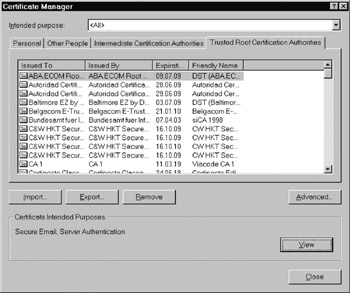
Figure 6.4: Microsoft Internet Explorer s Certificate Manager. ( 2002 Microsoft Corporation.)
Personal certificates are certificates that belong to the current user of the browser, whereas other peoples certificates belong to other people (as the name suggests). Other peoples certificates are mainly used for secure messaging (i.e., S/MIME). In addition, trusted root CAs and intermediate CAs certificates are used to verify the certificates of both Web sites and other people. Trusted root CAs certificates are implictly trusted by the user because they come preloaded with the browser s software distribution (i.e., the browser assumes that the user will trust these root CAs certificates, without even asking him or her). This fact must be considered with care.
Other browsers use similar control panels and mechanisms to manage personal and CA certificates. For example, Figure 6.5 illustrates Opera s Preferences panel. If a user presses the ˜ ˜Authorities... button, he or she comes to a screen where one can manage the certificates of trusted root CAs. This screen is illustrated in Figure 6.6. Again, there is a long list of CAs that are configured to be trustworthy. The management of public key certificates is further addressed in the following chapter.
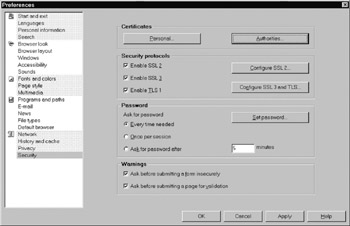
Figure 6.5: The Preferences panel in the Opera 6.0 browser. ( 2002 Opera Software.)
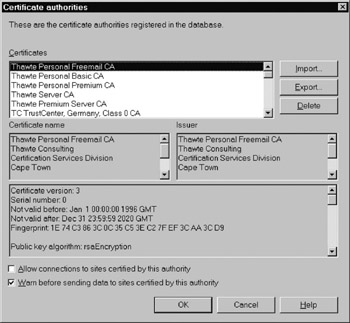
Figure 6.6: The screen to manage CA certificates in the Opera 6.0 browser. ( 2002 Opera Software.)
[18] More recently, the use of the AES has been specified in RFC 3268.

EAN: 2147483647
Pages: 142
- Structures, Processes and Relational Mechanisms for IT Governance
- Linking the IT Balanced Scorecard to the Business Objectives at a Major Canadian Financial Group
- A View on Knowledge Management: Utilizing a Balanced Scorecard Methodology for Analyzing Knowledge Metrics
- Technical Issues Related to IT Governance Tactics: Product Metrics, Measurements and Process Control
- Governance Structures for IT in the Health Care Industry