8.3 Profiling Properties for Columns
|
|
8.3 Profiling Properties for Columns
This section discusses each of the types of properties that apply to columns and shows examples of using them to find invalid values. The property list may include within it a domain definition that provides some of the properties. Not all property lists will have the same rule property types, in that some only apply to specific cases.
Business Meaning
The business meaning of a column is a very important property. It says what should be stored in the column semantically. A simple statement of what the column is encoding is important in determining if the column is, in fact, being used for that purpose. A look at some of the data values returned from discovery, along with the discovered properties, is necessary to satisfy the reviewers that the column is not being used for something else.
This is an area that is often overlooked. It is so simple to just look at some of the values to verify that the content appears to be what you think it is. It is amazing how people decide what is stored in a column merely from a COBOL programming label.
Programmers have often decided to use an existing column that is no longer needed to store the values for a new requirement. This rarely results in a change to the programming specifications for that column. As a result you have program documentation that says a column is one thing, when in reality the information recorded is something different.
For example, a label of SOCIAL_SECURITY_NUMBER would be expected to contain Social Security numbers. In one real case, examination of actual data content revealed that the values stored could not be Social Security numbers. Further investigation revealed them to be fishing license numbers.
Other factors besides visual inspection of the data values can be used. For example, if the lengths of the data values are much shorter than the maximum length, the column has probably been repurposed.
 |
One of the easiest conditions to discover is that a column is not being used at all. This is indicated by the column having only one value in it (usually a blank for text columns or zero for numeric columns).
It is amazing how often this is not known and the column is copied to decision support databases and used in decision support computations. All you have to do is look. In one case over 200 of these columns were found in a single database. The data management people were totally unaware of this situation and would have propagated these columns to their data warehouse had they not discovered it.
An unused column can contain more than one value. It may have been used for a period of time and then stopped being used. This is normally suggested by a very large number of empty values. Examination of the rows they are contained in will generally reveal whether the real values are recent or old. This will indicate whether it is a column that was used and then stopped being used or one that was recently added.
Recently added columns have their own problems when being propagated. Moving data for a block of time that includes periods where the column was not used can seriously distort decision support aggregations, graphs, and reports.
|
One last thing to do in establishing the business meaning is to ensure that the column has a good descriptive name in the data profiling repository. If the name provided is not representative of the content nor long enough to precisely indicate the content, a better name should be constructed to use during the data profiling process.
Storage Properties
Storage properties are a subset of column properties defined to the database or file system that allow them to store the data in proper containers. This includes data type, length, and precision for numeric fields. The basic rules that govern the shape of the values in a column are rarely violated because they are usually enforced by the database system or file system. However, surprises can often be found even here.
Physical Data Type
Most database or file systems have the notion of physical data typing that defines the form of data that can be stored in a column. Figure 8.5 shows a list of typical data types. It is assumed that the user will pick the data type that best represents the intended use of the column.

Figure 8.5: Typical data types.
However, all data except BINARY and DOUBLEBYTE data can be represented as character values. For example, a number column can be stored in a CHARACTER data type by just typing numeric characters such as 12345.67.
|
Even BINARY and DOUBLEBYTE data can be put into a CHARACTER column if the database or file system uses either a fixed CHARACTER or a separate length column for VARIABLE CHARACTER fields.
Only when the storage system locates the end of a column through the binary zero value can this not be done. For example, DB2 allows any coded values to be stored in CHARACTER fields.
|
The reasons for storing noncharacter data in character data types are many. One is that the system being used may not support the data type of the data. This is common for DATE, TIME, and TIMESTAMP data types. It may also be true of the FLOAT data type. Flat files commonly support nothing but character columns. The famous comma-delimited format of ASCII files is an example of a format for which everything must be in character format.
A second reason is that the user may intend to store values that are not represented by the data type. For example, a DATE data type cannot be used if you intend to store blanks for Date not known or 99/99/9999 to mean something special. If the domain you plan to use is not pure, the database system may reject a value you want to store because it requires perfect conformance. This excuse is usually a lame one that covers up poor data design in the first place.
Another reason is that you are accepting data from an external source that has used some of these nonconforming values in fields. If the original data source has values that do not conform, you have two choices: transform them to NULL or put them into a character column to preserve the original nonconforming values. If you are trying to perform assessment on the data, keeping the original values, even if wrong, can provide good feedback to the originator of the data.
The major problem with storing noncharacter data in a character data type is that it invites corruption. Because the database system will accept anything in the column, you are getting no advantage of filtering out bad values using the DBMS support. Legacy systems are notorious for this, as are external data feeds. If it can be corrupted, you can bet it will be.
|
Not only does the liberal use of CHARACTER invite wrong values to be stored, it also brings out the creativeness of data entry people. They invent all sorts of conventions for storing values in them to mean different things. For example, if a discount percentage is not known, they might enter NOT KNOWN or CALL SALESMAN. After a while, the data can contain a variety of information that is all valid but rarely useful. However, this lack of discipline will frustrate, if not destroy, attempts to use the data for a new purpose.
|
It is important not to accept the data type as used by the database or file system when profiling data. You need to discover the true data type of the data and then filter the data against that. This is a perfect example of improving on metadata you collect in the beginning. Discovering the true metadata can be done through discovery software or through visual inspection of values. Once you are confident of the content, you can then reprocess the data to find violations. If you have a database system that enforces data types, finding the violations can be done through a LOAD step after specifying the proper data types to the target.
Length
The length field is not usually considered very important. It usually only decides the width of the column used by the database or file system to store the values for a column. It is always wide enough; otherwise, values would not fit, and either inserts and updates would fail or data would have been truncated. In any case, the problem would have been fixed a long time ago.
However, examination of length issues can sometimes be important. For character fields it is valuable to see the distribution of lengths over the column. This can indicate multiple things. The most important is to see if the column is being used for the purpose intended. A quick length check of actual data values can often lead to the conclusion that the column is not what it purports to be. For example, if all values in a 30-character column are only two characters wide, a high suspicion is raised.
It can point to individual inaccurate values. For example, if in a NAME column 5% of the values have a length of one character, they deserve visual examination because they are probably inaccurate names.
It can point to waste in storage, which is not an inaccuracy problem. If all values never exceed 5 bytes in a 30-byte-wide character field, you can save space. If all values are the same or near the same length in a VARIABLE CHARACTER column, it should probably be changed to CHARACTER. If the distribution of lengths is highly variable, converting from CHARACTER to VARIABLE CHARACTER can be helpful.
For numeric columns, the length should be commensurate with the range of values found. This can lead to shortening an INTEGER column to SMALL INTEGER to save space.
Precision
The actual precision required and number of positions to the right of the decimal point can be computed for each value and a distribution chart developed that shows the number of values for each precision. This can show the variability in precision and may help determine whether the data type selected is appropriate. For example, if all values show even integer values, but the data type is decimal or float, a change may be indicated. It may also raise the question of whether the column is being used for its intended purpose.
Valid Value Properties
Once the basic storage shape of the column is determined and the business meaning validated against some of the values, the process of digging out invalid values can begin. This is a process of specifying one or more value properties for each column that test the database values against specific values allowed. The properties will take different forms based on the type of data.
The more detailed the property definitions, the more inaccurate values can be found. Property definitions narrow the list of acceptable values. In some cases you can say simply that these are the only values allowed. In other cases it is impossible or impractical to itemize all valid values. The property definitions just set boundary conditions that valid values must meet. Actual values may meet the boundary conditions but still be invalid.
The types of property definitions that are possible in specifying valid values are shown in Figure 8.6. Each of these is explained in the sections that follow.
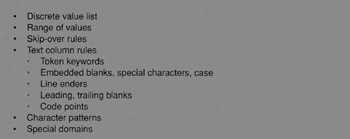
Figure 8.6: List of valid value rule types.
Discrete Value List
Many columns support only a small list of specific values. These may be real words or encoded values that represent real words. For example, the STATE column supports only a small list of valid state codes. These may be spelled out, or they may be the standard two-character state codes. Another example is a COLOR column, which would normally be a full word but in some cases (where the color is limited to a few values, such as Red, Green, and Blue) may be encoded (such as R, G, and B).
The first phase of value profiling is to validate the list of acceptable values. Instead of taking the list of values you believe to be the correct list and scanning for exceptions, it is a better practice in this phase to itemize the actual values stored, along with their frequency within the column. This approach will allow you to compare the actual values in the data to the valid value list in the rule.
In comparing the values you may discover the need to expand the valid value list. You may likewise discover that some of the values are not used at all. This may lead you to shorten the valid value list after investigation to determine the reason for the values being missing. You may also discover values that have disproportionately too many or too few values. This may lead to investigations that discover abuses in data entry. In other words, you may discover that the pull-down list default value occurs too many times, leading to the conclusion that it is being selected when the entry person either is too lazy to find the correct value or does not know the correct value.
Range Of Values
Ranges of values are typically used on numeric, date, time, or timestamp data. A typical range might be 0 > = value < = 1000 on QUANTITY_ORDERED, or HIRE_DATE BETWEEN 01/01/1985 AND CURRENT_DATE.
Ranges can be used on character data as well. For example, if product identifiers always begin with a letter in the range of A through F, a range check on the first character can be used to screen out invalid values.
As in the case of discrete values, it is better to initially let a program determine the range of values in the data instead of processing the data against the expected range. Producing a distribution list of values may be useful but also may be impractical if the number of discrete values is too large. In this case it is wise to include in the output the values close to the edge (the 100 smallest and 100 largest values, for example).
The purpose of doing it this way is to validate the range. If all of the values are hiding well within the range, possibly the range is too liberal and could be narrowed. Likewise, seeing the invalid values on the edges may lead to widening the range.
It is also helpful to see the most frequently found values within the range. This may be what you would expect or may surface a surprise.
|
These examples show how an analyst needs to look within valid values to find inaccurate data that "hides under the rules." Bad practices in creating data tend to be repeated, which often lead to clues within the set of valid values. Any clues as to the existence of inaccurate data need to be surfaced and investigated.
The perfect example of this is the HR department that used their supervisor's birth date for new employees that failed to provide a birth date on the hire form. This date showed up a surprisingly high number of times, thatβ led to an investigation that revealed the bad practice. The date was perfectly valid and was hiding within the range of valid values.
|
|
A Practice used sometimes on older legacy systems is to store a dollar-and-cents values as an integer. This saves space. However, the value stored is 100 times the real value. The decimal point is implied and is provided by the program by dividing the integer by 100 when it is used. This convention will generally be noticeable by examining the range of values against the business meaning of the column.
|
Skip-Over Rules
These rules exclude specific values within a range. They usually apply to date and time columns.
For example, a HIRE_DATE entry may have a further restriction against the date being a weekend or holiday. There are standard routines available that will return the day of week for any date. This combined with a list of holidays for each year could be used to screen for invalid dates within the acceptable range.
These types of tests are generally considered excessive and are not done. However, if it is very important that the date be exactly correct, they may be worth doing.
Text Column Rules
Text data is the most difficult to put rules to. As a result, most data profiling efforts do no checking of the internal content of text fields. However, many text fields can have rules applied to them that get inside the column and dig out inaccurate entries.
Some text fields are actually used to store information that could be specified as another data type. For example, often numbers or dates are stored in text fields. These should be tested against their true data type and not by rules described here.
The simplest text column is one that contains only a single word. The words that are allowed typically require no leading blanks, no embedded blanks, and no special characters, and consist of just letters of the alphabet. Often the list of valid values is either too long to itemize or not known in advance. An example is a column for CHEMICAL_NAME. The rules just described can be included in a check of the data.
The next level up is a text column that allows multiple words separated by blanks and possibly allows embedded special characters. The special characters allowed are usually restricted to items such as the period and comma. Examples are CITY, NAME, and COLLEGE_NAME. You would not want to allow special characters such as &*%$#@? to be embedded in them. You can also build a scanner for this set of rules.
Some text fields hold one or more keywords. For example, a column may include a provision for text such as GRADE = MEDIUM, SIZE = LARGE, DESTINATION = CHICAGO. These types of columns substitute the keyword construct for having separate columns for each keyword. In this way they can pack a lot of information in a smaller space if the keywords possible are many and the occurrence of them is sparse. In most cases this is poor data design, but expect it to exist in older systems. Profiling data involves a lot of dealing with poor data design. Keyword text columns can have a special routine built that checks the syntax required and that finds violations.
Totally generic text columns allow just about anything. Some contain text fragments, which may include special characters such as line enders and carriage returns. An example is SHIPPING_INSTRUCTIONS. There is not much you can do about checking these types of columns.
The best way to profile text columns is to execute a discovery program that returns its best opinion of the type of column and identifies the existence of blanks and individual special characters. This aids in determining the true characterization of the content and in determining that it is truly a CHARACTER column.
It is important to record the expected content of these columns, because moving them through extraction/transformation and load processes can cause failures over unexpected special characters if not known in advance. Many a data movement process has been torpedoed by line enders and carriage returns embedded in text columns.
Another factor to take into account is the code page the data comes from. Data coming from Europe, the Far East, or other places can include text columns with code points that may fail tests devised solely for USA text.
Patterns
Sometimes text columns have single words that are a coded value for something that must follow a specific character pattern to be valid. A common example is a PRODUCT_IDENTIFIER. An example of a pattern follows.
-
The first character indicates the type of product, which can be A, B, or C.
-
The next three characters identify the division that produces it, which are numeric digits.
-
The next character indicates storage requirements: R, S, H.
-
The next five characters are numeric digits that identify the unique product.
In these cases, a specific rule check can be constructed for the column to find all occurrences that violate the rule. In this example, you may even want to check uniqueness of the last five digits independently from the rest of the value.
Patterns are never checked by the database systems and thus are subject to violation. Many times they are not documented in advance. Through special software you can discover the patterns of single-word columns. They will identify the patterns and the percentage of values that support the rule. This can be helpful in determining if a pattern exists and in confirming or denying a pattern rule that comes with the metadata.
Multiple Conflicting Rules
In some cases it is possible to have a column that supports multiple rules that are distinct from one another. An example might be a ZIP_CODE column that supports USA and CANADIAN pattern rules. Another example is a TELEPHONE column that supports USA, CANADIAN, and MEXICAN TELEPHONE_NUMBER patterns.
It is okay to have this condition as long as the rules can be tested with an OR condition. As we shall see in the chapter on simple data rules, it is helpful to be able to correlate the pattern rule to a value (such as COUNTRY_CODE) in another column. However, this is not required to build rule sets. For example, a PRODUCT_IDENTIFIER column may contain product codes from two different companies that have recently merged.
Special Domains
Some columns contain values from a well-known domain. Examples are SOCIAL_SECURITY_NUMBER, ZIP_CODE, TELEPHONE_NUMBER, and STATE. These domains can usually be universally defined with rules that apply to all occurrences in all databases. The value in having these domains around is that they will help you identify inconsistencies in representation within a column as well as across columns in the same or multiple databases. For example, does the SOCIAL_SECURITY_NUMBER follow a pattern of 999999999 or 999-99-9999? It is very helpful to be able to identify these differences, in that this is a common cause of problems in integrating or aggregating data.
Empty Condition Rules
Every column has one or more rules regarding the NULL condition. The rule may be that none are allowed. It may allow values indicating the NULL condition but not restrict itself as to what they may be, leaving the door open to inventions by people entering data. This is a common condition in legacy systems.
Software can be used to scan for values that may indicate missing values. They can search for things such as blanks,?, none, **no value, and any others that are found to exist in data. If such values are found and judged to be NULL condition indicators, they all need to be documented in the repository because they must be transformed to a common indication when data is moved.
Sometimes the NULL indicators are descriptive. For example, you might find the words Don't know, Not applicable, and Did not provide. This may be valuable information to retain. It may be wise to raise a data accuracy issue so that they could be standardized into a separate column to avoid inaccurate query results in the future.
A lot of the NULL indications are bad data design practices or bad data entry practices resulting from a lack of complete data design. Again, identification of the actual rules being used is helpful in dealing with the data when it is repurposed or in launching a source system improvement project. Knowing the rule is so much better than not knowing the rule.
Other Descriptive Information
It is useful to add other information for columns in the repository that can help in understanding the likelihood of data being inaccurate. This may lead to not having to run tests over a column. This information may be useful to others in the organization when they subsequently try to repurpose the data. Although this is useful information, it is rarely documented in metadata.
Confidence
One of the factors is "confidence" factor that the data is accurate in some respect. For example, if the column is stored in a row of a relational database system and the column is declared as UNIQUE and NOT NULL, you can be assured that all values are indeed unique and that there are no nulls. This does not mean that the NULL condition has not been codified in some data value that the relational system cannot recognize as a NULL. However, along with the UNIQUE constraint, the likelihood of codified NULL conditions is very slim because they could occur at most one time.
Another example is DATE data typing in database systems that enforce valid dates. The DBMS will absolutely ensure that all dates stored are valid dates. You do not need to scan for this. You may still want to see date values on a value/frequency graph to help spot cases in which a single date is used too often or to apply a range check to make sure all dates are reasonable. However, you do not have to worry about any values being invalid dates.
The analyst may determine that the database system has a STORED PROCEDURE included that enforces ranges, discrete value lists, or patterns. Discovery of this procedure not only helps document the rules but increases the confidence that the values are in conformance with the rule. One danger here is to believe that the procedure has been applied to all values in the column. It may be that the procedure was added recently or changed. Older values may not have been processed by the procedure and therefore can be exceptions to the rule.
Extracted data screening logic from source code of the application programs is less reliable in building confidence. This is because it leaves open other means of data getting into the database or being changed afterward. For example, a database administrator could change any value through a simple SQL statement without going through the application program.
Another characteristic to record is the susceptibility of the column to have its values decay in accuracy over time. This is purely an external business analyst call because there is no way of programmatically identifying these columns.
Another factor to look for is the probability of an inaccurate value in a column being recognized and fixed. This again is a purely external semantic condition of the column. For example, in a payroll application, the PAYRATE column is more likely to get recognized if wrong (and fixed) than the DEPARTMENT column. The confidence factor for the one column being accurate is higher than the confidence factor for the other column. Scorekeeping on confidence factors will lead you to placing more emphasis on rule generation and testing of columns of lesser confidence than those of higher confidence if you lack the resources to exhaustively profile every column.
Time-Related Consistency
Another factor to examine is whether the column has had a change in the way data is encoded at one or more points in time in the past. The result is that the data is inconsistent in representing the real world, depending on how old the information is. There will be multiple time periods of the data within each of which there is consistency but across time periods little or no consistency.
There are programmatic methods of finding potential inconsistency points. However, these are very complex. This area of data profiling technology is very new, with little maturity in implementations. However, you can employ heuristic techniques to find them. One simple method is to divide data into samples coming from different time periods (such as three-month intervals), profiling them to determine the value/frequency pairs, and then comparing the results across sample sets.
To find the actual point of inconsistency you can sort data by CREATE_DATE and then select each value to determine the earliest and latest date that value appears in the data. This may reveal the inconsistency points as well as the data values that were impacted by the change.
You can also develop a process of computing for each column the earliest date any value other than blank or zero are found. This can identify those columns that were added or new values introduced to the database, as well as the point in time they were added.
Using this approach is very time consuming and should not be used over all columns or even over very many of them. You can select columns that you are suspicious of having inconsistency points and test them this way.
It is important to understand that all data inconsistencies are not the result of changes to the way data is recorded. The inconsistencies may result from a business model change such as dropping a product line, the impact of external factors such as a recession, or other factors. Determining whether an inconsistency point is relevant to the data profiling exercise or not is a semantic call involving business analysts and subject matter experts.
Inconsistency points need to be recorded in the data profiling repository. This will benefit potential future users by allowing them to make decisions on how far they can safely go back in the data for their intended purposes. Using data across inconsistency points can distort decision support computations.
|
|

EAN: 2147483647
Pages: 133