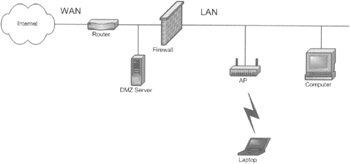
The LAN network should be protected from users on wireless APs. Figure 4-12 shows a typical corporate infrastructure today. The Internet connects to a router on the WAN side. On the LAN side of the router, you may
Figure 4-12:
The WLAN architecture
Figure 4-12 shows how this
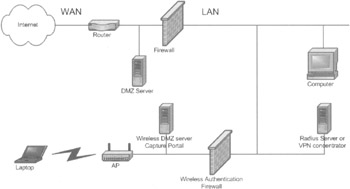
The network architecture can be changed by adding a wireless authentication firewall that regulates access to the LAN by enabling users to pass only after they have been authenticated, as shown in Figure 4-13. An optional wireless DMZ server or capture portal may exist on the WLAN side of the network. The wireless authentication firewall separates the WLAN from the LAN, thus protecting the enterprise's network from access through the wireless equipment. In an 802.1x/
Extensible Authentication Protocol
(EAP) arrangement, the AP will contain the firewall and an additional
Remote Authentication Dial-In User Service
(RADIUS) server will need to be located on the LAN. In a VPN arrangement, the LAN
Figure 4-13:
A wireless authentication firewall protects the LAN
If mobility is used, the solution must be secure during handoff. Handoffs open the network up to a redirection attack. If the network is not properly secured, the intruder can take over the communication with the destination entity after the
You need to know what is being protected. These could be devices such as servers, routers, modem banks, and information such as e-mail, intellectual property, trade secrets, customer lists, business plans, and medical records. Sometimes the information has to be protected by law. You also need an idea of who this information is being protected from—hackers, customers, insiders (
|
Security Level |
Configuration |
What Is Secured? |
Applications |
|
|---|---|---|---|---|
|
|
No security |
Network out of the box and no configuration (no WEP) |
Nothing |
There is no
|
|
1 |
Public access |
|
Network access |
Hot spots, libraries, coffee
|
|
2 |
Limited security |
40- or 128-bit WEP, MAC access control list (ACL), and no broadcast |
Some network access and data privacy |
Home and SOHO with portability |
|
3 |
Basic security |
Wi-Fi Protected Access (WPA) (later 802.11i) |
Network access and data privacy |
Home, SOHO, and small enterprise with portability |
|
4 |
Advanced security |
802.1x/EAP-X and RADIUS |
Network access and data privacy |
Enterprise with portability |
|
5 |
End-to-end security |
VPNs such as the Point-to-Point Tunneling Protocol (PPTP), PPTPv2, Layer 2 Tunneling Protocol (L2TP), Kerberos, and IP Security (IPSec) |
Network access and data privacy |
Special applications, business travelers,
|
No security is like leaving your door wide
Public access is like handing out keys to everyone you know and trust. NoCat Auth, Sputnik, and Wayport all restrict access to public users by authenticating them. The authentication process protects the network by verifying the access credentials. In some cases, billing is exchanged for granting access to the system. In NoCat Auth's case, access can be removed from people
Currently, basic access is like hiding a key under the mat. The key is hidden out there for clever people to find, but the network access and data are accessed to not be worth the trouble to break-in. It's easier for crooks to go where no security is in place.
At minimum, you should turn on WEP, password protect shared
Wi-Fi Protected Access (WPA)
In November 2002, the Wi-Fi Alliance announced the WPA security standard.
[14]
It will replace the current—and comparably weak—WEP standard
WPA uses the
Temporal Key Integrity Protocol
(TKIP), a more
WPA will work in two different ways, depending on the type of network. In
In the managed mode, it will work with ASs and will require the support of 802.1x and EAP. 802.1x and EAP enable a client network adapter to negotiate via an AP with a back-end AS using securely encrypted transactions to exchange session keys.
Every device on a wireless network must be upgraded to WPA in order for it to work. If a network is sewn together from several manufacturers' devices and the upgrade for one of the manufacturers is not available yet, you will have to wait to be able to deploy WPA. A mixed network can run with both WPA and WEP installed. However, security in the networks will default to WEP, which offers less protection.
WPA contains many
WPA, when it becomes available, will be a good step toward securing a home or SOHO WLAN. However, for larger
802.1x provides an authentication framework for WLANs, enabling a user to be authenticated by a central authority. The actual algorithm that is used to determine whether a user is
802.1x uses EAP, an existing protocol (RFC 2284) that works on Ethernet, Token Ring, or WLANs for message exchange during the authentication process.
802.1x Network Port Authentication
802.1x authentication for WLANs has three main
Figure 4-14:
802.1x authentication
The normal flow for an 802.11x authentication is as
The supplicant then sends an EAP-start message. The AP relies on an EAP-request identity message to obtain the supplicant's identity. The client's EAP-response packet containing the supplicant's identity is forwarded to the AS.
The AS authenticates the supplicant and either responds by accepting or rejecting the supplicant. Depending on the response from the AS, a positive authentication response will enable the port and negative authentication response will result in the port remaining blocked.
Extensible Authentication Protocol (EAP) To address the shortcomings of WEP for authentication, the industry is working toward solutions based on the 802.1x specification, which is based on the Internet Engineering Task Force (IETF) EAP. EAP was designed with flexibility in mind, and it has been used as the basis for many types of network authentication.
802.1x is based on EAP. EAP is
IEEE 802.1x is not a single authentication method; rather, it utilizes EAP as its authentication framework. This means that 802.1x-enabled switches and APs can support a wide variety of authentication
Figure 4-15:
802.1x protocol stack
Since switches and APs act as a pass through for EAP, new authentication methods can be added without upgrading the switch or AP, by adding software on the host and back-end AS.
Since IEEE 802.1x does not involve encapsulation (unlike
Point-to-Point Protocol over Ethernet
[PPPOE] or VPN), it adds no
IEEE 802.1x integrates well with open standards for
authentication
,
authorization
, and
accounting
(AAA) (including RADIUS and
Lightweight Directory Access Protocol
[LDAP]) so it fits in well with the existing infrastructure for managing dial-up networks and VPNs. RADIUS servers (including
These specifications describe how IEEE 802.1x works, and how it can be managed via RADIUS and SNMP. Through RADIUS, IEEE 802.1x
Supplicants for 802.1x/EAP The supplicant for 802.1x/EAP is included in Windows XP. In November 2002, Microsoft not only released a Windows 2000 client, [20] but also pledged future client support for the older Windows 98, ME, and NT 4 releases. It is planned to be developed under Linux, FreeBSD, and OpenBSD with the Open1X project. [21] Apple has not implemented an 802.1x/EAP supplicant at the time of this writing.
802.1x/EAP Authenticators Many commercial APs such as Cisco, Lucent/Orinoco/Agere, and Enterasys feature 802.1x authentication support. Support for homebrew authenticators is provided with the Open1X project.
Remote Access Dial-In User Service (RADIUS)
RADIUS
[22]
is currently the de facto standard for remote authentication. It is a widely deployed protocol for network access AAA in both new and legacy systems. Although a few security and transport issues are associated with it, it is very likely that RADIUS will continue to be widely used for many
The security issues revolve around the shallowness of the protocol and poor implementation of the specification. The protocol lacks confidentiality, authentication of client messages, and protection against a replay attack (integrity). The shared secret scheme does not allow for enough entropy in the keys and it seems to be open to offline dictionary attacks. RADIUS needs to be secured with an external protocol like IPSec.
The issues with transport are most relevant for accounting, in situations where services are billed according to usage. RADIUS runs on the
User Datagram Protocol
(UDP) and has no defined retransmission or accounting record retention policy, and does not support
Two specifications make up the RADIUS protocol suite: authentication and accounting. The authentication portion can be used to determine if a user can gain access to the network. The authentication can be done locally or by proxy to another RADIUS server.
If you're a
wireless Internet service provider
(WISP), and you're
The remote server may be
A couple of open-source implementations of RADIUS are available from www.freeradius.org/ and www.xs4all.nl/~evbergen/openradius/index.html. FreeRADIUS is available for a wide range of platforms, including Linux, FreeBSD, OpenBSD, OSF/Unix, and Solaris. Open-RADIUS is a RADIUS server that can be compiled to run on many variations of Unix.
EAP-MD5 EAP-MD5, or the Challenge Handshake Authentication Protocol (CHAP), [26] represents a kind of base-level EAP support among 802.1x devices. It is the least secure version of EAP because it uses usernames and passwords for authentication that are easily socialized. It is also vulnerable to dictionary attacks. In addition, EAP-MD5 does not support dynamic WEP keys, which is a critical liability.
LEAP
Cisco was one of the first vendors to market with its proprietary LEAP. [27] LEAP works only with Cisco client 802.11 cards, RADIUS servers, and Cisco APs. LEAP is vulnerable to man-in-the-middle dictionary attacks.
EAP-TLS
EAP-TLS is an open standard that is supported by many vendors.
[28]
It uses
Public Key Infrastructure
(PKI) and thus is very secure by using asymmetric public and private keys. EAP-TLS is supported natively in Windows XP and by Windows 2000 severs. The only
EAP-TTLS
EAP-TTLS and EAP-TLS are similar in that both use TLS (the successor to
Secure Sockets Layer
[SSL]) as the underlying strong cryptography. However, EAP-TTLS
EAP-SIM
EAP-SIM is an EAP method designed by Nokia that allows hardware authentication to a SIM chip. A SIM is a secure processor about the size of a small
PEAP
Protected EAP
(PEAP) is another Cisco-developed protocol. Although EAP was originally created for use with PPP, it has since been adopted for use with IEEE 802.1x network port authentication. Since its deployment, a number of weaknesses in EAP have become apparent. These include a lack of protection of the user identity or the EAP negotiation, no standardized mechanism for key exchange, no built-in support for fragmentation and reassembly, and a lack of support for fast
By wrapping the EAP protocol within TLS, PEAP addresses these deficiencies. [29] Any EAP method running within PEAP is provided with built-in support for key exchange, session resumption and fragmentation, and reassembly. PEAP provides the ability to seamlessly roam between APs. In the near future, PEAP will support the same EAP types that EAP supports.
The Downfall of 802.1x/EAP
The downfall of 801.1x/EAP is a lack of supplicants. Although an 802.1x supplicant is supplied in Windows XP, and a patch is available for Windows 2000, no supplicants are available for Windows 98, ME, CE, NT-4, Linux and its variants, and Apple 9 and X operating systems. A Linux open project called open1x has been started at http://www.open1x.org/links.html. Since Apple X is
A VPN enables a specific
VPNs create virtual point-to-point connections using a technique called tunneling . As the name suggests, tunneling acts like a pipe that bores through a network cloud to connect two points. Typically started by a remote user, the tunneling process encapsulates data and encrypts it into standard TCP/IP packets, which can then securely travel across the Internet to a VPN server on the other side where they are decrypted and de-encapsulated onto the private LAN network.
Two basic VPN types are available:
Remote access VPNs These securely connect remote users, such as mobile users and telecommuters, to the enterprise. This type of VPN can be used by 802.11 users to initiate a session back to their corporate LAN—for example, salespeople equipped with laptops and telecommuters who would like to connect intermittently from diverse locations such as hotels, airports, convention centers, and coffee shops. The key concerns are encryption and authentication. Performance and bandwidth can also be sacrificed because the connection is broadband.
LAN-to-LAN VPNs
These securely connect remote and branch offices to the enterprise (intranet VPNs). They also securely connect third parties, such as customers, suppliers, and business
How VPN Works for 802.11 To support 802.11 WLANs, VPN client software application is deployed on all machines that will use the WLAN, and a VPN gateway is introduced into the network between the AP and the WLAN segment, as shown in Figure 4-16.
Figure 4-16:
A WLAN with VPN
An encrypted VPN tunnel is built from the laptop through the wireless gateway and
A VPN solution also enables mobile workers to access their network from a remote location where security may or may not be provided, as shown in Figure 4-17.
Figure 4-17:
A WLAN with VPN using remote network access
The secure tunnel extends from the client's computer, through the Internet, and through the firewall/VPN gateway to the VPN server. From the VPN server, the data continues to its destination inside the corporate network.
Vulnerabilities of VPNs Although VPNs are touted as a secure solution for WLANs, VPNs using one-way authentication are still vulnerable to exploitation such as man-in-the-middle attacks.
The deployment of WLANs in large organizations can create a nightmare of distributing and maintaining client software to all
It is also important to note that many of the proprietary security extensions may have security flaws due to the lack of cryptographic rigor applied to them. Despite these vulnerabilities, encryption, authentication, and integrity
VPN Standards
Many protocols have been written for use with VPNs. These protocols attempt to close some of the security holes inherent in VPNs. These protocols continue to
IPSec IPSec VPNs have nearly become accepted as the de facto standard for securing IP data transmission over shared public data networks since VPN software has been developed for a wide variety of clients. It addresses authentication, data confidentiality, integrity, and key management, in addition to tunneling.
Basically, IPSec encapsulates a packet by wrapping another packet around it. It then encrypts the entire packet. This encrypted stream of traffic forms a secure tunnel across an
PPTP PPTP is a protocol specification developed by several companies. Nearly all flavors of Windows include built-in support for the protocol. PPTP was the dominant VPN before IPSec was deployed. PPTP tunnels data, encrypts user data, and authenticates users.
PPTP is a tunneling protocol that provides remote users encrypted, multiprotocol access to a corporate network over the Internet. PPTP uses generic routing encapsulation (GRE). PPTP wraps IP packets in GRE packets before sending them down the tunnel. Network layer protocols, such as Internetwork Packet Exchange (IPX) and NetBIOS Enhanced User Interface (NetBEUI), are encapsulated by the PPTP protocol for transport over the Internet.
The initial releases of PPTP for Windows by Microsoft contained security features that some experts claimed were too weak for serious use. However, Microsoft continues to improve its PPTP support.
L2TP L2TP was developed by Cisco. L2TP supports non-TCP/IP clients and protocols (such as frame relay, Asynchronous Transfer Mode [ATM], and Synchronous Optical Network [SONET]), but fails to define any encryption standard. Although L2TP is compatible with most network protocols, it is not widely deployed, but is common in certain telco and ISP networks.
L2TP over IPSec L2TP over IPSec offers tunneling, user authentication, mutual computer authentication, encryption, data authentication, and data integrity. L2TP offers multiprotocol support.
SSL SSL, working only with TCP/IP protocols, is the primary protocol for secure connections from web browsers to web servers, usually for secure credit card connections or sensitive data. SSL requires a valid site certificate issued from an authorized certificate authority. SSL provides tunneling, data encryption, mutual authentication, integrity, and nonrepudiation.
SOCKS Network Security Protocol
SOCKS is a VPN protocol that operates on layer 5, whereas most others operate at layer 2 or 3. SOCKS version 5 is a
IP Addresses—Network Address Translation (NAT)/Port Address Translation (PAT)
Many VPNs require fully routable/ public IP addresses and no port blocking on any ports except incoming port 80 and port 139 (VPNs do not use these ports). This is because the VPNs cannot
A growing number of VPN clients support emerging standards for UDP encapsulation to push IPSec through NAT/PAT. PPTP often
Kerberos provides a third method of securing the 802.11 over the air link. It is
Kerberos provides both user authentication and encryption key management, and can guard networks from attacks on data in transmission, including interruption, interception, modification, and fabrication. Kerberos was voted as the "mandatory-to-implement" security service for 802.11e authentication and encryption key management. Kerberos provides confidentiality, authentication, integrity, access control, and availability. Kerberos also works very well during handoffs between APs resulting in uninterrupted application connectivity. Reauthentication to the network is very quick.
How Kerberos Works for 802.11
Kerberos is based on the key distribution model developed by Needham and Schroeder.
[31]
Network authentication using Kerberos involves four processes: authentication exchange, ticket-granting service exchange, user/server exchange, and secure communications between user and server.
[32]
This is
Figure 4-18:
Kerberos authentication flow
Authentication Exchange The user sends a request to the AS for a ticket to the ticket-granting server (TGS). The AS looks up the user in its database, finds the client's secret key, and then generates a session key (SK1) for use between the client and the TGS.
The AS encrypts the session key using the user's secret key to form a message. The AS also uses the TGS's secret key (known only to the AS and the TGS) to encrypt the session key and the user's name to form a ticket-granting ticket (TGT). The TGT and the message are sent back to the user.
Ticket-Granting Service Exchange The user decrypts the message and recovers the session key. The user creates an authenticator by encrypting the user's name, IP address, and a timestamp with the session key. The user sends this authenticator, along with the TGT, to the TGS, requesting access to the target server. The TGS decrypts the TGT to recover SK1 and then uses the SK1 inside the TGT to decrypt the authenticator. It verifies information in the authenticator, the ticket, the user's network address, and the timestamp. If everything matches, it lets the request proceed.
Then the TGS creates a new session key (SK2) for the user and target server to use, encrypts it using SK1, and sends it to the user. The TGS also sends a ticket containing the user's name, a network address, a timestamp, and an expiration time for the ticket—all encrypted with the target server's secret key—and the name of the server.
User/Server Exchange
The user decrypts the message and gets SK2. Finally ready to approach the target server, the user creates a new authenticator encrypted with SK2. The user sends the session ticket (already encrypted with the target server's secret key) and the encrypted authenticator. Because the authenticator contains plaintext encrypted with SK2, it proves that the user
Secure Communications The target server knows that the user is who he or she claims to be, and the two now share an encryption key for secure communications. Because only the user and target server share this key, they can assume that a recent message encrypted in that key originated with the other party.
The Downfalls of Kerberos The following are inherent downfalls to the Kerberos authentication system:
If an attacker is logged on the same computer at the same time as an authorized user, the cached keys located on that computer are accessible to the attacker.
The Kerberos system relies on the synchronization of the clocks located on the different machines. If an intruder can mislead a host in terms of the correct time, the authentication ticket to the network can be used repeatedly as a result of the nonexpiring timestamp.
You must trust that all three machines (time/authenticator servers [KDC], the client, and the network server) are void of an intruder.
If a ticket is forwarded, the system must trust all of the other systems that the ticket has traveled through before reaching the current server. However, the server where the ticket arrives cannot tell where it has come from—it can only tell that it has been on other servers by a flag, which has been set to one.
Passwords can be guessed by plugging a password guess into the public encryption key algorithm.
The longer a ticket is granted, the more likely it is to be stolen and used by an unauthorized user.
In a wireless system using MAC address registration as an authentication method, if the NIC is stolen, the card has the inherent authentication of the user that is tied to that NIC and will be granted access to the network. [33]
Standards Kerberos V5 is standardized under RFC 1521. [34]
[14] Wi-Fi Alliance, "Overview—Wi-Fi Protected Access," www.wi-fi.com/OpenSection/pdf/Wi-Fi_Protected_Access_Overview.pdf October 31, 2002.
[15] IEEE 802.1x, http://standards.ieee.org/getieee802/.
[16] Matthew Gast, 802.11b Wireless Networks: The Definitive Guide (Sebastopol, California: O'Reilly & Associates, 2002), 100.
[17] The Unofficial 802.11 Security Web Page, http://www.drizzle.com/~aboba/IEEE/.
[18] Mishra, Arunesh, and Arbaugh, William A, "An Initial Security Analysis of the IEEE 802.1x Standard, Feb. 06, 2002, http://www.cs.umd.edu/~waa/1x.pdf.
[19] Cisco Aironet Response to University of Maryland's Paper, "An Initial Security Analysis of the IEEE 802.1x Standard," March 2002, http://www.cisco.com/warp/public/cc/pd/witc/ao350ap/prodlit/1680_pp.htm.
[20]
"Microsoft 802.1x Authentication Client," www.microsoft.com/windows2000/server/evaluation/news/
[21] "Open Source Implementation of IEEE 802.1x," www.openlx.org/.
[22] "Remote Authentication Dial-in User Service (RADIUS)," www.ietf.org/rfc/rfc2865.txt, and "Radius Accounting," www.ietf.org/rfc/rfc2866.txt.
[23] Joshua Hill, "An Analysis of the RADIUS Authentication Protocol," www.untruth.org/~josh/security/radius/radius-auth.html.
[24] Bernard Aboba and Ashwin Palakar, "IEEE 802.1x and RADIUS Security."
[25] "Radius Protocol and Best Practices," www.microsoft.com/windows2000/docs/RADIUS_Sec.doc.
[26] "PPP Challenge Handshake Authentication Protocol (CHAP)," www.ietf.org/rfc/rfc1994.txt.
[27] "Authentication with 802.1x and EAP Across Congested WAN Links," www.cisco.com/warp/public/cc/pd/witc/ao350ap/prodlit/authp_an.htm.
[28] "PPP EAP-TLS Authentication Protocol," www.ietf.org/rfc/rfc2716.txt.
[29] "Protected EAP Protocol (PEAP)," www.globecom.net/ietf/draft/draft-josefsson-pppext-eap-tls-eap-02.html.
[30] "Practical Steps to Secure Your Wireless LAN," a white paper from AirDefense, www.airdefense.com.
[31] R. M. Needham and M. D. Schroeder, "Using Encryption for Authentication in Large Networks of Computers," Communications of the ACM 21, no. 12 (December 1978): 993-99.
[32] Russel Kay, "Kerberos," Computer World, www.computerworld.com/news/2000/story/0,11280,46517,00.html, July 3, 2000.
[33] S. M. Bellovin and M. Merritt, "Limitations of the Kerberos Authentication System," Computer Communication Review 20, no. 5 (1990): 119–132.
[34] The Kerberos Network Authentication Service (V5)," www.ietf.org/rfc/rfc1510.txt.