Sams Teach Yourself Mac OS X Digital Media. All In One
Authors: Ness R. Ray J. Sengstack J.
Published year: 2003
Pages: 157-158/349
Buy this book on amazon.com >>

Making Videotapes from iMovie

To view an iMovie on television from a tape, the first step is to export the movie to your camcorder. Then you can either connect your camcorder to your television, or make a VHS tape from your digital tape (Mini-DV or Digital-8).

Task: Exporting to Camera

When you've finished your iMovie and are ready to take it to the next level, exporting to a camcorder will allow you to display it on the television. With a few simple steps, you can make the video ready to share in a one-time event, where you play the video only from the camera. Or, after you have exported the video from iMovie to your camcorder, you can then go on to make a tape from there.

  1. Load a blank tape into your camcorder and turn it on. (Make sure that you aren't about to record over something you want. Keep a pen around just for labeling tapesand label those tapes!)

  2. Connect your digital camcorder to your computer with a FireWire cable.

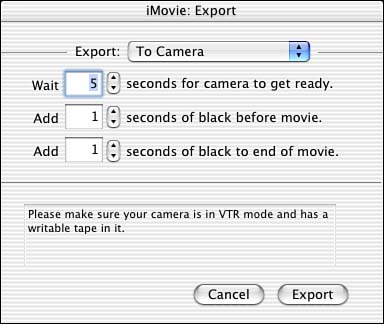
  3. In iMovie, choose File, Export Movie, and choose Export to Camera from the Export pop-up menu (see Figure 17.1).

    Figure 17.1. Exporting an iMovie to a camera.

    graphics/17fig01.jpg

  4. Click Export.

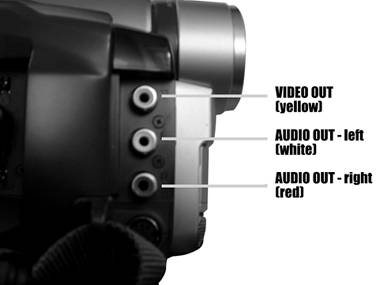
If you want to make VHS copies of the digital tape that you just made, you can connect your camcorder to your VCR using standard RCA cabling, where you connect a series of cables to the Video Out and Audio Out jacks of your camera. The video connector is usually indicated by a yellow color . Two cables carry the audio, where each cable carries half of a stereo signal (the left audio channel is the white connector; the right audio channel is the red connector) (see Figure 17.2).

Figure 17.2. The Video/Audio Out connectors on a typical camcorder.

graphics/17fig02.jpg

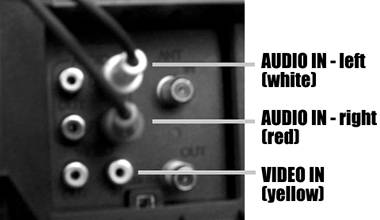
Then you connect the cables to the Video In and Audio In jacks of your VCR (see Figure 7.3).

Figure 17.3. The Video/Audio In connectors on the back of a typical VCR.

graphics/17fig03.jpg


Emailing iMovies

When you want to email an iMovie, you export it from iMovie and save it to your hard drive. Then you connect to the Internet and use your email program to attach the iMovie file to an email. If you've never emailed an attachment before, keep in mind that it can take a few minutes for the attachment to upload, depending on whether you are using a 56K modem or a higher-speed DSL or cable modem connection.

Another thing to keep in mind is that it will probably help you to choose a special name for the email version of your iMovie, such as my movie-email . Save it in a place that you can easily find on your hard drive, so that when it comes time to send it via email, you know which file to send and right where it is. (What you don't want to do is try to send your original iMovie via email. It'll be several hundred megabytes large, and would probably take a few weeks to send via modem.)

Task: Exporting to Email

You don't have to do any special preparation of your iMovie to send it via emailthat's what the Export function is for: to save it in a format that can be emailed.

  1. Choose File, Export, and then choose To QuickTime from the Export pop-up menu.

  2. Choose Email in the Formats pop-up menu (see Figure 17.4).

    Figure 17.4. Exporting an iMovie for email.

    graphics/17fig04.jpg

  3. Click Export and save your iMovie to a spot on your hard drive.

  4. Open the program that you use to send email (such as Mail, which we talked about in Chapter 4, "Using the Internet").

  5. Compose a new email and click the appropriate button to add an attachment to the email. (In Mail for OS X, you choose Add Attachment from the Edit menuor simply drag the file into the compose window and skip the next step.)

  6. Locate the iMovie that you want to send by email and attach it to your email. Figure 17.5 shows the iMovie attached to the email.

    Figure 17.5. Looking at an email that has an iMovie attached.

    graphics/17fig05.jpg

  7. Connect to the Internet and send the email (see Figure 17.5). You don't necessarily have to connect to the Internet before you attach the email. You can compose an email and attach a file before connecting with many email clients , and then you send the email when you do connect.

graphics/bookpencil_icon.gif

Some email programs have file size limitations. For example, at the time of writing, you probably can't send a file larger than 10 megabytes through AOL. (And it would take quite a long time to upload or download that large a file anyway if you're using a 56K modem.)


Sams Teach Yourself Mac OS X Digital Media. All In One
Authors: Ness R. Ray J. Sengstack J.
Published year: 2003
Pages: 157-158/349
Buy this book on amazon.com >>