Roaming
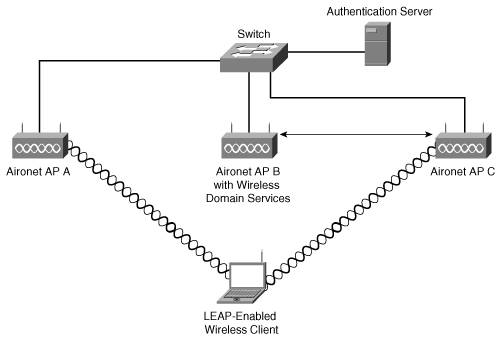
| The ability to wirelessly connect to the network provides a wonderful freedom for mobile users. Users can move to different locations in a building or different locations on a campus and still access the network. This freedom comes in two forms: portability and mobility. Portability is the act of being able to access the network from anyplace in the organization. That is, if he opens his laptop in the break room and is able to connect, he has portability. The important element here is that the user has moved from one cell to another and isn't concerned with constant coverage. Mobility, on the other hand, is concerned with constant coverage. Consider the nurse who is using a wireless IP phone at a hospital. As she moves between cells, she cannot restart the phone to get access to the new cell. She needs to roam freely. Cisco enables roaming via its fast, secure roaming technology. This section describes fast, secure roaming and configuring APs for roaming clients. Fast, Secure RoamingWhen stations move between APs, it is necessary to reauthenticate the devices to the AP. Obviously, if someone is using latency-sensitive applications (such as a nurse, for example), the time it takes to reauthenticate becomes troublesome. Fast, secure roaming allows LEAP-enabled clients to roam between APs without the need to bother the server. Rather, Cisco Centralized Key Management (CCKM) is used on an AP, which is set up to provide Wireless Domain Services (WDS). Note WDS is a collection of IOS software features for such tasks as enhancing WLAN mobility as well as radio management and client tracking. CCKM allows the authentication to occur quickly, and bypasses the authentication server. Figure 7-8 shows this process. Figure 7-8. Roaming Is Seamless with WDS The WDS device keeps a list of credentials for CCKM clients that are part of the WLAN. When a station roams into the AP's service area, the station sends a reassociation request to the AP, which is then forwarded to the WDS device. After authenticated by the WDS, the WDS forwards the information to the AP, which then allows the connection. This seems like a lengthy process, but only two packets are sent between the station and the AP. Configuring WDSThe following steps show the command-line interface (CLI) instructions that you can issue to your AP to configure it as a WDS AP:
You must begin in Privileged Exec mode on the AP that you wish to configure. Step 1: Configure Your APs or Switches as WDS DevicesYou can enable WDS on either the WLSM-enabled switch or the AP. When you set up WDS on an AP, here are some tips to keep in mind:
Use the following command-line instructions to configure APs as WDS devices. AP# configure terminal AP(config)# aaa new-model AP(config)# wlccp wds priority 200 interface bvi1 AP(config)# wlccp authentication-server infrastructure MI5 AP(config)# wlccp authentication-server client any fieldops AP(config-wlccp-auth)# ssid FelixLeiter AP(config-wlccp-auth)# ssid Quarrel AP(config)# end This series of instructions specifies that infrastructure devices are authenticated from server group MI5. CCKM-enabled clients that use the SSIDs of FelixLeiter and Quarrel are authenticated with the server group fieldops. The third line of code requires some explanation. Priority 200 is used to set the priority of this WDS candidate. You can configure multiple APs as WDS candidates, and when the candidate with the highest priority is taken out of service, the candidate with the next highest priority is elected. This number is a value between 1 and 255. The fifth line allows you to specify what type of authentication to use. In this case, any has been specified. However, you could also put in EAP or LEAP, or specify your own list of authentication methods. Step 2: Configure Your APs to Use the WDS DeviceNext, you must configure the APs to use the WDS device. To do this, see the following instructions: AP# configure terminal AP(config)# wlccp ap wds ip address 10.10.10.1 AP(config)# wlccp ap username JamesBond password 7 a$t1nm@rt1n AP(config)# end Here, the AP is configured to authenticate with a specific WDS-enabled device, and it uses the username JamesBond and the password a$t1nm@rt1n. The 7 before the password means that the AP's password is encrypted. This value could be set to 0, and means the password is unencrypted. You must use the same username and password on the AP as a client to the authentication server. Step 3: Enable Layer 3 Mobility to an SSIDThe next step is to map an SSID to a specific mobility network ID. Follow these commands: AP# configure terminal AP(config)# interface dot11radio 0 AP(config-if)# ssid MobileNet AP(config-if-ssid)# mobility network-id 7 AP(config-if-ssid)# end Here, the SSID MobileNet is mapped to mobility network ID 7. Step 4: Configure the Authentication Server to Support Fast, Secure RoamingThough the action seems to take place between the clients and the APs, don't forget that your WDS device and APs must also authenticate to the authentication server. Set up the server with usernames and passwords for the APs, along with username and password for the WDS device. Your authentication server is similar to Access Control Server (ACS) (though the AP can also act as an authentication server for up to 50 clients), and it requires you to log into ACS, and then add the name, password, and IP address of each WDS device candidate. You would also create user entries and passwords for the APs that use the WDS candidates. |

EAN: 2147483647
Pages: 126
- Integration Strategies and Tactics for Information Technology Governance
- Assessing Business-IT Alignment Maturity
- Linking the IT Balanced Scorecard to the Business Objectives at a Major Canadian Financial Group
- Measuring and Managing E-Business Initiatives Through the Balanced Scorecard
- Managing IT Functions
- Chapter IV How Consumers Think About Interactive Aspects of Web Advertising
- Chapter XI User Satisfaction with Web Portals: An Empirical Study
- Chapter XIV Product Catalog and Shopping Cart Effective Design
- Chapter XVI Turning Web Surfers into Loyal Customers: Cognitive Lock-In Through Interface Design and Web Site Usability
- Chapter XVIII Web Systems Design, Litigation, and Online Consumer Behavior