Flylib.com

Books Software


Microsoft Equation

 < Day Day Up > 


Microsoft Equation

I have known and used the Equation Editor for years , so you can imagine my surprise when I find Word users that aren’t even aware that it exists.

When you cannot find the symbol you want using the Insert Symbol dialog, try the Equation Editor. You can almost always manage to create your own symbol.

I recently got a call from a user who needed the letter “s” with a flat line above it; similar to the line we use to designate a long vowel sound. We were unable to find such a symbol under the Insert Symbol dialog.

We went to the Equation Editor using Insert Object, and choose MS Equation Editor. Figure 4-2 shows what the toolbar looks like.

click to expand
Figure 4-2: Microsoft Equation 3.0 Toolbar

You’ll note that you can do all kinds of things with Equation. We chose the 6th box on the bottom row and were able to make the desired symbol:

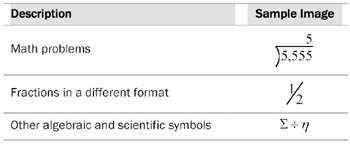
You may need to play with the font formatting and other settings, but just a few of the objects you can create using Equation are as follows :

click to expand


 < Day Day Up > 
 < Day Day Up > 


Calculations

Wow! Calculations are much easier than you thought!

What’s the fastest and easiest way to set up calculations? Please don’t forget, this is NOT Excel!

Down and dirty:

  1. Create a table.

  2. Put the values you want to total in a column.

  3. In the last row and the same column, choose Insert Field, then Equations and Formulas.

  4. In the Description box, type: =Sum(Above)

Yes, it’s that simple. When you create a table, Word sees that table much like Excel sees its cells . I made the following table, inserted the formula as previously described, and you can see how easily it works.

A1

B1

10

A2

B2

20

A3

B3

30


60

Creating invoices in Word can be so simple using calculations. If your invoices have more than several items, however, you might want to consider using Excel, which can make a very nice document as well, without worrying so much about your table format.

It seems that Word has difficulty keeping track of its cell references, particularly if you merge cells, insert rows and columns, or delete rows and columns .


 < Day Day Up > 
 < Day Day Up > 


Format Painter

It’s a crime how few people know how to use this feature. It’s so great! You receive a document and you love the formatting. But you add a paragraph or two and cannot figure out how the previous author got the paragraphs formatted so nicely when yours look like dirt. Use the Format Painter!

Simply select an original paragraph—the entire paragraph please , including the paragraph return at the end of it—and hit the Format Painter button once. Now click anywhere inside of the paragraph to which you want to apply the same formatting.

If you’d like to apply a certain style throughout your document, like Heading 1, select a paragraph using Heading 1, hit the Format Painter button TWICE (this turns the Format Painter on until you click it again to turn it off) and click once in each paragraph to which you want the Heading 1 style applied.

While the Format Painter cannot fix everything, it can fix your numbered lists and bullets that will not behave. See how in Bullets and Numbering on page 10-1.


 < Day Day Up >