Section 4.3. Virtual Memory
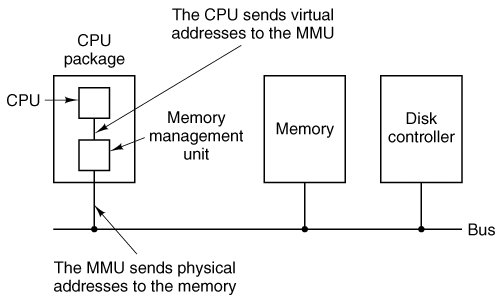
4.3. Virtual MemoryMany years ago people were first confronted with programs that were too big to fit in the available memory. The solution usually adopted was to split the program into pieces, called overlays. Overlay 0 would start running first. When it was done, it would call another overlay. Some overlay systems were highly complex, allowing multiple overlays in memory at once. The overlays were kept on the disk and swapped in and out of memory by the operating system, dynamically, as needed. Although the actual work of swapping overlays in and out was done by the system, the decision of how to split the program into pieces had to be done by the programmer. Splitting up large programs into small, modular pieces was time consuming and boring. It did not take long before someone thought of a way to turn the whole job over to the computer. The method that was devised has come to be known as virtual memory (Fotheringham, 1961). The basic idea behind virtual memory is that the combined size of the program, data, and stack may exceed the amount of physical memory available for it. The operating system keeps those parts of the program currently in use in main memory, and the rest on the disk. For example, a 512-MB program can run on a 256-MB machine by carefully choosing which 256 MB to keep in memory at each instant, with pieces of the program being swapped between disk and memory as needed. Virtual memory can also work in a multiprogramming system, with bits and pieces of many programs in memory at once. While a program is waiting for part of itself to be brought in, it is waiting for I/O and cannot run, so the CPU can be given to another process, the same way as in any other multiprogramming system. 4.3.1. PagingMost virtual memory systems use a technique called paging, which we will now describe. On any computer, there exists a set of memory addresses that programs can produce. When a program uses an instruction like MOV REG,1000 it does this to copy the contents of memory address 1000 to REG (or vice versa, depending on the computer). Addresses can be generated using indexing, base registers, segment registers, and other ways. These program-generated addresses are called virtual addresses and form the virtual address space. On computers without virtual memory, the virtual address is put directly onto the memory bus and causes the physical memory word with the same address to be read or written. When virtual memory is used, the virtual addresses do not go directly to the memory bus. Instead, they go to an MMU (Memory Management Unit) that maps the virtual addresses onto the physical memory addresses as illustrated in Fig. 4-7. Figure 4-7. The position and function of the MMU. Here the MMU is shown as being a part of the CPU chip because it commonly is nowadays. However, logically it could be a separate chip and was in years gone by. |
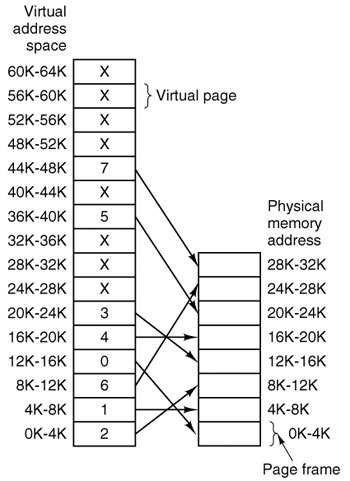
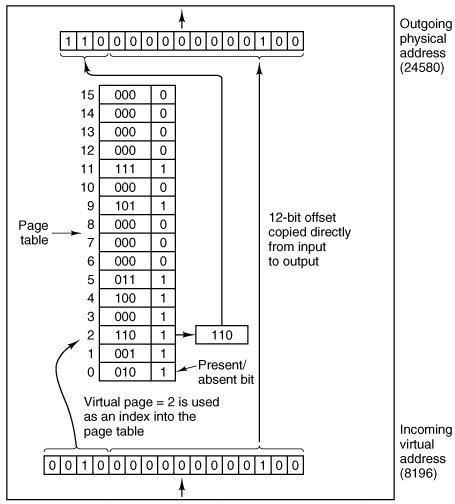
1. | The page table can be extremely large. |
2. | The mapping must be fast. |
The first point follows from the fact that modern computers use virtual addresses of at least 32 bits. With, say, a 4-KB page size, a 32-bit address space has 1 million pages, and a 64-bit address space has more than you want to contemplate. With 1 million pages in the virtual address space, the page table must have 1 million entries. And remember that each process needs its own page table (because it has its own virtual address space).
The second point is a consequence of the fact that the virtual-to-physical mapping must be done on every memory reference. A typical instruction has an instruction word, and often a memory operand as well. Consequently, it is necessary to make one, two, or sometimes more page table references per instruction. If an instruction takes, say, 1 nsec, the page table lookup must be done in under 250 psec to avoid becoming a major bottleneck.
The need for large, fast page mapping is a significant constraint on the way computers are built. Although the problem is most serious with top-of-the-line machines that must be very fast, it is also an issue at the low end as well, where cost and the price/performance ratio are critical In this section and the following ones, we will look at page table design in detail and show a number of hardware solutions that have been used in actual computers.
The simplest design (at least conceptually) is to have a single page table consisting of an array of fast hardware registers, with one entry for each virtual page, indexed by virtual page number, as shown in Fig. 4-9. When a process is started up, the operating system loads the registers with the process' page table, taken from a copy kept in main memory. During process execution, no more memory references are needed for the page table. The advantages of this method are that it is straightforward and requires no memory references during mapping. A disadvantage is that it is potentially expensive (if the page table is large). Also, having to load the full page table at every context switch hurts performance.
At the other extreme, the page table can be entirely in main memory. All the hardware needs then is a single register that points to the start of the page table. This design allows the memory map to be changed at a context switch by reloading one register. Of course, it has the disadvantage of requiring one or more memory references to read page table entries during the execution of each instruction. For this reason, this approach is rarely used in its most pure form, but below we will study some variations that have much better performance.
Multilevel Page Tables
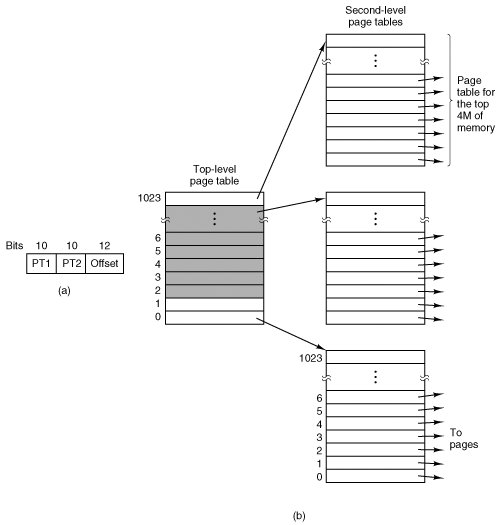
To get around the problem of having to store huge page tables in memory all the time, many computers use a multilevel page table. A simple example is shown in Fig. 4-10. In Fig. 4-10(a) we have a 32-bit virtual address that is partitioned into a 10-bit PT1 field, a 10-bit PT2 field, and a 12-bit Offset field. Since offsets are 12 bits, pages are 4 KB, and there are a total of 220 of them.
Figure 4-10. (a) A 32-bit address with two page table fields. (b) Two-level page tables. (This item is displayed on page 390 in the print version)
The secret to the multilevel page table method is to avoid keeping all the page tables in memory all the time. In particular, those that are not needed should not be kept around. Suppose, for example, that a process needs 12 megabytes, the bottom 4 megabytes of memory for program text, the next 4 megabytes for data, and the top 4 megabytes for the stack. In between the top of the data and the bottom of the stack is a gigantic hole that is not used.
In Fig. 4-10(b) we see how the two-level page table works in this example. On the left we have the top-level page table, with 1024 entries, corresponding to the 10-bit PT1 field. When a virtual address is presented to the MMU, it first extracts the PT1 field and uses this value as an index into the top-level page table. Each of these 1024 entries represents 4M because the entire 4-gigabyte (i.e., 32-bit) virtual address space has been chopped into chunks of 1024 bytes.
The entry located by indexing into the top-level page table yields the address or the page frame number of a second-level page table. Entry 0 of the top-level page table points to the page table for the program text, entry 1 points to the page table for the data, and entry 1023 points to the page table for the stack. The other (shaded) entries are not used. The PT2 field is now used as an index into the selected second-level page table to find the page frame number for the page itself.
As an example, consider the 32-bit virtual address 0x00403004 (4,206,596 decimal), which is 12,292 bytes into the data. This virtual address corresponds to PT1 = 1, PT2 = 2, and Offset = 4. The MMU first uses PT1 to index into the top-level page table and obtain entry 1, which corresponds to addresses 4M to 8M. It then uses PT2 to index into the second-level page table just found and extract entry 3, which corresponds to addresses 12,288 to 16,383 within its 4M chunk (i.e., absolute addresses 4,206,592 to 4,210,687). This entry contains the page frame number of the page containing virtual address 0x00403004. If that page is not in memory, the present/absent bit in the page table entry will be zero, causing a page fault. If the page is in memory, the page frame number taken from the second-level page table is combined with the offset (4) to construct a physical address. This address is put on the bus and sent to memory.
The interesting thing to note about Fig. 4-10 is that although the address space contains over a million pages, only four page tables are actually needed: the top-level table, the second-level tables for 0 to 4M, 4M to 8M, and the top 4M. The present/absent bits in 1021 entries of the top-level page table are set to 0, forcing a page fault if they are ever accessed. Should this occur, the operating system will notice that the process is trying to reference memory that it is not supposed to and will take appropriate action, such as sending it a signal or killing it. In this example we have chosen round numbers for the various sizes and have picked PT1 equal to PT2 but in actual practice other values are also possible, of course.
The two-level page table system of Fig. 4-10 can be expanded to three, four, or more levels. Additional levels give more flexibility, but it is doubtful that the additional complexity is worth it beyond two levels.
Structure of a Page Table Entry
Let us now turn from the structure of the page tables in the large, to the details of a single page table entry. The exact layout of an entry is highly machine dependent, but the kind of information present is roughly the same from machine to machine. In Fig. 4-11 we give a sample page table entry. The size varies from computer to computer, but 32 bits is a common size. The most important field is the page frame number. After all, the goal of the page mapping is to locate this value. Next to it we have the present/absent bit. If this bit is 1, the entry is valid and can be used. If it is 0, the virtual page to which the entry belongs is not currently in memory. Accessing a page table entry with this bit set to 0 causes a page fault.
Figure 4-11. A typical page table entry.
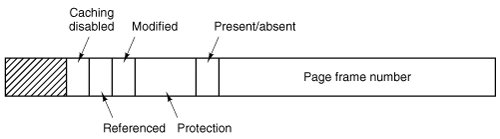
The protection bits tell what kinds of access are permitted. In the simplest form, this field contains 1 bit, with 0 for read/write and 1 for read only. A more sophisticated arrangement is having 3 independent bits, one bit each for individually enabling reading, writing, and executing the page.
The modified and referenced bits keep track of page usage. When a page is written to, the hardware automatically sets the modified bit. This bit is used when the operating system decides to reclaim a page frame. If the page in it has been modified (i.e., is "dirty"), it must be written back to the disk. If it has not been modified (i.e., is "clean"), it can just be abandoned, since the disk copy is still valid. The bit is sometimes called the dirty bit, since it reflects the page's state.
The referenced bit is set whenever a page is referenced, either for reading or writing. Its value is to help the operating system choose a page to evict when a page fault occurs. Pages that are not being used are better candidates than pages that are, and this bit plays an important role in several of the page replacement algorithms that we will study later in this chapter.
Finally, the last bit allows caching to be disabled for the page. This feature is important for pages that map onto device registers rather than memory. If the operating system is sitting in a tight loop waiting for some I/O device to respond to a command it was just given, it is essential that the hardware keep fetching the word from the device, and not use an old cached copy. With this bit, caching can be turned off. Machines that have a separate I/O space and do not use memory mapped I/O do not need this bit.
Note that the disk address used to hold the page when it is not in memory is not part of the page table. The reason is simple. The page table holds only that information the hardware needs to translate a virtual address to a physical address. Information the operating system needs to handle page faults is kept in software tables inside the operating system. The hardware does not need it.
4.3.3. TLBsTranslation Lookaside Buffers
In most paging schemes, the page tables are kept in memory, due to their large size. Potentially, this design has an enormous impact on performance. Consider, for example, an instruction that copies one register to another. In the absence of paging, this instruction makes only one memory reference, to fetch the instruction. With paging, additional memory references will be needed to access the page table. Since execution speed is generally limited by the rate the CPU can get instructions and data out of the memory, having to make two page table references per memory reference reduces performance by 2/3. Under these conditions, no one would use it.
Computer designers have known about this problem for years and have come up with a solution. Their solution is based on the observation that most programs tend to make a large number of references to a small number of pages, and not the other way around. Thus only a small fraction of the page table entries are heavily read; the rest are barely used at all. This is an example of locality of reference, a concept we will come back to in a later section.
The solution that has been devised is to equip computers with a small hardware device for rapidly mapping virtual addresses to physical addresses without going through the page table. The device, called a TLB (Translation Lookaside Buffer) or sometimes an associative memory, is illustrated in Fig. 4-12. It is usually inside the MMU and consists of a small number of entries, eight in this example, but rarely more than 64. Each entry contains information about one page, including the virtual page number, a bit that is set when the page is modified, the protection code (read/write/execute permissions), and the physical page frame in which the page is located. These fields have a one-to-one correspondence with the fields in the page table. Another bit indicates whether the entry is valid (i.e., in use) or not.
Valid | Virtual page | Modified | Protection | Page frame |
|---|---|---|---|---|
1 | 140 | 1 | RW | 31 |
1 | 20 | 0 | R X | 38 |
1 | 130 | 1 | RW | 29 |
1 | 129 | 1 | RW | 62 |
1 | 19 | 0 | R X | 50 |
1 | 21 | 0 | R X | 45 |
1 | 860 | 1 | RW | 14 |
1 | 861 | 1 | RW | 75 |
An example that might generate the TLB of Fig. 4-12 is a process in a loop that spans virtual pages 19, 20, and 21, so these TLB entries have protection codes for reading and executing. The main data currently being used (say, an array being processed) are on pages 129 and 130. Page 140 contains the indices used in the array calculations. Finally, the stack is on pages 860 and 861.
Let us now see how the TLB functions. When a virtual address is presented to the MMU for translation, the hardware first checks to see if its virtual page number is present in the TLB by comparing it to all the entries simultaneously (i.e., in parallel). If a valid match is found and the access does not violate the protection bits, the page frame is taken directly from the TLB, without going to the page table. If the virtual page number is present in the TLB but the instruction is trying to write on a read-only page, a protection fault is generated, the same way as it would be from the page table itself.
The interesting case is what happens when the virtual page number is not in the TLB. The MMU detects the miss and does an ordinary page table lookup. It then evicts one of the entries from the TLB and replaces it with the page table entry just looked up. Thus if that page is used again soon, the second time around it will result in a hit rather than a miss. When an entry is purged from the TLB, the modified bit is copied back into the page table entry in memory. The other values are already there. When the TLB is loaded from the page table, all the fields are taken from memory.
Software TLB Management
Up until now, we have assumed that every machine with paged virtual memory has page tables recognized by the hardware, plus a TLB. In this design, TLB management and handling TLB faults are done entirely by the MMU hardware. Traps to the operating system occur only when a page is not in memory.
In the past, this assumption was true. However, many modern RISC machines, including the SPARC, MIPS, HP PA, and PowerPC, do nearly all of this page management in software. On these machines, the TLB entries are explicitly loaded by the operating system. When a TLB miss occurs, instead of the MMU just going to the page tables to find and fetch the needed page reference, it just generates a TLB fault and tosses the problem into the lap of the operating system. The system must find the page, remove an entry from the TLB, enter the new one, and restart the instruction that faulted. And, of course, all of this must be done in a handful of instructions because TLB misses occur much more frequently than page faults.
Surprisingly enough, if the TLB is reasonably large (say, 64 entries) to reduce the miss rate, software management of the TLB turns out to be acceptably efficient. The main gain here is a much simpler MMU, which frees up a considerable amount of area on the CPU chip for caches and other features that can improve performance. Software TLB management is discussed by Uhlig et al. (1994).
Various strategies have been developed to improve performance on machines that do TLB management in software. One approach attacks both reducing TLB misses and reducing the cost of a TLB miss when it does occur (Bala et al., 1994). To reduce TLB misses, sometimes the operating system can use its intuition to figure out which pages are likely to be used next and to preload entries for them in the TLB. For example, when a client process sends a message to a server process on the same machine, it is very likely that the server will have to run soon. Knowing this, while processing the trap to do the send, the system can also check to see where the server's code, data, and stack pages are and map them in before they can cause TLB faults.
The normal way to process a TLB miss, whether in hardware or in software, is to go to the page table and perform the indexing operations to locate the page referenced. The problem with doing this search in software is that the pages holding the page table may not be in the TLB, which will cause additional TLB faults during the processing. These faults can be reduced by maintaining a large (e.g., 4-KB or larger) software cache of TLB entries in a fixed location whose page is always kept in the TLB. By first checking the software cache, the operating system can substantially reduce the number of TLB misses.
4.3.4. Inverted Page Tables
Traditional page tables of the type described so far require one entry per virtual page, since they are indexed by virtual page number. If the address space consists of 232 bytes, with 4096 bytes per page, then over 1 million page table entries are needed. As a bare minimum, the page table will have to be at least 4 megabytes. On large systems, this size is probably doable.
However, as 64-bit computers become more common, the situation changes drastically. If the address space is now 264 bytes, with 4-KB pages, we need a page table with 252 entries. If each entry is 8 bytes, the table is over 30 million gigabytes. Tying up 30 million gigabytes just for the page table is not doable, not now and not for years to come, if ever. Consequently, a different solution is needed for 64-bit paged virtual address spaces.
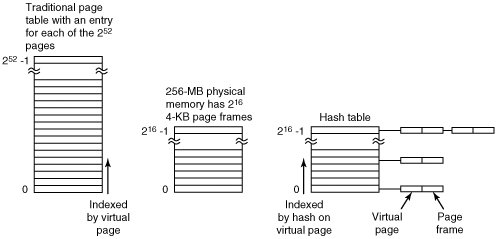
One such solution is the inverted page table. In this design, there is one entry per page frame in real memory, rather than one entry per page of virtual address space. For example, with 64-bit virtual addresses, a 4-KB page, and 256 MB of RAM, an inverted page table only requires 65,536 entries. The entry keeps track of which (process, virtual page) is located in the page frame.
Although inverted page tables save vast amounts of space, at least when the virtual address space is much larger than the physical memory, they have a serious downside: virtual-to-physical translation becomes much harder. When process n references virtual page p, the hardware can no longer find the physical page by using p as an index into the page table. Instead, it must search the entire inverted page table for an entry (n, p). Furthermore, this search must be done on every memory reference, not just on page faults. Searching a 64K table on every memory reference is definitely not a good way to make your machine blindingly fast.
The way out of this dilemma is to use the TLB. If the TLB can hold all of the heavily used pages, translation can happen just as fast as with regular page tables. On a TLB miss, however, the inverted page table has to be searched in software. One feasible way to accomplish this search is to have a hash table hashed on the virtual address. All the virtual pages currently in memory that have the same hash value are chained together, as shown in Fig. 4-13. If the hash table has as many slots as the machine has physical pages, the average chain will be only one entry long, greatly speeding up the mapping. Once the page frame number has been found, the new (virtual, physical) pair is entered into the TLB and the faulting instruction restarted.
Figure 4-13. Comparison of a traditional page table with an inverted page table. (This item is displayed on page 396 in the print version)
Inverted page tables are currently used on IBM, Sun, and Hewlett-Packard workstations and will become more common as 64-bit machines become widespread. Inverted page tables are essential on this machines. Other approaches to handling large virtual memories can be found in Huck and Hays (1993), Talluri and Hill (1994), and Talluri et al. (1995). Some hardware issues in implementation of virtual memory are discussed by Jacob and Mudge (1998).

EAN: 2147483647
Pages: 102