Calendars
| The calendar system known and used in most English-speaking countries is known as the Gregorian calendar. Started in 1582, it replaced the previous Julian calendar system, which had become increasingly inaccurate. Like other globalization issues, you can support any number of alternative calendar systems in use throughout the world without being aware of their differences by using the calendar classes provided. You can create new calendar objects directly from their class constructors (e.g., new GregorianCalendar()), but you will also encounter calendars through the use of the CultureInfo.Calendar, CultureInfo.OptionalCalendars and Date-TimeFormatInfo.Calendar properties. For the "en-US" culture, CultureInfo. Calendar is a GregorianCalendar object. For the "ar-SA" (Arabic (Saudi Arabia)) culture, CultureInfo.Calendar is a HijriCalendar object. In fact, it is only the Arabic, Divehi and Thai cultures for which CultureInfo.Calendar is not a GregorianCalendar. The CultureInfo.Calendar property represents merely the "default" calendar used by the culture. Cultures can support any number of calendars (although the current maximum is seven) through the OptionalCalendars property. This array's first element contains the default calendar object, so CultureInfo.Calendar is equal to CultureInfo.OptionalCalendars[0]. The list of OptionalCalendars for the Arabic (Saudi Arabia) culture is shown in Table 6.8.
As you can see, the last five calendars are all GregorianCalendars. GregorianCalendars have a CalendarType property (see Table 6.9) that determines the language used in date/time strings, but it does not affect the values of Gregorian Calendar properties.
For cultures that support more than one calendar, you can change the culture's calendar to one of the OptionalCalendars by assigning a new calendar to the culture's DateTimeFormat.Calendar: CultureInfo cultureInfo = new CultureInfo("ar-SA"); // change the calendar to the second optional calendar cultureInfo.DateTimeFormat.Calendar = cultureInfo.OptionalCalendars[1]; // change the calendar to the Gregorian(MiddleEastFrench) calendar cultureInfo.DateTimeFormat.Calendar = new GregorianCalendar(GregorianCalendarTypes.MiddleEastFrench); // Throws an ArgumentOutOfRangeException cultureInfo.DateTimeFormat.Calendar = new JapaneseCalendar(); The complete set of calendar classes is shown in Figure 6.7. The classes typically differ in the following ways:
Figure 6.7. .NET Framework Calendar Class Hierarchy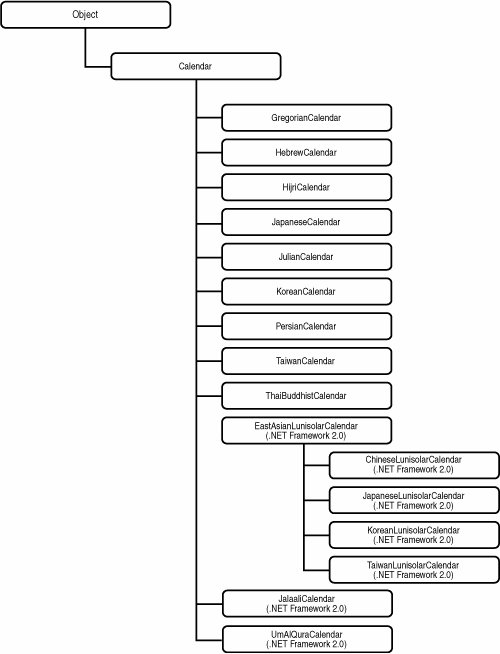 Methods that perform day, week, and time arithmetic (such as AddDays, AddHours, AddSeconds, AddWeeks) are implemented in the base Calendar class. The logic behind the calendar calculations is determined mostly by the AlgorithmType property, which is a CalendarAlgorithmType enumeration (see Table 6.11). Although this property and its enumeration are new in the .NET Framework 2.0, it is still useful for categorizing the calendar classes in a discussion involving any version of the framework.
Table 6.12 shows some of the differences that you can expect from the calendars based on the different algorithms. The table shows the different possible values for the Calendar GetDaysInMonth, GetMonthsInYear, and GetdaysInYear methods. If there was any doubt about whether you should hard-code these values based on a North American/European background or use the .NET Framework's globalization classes, this table should remove that doubt.
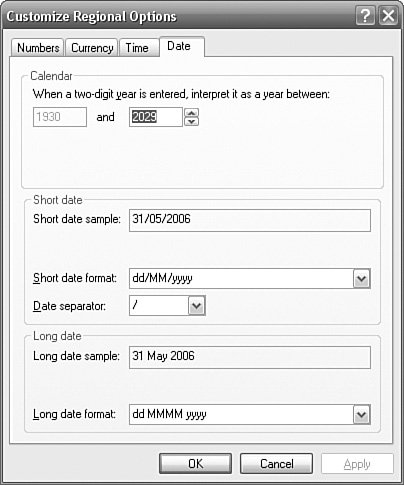
Calendars classes are often used in DateTime constructors to work with dates based on a given calendar, so in the following example, the year/month/day has a different meaning to each of the three calendars: DateTime dateTime1 = new DateTime(2000, 1, 1, new GregorianCalendar()); DateTime dateTime2 = new DateTime(2000, 1, 1, new HijriCalendar()); DateTime dateTime3 = new DateTime(2000, 1, 1, new JapaneseCalendar()); listBox1.Items.Add(dateTime1.ToString("dd MMM yyyy")); listBox1.Items.Add(dateTime2.ToString("dd MMM yyyy")); listBox1.Items.Add(dateTime3.ToString("dd MMM yyyy")); The result is: 01 Jan 2000 07 Jan 2562 01 Jan 3988 In this example, the year (2000), month (1), and day (1) mean a different day in time to different calendars. Calendar ErasThe Calendar class has a read-only Eras integer array that lists the era numbers that can be used with the calendar. For all calendars except the JapaneseCalendar and JapaneseLunisolarCalendar, Eras has a single element containing the value 1. For the GregorianCalendar, this means that the calendar covers a single era namely, AD (Anno Domini), also called CE (Current Era). The previous era, BC (Before Christ), also called BCE (Before Common Era), is not covered by the GregorianCalendar. The JapaneseCalendar has four eras, which are numbered 4, 3, 2, and 1 in elements 0, 1, 2, and 3 of the Eras array. The JapaneseLunisolarCalendar has two eras, which are numbered 2 and 1 in elements 0 and 1. The only information that is available about these eras is the era name (in Kanji) and the era's abbreviated name (in Kanji). No further information is available about these eras programmatically, so you need to know that they refer to the eras of the Japanese Modern Period. Each era corresponds to the reign of a different emperor. Information about these eras, such as the Romaji names of the eras (Meiji, Taisho, Showa, and Heisei), the names of the emperors, and the periods of the eras are all unavailable, and you would have to manually hard-code such information into your application if you needed to make reference to it. The two references to the Eras property in the Calendar class are by the GetEras method and the CurrentEra field. The GetEras method accepts a DateTime and reports the era number (not the Era array element number), so the era for January 1, 2005, is 4. The Calendar.CurrentEra field is a read-only static constant with the value 0 and refers to the element number of the Eras array. Unfortunately, whereas GregorianCalendar has a static constant field (ADEra) that identifies its single era number, the JapaneseCalendar and JapaneseLunisolarCalendar classes do not have equivalent constants (e.g., MeijiEra, TaishoEra, ShowaEra, and HeiseiEra) to make programmatic comparisons with era numbers meaningful. Calendar.TwoDigitYearMaxThe Calendar.TwoDigitYearMax property is used to identify the century of two-digit years when date strings are parsed. For example, is "1/1/30" January 1, 0030, or January 1, 1930, or January 1, 2030 ? The TwoDigitYearMax represents the maximum year that is used for interpreting the century. Two-digit years that are higher than the last two digits of the year are assumed to be 100 years earlier than the TwoDigitYearMax. The following example uses the English(US) culture, which uses the GregorianCalendar, which has a TwoDigitYearMax of 2029: Thread.CurrentThread.CurrentCulture = new CultureInfo("en-US"); listBox1.Items.Add(DateTime.Parse("1/1/29").ToLongDateString()); listBox1.Items.Add(DateTime.Parse("1/1/30").ToLongDateString()); cultureInfo.Calendar.TwoDigitYearMax = 2050; listBox1.Items.Add(DateTime.Parse("1/1/29").ToLongDateString()); listBox1.Items.Add(DateTime.Parse("1/1/30").ToLongDateString()); The result is: Monday, January 01, 2029 Wednesday, January 01, 1930 Monday, January 01, 2029 Tuesday, January 01, 2030 The user can change the TwoDigitYearMax (see Figure 6.8) by clicking the Customize button in the Regional Settings tab of Regional and Language Options. Figure 6.8. Customizing the Calendar.TwoDigitYearMax For the value to be used, the CultureInfo's UseUserOverride parameter must be true, which, by default, it is. |

EAN: 2147483647
Pages: 213