| Let's look more closely at an example. Like the U.S. government's old disability information site, National Public Radio's site offers a text-only link in the upper-left corner of the page (Figure 8-3). Figure 8-3. Screen shot of the home page for National Public Radio. A link to the text-only version of the site appears in tiny letters in the upper-left corner of the screen. Accessed July 21, 2001, at http://www.npr.org. Used with permission. 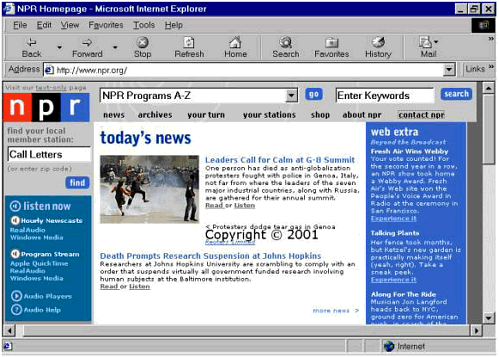 Listening to NPR's Home Page Here's how the JAWS screen reader speaks the first 23 items on the main page of NPR's site. NPR hahmapage Visit our link text dash only page Link graphic NPR Combo box NPR programs A dash Z Go button Edit enter keywords Find button Link news Link archives Link your turn Link your stations Link shop Link about NPR Link contact NPR Find your local member station colon Edit call letters left paren or enter ZIP code right paren Find button Graphic listen now Hourly newscasts Link RealAudio Link Windows Media Program stream Link Apple QuickTime Link RealAudio Link Windows Media Link Audio Players Link Audio Help Graphic our online partners Link graphic PBS slash sbanner [pbsbanner] underline enproam [nprhome] Link audible dot com for downloadable NPR programming Link Adaptive Path User Experience Consultants Link graphic NPR shop [And so on. . . .] [4] [4] Transcript of JAWS reading the National Public Radio home page, accessed July 21, 2001, at http://www.npr.org.
Visiting NPR's Text-Only Page The text-only link leads to a menu of links that is indeed text-only (Figure 8-4). Figure 8-4. Screen shot of National Public Radio's text-only menu. Accessed July 21, 2001, at http://www.npr.org/about/textonly.html. Used with permission. 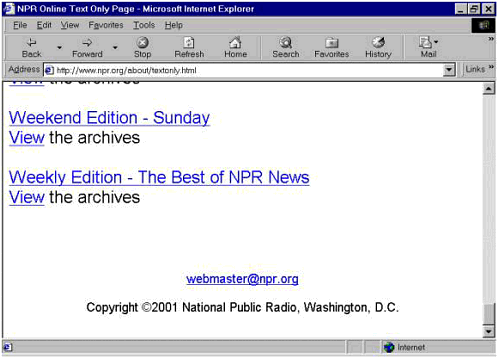 This page doesn't qualify as an "equivalent alternative" to the primary NPR site. The text-only menu is organized quite differently from the menu on the main home page. By labeling groups of links (Main Navigation, Audio Help, Radio Programs), it provides some contextual information that isn't available on the page we listened to and looked at a moment ago, as suggested by WCAG 1.0 Checkpoint 13.8 ("Place distinguishing information at the beginning of headings, paragraphs, lists, etc."). But the text-only menu does not include the news items that are prominently displayed on what is clearly the real home page, nor does it include the links that run down the right side of the screen. Moreover, some of the links (the link to All Things Considered, for example) point back to graphically intense pages. For comparison with the transcript of the main page presented earlier, here's how JAWS reports the first 23 items on the text-only page. National Public Radio Online Main navigation Link news Link program archives left paren good for searching right paren Link your turn Link your stations Link shop Link about NPR Link contact NPR Audio help Link audio players Link audio help Radio programs Here's a listing of NPR's produced and distributed programs period. Link all songs considered link listen to the latest show or link view the archives Link all things considered registered Link listen to the latest show or link view the archives Link along for the ride Link view the archives link American Radio Works At the Opera view the archives beyond 2000 Billy Taylor's Jazz view the archives Car Talk registered the changing face of America Link view the archives The Connection the Diane Rehm Show Fresh Air registered with Terry Gross listen to the latest show or view the archives Jazz from Lincoln Center Link Jazz Profiles view the archives Jazz Set with Branford Marsalis Justice Talking Latino USA Living on Earth Lost and Found Sound view the archives Marian Link McPartland's Piano Jazz The Merrow Report Morning Edition registered listen to the latest show or view the archives National Press Club view the archives NPR Playhouse NPR World of Opera On the Media registered Only a Game Performance Today registered Public Interest Radio Expeditions view the archives Rewind says you exclaim Selected Shorts Sunday Link Baroque Symphony Cast Talk of the Nation view the archives [And so on. . . .] [5] [5] Transcript of JAWS reading the text-only version of the National Public Radio site, accessed July 21, 2001, at http://www.npr.org/about/textonly.html.
Something has gone seriously wrong here. It isn't just that the information on this page differs from what's available on the main page or that it's in a different order. The page is "broken" from the point immediately after the link to a show called Along for the Ride, links for multiple shows and their archives are run together in an incoherent way. It's impossible to tell where the links will go. Problems at the Source This is not a good thing, of course. But when we looked at the source code, we were amazed that the page worked at all. To begin with, the document doesn't start with the obligatory HTML tag (<html> ) though it does end with the end-HTML tag (</html>). It has just a tiny <head> section (it contains nothing but a <title> element) sitting atop a distorted <body> section consisting of a <table> element that has a beginning <table> tag and not one but two closing tags several lines apart (</table> . . . </table>). And on the table chaos. The first line of code inside the <body> element looks like this: <table width=650><td><tr> It's common practice to use tables to lay out lists of links, and presumably that is the intention here. But the code is backwards: it puts the first table row (the <tr> element) inside the first data cell (the <td> element). There is no closing tag for either the data cell or the row, and there are no more rows or cells. Instead, links are presented as items in a list (using the <li> element), but the beginning and end of the list are not identified a violation of WCAG 1.0 Checkpoint 3.6 ("Mark up lists and list items properly"). And only some of the links are organized into a list. Those arranged under Audio Help and Radio Programs are simply separated by line breaks with the <br> element. What appear on the screen to be section headings (Audio Help, Radio Programs, and so on) are actually just phrases formatted as bold text, whereas they would be more appropriately tagged as structural sections of the document (<h1>, <h2>, <h3>, and so on) in accordance with WCAG 1.0 Checkpoint 3.5 ("Use header elements to convey document structure and use them according to specification"). And then the whole thing breaks down, as shown in the source code below from the National Public Radio text-only page. <a href="/programs/theride/index.html"> Along for the Ride</a> <br><a href="/ramfiles/theride/lfunderburg/aftr.lfunderburg.01. rmm"><!-- Listen</a> to the latest show <img src="/books/3/135/1/html/2/bullet.gif"> --> <a href="http://www.npr.org/programs/ theride/archives.html">View</a> the archives<br><br> This is the point at which JAWS began running the names of radio programs together. In the code fragment shown above, the first two lines, from the initial <a href . . .> to the first occurrence of </a>, define a link to a radio program called Along for the Ride. Then comes trouble. Following a line break (<br>) comes the beginning of a new link. But where the link text should be (it's supposed to read "Listen to the latest show") there is instead a comment tag (<!-- . . . -->), which tells the browser to ignore what it encloses. That comment is clearly meant to enclose (and thus cause not to appear on the screen) an image called bullet.gif, which has evidently been caught red-handed trying to sneak onto this text-only page. Unfortunately, though, the comment tag starts a little early, and it also captures what was supposed to be the link text and the closing tag of the link. Then comes the beginning of a new link to the archives for this show but the browser and JAWS are forced to try to treat this new link as the link text for the unclosed link to the audio files for the most recent edition of the show. Meltdown. How did this happen? We can't say for sure, but we'll hazard a guess. The person to whom the job of making a text-only version was assigned did what so many HTML developers do: he or she copied the source from a version of the page that included some graphics and pasted it into a new document. Then he or she realized that there were images in there and went back in to comment them out of the code. This developer clearly was in a hurry and didn't have time to test the page not even to eyeball it quickly, let alone put it through the W3C's online HTML Validation Service at http://validator.w3.org/, which would have caught the error even if no one else did. (So would an authoring tool conforming with the Authoring Tool Accessibility Guidelines 1.0, had there been any such tools.) And that was that. (We are pleased to note that, as of June 2002, the broken links on this text-only menu have been mended: the source code still contains the <img> element, but the comment tag is correctly placed now so that only the link to the most recent show is commented out. The other errors described above remain, however.) The text-only version is no doubt well intentioned. But the good intentions matter only if they're carried through to every level of the site, and in this case as in many others that doesn't happen. The links on NPR's text-only menu, for example, point back to the graphical version of the site. And selecting the link for the afternoon news show All Things Considered brings up the screen shown in Figure 8-5. The page for All Things Considered is dense with text, but there are a number of images and graphical links as well this is not a text-only page. This bouncing back and forth between text-only and graphical pages isn't especially problematic in the case of All Things Considered. But in the next section of this chapter, we'll show you how confusing it can be when a user is "slammed" unpredictably from one version to another without warning. Figure 8-5. Screen shot of the graphical version of the All Things Considered site at NPR, reached by selecting a link on the text-only menu. Accessed September 8, 2001, at http://www.npr.org/programs/atc/index.html. Used with permission. 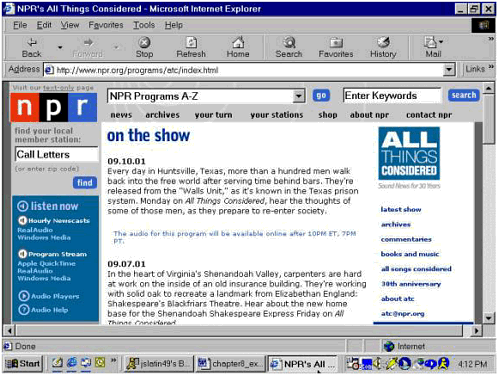 | 


