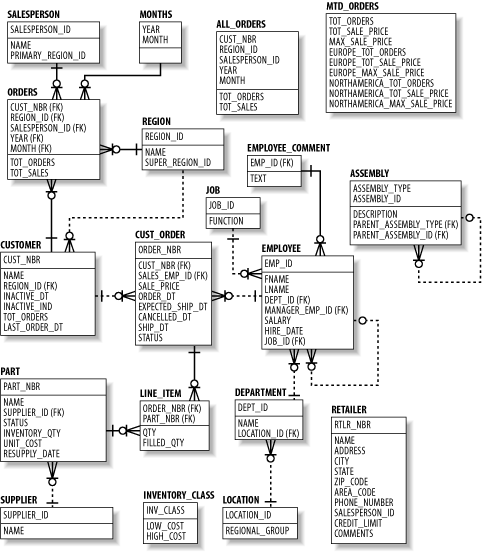
1.4 DML Statements
In this section, we will introduce the five statements that comprise the DML portion of SQL. The information presented in this section should be enough to allow you to start writing DML statements. As is discussed at the end of the section, however, DML can look deceptively simple, so keep in mind while reading the section that there are many more facets to DML than are discussed here.
1.4.1 The SELECT Statement
The SELECT statement is used to retrieve data from a database. The set of data retrieved via a SELECT statement is referred to as a
result set
. Like a table, a result set is comprised of rows and
columns
, making it possible to populate a table using the result set of a SELECT statement. The SELECT statement can be summarized as
follows
:
SELECT <one or more things>
FROM <one or more places>
WHERE <zero, one, or more conditions apply>
While the SELECT and FROM clauses are required, the WHERE clause is optional (although you will seldom see it omitted). We will therefore begin with a simple example that retrieves three columns from every row of the
customer
table:
SELECT cust_nbr, name, region_id
FROM customer;
CUST_NBR NAME REGION_ID
---------- ------------------------------ ----------
1 Cooper Industries 5
2 Emblazon Corp. 5
3 Ditech Corp. 5
4 Flowtech Inc. 5
5 Gentech Industries 5
6 Spartan Industries 6
7 Wallace Labs 6
8 Zantech Inc. 6
9 Cardinal Technologies 6
10 Flowrite Corp. 6
11 Glaven Technologies 7
12 Johnson Labs 7
13 Kimball Corp. 7
14 Madden Industries 7
15 Turntech Inc. 7
16 Paulson Labs 8
17 Evans Supply Corp. 8
18 Spalding Medical Inc. 8
19 Kendall-Taylor Corp. 8
20 Malden Labs 8
21 Crimson Medical Inc. 9
22 Nichols Industries 9
23 Owens-Baxter Corp. 9
24 Jackson Medical Inc. 9
25 Worcester Technologies 9
26 Alpha Technologies 10
27 Phillips Labs 10
28 Jaztech Corp. 10
29 Madden-Taylor Inc. 10
30 Wallace Industries 10
Since we neglected to impose any conditions via a WHERE clause, the query returns every row from the customer table. If you want to restrict the set of data returned by the query, you can include a WHERE clause with a single condition:
SELECT cust_nbr, name, region_id
FROM customer
WHERE region_id = 8;
CUST_NBR NAME REGION_ID
---------- ------------------------------ ----------
16 Paulson Labs 8
17 Evans Supply Corp. 8
18 Spalding Medical Inc. 8
19 Kendall-Taylor Corp. 8
20 Malden Labs 8
The result set now includes only those customers residing in the region with a
region_id
of 8. But what if you want to specify a region by name instead of
region_id
? You could query the
region
table for a particular name and then query the
customer
table using the retrieved
region_id
. Instead of issuing two different queries, however, you can produce the same outcome using a single query by introducing a
join
, as in:
SELECT customer.cust_nbr, customer.name, region.name
FROM customer INNER JOIN region
ON region.region_id = customer.region_id
WHERE region.name = 'New England';
CUST_NBR NAME NAME
---------- ------------------------------ -----------
1 Cooper Industries New England
2 Emblazon Corp. New England
3 Ditech Corp. New England
4 Flowtech Inc. New England
5 Gentech Industries New England
The FROM clause now contains two tables instead of one and includes a
join condition
that specifies that the
customer
and
region
tables are to be joined using the
region_id
column found in both tables. Joins and join conditions will be explored in detail in Chapter 3.
Since both the
customer
and
region
tables contain a column called
name
, you must specify which table's
name
column you are interested in. This is done in the previous example by using dot-notation to append the table name in front of each column name. If you would rather not type full table
names
, you can assign
table aliases
to each table in the FROM clause and use those aliases instead of the table names in the SELECT and WHERE clauses, as in:
SELECT c.cust_nbr, c.name, r.name
FROM customer c INNER JOIN region r
ON r.region_id = c.region_id
WHERE r.name = 'New England';
In this example, we assigned the alias
c
to the customer table and the alias
r
to the region table. Thus, we can use
c
. and
r
. instead of
customer
. and
region
. in the SELECT and WHERE clauses.
1.4.1.1 SELECT clause elements
In the examples thus far, the result sets generated by our queries have contained columns from one or more tables. While most elements in your SELECT clauses will typically be simple column references, a SELECT clause may also include:
-
Literal values, such as
numbers
(27) or strings (`abc')
-
Expressions, such as shape.diameter * 3.1415927
-
Function calls, such as TO_DATE(`01-JAN-2004',`DD-MON-YYYY')
-
Pseudocolumns
, such as ROWID, ROWNUM, or LEVEL
While the first three items in this list are
fairly
straightforward, the last item merits further discussion. Oracle makes available several phantom columns, known as
pseudocolumns
, that do not exist in any tables. Rather, they are values visible during query execution that can be helpful in certain situations.
For example, the pseudocolumn ROWID represents the physical location of a row. This information represents the
fastest
possible access mechanism. It can be useful if you plan to delete or update a row retrieved via a query. However, you should never store ROWID values in the database, nor should you reference them outside of the transaction in which they are retrieved, since a row's ROWID can change in certain situations, and ROWIDs can be reused after a row has been deleted.
The
next
example
demonstrates
each of the different element types from the previous list:
SELECT ROWNUM,
cust_nbr,
1 multiplier,
'cust # ' cust_nbr cust_nbr_str,
'hello' greeting,
TO_CHAR(last_order_dt, 'DD-MON-YYYY') last_order
FROM customer;
ROWNUM CUST_NBR MULTIPLIER CUST_NBR_STR GREETING LAST_ORDER
------ -------- ---------- ------------ -------- -----------
1 1 1 cust # 1 hello 15-JUN-2000
2 2 1 cust # 2 hello 27-JUN-2000
3 3 1 cust # 3 hello 07-JUL-2000
4 4 1 cust # 4 hello 15-JUL-2000
5 5 1 cust # 5 hello 01-JUN-2000
6 6 1 cust # 6 hello 10-JUN-2000
7 7 1 cust # 7 hello 17-JUN-2000
8 8 1 cust # 8 hello 22-JUN-2000
9 9 1 cust # 9 hello 25-JUN-2000
10 10 1 cust # 10 hello 01-JUN-2000
11 11 1 cust # 11 hello 05-JUN-2000
12 12 1 cust # 12 hello 07-JUN-2000
13 13 1 cust # 13 hello 07-JUN-2000
14 14 1 cust # 14 hello 05-JUN-2000
15 15 1 cust # 15 hello 01-JUN-2000
16 16 1 cust # 16 hello 31-MAY-2000
17 17 1 cust # 17 hello 28-MAY-2000
18 18 1 cust # 18 hello 23-MAY-2000
19 19 1 cust # 19 hello 16-MAY-2000
20 20 1 cust # 20 hello 01-JUN-2000
21 21 1 cust # 21 hello 26-MAY-2000
22 22 1 cust # 22 hello 18-MAY-2000
23 23 1 cust # 23 hello 08-MAY-2000
24 24 1 cust # 24 hello 26-APR-2000
25 25 1 cust # 25 hello 01-JUN-2000
26 26 1 cust # 26 hello 21-MAY-2000
27 27 1 cust # 27 hello 08-MAY-2000
28 28 1 cust # 28 hello 23-APR-2000
29 29 1 cust # 29 hello 06-APR-2000
30 30 1 cust # 30 hello 01-JUN-2000
|
Note that the third through
sixth
columns have been given
column aliases
, which are names that you assign to a column. If you are going to refer to the columns in your query by name instead of by position, you will want to assign each column a name that makes sense to you.
|
|
Interestingly, a SELECT clause is not required to reference columns from any of the tables in the FROM clause. For example, the next query's result set is
composed
entirely of literals:
SELECT 1 num, 'abc' str
FROM customer;
NUM STR
---------- ---
1 abc
1 abc
1 abc
1 abc
1 abc
1 abc
1 abc
1 abc
1 abc
1 abc
1 abc
1 abc
1 abc
1 abc
1 abc
1 abc
1 abc
1 abc
1 abc
1 abc
1 abc
1 abc
1 abc
1 abc
1 abc
1 abc
1 abc
1 abc
1 abc
1 abc
Since there are 30 rows in the
customer
table, the query's result set includes 30 identical rows of data.
1.4.1.2 Ordering your results
In general, there is no guarantee that the result set generated by your query will be in any particular order. If you want your results to be sorted by one or more columns, you can add an ORDER BY clause after the WHERE clause. The following example sorts the results from the New England query by customer name:
SELECT c.cust_nbr, c.name, r.name
FROM customer c INNER JOIN region r
ON r.region_id = c.region_id
WHERE r.name = 'New England'
ORDER BY c.name;
CUST_NBR NAME NAME
-------- ------------------------------ -----------
1 Cooper Industries New England
3
Ditech Corp
. New England
2
Emblazon Corp
. New England
4 Flowtech Inc. New England
5 Gentech Industries New England
You may also
designate
the sort column(s) by their position in the SELECT clause. To
sort
the previous query by customer number, which is the first column in the SELECT clause, you could issue the following statement:
SELECT c.cust_nbr, c.name, r.name
FROM customer c INNER JOIN region r
ON r.region_id = c.region_id
WHERE r.name = 'New England'
ORDER BY 1;
CUST_NBR NAME NAME
---------- ------------------------------ -----------
1 Cooper Industries New England
2 Emblazon Corp
. New England
3 Ditech Corp
. New England
4 Flowtech Inc. New England
5 Gentech Industries New England
Specifying sort keys by position will
certainly
save you some typing, but it can often lead to errors if you later change the order of the columns in your SELECT clause.
1.4.1.3 Removing duplicates
In some cases, your result set may contain duplicate data. For example, if you are compiling a list of
parts
that were included in last month's orders, the same part number would appear multiple times if more than one order included that part. If you want duplicates removed from your result set, you can include the DISTINCT keyword in your SELECT clause, as in:
SELECT
DISTINCT
li.part_nbr
FROM cust_order co INNER JOIN line_item li
ON co.order_nbr = li.order_nbr
WHERE co.order_dt >= TO_DATE('01-JUL-2001','DD-MON-YYYY')
AND co.order_dt < TO_DATE('01-AUG-2001','DD-MON-YYYY');
This query returns the distinct set of parts ordered during July 2001. Without the DISTINCT keyword, the result set would contain one row for every
line-item
of every order, and the same part would appear multiple times if it was included in multiple orders. When deciding whether to include DISTINCT in your SELECT clause, keep in mind that finding and removing duplicates necessitates a sort operation, which can greatly increase the execution time of your query.
1.4.2 The INSERT Statement
The INSERT statement is the mechanism for loading data into your database. This section will introduce the traditional single-table INSERT statement, as well as the new multitable INSERT ALL statement introduced in Oracle 9
i
.
1.4.2.1 Single-table
inserts
With the traditional INSERT statement, data can be inserted into only one table at a time, although the data being loaded into the table can be pulled from one or more additional tables. When inserting data into a table, you do not need to provide values for every column in the table; however, you need to be aware of the columns that require non-NULL
values and the ones that do not. Here's the definition of the
employee
table:
describe employee
Name Null? Type
----------------------------------------- -------- ------------
EMP_ID NOT NULL NUMBER(5)
FNAME VARCHAR2(20)
LNAME VARCHAR2(20)
DEPT_ID NOT NULL NUMBER(5)
MANAGER_EMP_ID NUMBER(5)
SALARY NUMBER(5)
HIRE_DATE DATE
JOB_ID NUMBER(3)
The NOT NULL designation for the
emp_id
and
dept_id
columns indicates that values are required for these two columns. Therefore, you must be sure to provide values for at least these two columns in your INSERT statements, as demonstrated by the following:
INSERT INTO employee (emp_id, dept_id)
VALUES (101, 20);
Any inserts into
employee
may
optionally
include any or all of the remaining six columns, which are described as
nullable
since they may be left undefined. Thus, you could decide to add the employee's last name to the previous statement:
INSERT INTO employee (emp_id, lname, dept_id)
VALUES (101, 'Smith', 20);
The VALUES clause must contain the same number of elements as the column list, and the data types must match the column definitions. In this example,
emp_id
and
dept_id
hold numeric values while
lname
holds character data, so the INSERT statement will execute without error. Oracle always
tries
to convert data from one type to another automatically, however, so the following statement will also run without error:
INSERT INTO employee (emp_id, lname, dept_id)
VALUES ('101', 'Smith', '20');
Sometimes, the data to be inserted needs to be retrieved from one or more tables. Since the SELECT statement generates a result set consisting of rows and columns of data, you can feed the result set from a SELECT statement directly into an INSERT statement, as in:
INSERT INTO employee (emp_id, fname, lname, dept_id, hire_date)
SELECT 101, 'Dave', 'Smith',
d.dept_id
, SYSDATE
FROM department d
WHERE d.name = 'ACCOUNTING';
In this example, the purpose of the SELECT statement is to retrieve the department ID for the Accounting department. The other four columns in the SELECT clause are either literals (
101
, '
Dave
', '
Smith
') or function calls (SYSDATE).
1.4.2.2 Multitable inserts
While inserting data into a single table is the norm, there are situations where data from a single source must be inserted either into multiple tables or into the same table multiple times. Such
tasks
would normally be handled programatically using PL/SQL, but Oracle9
i
introduced the concept of a multitable insert to allow complex data insertion via a single INSERT statement. For example, let's say that one of Mary Turner's customers wants to set up a recurring order on the last day of each month for the next six months. The following statement adds six rows to the
cust_order
table using a SELECT statement that returns exactly one row:
INSERT ALL
INTO cust_order (order_nbr, cust_nbr, sales_emp_id,
order_dt, expected_ship_dt, status)
VALUES (ord_nbr, cust_nbr, emp_id,
ord_dt, ord_dt + 7, status)
INTO cust_order (order_nbr, cust_nbr, sales_emp_id,
order_dt, expected_ship_dt, status)
VALUES (ord_nbr + 1, cust_nbr, emp_id,
add_months(ord_dt, 1), add_months(ord_dt, 1) + 7, status)
INTO cust_order (order_nbr, cust_nbr, sales_emp_id,
order_dt, expected_ship_dt, status)
VALUES (ord_nbr + 2, cust_nbr, emp_id,
add_months(ord_dt, 2), add_months(ord_dt, 2) + 7, status)
INTO cust_order (order_nbr, cust_nbr, sales_emp_id,
order_dt, expected_ship_dt, status)
VALUES (ord_nbr + 3, cust_nbr, emp_id,
add_months(ord_dt, 3), add_months(ord_dt, 3) + 7, status)
INTO cust_order (order_nbr, cust_nbr, sales_emp_id,
order_dt, expected_ship_dt, status)
VALUES (ord_nbr + 4, cust_nbr, emp_id,
add_months(ord_dt, 4), add_months(ord_dt, 4) + 7, status)
INTO cust_order (order_nbr, cust_nbr, sales_emp_id,
order_dt, expected_ship_dt, status)
VALUES (ord_nbr + 5, cust_nbr, emp_id,
add_months(ord_dt, 5), add_months(ord_dt, 5) + 7, status)
SELECT 99990 ord_nbr, c.cust_nbr cust_nbr, e.emp_id emp_id,
last_day(SYSDATE) ord_dt, 'PENDING' status
FROM customer c CROSS JOIN employee e
WHERE e.fname = 'MARY' and e.lname = 'TURNER'
and c.name = 'Gentech Industries';
The SELECT statement returns the data necessary for this month's order, and the INSERT statement modifies the
order_nbr
,
order_dt
, and
expected_ship_dt
columns for the next five months' orders. You are not obligated to insert all rows into the same table, nor must your SELECT statement return only one row, making the multitable insert statement quite flexible and powerful. The next example shows how data about a new salesperson can be entered into both the
employee
and
salesperson
tables:
INSERT ALL
INTO employee (emp_id, fname, lname, dept_id, hire_date)
VALUES (eid, fnm, lnm, did, TRUNC(SYSDATE))
INTO salesperson (salesperson_id, name, primary_region_id)
VALUES (eid, fnm ' ' lnm, rid)
SELECT 1001 eid, 'JAMES' fnm, 'GOULD' lnm,
d.dept_id did, r.region_id rid
FROM department d, region r
WHERE d.name = 'SALES' and r.name = 'Southeast US';
So far, you have seen how multiple rows can be inserted into the same table and how the same rows can be inserted into multiple tables. The next, and final, example of multitable inserts demonstrates how a
conditional clause
can be used to direct each row of data generated by the SELECT statement into zero, one, or many tables:
INSERT FIRST
WHEN order_dt < TO_DATE('2001-01-01', 'YYYY-MM-DD') THEN
INTO cust_order_2000 (order_nbr, cust_nbr, sales_emp_id,
sale_price, order_dt)
VALUES (order_nbr, cust_nbr, sales_emp_id, sale_price, order_dt)
WHEN order_dt < TO_DATE('2002-01-01', 'YYYY-MM-DD') THEN
INTO cust_order_2001 (order_nbr, cust_nbr, sales_emp_id,
sale_price, order_dt)
VALUES (order_nbr, cust_nbr, sales_emp_id, sale_price, order_dt)
WHEN order_dt < TO_DATE('2003-01-01', 'YYYY-MM-DD') THEN
INTO cust_order_2002 (order_nbr, cust_nbr, sales_emp_id,
sale_price, order_dt)
VALUES (order_nbr, cust_nbr, sales_emp_id, sale_price, order_dt)
SELECT co.order_nbr, co.cust_nbr, co.sales_emp_id,
co.sale_price, co.order_dt
FROM cust_order co
WHERE co.cancelled_dt IS NULL
AND co.ship_dt IS NOT NULL;
This statement copies all customer orders prior to January 1, 2003, to one of three tables depending on the value of the
order_dt
column. The keyword FIRST specifies that once one of the conditions evaluates to TRUE, the statement should skip the remaining conditions and move on to the next row. If you specify ALL instead of FIRST, all conditions will be evaluated, and each row might be inserted into multiple tables if more than one condition
evaluates
to TRUE.
1.4.3 The DELETE Statement
The DELETE statement facilitates the removal of data from the database. Like the SELECT statement, the DELETE statement contains a WHERE clause that specifies the conditions used to identify rows to be deleted. If you neglect to add a WHERE clause to your DELETE statement, all rows will be deleted from the target table. The following statement will delete all
employees
with the last name of Hooper from the employee table:
DELETE FROM employee
WHERE lname = 'HOOPER';
In some cases, the values needed for one or more of the conditions in your WHERE clause exist in another table. For example, your company may decide to outsource its accounting functions, thereby necessitating the removal of all accounting personnel from the
employee
table:
DELETE FROM employee
WHERE dept_id =
(SELECT dept_id
FROM department
WHERE name = 'ACCOUNTING');
The use of the SELECT statement in this example is known as a
subquery
and will be studied in detail in Chapter 5.
In certain cases, you may want to restrict the number of rows that are to be deleted from a table. For example, you may want to remove all data from a table, but you want to limit your transactions to no more than 100,000 rows. If the
cust_order
table contained 527,365 records, you would need to find a way to restrict your DELETE statement to 100,000 rows and then run the statement six times until all the data has been purged. The following example demonstrates how the ROWNUM pseudocolumn may be used in a DELETE statement to achieve the desired effect:
DELETE FROM cust_order
WHERE ROWNUM <= 100000;
COMMIT;
1.4.4 The UPDATE Statement
Modifications to existing data are handled by the UPDATE statement. Like the DELETE statement, the UPDATE statement includes a WHERE clause to specify which rows should be
targeted
. The following example shows how you might give a 10% raise to everyone making less than $40,000:
UPDATE employee
SET salary = salary * 1.1
WHERE salary < 40000;
If you want to modify more than one column in the table, you have two choices: provide a set of column/value pairs separated by commas, or provide a set of columns and a subquery. The following two UPDATE statements modify the
inactive_dt
and
inactive_ind
columns in the
customer
table for any customer who hasn't placed an order in the past year:
UPDATE customer
SET inactive_dt = SYSDATE, inactive_ind = 'Y'
WHERE last_order_dt < SYSDATE -- 365;
UPDATE customer
SET (inactive_dt, inactive_ind) =
(SELECT SYSDATE, 'Y' FROM dual)
WHERE last_order_dt < SYSDATE -- 365;
The subquery in the second example is a bit forced, since it uses a query against the
dual
table to build a result set containing two literals, but it should give you an idea of how you would use a subquery in an UPDATE statement. In later chapters, you will see far more interesting uses for subqueries.
|
dual
is an Oracle-provided table containing exactly one row with one column. It comes in handy when you need to construct a query that returns exactly one row.
|
|
1.4.5 The MERGE Statement
There are certain situations,
especially
within Data Warehouse applications, where you may want to either insert a new row into a table or update an existing row depending on whether or not the data already exists in the table. For example, you may receive a nightly feed of parts data that contains both parts that are known to the system along with parts just introduced by your suppliers. If a part number exists in the
part
table, you will need to update the
unit_cost
and
status
columns;
otherwise
, you will need to insert a new row.
While you could write code that reads each record from the feed, determines whether or not the part number exists in the
part
table, and issues either an INSERT or UPDATE statement, you could instead issue a single MERGE statement.
Assuming that your data feed has been loaded into the
part_stg
staging table, your MERGE statement would look something like the following:
MERGE INTO part p_dest
USING part_stg p_src
ON (p_dest.part_nbr = p_src.part_nbr)
WHEN MATCHED THEN UPDATE
SET p_dest.unit_cost = p_src.unit_cost, p_dest.status = p_src.status
WHEN NOT MATCHED THEN INSERT (p_dest.part_nbr, p_dest.name,
p_dest.supplier_id, p_dest.status, p_dest.inventory_qty,
p_dest.unit_cost, p_dest.resupply_date)
VALUES (p_src.part_nbr, p_src.name,
p_src.supplier_id, p_src.status, 0, p_src.unit_cost, null);
This statement looks fairly complex, so here is a description of what it is doing:
-
-
Lines 1-3
-
For each row in the
part_stg
table, see if the
part_nbr
column exists in the part table.
-
-
Lines 4-5
-
If it does, then update the matching row in the
part
table using data from the
part_stg
table.
-
-
Lines 6-10
-
Otherwise, insert a new row into the
part
table using the data from the
part_stg
table.
|