Working with Titles and Subtitles
| A detailed auction template contains more than just the text description, of course. You want to preface the descriptive text with a titleand, perhaps, a subtitle as well. The easiest way to add titles and subtitles is to use HTML <h1> and <h2> heading tags, as you'll see with the next batch of templates. Template 6.7. Left-Aligned Title with Left-Aligned Text Our first title template is as simple as you can get. We take the standard eBay left-aligned Times Roman text description, and add a left-aligned Times Roman title, as shown in Figure 6.7. Figure 6.7. Left-aligned title with left-aligned text.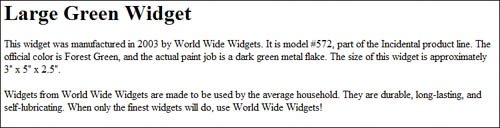 The code for this simple title template is equally simple. All you have to do is add the text for your title within the <h1> and </h1> heading container tags, like this: <h1>This is the title</h1> <p> This is the first paragraph of the description </p> <p> This is the second paragraph of the description </p> Template 6.8. Centered Title with Centered Text If you prefer both your title and description centered, this is the template for you. As you can see in Figure 6.8, there's nothing fancy here, just centered text and title elements. Figure 6.8. Centered title with centered text. There are two ways to code this particular template. The first approach uses simple HTML and the <center> tag, like this: <center> <h1>This is the title</h1> <p> This is the first paragraph of the description </p> <p> This is the second paragraph of the description </p> </center> The second approach uses CSS code to define each element as centered: <h1 style="text-align: center">This is the title</h1> <p style="text-align: center"> This is the first paragraph of the description </p> <p style="text-align: center"> This is the second paragraph of the description </p> Template 6.9. Centered Title with Left-Aligned Text The previous template is all well and good, but remember my admonition about including too much centered body text. Still, having a centered title is a nice effectso let's combine the best of both worlds by centering the title while left-aligning the descriptive text, as shown in Figure 6.9. Figure 6.9. Centered title with left-aligned text.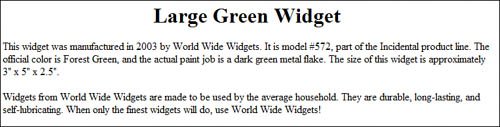 This is another example of how CSS makes things easy. Just add a CSS style attribute to each page element, and specify the appropriate text-align property, like this: <h1 style="text-align: center">This is the title</h1> <p style="text-align: left"> This is the first paragraph of the description </p> <p style="text-align: left"> This is the second paragraph of the description </p> Template 6.10. Left-Aligned Title and Subtitle with Left-Aligned Text Sometimes a one-line title isn't enough of a lead-in for your auction listing. If you find yourself wanting to tell potential buyers just a little bit more before they get to the detailed description, add a subtitle below your title, like the one in Figure 6.10. Figure 6.10. Left-aligned title and subtitle with left-aligned text. This template goes with left-aligned title, subtitle, and description. As such, we don't need to specify any alignment, as all elements are left-aligned by default. We do, however, code the subtitle as a level-two heading with the <h2> code; a level-two heading is a little smaller than the level-one title. Here's the code: <h1>This is the title</h1> <h2>This is the subtitle</h2> <p> This is the first paragraph of the description </p> <p> This is the second paragraph of the description </p> Template 6.11. Centered Title and Subtitle with Left-Aligned Text This template is for sellers who like centered titles (and subtitles), with left-aligned descriptive text, as shown in Figure 6.11. As in the previous example, we'll use the <h2> tag for the subtitle. Figure 6.11. Centered title and subtitle with left-aligned text. As I've said previously, when you want some of your description centered and some of it left-aligned, I find it best to define each element separately with CSS declarations. So here's the CSS approach to this particular template: <h1 style="text-align: center">This is the title</h1> <h2 style="text-align: center">This is the subtitle</h2> <p style="text-align: left"> This is the first paragraph of the description </p> <p style="text-align: left"> This is the second paragraph of the description </p> |


EAN: 2147483647
Pages: 101