23.9 Reading HTMLFigure 23-11 shows the hierarchy breakdown for the classes involved in reading and parsing an HTML document with the HTMLEditorKit . Figure 23-11. The class hierarchy for parsing HTML via HTMLEditorKit
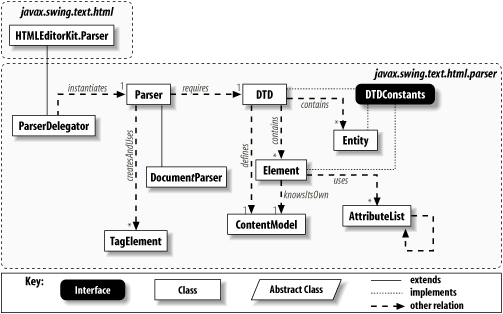
23.9.1 Document ParsersThe first function involved in loading and displaying an HTML document is parsing it. The HTMLEditorKit class has hooks for returning a parser to do the job. The classes in the javax.swing.text.html.parser package implement a DTD-based [8] parser for this purpose.
But since we're here, let's look at the flow of an incoming HTML document. The editor kit instantiates a parser to read the document.
ParserDelegator
does what its
You can display the document as it is built, or you can wait for the entire document to be loaded before displaying it. The tokenThreshold property from HTMLDocument determines exactly when the display work begins. See the discussion following Table 23-12 for more details on the token threshold. |
23.10 A Custom EditorKit
Although Swing's HTML support is less than ideal, it is sufficient to handle inline help systems and aid in rapid prototyping. Each release of the SDK
If you're interested in doing your own
EditorKit
work, look up the more detailed
HTMLEditorKit
chapters online. You should also check out the
javax.swing.text.rtf
package. It serves the same basic purpose as the HTML package but reads and
To round out this final section, we'll review the steps involved in creating your own editor kit. These steps include:
23.10.1 Create the EditorKit ClassFirst, create your EditorKit class. Depending on the type of documents you're going to support, you can subclass the abstract EditorKit base class or extend any of the existing kits we've covered in this chapter.
Much of the work in creating this class is covered in the steps that follow. In addition to those more complex issues, you should implement the following
EditorKit
23.10.2 Define the Document TypeDepending on the complexity of your editor kit, you may need to define a new Document class. The HTMLEditorKit does this, defining HTMLDocument as a subclass of DefaultStyledDocument . Whether you use an existing document type or create your own, make sure createDefaultDocument( ) returns an instance of the type of document you want your kit to use. 23.10.3 Define New ActionsIf you want your kit to assist in the creation of editors for your document type, you may want to define additional Action classes to perform certain activities. The three basic steps for creating any document editor are:
23.10.4 Create Custom View ClassesIf you want your documents to be displayed in a special way, you may need to define your own view classes. It's a good idea to take a look at the available classes and see if they do what you need, or if they can be extended to provide the look you want. Also, be sure to take advantage of the static text painting methods provided by the javax.swing.text.Utilities class.
Note that you are not under any obligation to keep a one-to-one mapping from
Element
s to
View
objects. It's
23.10.5 Create a ViewFactory Interface and View ClassesIf you want to control the types of View objects created for the different types of Element s in your documents, implement a ViewFactory . This interface contains one method, create( ) . A typical implementation of this interface looks something like this:
class MyFactory implements ViewFactory {
public View create(Element e) {
String name = e.getName( );
if (name != null) {
if (name.equals(AbstractDocument.ContentElementName)) {
return new LabelView(e);
}
if (name.equals(SomeOtherElementName)) {
return new SomeOtherView(e);
}
}
return new LabelView(e); // A default
}
}
The key thing is to ensure that the correct type of View is created for any Element types allowed in your documents. Note that you need to write this factory from scratch; there are no existing public factories (except for HTMLEditorKit.HTMLFactory ) to subclass. If you do implement your own ViewFactory , remember to implement the EditorKit.getViewFactory( ) method to return an instance of your factory class. 23.10.6 Create a "Reader" and a "Writer"
Potentially, the most
However you choose to implement the parsing and saving operations (perhaps taking advantage of the AbstractWriter class), you need to provide implementations of the read( ) and write( ) methods (unless the implementations provided by the class you're extending serve your purposes). Unless you have special requirements, you implement only the methods that work with the java.io Reader and Writer classes. If you're extending DefaultEditorKit , the other versions just call these. Earlier in this chapter, we discussed the strategy of reading and writing styled documents using the built-in Java serialization mechanism. Depending on your needs, this may be a reasonable approach. Keep in mind that if you read in a serialized document, you'll have to copy all the attributes and content over to the document passed in to the read( ) method. While this may be a pain, it may be less trouble than defining your own document format and parser. 23.10.7 Tell JEditorPane About Your New KitIf you want JEditorPane to use your editor kit when it encounters URLs of the appropriate MIME type, you need to register the kit with the JEditorPane class. This is done by calling either the static method registerEditorKitForContentType( ) or the nonstatic setEditorKitForContentType( ) . The first method takes two strings: the content type your kit works with and the class name of your kit. You might call it like this:
JEditorPane.registerEditorKitForContentType("text/foo","mypackage.FooEdKit");
The other option takes the content type and an instance of the kit. For example:
JEditorPane ed = new JEditorPane( );
ed.setEditorKitForContentType("text/foo", new FooEditorKit( ));
If you go with the first version (which applies to all JEditorPane objects), keep in mind that JEditorPane won't know about your kit until this call is made, so you need to be sure to make the call before you expect your kit to be used.
This step is required only if you are using a standard MIME type that the
java.net.URLConnection
class
At last, we've come to the close of this multi-chapter
No matter which road you took to reach this final paragraph, it's important not to let all the complexity scare you away from using the Swing text
|