Anatomy of a Vector Object
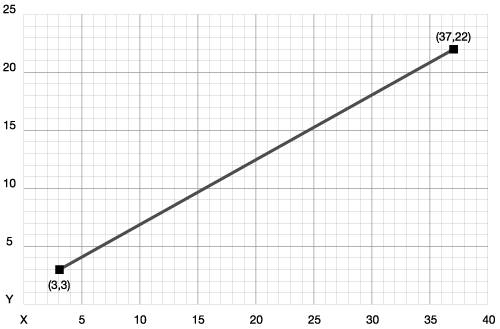
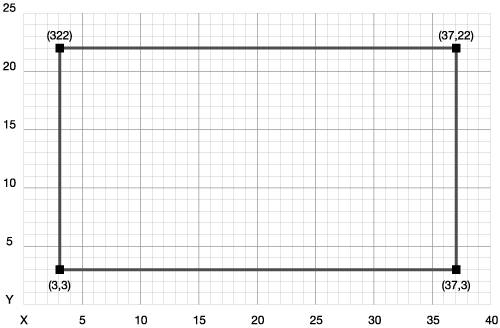
| Now that you understand the differences between rasters and vectors, you can dissect vectors and find out what makes them tick. We mentioned that vectors are defined by plotted anchor points, and the coordinates of these points are what define the actual shape. You'll start with a simple patha straight lineto see exactly what that means. A straight line is made up of two anchor points. The first anchor point defines where the path begins, and the second anchor point defines where the path ends (Figure 2.5). Once the two points are plotted, Illustrator connects them with a straight line. Figure 2.5. A straight vector path has two anchor points. The numbers in parentheses are the coordinates of the anchor points. OK, you can create two anchor points to create a line, so logic dictates that you need four anchor points to create a rectangle (Figure 2.6, next page). Again, focus on the four points and remember that Illustrator connects them all with straight lines. Figure 2.6. A vector rectangle has four anchor points; straight lines makes them all connect. By creating both a straight line and a rectangle, you've created the two kinds of vector paths you can draw. A straight line is an open path, because the path that connects the dots starts at one anchor point and ends at another. The rectangle, however, has a path that begins at one anchor point and then returns to that same anchor point, creating a closed path.
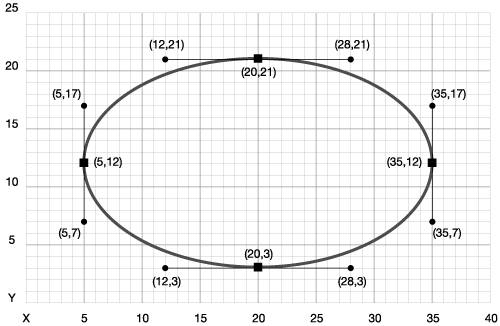
This all seems easy because we've been talking about straight lines. However, the line that Illustrator draws to connect two anchor points doesn't have to be straightit can be curved. Anchor points connected by straight lines are called corner anchor points. Anchor points that are connected to each other by curved lines are called smooth anchor points and they have some additional attributes. A smooth anchor point has two direction handles (aka control points), which specify how the curved line is drawn. The smooth anchor point becomes a tangent to the drawn path itself and the position of the direction handles defines the curve (Figure 2.7). For example, to draw an oval, you need to create four smooth anchor points; each anchor point has to have two control handles that define how the curved lines should be drawn (Figure 2.8). Figure 2.7. A vector path that is curved contains direction handles that define the slope of the path that connects the two anchor points.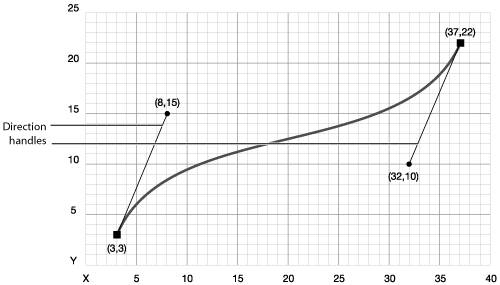 Figure 2.8. A vector ellipse, like a rectangle, has four anchor points. However, the additional direction handles define a curved path that is drawn between each anchor point. The good news is that Illustrator's primitive drawing tools allow you to create simple shapes without having to worry about anchor points or direction handles. You won't be creating individual anchor points at this stage (we'll cover that in Chapter 4, Advanced Vectors), but for now, you'll be able to use what you know to start drawing.
|



EAN: 2147483647
Pages: 147