Easter Eggs
| It's a tradition in Macintosh software to include Easter Eggsthose wacky little undocumented, nonutilitarian features that serve only to amuse the programmer and (they hope) the user. Note that if your friends think you have no sense of humor, you might want to skip this section; it might just annoy you. There are (at least) three Easter Eggs in Photoshoptwo hidden screens and one quote list. Dark MatterA tradition even more venerable than Easter Eggs is code names. Almost all software has a code name that the developers use before the product is christened with a real shipping name. Photoshop 4 was code-named Big Electric Cat (it's an Adrian Belew reference, if you care). Photoshop 5 was code-named Strange Cargo. Photoshop 6 was called Venus in Furs. Photoshop 7 was called Liquid Sky. Photoshop CS was called Dark Matter. Photoshop CS2 was called Space Monkey. To see the original Space Monkey splash screen, hold down the Command key while selecting About Photoshop from the Photoshop menu. In Photoshop for Windows, press Control-Alt and select About Photoshop from the Help menu. QuotesIf you watch either the standard About Photoshop screen or the Space Monkey splash screen, you'll notice that the credits at the bottom of the screen start to scroll by, thanking everyone and their dog for participating in the development process. Don't get impatientthe last person on the list is someone special. (Actually, if you are the impatient type, hold down the Option or Alt key once the credits start rolling; see Figure 2-36) Figure 2-36. Adobe Transient Witticisms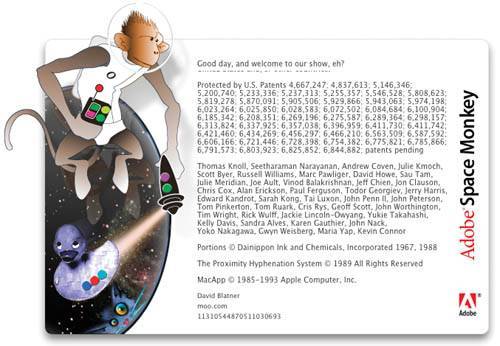 The now-legendary Adobe Transient Witticisms demonstrate just how twisted people get when building a new version of Photoshop, but they also get hidden deeper in each version. Here's how to find them in Photoshop CS2. Open the Space Monkey splash screen, and go all the way through the scrolling credits (the Option key helps), then, as soon as they've finished, Option-click in the white space between Version 9.0 and the credits. Merlin lives!Finally (at least, this is the last one we know about), there's a little hidden dialog box nestled away. When you hold down the Option key while selecting Palette Options from the flyout menus in either the Paths, Layers, or Channels palettes, Merlin happily jumps out. |

EAN: N/A
Pages: 220