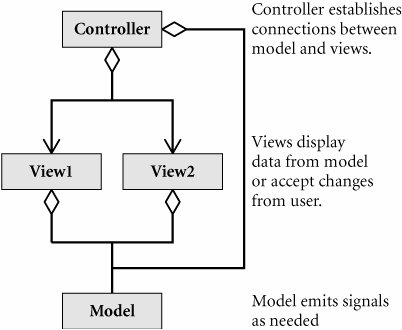
The model created in Example 17.1 represents a form containing questions of different "types," where the first two are simple string inputs, but the last two are constrained to a set of possible values. The
main
program creates a model and a view, and hooks them together. In Example 17.2, you can think of
main
as the controller.
Example 17.2. src/libs/forms/testform.cpp
[ . . . . ]
int main(int argc, char** argv) {
QApplication a(argc, argv);
QMainWindow mw;
BridgeKeeper keeper;
qDebug() << keeper.toString();
FormDialog fv(&keeper);
fv.setWindowTitle("I am the keeper of the Bridge of Death.");
mw.setCentralWidget(&fv);
mw.setVisible(true);
int retval = a.exec();
QVariant speed = keeper.property("speed");
QVariant color = keeper.property("color");
QVariant quest = keeper.property("quest");
QVariant name = keeper.property("name");
if (color.toString() == "blue") {
qDebug() << "no, I mean red! aaaaaaahhhhhhhhhhh!" ;
}
else {
qDebug() << "My name is " << name.toString()
<< ", and I " << quest.toString()
<< ". My favorite color is " << color.toString()
<< ". The speed is " << speed.toInt();
}
return retval;
}
|
In Example 17.2, you can think of
main
as the controller.
The
FormDialog
below is automatically generated from the model above, even though it does not depend on the specific model.
The dialog embeds a
FormView
, which contains the actual input widgets.
-
View classes access
Question
s only through the public polymorphic interface.
-
Model classes emit signals to communicate information to views, instead of invoking objects directly through references or pointers passed around as function parameters.
-
The code that does depend on both model and view (or on specific types of
Question
) is kept separate as controller code.
A
FormModel
wraps a collection of
Question
s, which are model classes. A
FormView
wraps a collection of
InputField
s, which are views (because they derive from
QWidget
), but encapsulate complex input widgets.
In the Doxygen collaboration diagram in Figure 17.2, there is a 1:1 correspondence between
InputField
and
Question
, but the classes are
strictly
decoupled
.
A
Question
models (
ideally
) all of the information needed by
FormFactory
to create an appropriate
InputField
. A
FormView
is a grouping of input widgets. An input widget serves as a proxy, or delegate, between Qt input widgets and
Question
-derived models.
|
The
Strategy pattern
encapsulates each member of a family of algorithms so that they can be selected independently by
clients
. Each encapsulated algorithm is called a
strategy
.
|
Figure 17.3 shows that an
InputField
can be a variety of things. Because Qt input widgets
do not have a common
QVariant
-based interface for getting and setting data, the
InputField
serves as an
adaptor
, that provides a property-like interface.
InputField
uses the Strategy pattern to organize the getters and setters for different types as virtual functions.
With a hierarchy of views, we end up with an extensible framework for adding other kinds of
InputField
s later.
Exercises: Dynamic Form Models
|
1.
|
Add a
DoubleInputField
class, derived from
InputField
, and update the
FormFactory
to return it as needed.
|
|
2.
|
Write a testcase with a
QVariant Question
in it, and verify that a
QDoubleSpinBox
shows up.
|
17.2.1. Form Models
In addition to different kinds of input widgets (for the different data types), there can also be different kinds of
Question
models for getting/setting the data in different places.
The
FormModel
and the
Question
classes, shown in Figure 17.4, are two adjoining
layers
in the model. Because they are models, they are
meant
to be very simple classes, holding data but containing no GUI or controller code.
FormModel
provides a simple operation,
setValues()
, for updating all of its
Question
's values, shown in Example 17.3.
Example 17.3. src/libs/forms/formmodel.cpp
[ . . . . ]
bool FormModel::setValues(QList<QVariant> list) {
bool retval = true;
for (int i=0; i<list.size(); ++i) {
QString str = list.at(i).toString();
Question* q = m_Questions.at(i);
retval = q->setValue(str) && retval;
}
emit modelChanged();
return retval;
}
|
Question
encapsulates all the things that are needed for an interaction with a user, including the type and value of the expected answer. The constructors, declared in Example 17.4, are
protected
because we will use a factory to create
Question
objects.
Example 17.4. src/libs/forms/question.h
[ . . . . ]
class Question : public QObject {
Q_OBJECT
protected:
Question(QString name, QString label = QString(),
QVariant::Type type=QVariant::String);
Question(QString name, QString label,
QStringList choices, bool open=false);
Question() {}
public:
virtual Qt::ItemFlags flags() const;
virtual QString toString() const;
virtual QVariant value() const;
virtual QVariant::Type type() const ;
QStringList choices() const ;
QString label() const {return m_Label;}
virtual ~Question() {}
public slots:
virtual bool setValue(QVariant newValue);
signals:
void valueChanged();
protected:
void setType(QVariant::Type type) ;
void setLabel(QString label) ;
private:
QString m_Label;
QVariant m_Value;
QStringList m_Choices;
QVariant::Type m_Type;
};
[ . . . . ]
|
When we need a
Question
instance,
FormFactory
creates it by using one of the
protected
constructors, defined in Example 17.5.
Example 17.5. src/libs/forms/question.cpp
[ . . . . ]
Question::Question( QString name, QString label, QVariant::Type t):
m_Label(label) {
setObjectName(name);
if (m_Label == QString())
m_Label = name;
m_Value = QVariant(t);
m_Type = m_Value.type();
}
Question::Question( QString name, QString label, QStringList choices,
bool) : m_Label(label), m_Choices(choices) {
setObjectName(name);
if (m_Label == QString())
m_Label = name;
m_Type = QVariant::StringList;
}
|
17.2.2. Form Views
The view classes, shown in Figure 17.5, are separated into three layers.
-
FormDialog
includes the
buttons
and actions plus some management/ controller code.
-
FormView
is solely responsible for holding layouts for labels and input widgets.
-
InputField
is responsible for a single input widget.
FormView
can be automatically created from a
FormModel
without any knowledge of the individual
InputField
or
Question
types. This is thanks to the
createEditor
Factory method, used in Example 17.6, which returns polymorphic objects.
Example 17.6. src/libs/forms/formfactory.cpp
[ . . . . ]
FormView* FormFactory::formView(FormModel* mod) {
FormView* retval = new FormView();
retval->m_Model = mod;
retval->m_LabelLayout = new QVBoxLayout();
retval->m_EditLayout = new QVBoxLayout();
foreach (Question* q, mod->questions()) {
QLabel* label = new QLabel(q->label());
retval->m_LabelLayout->addWidget(label);
InputField* editField = createEditor(q);
<-- 1
retval->m_Fields += editField;
label->setBuddy(editField->widget());
retval->m_EditLayout->addWidget(editField->widget());
}
QWidget* labels = new QWidget();
labels->setLayout(retval->m_LabelLayout);
QWidget* edits = new QWidget();
edits->setLayout(retval->m_EditLayout);
retval->addWidget(labels);
retval->addWidget(edits);
return retval;
}
(1)
This is a factory method that returns polymorphic concrete instances.
|
The specific
InputField
types that get created depend on the type of the
Question
passed in, and that is determined in
FormFactory
, shown in Example 17.7.
Example 17.7. src/libs/forms/formfactory.cpp
[ . . . . ]
InputField* FormFactory::createEditor(Question* q) {
QVariant::Type type = q->type();
InputField* retval = 0;
switch(type) {
case QVariant::StringList:
retval = new ChoiceInputField(
q->objectName(), q->choices());
break;
case QVariant::String:
retval = new StringInputField(q->objectName());
break;
case QVariant::Int:
retval = new IntInputField(q->objectName());
break;
case Variant::Dir:
retval = new DirInputField(q->objectName());
break;
default:
retval=new StringInputField(q->objectName(), 0);
qDebug() << QString("Unknown property type %1").arg(type);
}
if (q->flags() != Qt::ItemIsEditable) {
retval->setReadOnly(true);
}
return retval;
}
|
In Example 17.7, notice the
switch
statement, which is normally to be avoided in object-oriented code. We have it here to map polymorphically from the
QVariant::Type
(an enumerated value) to an
InputField
class. This makes it possible for us to use the Strategy pattern on
InputField
(which provides input and output in various ways, on various types).
By default,
createEditor()
returns a
StringInputField
, shown in Example 17.8. It has a simple
QLineEdit
as its input widget.
Example 17.8. src/libs/forms/inputfields.h
[ . . . . ]
class StringInputField : public InputField {
Q_OBJECT
public:
StringInputField(QString name, QWidget* parent = 0);
QVariant value() const ;
QWidget* widget() const ;
public slots:
void setReadOnly(bool v);
void setView(QVariant qv);
void clearView();
protected:
QLineEdit *qle;
};
|
17.2.3. Unforseen Types
It is possible there will be other "types" of data that
correspond
to different kinds of input widgets, but are not among those defined in
QVariant
. In Example 17.9, we introduce user-defined enumerated values above
QVariant
(127) that will not share a value with those already predefined in
QVariant::Type
.
Example 17.9. src/libs/dataobjects/variant.h
#ifndef VARIANT_H
#define VARIANT_H
#include <QVariant>
namespace Variant {
const QVariant::Type File = static_cast<QVariant::Type(128);
const QVariant::Type Dir = static_cast<QVariant::Type(129);
}
#endif
|
{% if main.adsdop %}{% include 'adsenceinline.tpl' %}{% endif %}
A directory can be encoded and decoded as a
QString
quite naturally, but a
Question
with a
Variant::Directory
as its type gives a hint to the
FormFactory
that the input widget it creates should be a
QFileDialog
that is already in "directory-chooser" mode.
Example 17.10. src/libs/forms/dirinputfield.h
[ . . . . ]
class DirInputField : public StringInputField {
Q_OBJECT
public:
DirInputField(QString name);
QWidget* widget() const;
void clearView();
static void setFileDialog(QFileDialog* fd) {
sFileDialog = fd;
}
public slots:
void browse();
private:
QHBoxLayout *m_Layout;
QPushButton *m_Button;
QWidget *m_Widget;
static QFileDialog* sFileDialog;
};
[ . . . . ]
|
The
DirInputField
, defined in Example 17.10, extends the
StringInputField
and still has the
QLineEdit
for accepting a string from the user. In addition, there is a
Browse
button, which when clicked will pop up a
QFileDialog
pre-set
to accept only a directory as a valid selection.
17.2.4. Controlling Actions
In this section, we discuss issues of synchronizing data between the model and the view. Since these
methods
depend on both model and view, we are going to isolate them from both, in their own controller classes. In Example 17.11, we derived two custom
QAction
classes, each responsible for synchronizing in one direction.
Example 17.11. src/libs/forms/formactions.h
[ . . . . ]
class OkAction : public QAction {
Q_OBJECT
public:
OkAction(FormModel* model, FormView* view);
public slots:
void ok();
private:
FormModel *m_Model;
FormView *m_View;
};
class CancelAction : public QAction {
Q_OBJECT
public slots:
void cancel();
[ . . . . ]
|
OkAction
(or apply) should send the data from the view to the model.
CancelAction
, in the case where the dialog is not to be closed afterwards, should do the
opposite
(send the data from the model back to the view, to restore old or set default values). Their definitions are in Example 17.12.
Example 17.12. src/libs/forms/formactions.cpp
#include <QDebug>
#include "formactions.h"
#include "formmodel.h"
#include "formview.h"
#include "inputfield.h"
#include "question.h"
OkAction::OkAction(FormModel* model, FormView* view) :
QAction( tr("&Ok"), view), m_Model(model), m_View(view) {
connect (this, SIGNAL(triggered()), this, SLOT(ok()));
}
void OkAction::ok() {
qDebug() << "OK()" << endl;
QList<QVariant> values;
InputList fields = m_View->fields();
foreach (InputField* field, fields) {
QVariant v = field->value();
qDebug() << "submitting value: " << v.toString();
values += v;
}
m_Model->setValues(values);
qDebug() << m_Model->toString();
}
CancelAction::CancelAction(FormModel* model, FormView* view) :
QAction( tr("&Cancel"), view), m_Model(model), m_View(view) {
connect (this, SIGNAL(triggered()), this, SLOT(cancel()));
}
void CancelAction::cancel() {
qDebug() << "Cancel() " << endl;
QList<Question*> qlist = m_Model->questions();
InputList fields = m_View->fields();
for (int i=qlist.size()-1; i>-1; --i) {
Question* q = qlist.at(i);
InputField* f = fields.at(i);
qDebug() << QString(" name: %1 val: %2")
.arg(q->objectName())
.arg(q->value().toString());
f->setView(q->value());
}
}
|
These actions are in fact
delegates
, and perform a similar function to Qt's
QItemDelegate
.
17.2.5. DataObject Form Model
In Example 17.1, we extended
FormModel
, and in the constructor we created and added
Question
objects to compose a custom form. The
FormModel
itself can be used in other ways, including those listed below.
-
Creating a
FormModel
from a
DataObject
(one
Question
per property)
-
Connecting fields of a
FormModel
to
QSettings
values, to give persistence
-
Importing and exporting in XML
-
Importing and exporting in HTML
-
Can you think of others?
We wish to create a
FormModel
from a
DataObject
, so this means that another function goes into the
ModelFactory
. We extended
Question
, the basic
FormModel
building block, so that it would get/set values from/to a
DataObject
property instead of its own
m_Value
.
PropQuestion
, shown in Figure 17.6, serves as a
proxy
or
delegate
between a
DataObject
property and an
InputField
widget. We see this in Example 17.13: Most of the methods simply pass on the request to the underlying
DataObject
,
mDest
.
Example 17.13. src/libs/forms/propquestion.cpp
#include "propquestion.h"
#include <QMetaProperty>
#include <QVariant>
PropQuestion::PropQuestion(QString name, DataObject* dest):
m_Dest(dest) {
setObjectName(name);
m_Prop = m_Dest->metaProperty(name);
setLabel(name);
setType(m_Prop.type());
}
Qt::ItemFlags PropQuestion::flags() const {
if (m_Prop.isWritable()) return Qt::ItemIsEditable;
else return Qt::ItemIsSelectable;
}
QVariant PropQuestion::value() const {
return m_Dest->property(objectName());
}
bool PropQuestion::setValue(QVariant newValue) {
return m_Dest->setProperty(objectName(), newValue);
}
|
Example 17.14 uses the
DataObject
model applied to the
FileTagger
class to
auto-generate
a form, which looks like Figure 17.7.
Example 17.14. src/libs/forms/testform2.cpp
#include <QMainWindow>
#include <QApplication>
#include "formfactory.h"
#include "formdialog.h"
#include "formmodel.h"
#include "filetagger.h"
int main(int argc, char** argv) {
QApplication a(argc, argv);
QMainWindow mw;
FileTagger ft;
FormModel* mod = FormFactory::newForm(&ft);
FormDialog dialog(mod);
mw.setCentralWidget(&dialog);
mw.setVisible(true);
return a.exec();
}
|
The
newForm
Factory method defined in Example 17.15 simply returns a
PropQuestion
instead of a
Question
when it is creating the
FormModel
from a
DataObject
.
Example 17.15. src/libs/forms/formfactory.cpp
[ . . . . ]
FormModel* FormFactory::newForm(DataObject* dobj) {
QStringList props = dobj->propertyNames();
FormModel *mod = new FormModel(dobj->className());
foreach (QString prop, props) {
if (prop == "objectName")
continue;
PropQuestion *pq = new PropQuestion(prop, dobj);
*mod << pq;
}
return mod;
}
|
Exercises: DataObject Form Model
|
1.
|
Example 17.16 is an XHTML [w3c] fragment that contains three different kinds of input widgets and
roughly
represents the form we've seen earlier.
Example 17.16. src/modelview/html/bridgekeeper.html
<form>
<title> I am the keeper of the bridge of death </title>
<p> Answer these questions three and you can proceed over the
bridge. </p>
<label for="name">What is your name? </label>
<input name="name" type="text">
<label for="quest">What is your quest? </label>
<input name="quest" type="text" />
<label for="color">What is your favorite color? </label>
<select name="color">
<option value="blue">blue</option>
<option value="green">green</option>
<option value="orange">orange</option>
<option value="burgundy">burgundy</option>
<option value="crimson">crimson</option>
</select>
<input type="submit" name="ok" value="ok" />
<input type="submit" name="cancel" value="cancel" />
</form>
|
It is possible to preview it in a browser by opening it as a file. It doesn't look fancy without any css styling, but you can use it as a
sanity
check for your files.
Write a
FormReader
class that can read an XML file of the above format. (Do not worry about handling XHTML elements or formats that are not shown in Example 17.16.)
|
|
2.
|
Write a
FormWriter
class that can write a
FormModel
to an XML file in the same format.
|
|
3.
|
Write a Mad Libs game that asks the user for a bunch of nouns, verbs, adjectives, and adverbs such that when the form is submitted, it sticks the strings into a paragraph and shows the result to the user. The passage of text should be at least two paragraphs long, and contain at least ten blanks to be filled in.
|