Flylib.com

Books Software


How It Works

How It Works

Before you can use any feature (such as a DTC) that depends upon the Scripting Object Model, you must enable the SOM. If you try to insert an object in a page that requires the Scripting Object Model but have not yet enabled the SOM, Visual InterDev will warn you that you need to enable the SOM first and will prompt you to enable it.

You can directly enable the Scripting Object Model with these steps:

  1. Display the properties for the ASP Web page by right-clicking the page and selecting Properties from the context menu.
  2. Check the Enable Scripting Object Model check box under ASP Settings.

This will add the SOM code to your page, enabling you to use DTCs and other features that require the Scripting Object Model. This process is illustrated in Figure 4-1, which shows the Enable Scripting Object Model check box checked and the Apply button clicked. At the top of the page, the following code has been inserted:

<%@ Language=VBScript %>
<% ' VI 6.0 Scripting Object Model Enabled %>
<!--#include file="_ScriptLibrary/pm.asp"-->
<% if StartPageProcessing() Then Response.End() %>
<FORM name=thisForm METHOD=post>

This code will be inserted at the end of the file:

<% ' VI 6.0 Scripting Object Model Enabled %>
<% EndPageProcessing() %>
</FORM>
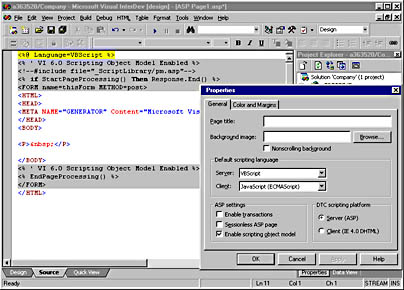
click to view at full size.

Figure 4-1. The Properties dialog box for an ASP Web page allows you to enable the SOM.

These two sections of code do several things. First, the pm.asp file is included in the project. This file contains numerous functions that will be called by DTCs and possibly by your code. Next, the StartPageProcessing function is called to initiate the SOM for this page. Then, an HTML form named thisForm is created. The form is used by DTCs and other objects as well as your own code. Lastly, the code at the end of the page executes the EndPageProcessing function and terminates thisForm .

The run-time properties of the Scripting Object Model do not appear in the Properties window. These properties and methods are available in the Microsoft IntelliSense statement completion features of Visual InterDev 6.

How the Scripting Object Model Works

The files for the Scripting Object Model are contained in the _ScriptLibrary folder that Visual InterDev 6 inserts in your Web project when you create a project. (See Figure 4-2) You should never change anything in one of the _ScriptLibrary files or delete any of these files.

Microsoft is going to replace the JScript files that make up the SOM with a set of components written in C++ using the Active Template Library (ATL). The new Scripting Object Model components should provide faster execution, a more stable environment, and a true black-box architecture for the server. In the interim, you should treat the Scripting Object Model as a black box (that is, you should not be concerned about how it accomplishes its tasks ).

Figure 4-2. The _ScriptLibrary folder contains the Scripting Object Model files.

ASP files execute in a linear manner as indicated by Figure 4-3. When a user visits an ASP file, the page starts executing at the first line of code and continues to execute sequentially top to bottom. Once the code in a page is executed, the HTML generated is sent to the browser via HTTP. The only changes to the linear flow of execution are governed by the logic in the page that might call procedures or redirect the flow of execution directly.

click to view at full size.

Figure 4-3. The ASP execution model is sequential from top to bottom.

DHTML pages, on the other hand, execute in an event-driven manner just as Visual Basic applications do. Figure 4-4 demonstrates how this can look when a page executes.

click to view at full size.

{% if main.adsdop %}{% include 'adsenceinline.tpl' %}{% endif %}

Figure 4-4. The DHTML execution model is event-driven.

In Figure 4-4, when a user clicks a hyperlink to this page, the onload event will execute when the page loads. The onclick event will not execute until the user clicks the command button. This execution model greatly simplifies the way you build Web applications and reduces the long- term maintenance costs of the applications. You as the developer can control what happens when particular parts of the page execute. This allows you to isolate your code and execute code discretely when certain actions (events) occur in a page.

The Document Object Model of the browser exposes the page as an object hierarchy. The script in the page can execute against the Document Object Model, automating features of the page and making it dynamic. DHTML pages are typically event driven, with code that is contained in event procedures within the page. Of course, you must be using a browser that supports DHTML, such as Microsoft Internet Explorer 4, to use the DHTML features.

The Scripting Object Model works with both DHTML and ASP files. It provides the framework to allow both ASP and DHTML Web pages to execute in an object-oriented manner. Figure 4-5 demonstrates how ASP files have an object model when using the SOM.

You can see the event model of ASP files in Figure 4-5. This new event model is particularly interesting as it allows you to script events for DTCs in either the client or server. Whenever you use the Scripting Object Model, at run-time an object is created for each DTC and the current page. These objects are the mechanism that you use to have access to the features of the page and its DTCs. More on this in a moment.

click to view at full size.

Figure 4-5. The Visual InterDev 6 Scripting Object Model provides ASP events.

The DTCs' event model is implemented by the Scripting Object Model at run time. This allows you to build events in client or server code. Usage of the new DTCs is covered in detail in Chapter 6. The server events for pages are provided by the PageObject DTC, which is the foundation for page type events and other support for treating pages as objects. Its close relationship to the Scripting Object Model is the reason for covering it in this chapter.