The Run-Time Library
Overview
The Delphi programming language favors an object-oriented approach, tied with a visual development style. This is where Delphi shines, and we will cover component-based and visual development in this book; however, I want to underline the fact that many of Delphi's ready-to-use features come from its run-time library (RTL). This is a large collection of functions you can use to perform simple tasks, as well as some complex ones, within your Pascal code. (I use "Pascal" here, because the run-time library primarily contains procedures and functions written with the traditional language constructs and not the OOP extensions added to the language by Borland.)
There is a second reason to devote this chapter of the book to the run-time library: Delphi 6 saw a large number of enhancements to this area, and a few more are provided in Delphi 7. New groups of functions are available, functions have been moved to new units, and other elements have changed, creating a few incompatibilities with older code from which you might be porting your projects. So, even if you've used past versions of Delphi and feel confident with the RTL, you should still read at least portions of this chapter.
The Units of the RTL
In the most recent versions of Delphi, the RTL has a new structure and several new units. Borland added new units because it also added many new functions. In most cases, you'll find the existing functions in the units where they used to be, but the new functions appear in specific units. For example, new functions related to dates are now in the DateUtils unit, but existing date functions have not been moved out of SysUtils in order to avoid incompatibilities with existing code.
The exception to this rule relates to some of the variant support functions, which were moved out of the System unit to avoid unwanted linkage of specific Windows libraries, even in programs that didn't use those features. These variant functions are now part of the Variants unit, described later in the chapter.
| Warning |
Some of your Delphi 4 and Delphi 5 code might need to use the Variants unit to recompile. Delphi is smart enough to acknowledge this requirement and auto-include the Variants unit in projects that use the Variant type, issuing only a warning. |
A little fine-tuning has also been applied to reduce the minimum size of an executable file, which is at times enlarged by the unwanted inclusion of global variables or initialization code.
Executable Size under the Microscope
While touching up the RTL, Borland engineers have been able to trim a little "fat" out of each and every Delphi application. Reducing the minimum program size by a few KB seems odd, given all the bloated applications these days, but it is a good service to developers. In some cases, even a few KB (multiplied by many applications) can reduce size and eventually download time.
As a simple test, I've built the MiniSize program, which is not an attempt to build the smallest possible program, but rather an attempt to build a very small program that does something interesting: It reports the size of its own executable file. All of the example code is as follows:
program MiniSize;

uses
 Windows;

{$R *.RES}

var
 nSize: Integer;
 hFile: THandle;
 strSize: String;

begin
 // open the current file and read the size
 hFile := CreateFile (PChar (ParamStr (0)),
 0, FILE_SHARE_READ, nil, OPEN_EXISTING, 0, 0);
 nSize := GetFileSize (hFile, nil);
 CloseHandle (hFile);

 // copy the size to a string and show it
 SetLength (strSize, 20);
 Str (nSize, strSize);
 MessageBox (0, PChar (strSize),
 'Mini Program', MB_OK);
end.
The program opens its own executable file, after retrieving its name from the first command-line parameter (ParamStr (0)), extracts the size, converts it into a string using the simple Str function, and shows the result in a message. The program does not have top-level windows. Moreover, I use the Str function for the integer-to-string conversion to avoid including SysUtils, which defines all of the more complex formatting routines and would impose a little extra overhead.
If you compile this program with Delphi 5, you obtain an executable size of 18,432 bytes. Delphi 6 reduces this size to only 15,360 bytes, trimming about 3 KB. In Delphi 7, the size is only slightly greater, at 15,872 bytes. By replacing the long string with a short string and modifying the code a little, you can trim the program further, to less than 10 KB. (You'll end up removing the string support routines and also the memory allocator, something possible only in programs using exclusively low-level calls.) You can find both versions in the source code of the example file.
Notice that decisions of this type always imply a few trade-offs. In eliminating the overhead of variants from Delphi applications that don't use them, for example, Borland added a little extra burden to applications that do. The real advantage of this operation, though, is in the reduced memory footprint of Delphi applications that do not use variants, as a result of not having to bring in several megabytes of the Ole2 system libraries.
What is really important, in my opinion, is the size of full-blown Delphi applications based on run-time packages. A simple test with a do-nothing program, the MiniPack example, shows an executable size of 17,408 bytes.
In the following sections you'll find a list of the RTL units in Delphi, including all the units available (with the complete source code) in the SourceRtlSys subfolder of the Delphi directory and some of those available in the subfolder SourceRtlCommon. This second directory hosts the source code of units that make up the new RTL package, which comprises both the function-based library and the core classes, discussed at the end of this chapter and in Chapter 4 ("Core Library Classes").
| Note |
The original VCL package present up to version 5 of Delphi has been split into the VCL and RTL packages, so that nonvisual applications using run-time packages don't have the overhead of also deploying visual portions of the VCL. This change also helps with Linux compatibility, because the new package is shared between the VCL and CLX libraries. In addition, notice that the package names in Delphi 6 and 7 don't include the version number; when they are compiled, though, the BPL does have the version in its filename, as discussed in more detail in Chapter 10 ("Libraries and Packages"). |
I'll give a short overview of the role of each unit and an overview of the groups of functions included. I'll also devote more space to the newer units. I won't provide a detailed list of the functions included, because the online help includes similar reference material. However, I've tried to pick
a few interesting or little-known functions, and I will discuss them shortly.
The System and SysInit Units
System is the core unit of the RTL and is automatically included in any compilation (through an automatic and implicit uses statement referring to it). If you try adding the unit to the uses statement of a program, you'll get the following compile-time error:
[Error] Identifier redeclared: System
The System unit includes, among other things:
- The TObject class, which is the base class of any class defined in the Object Pascal language, including all the classes of the VCL. (This class is discussed later in this chapter.)
- The IInterface, IInvokable, IUnknown, and IDispatch interfaces, as well as the simple implementation class TInterfacedObject. IInterface was added in Delphi 6 to underscore the point that the interface type in the Delphi language definition is in no way dependent on the Windows operating system. IInvokable was added in Delphi 6 to support SOAP-based invocation.
- Some variant support code, including the variant type constants, the TVarData record type and the new TVariantManager type, a large number of variant conversion routines, and variant record and dynamic array support. This area has seen a lot of changes compared to Delphi 5. The basic information on variants is provided in Chapter 10 of Essential Pascal (for more information see Appendix C, "Free Companion Books on Delphi Programming").
- Many base data types, including pointer and array types and the TDateTime type described in Chapter 2, "The Delphi Programming Language."
- Memory allocation routines, such as GetMem and FreeMem, and the actual memory manager, defined by the TMemoryManager record and accessed by the GetMemoryManager and SetMemoryManager functions. For information, the GetHeapStatus function returns a THeapStatus data structure. Two global variables (AllocMemCount and AllocMemSize) hold the number and total size of allocated memory blocks. There is more on memory and the use of these functions in Chapter 8, "The Architecture of Delphi Applications" (see in particular the ObjsLeft example).
- Package and module support code, including the PackageInfo pointer type, the GetPackage-InfoTable global function, and the EnumModules procedure (package internals are discussed in Chapter 12).
- A rather long list of global variables, including the Windows application instance MainInstance; IsLibrary, indicating whether the executable file is a library or a stand-alone program; IsConsole, indicating console applications; IsMultiThread, indicating whether there are secondary threads; and the command-line string CmdLine. (The unit also includes ParamCount and ParamStr for easy access to command-line parameters.) Some of these variables are specific to the Windows platform, some are also available on Linux, and others are specific to Linux.
- Thread-support code, with the BeginThread and EndThread functions; file support records and file-related routines; wide string and OLE string conversion routines; and many other low-level and system routines (including a number of automatic conversion functions).
The companion unit of System, called SysInit, includes the system initialization code, with functions you'll seldom use directly. This is another unit that is always implicitly included, because it is used by the System unit.
Recent Changes in the System Unit
I've already described some interesting features of the System unit in the previous section's list. Most of the changes in recent Delphi versions relate to making the core RTL more cross-platform portable, replacing Windows-specific features with generic implementations now shared by Delphi and Kylix. Along this line, there are new names for interface types, totally revised support for variants, new pointer types, dynamic array support, and functions to customize the management of exception objects.
| Note |
If you read the source code of System.pas, you'll notice some heavy use of conditional compilation, with many instances of {$IFDEF LINUX} and {$IFDEF MSWINDOWS} used to discriminate between the two operating systems. Notice that for Windows, Borland uses the MSWINDOWS define to indicate the entire platform, because WINDOWS was used in 16-bit versions of the OS (and contrasts with the symbol WIN32). |
For example, an addition for compatibility between Linux and Windows relates to line breaks in text files. The DefaultTextLineBreakStyle variable affects the behavior of routines that read and write files, including most text-streaming routines. The possible values for this global variable are tlbsLF (the default in Kylix) and tlbsCRLF (the default in Delphi). The line-break style can also be set on a file-by-file basis with SetTextLineBreakStyle function.
Similarly, the global sLineBreak string constant has the value #13#10 in the Windows version of the IDE and the value #10 in the Linux version. Another change is that the System unit now includes the TFileRec and TTextRec structures, which were defined in the SysUtils unit in earlier versions of Delphi.
The SysUtils and SysConst Units
The SysConst unit defines a few constant strings used by the other RTL units for displaying messages. These strings are declared with the resourcestring keyword and saved in the program resources. Like other resources, they can be translated by means of the Integrated Translation Manager or the External Translation Manager.
The SysUtils unit is a collection of system utility functions of various types. Unlike other RTL units, it is largely an operating system–dependent unit. The SysUtils unit has no specific focus, but it includes a bit of everything, from string management to locale and multibyte-characters support, from the Exception class and several other derived exception classes to a plethora of string-formatting constants and routines. In particular, later in this chapter we'll focus on some of the unit's file management routines.
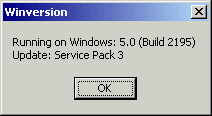
Some features of SysUtils are used every day by every programmer, such as the IntToStr or Format string-formatting functions; other features are lesser known, such as the Windows version information global variables. These indicate the Windows platform (Window 9x or NT/2000/XP), the operating system version and build number, and the service pack installed. They can be used as in the following code, extracted from the WinVersion example:
case Win32Platform of
 VER_PLATFORM_WIN32_WINDOWS: ShowMessage ('Windows 9x');
 VER_PLATFORM_WIN32_NT: ShowMessage ('Windows NT');
end;

ShowMessage ('Running on Windows: ' + IntToStr (Win32MajorVersion) + '.' +
 IntToStr (Win32MinorVersion) + ' (Build ' + IntToStr (Win32BuildNumber) +
 ') ' + #10#13 + 'Update: ' + Win32CSDVersion);
The second code fragment produces a message like the one in the following graphic (of course, on the operating-system version you have installed):
Another little-known feature of this unit is the TMultiReadExclusiveWriteSynchronizer class— probably the VCL class with the longest name. Borland has defined an alias name for the class, which is much shorter: TMREWSync (the two classes are identical). This class supports multithreading: It allows you to work with resources that can be used by multiple threads at the same time for reading (multiread) but must be used by a single thread when writing (exclusive-write). This means writing cannot begin until all the reading threads have terminated.
The implementation of the TMultiReadExclusiveWriteSynchronizer class has been updated in Delphi 7, but similar improvements are available in an informal patch released after Delphi 6 update 2. The new version of the class is more optimized and less subject to deadlocks, which are often a problem with synchronization code.
| Note |
The multiread synchronizer is unique in that it supports recursive locks and promotion of read locks to write locks. The main purpose of the class is to allow multiple threads easy, fast access to read from a shared resource, but still allow one thread to gain exclusive control of the resource for relatively infrequent updates. Delphi includes other synchronization classes, declared in the SyncObjs unit (available under Source/Rtl/Common) and closely mapped to operating-system synchronization objects (such as events and critical sections in Windows). |
Recent SysUtils Functions
Over the last couple of versions, Delphi has added some new functions within the SysUtils unit. One of these areas relates to Boolean-to-string conversion. The BoolToStr function generally returns '–1' and '0' for true and false values. If the second optional parameter is specified, the function returns the first string in the TrueBoolStrs and FalseBoolStrs arrays (by default 'TRUE' and 'FALSE'):
BoolToStr (True) // returns '-1'
BoolToStr (False, True) // returns 'FALSE' by default
The reverse function is StrToBool, which can convert a string containing either one of the values of the two Boolean arrays mentioned or a numeric value. In the latter case, the result will be true unless the numeric value is zero. You can see a simple demo of the use of the Boolean conversion functions in the StrDemo example, later in this chapter.
Other functions recently added to SysUtils relate to floating-point conversions to currency and date time types: You can use FloatToCurr and FloatToDateTime to avoid an explicit typecast. The TryStrToFloat and TryStrToCurr functions try to convert a string into a floating-point or currency value and will return False in case of error instead of generating an exception (as the classic StrToFloat and StrToCurr functions do).
The AnsiDequotedStr function, which removes quotes from a string, matches the AnsiQuoteStr function added in Delphi 5. Speaking of strings, as of Delphi 6 there is much-improved support for wide strings, with a series of routines including WideUpperCase, WideLowerCase, WideCompareStr, WideSameStr, WideCompareText, WideSameText, and WideFormat. All of these functions work like their AnsiString counterparts.
Three functions (TryStrToDate, TryEncodeDate, and TryEncodeTime) try to convert a string to a date or to encode a date or time, without raising an exception, similar to the Try functions previously mentioned. In addition, the DecodeDateFully function returns more detailed information, such as the day of the week, and the CurrentYear function returns the year of today's date.
A portable, friendly, overloaded version of the GetEnvironmentVariable function uses string parameters instead of PChar parameters and is definitely easier to use than the original version based on PChar pointers:
function GetEnvironmentVariable(Name: string): string;
Other functions relate to interface support. Two overloaded versions of the little-known Support function allow you to check whether an object or a class supports a given interface. The function corresponds to the behavior of the is operator for classes and is mapped to the QueryInterface method. Here's an example:
var
 W1: IWalker;
 J1: IJumper;
begin
 W1 := TAthlete.Create;
  // more code...
 if Supports (w1, IJumper) then
 begin
 J1 := W1 as IJumper;
 Log (J1.Walk);
 end;
SysUtils also includes an IsEqualGUID function and two functions for converting strings to GUIDs and vice versa. The function CreateGUID has been moved to SysUtils, as well, to make it available on Linux (with a custom implementation, of course).
Finally, more features were added in recent versions to improve cross-platform support. The AdjustLineBreaks function can now do different types of adjustments to carriage-return and line-feed sequences, and new global variables for text files have been introduced in the System unit, as described earlier. The FileCreate function has an overloaded version in which you can specify file-access rights the Unix way. The ExpandFileName function can locate files (on case-sensitive file systems) even when their cases don't exactly correspond. The functions related to path delimiters (backslash or slash) have been made more generic than in earlier versions of Delphi and renamed accordingly. (For example, the old IncludeTrailingBackslash function is now better known as IncludingTrailingPathDelimiter.)
Speaking of files, Delphi 7 adds to the SysUtils unit the GetFileVersion function, which reads the version number from the version information optionally added to a Windows executable file (which is why this function won't work on Linux).
Delphi 7 Extended String Formatting Routines
Most of Delphi's string formatting routines (see Appendix C, "Free Companion Books on Delphi," for instructions on how to get an e-book introducing some of them) use global variables to determine decimal and thousand separators, date/time formats, and so on. The values of these variables are first read from the system (Windows regional settings) when a program starts, and you are free to override each of them. However, if the user modifies the Regional Settings in Control Panel while your program is running, the program will respond to the broadcast message by updating the variables, probably losing your hard-coded changes.
If you need different output formats in different places within a program, you can take advantage of the new set of overloaded string formatting routines; they take an extra parameter of type TFormatSettings, including all the relevant settings. For example, there are now two versions of Format:
function Format(const Format: string;
 const Args: array of const): string; overload;
function Format(const Format: string; const Args: array of const;
 const FormatSettings: TFormatSettings): string; overload;
Tens of functions have this new extra parameter, which is then used instead of the global settings. However, you can initialize it with the default settings of the computer on which your program is running by calling the new GetLocaleFormatSettings function (available only on Windows, not Linux).
The Math Unit
The Math unit hosts a collection of mathematical functions: about 40 trigonometric functions, logarithmic and exponential functions, rounding functions, polynomial evaluations, almost 30 statistical functions, and a dozen financial functions.
Describing all the functions of this unit would be rather tedious, although some readers are probably very interested in Delphi's mathematical capabilities. For this reason, I've decided to focus on math functions introduced in the latest versions of Delphi (particularly Delphi 6) and then cover one specific topic that often confuses Delphi programmers— rounding.
New Math Functions
Recent versions add to the Math unit quite a number of features. They include support for infinite constants (Infinity and NegInfinity) and related comparison functions (IsInfinite and IsNan), along with new trigonometric functions for cosecants and cotangents, and new angle-conversion functions.
A handy feature is the availability of an overloaded IfThen function, which returns one of two possible values depending on a Boolean expression. (A similar function is available also for strings.) You can use it, for example, to compute the minimum of two values:
nMin := IfThen (nA < nB, na, nB);
| Note |
The IfThen function is similar to the ?: operator of the C/C++ language. I find it handy because you can replace a complete if/then/else statement with a much shorter expression, writing less code and often declaring fewer temporary variables. |
You can use RandomRange and RandomFrom instead of the traditional Random function to gain more control over the random values produced by the RTL. The first function returns a number within two extremes you specify, and the second selects a random value from an array of possible numbers you pass to it as a parameter.
The InRange Boolean function can be used to check whether a number is within two other values. The EnsureRange function, on the other hand, forces the value to be within the specified range. The return value is the number itself or the lower limit or upper limit, in the event the number is out of range. Here is an example:
// do something only if value is within min and max
if InRange (value, min, max) then
 ...

// make sure the value is between min and max
value := EnsureRange (value, min, max);
...
Another set of useful functions relates to comparisons. Floating-point numbers are fundamentally inexact; a floating-point number is an approximation of a theoretical real value. When you do mathematical operations on floating-point numbers, the inexactness of the original values accumulates in the results. Multiplying and dividing by the same number might not return exactly the original number but one that is very close to it. The SameValue function allows you to check whether two values are close enough in value to be considered equal. You can specify how close the two numbers should be or let Delphi compute a reasonable error range for the representation you are using. (This is why the function is overloaded.) Similarly, the IsZero function compares a number to zero, with the same "fuzzy logic."
The CompareValue function uses the same rule for floating-point numbers but is available also for integers; it returns one of the three constants LessThanValue, EqualsValue, and GreaterThanValue (corresponding to –1, 0, and 1). Similarly, the new Sign function returns –1, 0, or 1 to indicate a negative value, zero, or a positive value.
The DivMod function is equivalent to both the div and mod operations, returning the result of the integer division and the remainder (or modulus) at once. The RoundTo function allows you to specify the rounding digit—allowing, for example, rounding to the nearest thousand or to two decimals:
RoundTo (123827, 3); // result is 124,000
RoundTo (12.3827, -2); // result is 12.38
| Warning |
Notice that the RoundTo function uses a positive number to indicate the power of 10 to round to (for example, 2 for hundreds) or a negative number for the number of decimal places. This is exactly the opposite of the Round function used by spreadsheets such as Excel. |
There have also been some changes to the standard rounding operations provided by the Round function: You can now control how the FPU (the floating-point unit of the CPU) does the rounding by calling the SetRoundMode function. Other functions control the FPU precision mode and its exceptions.
Rounding Headaches
Delphi's classic Round function and the newer RoundTo functions are mapped to the CPU/ FPU rounding algorithms. By default, Intel CPUs use banker's rounding, which is also the type of rounding typically found in spreadsheet applications.
Banker's rounding is based on the assumption that when you're rounding numbers that lie exactly between two values (the .5 numbers), rounding them all up or all down will statistically increase or reduce the total amount (of money, in general). For this reason, the rule of banker's rounding indicates that .5 numbers should be rounded down or up depending on whether the number (without decimals) is odd or even. This way, the rounding will be balanced, at least statistically. You can see an example of the output of banker's rounding in Figure 3.1, which shows the output of the Rounding example I've built to demonstrate different types of rounding.
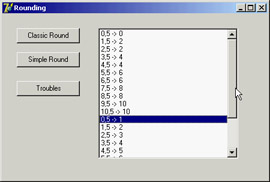
Figure 3.1: The Rounding example, demon-strated banker's rounding and arithmetic rounding
The program also uses another type of rounding provided by the Math unit in the SimpleRoundTo function, which uses asymmetric arithmetic rounding. In this case, all .5 numbers are rounded to the upper value. However, as highlighted in the Rounding example, the function doesn't work as expected when rounding to a decimal digit (that is, when you pass a negative second parameter). In this case, due to the representation errors of floating-point numbers, the rounding trims the values; for example, it turns 1.15 into 1.1 instead of the expected 1.2. The solution is to multiply the value by ten before rounding, round it to zero decimal digits, and then divide it, as demonstrated in the sample program:
SimpleRoundTo (d * 10, 0) / 10)
The ConvUtils and StdConvs Units
The ConvUtils unit contains the core of the conversion engine introduced in Delphi 6. It uses the conversion constants defined by a second unit, StdConvs. I'll cover these two units later in this chapter and show how to extend them with new measurement units.
| Note |
Delphi 7 makes only a single improvement to the conversion unit: It adds support for stones (the British unit of measurement that is equivalent to 14 pounds). In any case, if you have to deal with units of measurements in your code, you'll appreciate the features available in this engine. |
The DateUtils Unit
The DateUtils unit is a collection of date- and time-related functions. It includes functions for picking values from a TDateTime variable or counting values from a given interval, such as
// pick value
function DayOf(const AValue: TDateTime): Word;
function HourOf(const AValue: TDateTime): Word;
// value in range
function WeekOfYear(const AValue: TDateTime): Integer;
function HourOfWeek(const AValue: TDateTime): Integer;
function SecondOfHour(const AValue: TDateTime): Integer;
Some of these functions are quite odd, such as MilliSecondOfMonth or SecondOfWeek, but Borland developers have decided to provide a complete set of functions, no matter how impractical they sound. (I actually used some of these functions in Chapter 2, to build the TDate class.)
There are functions for computing the initial or final value of a given time interval (day, week, month, year) including the current date, and for range checking and querying; for example:
function DaysBetween(const ANow, AThen: TDateTime): Integer;
function WithinPastDays(const ANow, AThen: TDateTime;
 const ADays: Integer): Boolean;
Other functions cover incrementing and decrementing by each of the possible time intervals, encoding and "recoding" (replacing one element of the TDateTime value, such as the day, with a new one), and doing "fuzzy" comparisons (approximate comparisons where a difference of a millisecond will still make two dates equal). Overall, DateUtils is quite interesting and not terribly difficult to use.
The StrUtils Unit
The StrUtils unit was introduced in Delphi 6 with some new string-related functions. One of the key features of this unit is the availability of many string comparison functions. There are functions based on a soundex algorithm (AnsiResembleText), and others that provide lookup in arrays of strings (AnsiMatchText and AnsiIndexText), substring location, and text replacement (including AnsiContainsText and AnsiReplaceText).
| Note |
Soundex is an algorithm that compares names based on how they sound rather than how they are spelled. The algorithm computes a number for each word sound, so that by comparing two such numbers you can determine whether two names sound similar. The system was first applied in 1880 by the U.S. Bureau of the Census; it was patented in 1918 and is now in the public domain. The soundex code is an indexing system that translates a name into a four-character code consisting of one letter and three numbers. More information is available at www.nara.gov/genealogy/coding.html. |
Beside comparisons, other functions provide a two-way test (the nice IfThen function, similar to the one we've already seen for numbers), duplicate and reverse strings, and replace substrings. Most of these string functions were added as a convenience to Visual Basic programmers migrating to Delphi.
I've used some of these functions in the StrDemo example, which uses also some of the Boolean-to-string conversions defined within the SysUtils unit. The program is little more than a test for a few of these functions. For example, it uses the soundex comparison between the strings entered in two edit boxes, converting the resulting Boolean into a string and showing it:
ShowMessage (BoolToStr (AnsiResemblesText
 (EditResemble1.Text, EditResemble2.Text), True));
The program also showcases the AnsiMatchText and AnsiIndexText functions, after filling a dynamic array of strings (called strArray) with the values of the strings inside a list box. I could have used the simpler IndexOf method of the TStrings class, but doing so would have defeated the purpose of the example. The two list comparisons are as follows:
procedure TForm1.ButtonMatchesClick(Sender: TObject);
begin
 ShowMessage (BoolToStr (AnsiMatchText(EditMatch.Text, strArray), True));
end;

procedure TForm1.ButtonIndexClick(Sender: TObject);
var
 nMatch: Integer;
begin
 nMatch := AnsiIndexText(EditMatch.Text, strArray);
 ShowMessage (IfThen (nMatch >= 0, 'Matches the string number ' +
 IntToStr (nMatch), 'No match'));
end;
Notice the use of the IfThen function in the last few lines of code; it has two alternative output strings, depending on the result of the initial test (nMatch >= 0).
Three more buttons do simple calls to three other new functions, with the following lines of code (one for each):
// duplicate (3 times) a string
ShowMessage (DupeString (EditSample.Text, 3));
// reverse the string
ShowMessage (ReverseString (EditSample.Text));
// choose a random string
ShowMessage (RandomFrom (strArray));
From Pos to PosEx
Delphi 7 adds a little to the StrUtils unit. The new PosEx function will be handy to many developers and is worth a brief mention. When searching for multiple occurrences of a string within another one, a classic Delphi solution was to use the Pos function and repeat the search over the remaining portion of the string. For example, you could count the occurrences of a string inside another string with code like this:
function CountSubstr (text, sub: string): Integer;
var
 nPos: Integer;
begin
 Result := 0;
 nPos := Pos (sub, text);
 while nPos > 0 do
 begin
 Inc (Result);
 text := Copy (text, nPos + Length (sub), MaxInt);
 nPos := Pos (sub, text);
 end;
end;
The new PosEx function allows you to specify the starting position of the search within a string, so you don't need to alter the original string (wasting quite some time). Thus the previous code can be simplified in the following way:
function CountSubstrEx (text, sub: string): Integer;
var
 nPos: Integer;
begin
 Result := 0;
 nPos := PosEx (sub, text, 1); // default
 while nPos > 0 do
 begin
 Inc (Result);
 nPos := PosEx (sub, text, nPos + Length (sub));
 end;
end;
Both code snippets are used in a trivial way in the StrDemo example discussed earlier.
The Types Unit
The Types unit holds data types common to multiple operating systems. In past versions of Delphi, the same types were defined by the Windows unit; now they've been moved to this common unit, shared by Delphi and Kylix. The types defined here are simple and include, among others, the TPoint, TRect, and TSmallPoint record structures plus their related pointer types.
| Warning |
Notice that you will have to update old Delphi programs that refer to TRect or TPoint, by adding the Types unit in the uses statement; otherwise they won't compile. |
The Variants and VarUtils Units
Variants and VarUtils are two more units introduced in Delphi 6 to host the variant-related portion of the library. The Variants unit contains generic code for variants. As mentioned earlier, some of the routines in this unit have been moved here from the System unit. Functions include generic variant support, variant arrays, variant copying, and dynamic array to variant array conversions. In addition, the TCustomVariantType class defines customizable variant data types.
The Variants unit is totally platform independent and uses the VarUtils unit, which contains OS-dependent code. In Delphi, this unit uses the system APIs to manipulate variant data; in Kylix, it uses custom code provided by the RTL library.
| Note |
In Delphi 7, these units have been extended and some bugs have been patched. The variant implementation has been heavily reworked behind the scenes to improve the speed of this technology and decrease the memory footprint of its code. |
A specific area that has seen significant improvement in Delphi 7 is the ability to control the behavior of variant implementations, particularly comparison rules. Delphi 6 saw a change in the variant code so that null values cannot be compared with other values. This behavior is correct from a formal point of view, specifically for the fields of a dataset (an area in which variants are heavily used), but this change had the side effect of breaking existing code. Now you can control this behavior using the NullEqualityRule and NullMagnitudeRule global variables, each of which assumes one of the following values:
ncrError Any type of comparison causes an exception to be raised, because you cannot compare an undefined value; this was the (new) default behavior in Delphi 6.
ncrStrict Any type of comparison always fails (returning False), regardless of the values.
ncrLoose Equality tests succeed only among null values (a null is different from any other value). In comparisons null values are considered like empty values or zeros.
Other settings like NullStrictConvert and NullAsStringValue control how conversion is accomplished in case of null values. I suggest that you carry out your own experiments using the VariantComp example available with the code for this chapter. As you can see in Figure 3.2, this program has a form with a RadioGroup you can use to change the settings of the NullEqualityRule and NullMagnitudeRule global variables, and a few buttons to perform various comparisons.
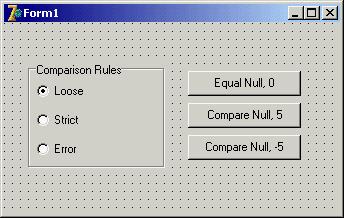
Figure 3.2: The form of the VariantComp example at design time
Custom Variants and Complex Numbers
Another recent extension to the concept of variants is the possibility of extending the type system with custom variants. This technique allows you to define a new data type that, contrary to a class, overloads standard arithmetic operators.
A variant is a type holding both the type specification and the actual value. One variant can contain a string; another can contain a number. The system defines automatic conversions among variant types, allowing you to mix them inside operations (including custom variants). This flexibility comes at a high cost: Operations on variants are much slower than on native types, and variants use extra memory.
As an example of a custom variant type, Delphi ships with an interesting definition for complex numbers, found in the VarCmplx unit (available in source-code format in the RtlCommon folder). You can create complex variants by using one of the overloaded VarComplexCreate functions and use them in any expression, as the following code fragment demonstrates:
var
 v1, v2: Variant;
begin
 v1 := VarComplexCreate (10, 12);
 v2 := VarComplexCreate (10, 1);
 ShowMessage (v1 + v2 + 5);
The complex numbers are defined using classes, but they are surfaced as variants by inheriting a new class from the TCustomVariantType class (defined in the Variants unit), overriding a few virtual abstract functions, and creating a global object that takes care of the registration within the system.
Besides these internal definitions, the Variants unit includes a long list of routines for operating on variants, including mathematical and trigonometric operations. I'll leave them to your study, because not all readers will be interested in complex numbers for their programs.
| Warning |
Building a custom variant is certainly not an easy task, and I can hardly find reasons for using them instead of objects and classes. With a custom variant you gain the advantage of using operator overloading on your own data structures, but you lose compile-time checking, make the code much slower, miss several OOP features, and have to write a lot of rather complex code. |
The DelphiMM and ShareMem Units
The DelphiMM and ShareMem units relate to memory management. The standard Delphi memory manager is declared in the System unit.
The DelphiMM unit defines an alternative memory manager library to be used when passing strings from an executable to a DLL (a Windows dynamic linking library), both built with Delphi. This memory manager library is compiled by default in the Borlndmm.dll library file you'll have to deploy with your program.
The interface to this memory manager is defined in the ShareMem unit. You must include this unit (it's required to be the first unit) in the projects of both your executable and library, as described in more detail in Chapter 10, "Libraries and Packages."
| Note |
Unlike Delphi, Kylix has no DelphiMM and ShareMem units, because memory management is provided in the native Linux libraries (in particular, Kylix uses malloc from glibc) and so is effectively shared among different modules. In Kylix, however, applications with multiple modules must use the ShareExcept unit, which allows exceptions raised in a module to be surfaced to another module. |
COM Related Units
ComConst, ComObj, and ComServ provide low-level COM support. These units are not really part of the RTL, from my point of view, so I won't discuss them here in any detail. You can refer to Chapter 12 for all the related information. These units have not changed much in recent versions of Delphi.
Converting Data
As mentioned earlier in this chapter, Delphi includes a new conversion engine, defined in the Conv Utils unit. The engine by itself doesn't include any definition of actual measurement units; instead, it has a series of core functions for end users.
The key function is the conversion call, the Convert function. You simply provide the amount, the units it is expressed in, and the units you want it converted into. The following converts a temperature of 31 degrees Celsius to Fahrenheit:
Convert (31, tuCelsius, tuFahrenheit)
An overloaded version of the Convert function lets you convert values that have two units, such as speed (which has both a length unit and a time unit). For example, you can convert miles per hour to meters per second with this call:
Convert (20, duMiles, tuHours, duMeters, tuSeconds)
Other functions in the unit allow you to convert the result of an addition or a difference, check if conversions are applicable, and even list the available conversion families and units.
A predefined set of measurement units is provided in the StdConvs unit. This unit has conversion families and an impressive number of values, as shown in the following reduced excerpt:
// Distance Conversion Units
// basic unit of measurement is meters
cbDistance: TConvFamily;

duAngstroms: TConvType;
duMicrons: TConvType;
duMillimeters: TConvType;
duMeters: TConvType;
duKilometers: TConvType;
duInches: TConvType;
duMiles: TConvType;
duLightYears: TConvType;
duFurlongs: TConvType;
duHands: TConvType;
duPicas: TConvType;
This family and the various units are registered in the conversion engine in the initialization section of the unit, providing the conversion ratios (saved in a series of constants, such as MetersPerInch in the following code):
cbDistance := RegisterConversionFamily('Distance');
duAngstroms := RegisterConversionType(cbDistance, 'Angstroms', 1E-10);
duMillimeters := RegisterConversionType(cbDistance, 'Millimeters', 0.001);
duInches := RegisterConversionType(cbDistance, 'Inches', MetersPerInch);
To test the conversion engine, I built a generic example (ConvDemo) that allows you to work with the entire set of available conversions. The program fills a combo box with the available conversion families and a list box with the available units of the active family. This is the code:
procedure TForm1.FormCreate(Sender: TObject);
var
 i: Integer;
begin
 GetConvFamilies (aFamilies);
 for i := Low(aFamilies) to High(aFamilies) do
 ComboFamilies.Items.Add (ConvFamilyToDescription (aFamilies[i]));
  // get the first and fire event
 ComboFamilies.ItemIndex := 0;
 ChangeFamily (self);
end;

procedure TForm1.ChangeFamily(Sender: TObject);
var
 aTypes: TConvTypeArray;
 i: Integer;
begin
 ListTypes.Clear;
 CurrFamily := aFamilies [ComboFamilies.ItemIndex];
 GetConvTypes (CurrFamily, aTypes);
 for i := Low(aTypes) to High(aTypes) do
 ListTypes.Items.Add (ConvTypeToDescription (aTypes[i]));
end;
The aFamilies and CurrFamily variables are declared in the private section of the form as follows:
aFamilies: TConvFamilyArray;
CurrFamily: TConvFamily;
At this point, a user can enter two measurement units and an amount in the corresponding edit boxes on the form, as you can see in Figure 3.3. To make the operation faster, the user can select a value in the list and drag it to one of the two Type edit boxes. The dragging support is described in the following sidebar "Simple Dragging in Delphi."
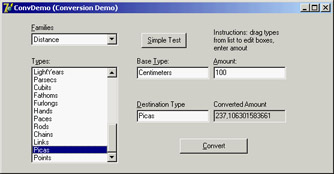
Figure 3.3: The ConvDemo example at run time
Simple Dragging in Delphi
The ConvDemo example, built to show how to use the conversion engine, uses an interesting technique: dragging. You can move the mouse over the list box, select an item, and then keep the left mouse button pressed and drag the item over one of the edit boxes in the center of the form.
To accomplish this functionality, I had to set the DragMode property of the list box (the source component) to dmAutomatic and implement the OnDragOver and OnDragDrop events of the target edit boxes (the two edit boxes are connected to the same event handlers, sharing the same code). In the first method, the program indicates that the edit boxes always accept the dragging operation, regardless of the source. In the second method, the program copies the text selected in the list box (the Source control of the dragging operation) to the edit box that fired the event (the Sender object). Here is the code for the two methods:
procedure TForm1.EditTypeDragOver(Sender, Source: TObject;
 X, Y: Integer; State: TDragState; var Accept: Boolean);
begin
 Accept := True;
end;

procedure TForm1.EditTypeDragDrop(Sender, Source: TObject;
 X, Y: Integer);
begin
 (Sender as TEdit).Text := (Source as TListBox).Items
 [(Source as TListBox).ItemIndex];
end;
The units must match those available in the current family. In case of error, the text in the Type edit boxes is shown in red. This is the effect of the first part of the form's DoConvert method, which is activated as soon as the value of one of the edit boxes for the units or the amount changes. After checking the types in the edit boxes, the DoConvert method performs the conversion, displaying the result in the fourth, grayed edit box. In case of errors, you'll get an appropriate message in the same box. Here is the code:
procedure TForm1.DoConvert(Sender: TObject);
var
 BaseType, DestType: TConvType;
begin
  // get and check base type
 if not DescriptionToConvType(CurrFamily, EditType.Text, BaseType) then
 EditType.Font.Color := clRed
 else
 EditType.Font.Color := clBlack;

  // get and check destination type
 if not DescriptionToConvType(CurrFamily, EditDestination.Text,
 DestType) then
 EditDestination.Font.Color := clRed
 else
 EditDestination.Font.Color := clBlack;

 if (DestType = 0) or (BaseType = 0) then
 EditConverted.Text := 'Invalid type'
 else
 EditConverted.Text := FloatToStr (Convert (
 StrToFloat (EditAmount.Text), BaseType, DestType));
end;
If all this is not interesting enough for you, consider that the conversion types provided serve only as a demo: You can fully customize the engine by providing the measurement units you are interested in, as described in the next section.
What About Currency Conversions?
Converting currencies is not exactly the same as converting measurement units, because currency rates change constantly. In theory, you can register a conversion rate with Delphi's conversion engine. From time to time, you check the new rate of exchange, unregister the existing conversion, and register a new one. However, keeping up with the actual rate means changing the conversion so often that the operation might not make a lot of sense. Also, you'll have to triangulate conversions: You must define a base unit (probably the U.S. dollar if you live in America) and convert to and from this currency even if you're converting between two different currencies.
It's more interesting to use the engine to convert member currencies of the euro, for two reasons. First, conversion rates are fixed (until the single euro currency takes over). Second, the conversion among euro currencies is legally done by converting a currency to euros first and then from the euro amount to the other currency—the exact behavior of Delphi's conversion engine. There is one small problem: You should apply a rounding algorithm at every step of the conversion. I'll consider this problem after I've provided the base code for integrating euro currencies with the Delphi conversion engine.
| Note |
The ConvertIt demo available among the Delphi examples provides support for euro conversions, using a slightly different rounding approach, still not as precise as demanded by the European currency conversion rules. I've decided to keep this example, because it is instructive in showing how to create a new measurement system. |
The example, called EuroConv, teaches how to register any new measurement unit with the engine. Following the template provided by the StdConvs unit, I've created a new unit (called EuroConvConst). In the interface portion, I've declared variables for the family and the specific units, as follows:
interface

var
 // Euro Currency Conversion Units
 cbEuroCurrency: TConvFamily;

 cuEUR: TConvType;
 cuDEM: TConvType; // Germany
 cuESP: TConvType; // Spain
 cuFRF: TConvType; // France
 // and so on...
The implementation portion of the unit defines constants for the various official conversion rates:
implementation

const
 DEMPerEuros = 1.95583;
 ESPPerEuros = 166.386;
 FRFPerEuros = 6.55957;
  // and so on...
Finally, the unit initialization code registers the family and the various currencies, each with its own conversion rate and a readable name:
initialization
 // Euro Currency's family type
 cbEuroCurrency := RegisterConversionFamily('EuroCurrency');

 cuEUR := RegisterConversionType(
 cbEuroCurrency, 'EUR', 1);
 cuDEM := RegisterConversionType(
 cbEuroCurrency, 'DEM', 1 / DEMPerEuros);
 cuESP := RegisterConversionType(
 cbEuroCurrency, 'ESP', 1 / ESPPerEuros);
 cuFRF := RegisterConversionType(
 cbEuroCurrency, 'FRF', 1 / FRFPerEuros);
| Note |
The engine uses as a conversion factor the amount of the base unit necessary to obtain the secondary units, with a constant like MetersPerInch, for example. The standard rate of euro currencies is defined the opposite way. For this reason, I've kept the conversion constants with the official values (like DEMPerEuros) and passed them to the engine as fractions (1/DEMPerEuros). |
Having registered this unit, you can now convert 120 German marks to Italian liras as follows:
Convert (120, cuDEM, cuITL)
The demo program does a little more: It provides two list boxes with the available currencies, extracted as in the previous example, and edit boxes for the input value and final result. You can see the form at run time in Figure 3.4.
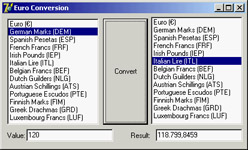
Figure 3.4: The output of the EuroConv unit, showing the use of Delphi's conversion engine with a custom measurement unit
The program works nicely but is not perfect, because the proper rounding is not applied; you should round not only the final result of the conversion but also the intermediate value. Using the conversion engine to accomplish this rounding directly is not easy. The engine allows you to provide either a custom conversion function or a conversion rate. But writing identical conversion functions for all the currencies seems like a bad idea, so I've decided to take a different path. (You can see examples of custom conversion functions in the StdConvs unit, in the portion related to temperatures.)
In the EuroConv example, I've added to the unit with the conversion rates a custom EuroConv function that does the proper conversion. Simply calling this function instead of the standard Convert function does the trick (and I see no drawback to this approach, because in such programs you'll rarely mix currencies with distances or temperatures). As an alternative, I could have inherited a new class from TConvTypeFactor, providing a new version of the FromCommon and ToCommon methods; or I could have called the overloaded version of the RegisterConversionType that accepts these two functions as parameters. However, neither of these techniques would have allowed me to handle special cases, such as the conversion of a currency to itself.
This is the code of the EuroConv function, which uses the internal EuroRound function to round to the number of digits specified in the Decimals parameter (which must be between 3 and 6, according to the official rules):
type
 TEuroDecimals = 3..6;

function EuroConvert (const AValue: Double;
 const AFrom, ATo: TConvType;
 const Decimals: TEuroDecimals = 3): Double;

 function EuroRound (const AValue: Double): Double;
 begin
 Result := AValue * Power (10, Decimals);
 Result := Round (Result);
 Result := Result / Power (10, Decimals);
 end;

begin
 // check special case: no conversion
 if AFrom = ATo then
 Result := AValue
 else
 begin
 // convert to Euro, then round
 Result := ConvertFrom (AFrom, AValue);
 Result := EuroRound (Result);
 // convert to currency then round again
 Result := ConvertTo (Result, ATo);
 Result := EuroRound (Result);
 end;
end;
Of course, you might want to extend the example by providing conversion to other non-euro currencies, eventually picking the values automatically from a website. I'll leave this as a rather complex exercise for you.
Managing Files with SysUtils
To access files and file information, you can generally rely on the standard functions available in the SysUtils unit. Relying on these fairly traditional Pascal libraries makes your code easily portable among quite different operating systems (although you'll have to consider with great care the differences in the file system architectures, particularly case sensitivity on the Linux platform).
For example, the FilesList example uses the FindFirst, FindNext, and FindClose combination to retrieve from within a folder a list of files that match a filter, with the same code you could use on Kylix and Linux (an example of the output appears in Figure 3.5).
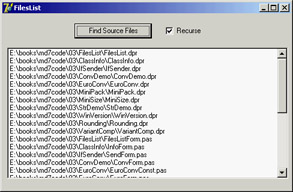
Figure 3.5: An example of the output of the FilesList application
The following code adds the filenames to a list box called lbFiles:
procedure TForm1.AddFilesToList(Filter, Folder: string;
 Recurse: Boolean);
var
 sr: TSearchRec;
begin
 if FindFirst (Folder + Filter, faAnyFile, sr) = 0 then
 repeat
 lbFiles.Items.Add (Folder + sr.Name);
 until FindNext(sr) <> 0;
 FindClose(sr);
If the Recurse parameter is set, the AddFilesToList procedure gets a list of subfolders by examining the local files again, and then calls itself for each of the subfolders. The list of folders is placed in a string list object, with the following code:
procedure GetSubDirs (Folder: string; sList: TStringList);
var
 sr: TSearchRec;
begin
 if FindFirst (Folder + '*.*', faDirectory, sr) = 0 then
  try
    repeat
 if (sr.Attr and faDirectory) = faDirectory then
 sList.Add (sr.Name);
 until FindNext(sr) <> 0;
 finally
 FindClose(sr);
 end;
end;
Finally, the program uses an interesting technique to ask the user to select the initial directory for the file search, by calling the SelectDirectory procedure (see Figure 3.6):
if SelectDirectory ('Choose Folder', '', CurrentDir) then ...
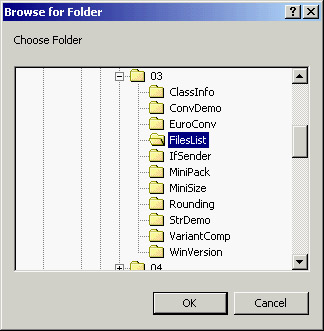
Figure 3.6: The dialog box of the SelectDirectory procedure, displayed by the FilesList application
The TObject Class
As mentioned earlier, a key element of the System unit is the definition of the TObject class, which is the mother of all Delphi classes. Every class in the system inherits from the TObject class, either directly (if you specify TObject as the base class), implicitly (if you indicate no base class), or indirectly
(when you specify another class as the ancestor). The entire hierarchy of classes in an Object Pascal program has a single root. So, you can use the TObject data type as a replacement for the data type
of any class type in the system, according to the type compatibility rules covered in Chapter 2 in the section "Inheritance and Type Compatibility."
For example, components' event handlers usually have a Sender parameter of type TObject. This simply means that the Sender object can be of any class, because every class is ultimately derived
from TObject. The typical drawback of such an approach is that to work on the object, you need to know its data type. In fact, when you have a variable or a parameter of the TObject type, you can apply to it only the methods and properties defined by the TObject class itself. If this variable or parameter happens to refer to an object of the TButton type, for example, you cannot directly access its Caption property. The solution to this problem lies in the use of the safe down-casting or run-time type information (RTTI) operators (is and as) discussed in Chapter 2.
You can also use another approach. For any object, you can call the methods defined in the TObject class. For example, the ClassName method returns a string with the name of the class. Because it is a class method (see Chapter 2 for details), you can apply it both to an object and to a class. Suppose you have defined a TButton class and a Button1 object of that class. Then the following statements have the same effect:
Text := Button1.ClassName;
Text := TButton.ClassName;
On some occasions you need to use the name of a class, but it can also be useful to retrieve a class reference to the class itself or to its base class. The class reference allows you to operate on the class at run time (as you saw in the preceding chapter), whereas the class name is just a string. You can get these class references with the ClassType and ClassParent methods. The first returns a class reference to the class of the object; the second returns a class reference to the object's base class. Once you have a class reference, you can apply to it any class methods of TObject—for example, to call the ClassName method.
Another method that might be useful is InstanceSize, which returns the run-time size of an object. Although you might think that the SizeOf global function provides this information, that function actually returns the size of an object reference—a pointer, which is invariably four bytes—instead of the size of the object itself.
In Listing 3.1, you can find the complete definition of the TObject class, extracted from the System unit. In addition to the methods I've already mentioned, notice InheritsFrom, which provides a test that's similar to the is operator but that can also be applied to classes and class references (the first argument of is must be an object).
Listing 3.1: The definition of the TObject class (in the System RTL unit)
type
 TObject = class
 constructor Create;
 procedure Free;
 class function InitInstance(Instance: Pointer): TObject;
 procedure CleanupInstance;
 function ClassType: TClass;
 class function ClassName: ShortString;
 class function ClassNameIs(
 const Name: string): Boolean;
 class function ClassParent: TClass;
 class function ClassInfo: Pointer;
 class function InstanceSize: Longint;
 class function InheritsFrom(AClass: TClass): Boolean;
 class function MethodAddress(const Name: ShortString): Pointer;
 class function MethodName(Address: Pointer): ShortString;
 function FieldAddress(const Name: ShortString): Pointer;
 function GetInterface(const IID: TGUID;out Obj): Boolean;
 class function GetInterfaceEntry(
 const IID: TGUID): PInterfaceEntry;
 class function GetInterfaceTable: PInterfaceTable;
 function SafeCallException(ExceptObject: TObject;
 ExceptAddr: Pointer): HResult; virtual;
 procedure AfterConstruction; virtual;
 procedure BeforeDestruction; virtual;
 procedure Dispatch(var Message); virtual;
 procedure DefaultHandler(var Message); virtual;
 class function NewInstance: TObject; virtual;
 procedure FreeInstance; virtual;
 destructor Destroy; virtual;
 end;
| Note |
The ClassInfo method returns a pointer to the internal run-time type information (RTTI) of the class, introduced in the next chapter. |
These methods of TObject are available for objects of every class, because TObject is the common ancestor class of every class. Here is how you can use these methods to access class information:
procedure TSenderForm.ShowSender(Sender: TObject);
begin
 Memo1.Lines.Add ('Class Name: ' + Sender.ClassName);

 if Sender.ClassParent <> nil then
 Memo1.Lines.Add ('Parent Class: ' + Sender.ClassParent.ClassName);

 Memo1.Lines.Add ('Instance Size: ' + IntToStr (Sender.InstanceSize));
end;
The code checks to see whether the ClassParent is nil, in case you are using an instance of the TObject type, which has no base type.
This ShowSender method is part of the IfSender example. The method is connected with the OnClick event of several controls: three buttons, a check box, and an edit box. When you click each control, the ShowSender method is invoked with the corresponding control as sender (more on events in Chapter 4). One of the buttons is a Bitmap button, an object of a TButton subclass. You can see an example of the output of this program at run time in Figure 3.7.
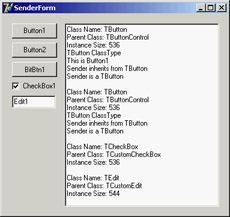
Figure 3.7: The output of the IfSender example
You can use other methods to perform tests. For example, you can check whether the Sender object is of a specific type with the following code:
if Sender.ClassType = TButton then ...
You can also check whether the Sender parameter corresponds to a given object, with this test:
if Sender = Button1 then...
Instead of checking for a particular class or object, you'll generally need to test the type compatibility of an object with a given class; that is, you'll need to check whether the class of the object is a given class or one of its subclasses. Doing so lets you know whether you can operate on the object with the methods defined for the class. This test can be accomplished using the InheritsFrom method, which is also called when you use the is operator. The following two tests are equivalent:
if Sender.InheritsFrom (TButton) then ...
if Sender is TButton then ...
Showing Class Information
I've extended the IfSender example to show a complete list of base classes of a given object or class. Once you have a class reference you can add all of its base classes to the ListParent list box with the following code:
with ListParent.Items do
begin
 Clear;
 while MyClass.ClassParent <> nil do
 begin
 MyClass := MyClass.ClassParent;
 Add (MyClass.ClassName);
 end;
end;
You'll notice that I use a class reference at the heart of the while loop, which tests for the absence of a parent class (so that the current class is TObject). Alternatively, I could have written the while statement in either of the following ways:
while not MyClass.ClassNameIs ('TObject') do...
while MyClass <> TObject do...
The code in the with statement referring to the ListParent list box is part of the ClassInfo example, which displays the list of parent classes and some other information about a few components of the VCL (basically those on the Standard page of the Component Palette). These components are manually added to a dynamic array holding classes and declared as
private
 ClassArray: array of TClass;
When the program starts, the array is used to show all the class names in a list box. Selecting an item from the list box triggers the visual presentation of its details and its base classes, as you can see in the program output in Figure 3.8.
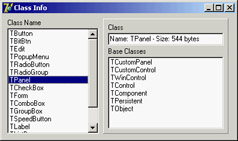
Figure 3.8: The output of the ClassInfo example
| Note |
As a further extension of this example, you can create a tree with all the base classes of the various components in a hierarchy. To do that, I've created the VclHierarchy wizard, discussed in Appendix A ("Extra Delphi Tools by the Author"). |
What s Next?
In this chapter, I've focused my attention on new features of the Delphi function-based run-time library. I have provided only a summary of the RTL, not a complete overview (which would take too much space). You can find more examples of the basic RTL functions of Delphi in the free e-books available on my website, as discussed in Appendix C.
In the next chapter, we'll begin moving from the function-based RTL to the class-based RTL, which is the core of Delphi's class library. I won't debate whether the core classes common to the VCL and CLX, such as TObject, actually belong to the RTL or the class library. I've covered everything defined in System, SysUtils, and other units hosting functions and procedures in this chapter; the next chapter focuses on the Classes unit and other core units that define classes.
Along with the preceding chapter on the Delphi language, Chapter 4 will provide a foundation for discussing visual- and database-oriented classes (or components, if you prefer). Looking at the various library units, you'll find many more global functions, which don't belong to the core RTL but are still quite useful.
Part I - Foundations
- Delphi 7 and Its IDE
- The Delphi Programming Language
- The Run-Time Library
- Core Library Classes
- Visual Controls
- Building the User Interface
- Working with Forms
Part II - Delphi Object-Oriented Architectures
- The Architecture of Delphi Applications
- Writing Delphi Components
- Libraries and Packages
- Modeling and OOP Programming (with ModelMaker)
- From COM to COM+
Part III - Delphi Database-Oriented Architectures
- Delphis Database Architecture
- Client/Server with dbExpress
- Working with ADO
- Multitier DataSnap Applications
- Writing Database Components
- Reporting with Rave
Part IV - Delphi, the Internet, and a .NET Preview
- Internet Programming: Sockets and Indy
- Web Programming with WebBroker and WebSnap
- Web Programming with IntraWeb
- Using XML Technologies
- Web Services and SOAP
- The Microsoft .NET Architecture from the Delphi Perspective
- Delphi for .NET Preview: The Language and the RTL
- Appendix A Extra Delphi Tools by the Author
- Appendix B Extra Delphi Tools from Other Sources
- Appendix C Free Companion Books on Delphi

EAN: 2147483647
Pages: 279
