The Microsoft Client Library for AJAX
Overview
Most of the power of AJAX resides on the client and is strictly related to the browser’s and platform’s client-side functionality. Even though a large share of AJAX pages are built using a slightly different set of server controls, they couldn’t work without a powerful environment available on the client and written in JavaScript. Such a script code governs the execution of out-of-band calls and often kicks in and replaces regular postbacks with AJAX postbacks. No AJAX functionality would ever be possible without JavaScript and a standard (and rich) Document Object Model (DOM). The DOM, though, is not enough.
The DOM represents the programming gateway to the page constituent elements, but it is not designed to provide programming facilities such as those you can find in a general-purpose library. Normally, the script tools you can leverage to consume objects and contents from the DOM are those provided by the JavaScript language. Not exactly a powerful toolkit. Enter the Microsoft AJAX Library.
The Microsoft AJAX library is written in JavaScript, although with a strong sense of objectorientation. The JavaScript language does support objects and allow the creation of custom objects. It does not, however, support full object-orientedness since it has no native concept of true object inheritance. Nonetheless, even excluding true object-orientation, JavaScript is still a modern and suitable language that can be used to build a class framework a la the .NET Framework. ASP.NET AJAX takes the JavaScript language to the next level by adding some type-system extensions and the notions of namespace and inheritance. In addition, the ASP.NET AJAX JavaScript supports interfaces and enumerations, and has a number of helper functions to manipulate strings and arrays.
These extensions are coded using the base set of instructions that characterize the core JavaScript language, and they’re persisted to the .js files that form the Microsoft AJAX client runtime environment.
In this chapter, you’ll first learn how to use extensions to JavaScript-such as namespaces, interfaces, and inheritance-and then take the plunge into the namespaces and classes that form the client-side AJAX framework.
JavaScript Language Extensions
Writing a rich and complex framework such as ASP.NET AJAX using only plain old JavaScript is probably beyond human capabilities. On the other hand, using another language would pose serious browser-compatibility issues and eliminate the main reason behind the today’s success of the AJAX paradigm-its broad reach.
Infrastructure for Extensions
The Microsoft AJAX library adds a strong focus on typing to the JavaScript language. Top-level types such as array, Boolean, string, and number are encapsulated in classes and forced into a hierarchical structure that mirrors-to the extent that it is possible-the true .NET Framework. The Microsoft AJAX library exposes a class-oriented type system to the outside world that supports namespaces, inheritance, interfaces, enumerations, reflection, and a good deal of helper methods for strings, arrays, and other base types.
All together, these extensions enable you to code ASP.NET AJAX client functionalities in a more structured way and thereby improve maintenance, extensibility, and ease of development.
The Microsoft AJAX Library Engine
The library is made of a few .js files downloaded to the client browser on demand. At a minimum, the core runtime script file is downloaded. All script files are incorporated as resources in the ASP.NET AJAX assembly-the System.Web.Extensions.dll file-and are extracted and injected in the client page as required by the page itself.
Adding the Microsoft AJAX library to a Web application makes JavaScript programming easier, and it automatically endows the client environment with a set of new and richer objects and object-oriented capabilities.
| Note |
Although the Microsoft AJAX library ships as part of ASP.NET AJAX Extensions, nothing prevents you from using those .js files in non–ASP.NET 2.0 applications. In particular, you are encouraged to download the JavaScript files from the ASP.NET AJAX Web site and link them from, say, a PHP or ASP.NET 1.1 application, obtaining the same pleasant effect-object-oriented features from a script language. You get the files under the Microsoft permissive license agreement and are allowed to use and modify these scripts in your own applications. Find them at http://ajax.asp.net/downloads/default.aspx. |
The Root Object of the Microsoft AJAX Library
Overall, JavaScript is an object-based language. (It’s not truly object-oriented because it doesn’t implement some of the required object-oriented concepts, such as true object inheritance.) The language features a set of built-in objects, including Function, Object, Boolean, Array, Number, and String. All intrinsic objects have a read-only property named prototype. You use the prototype property to provide a base set of functionality shared by any new instance of an object of that class. New functionality can be added to the class prototype inside of an application to extend and improve the capabilities of a given class. This is exactly what the Microsoft AJAX library does.
In the library (precisely, in the MicrosoftAjax.js file), all built-in JavaScript objects feature a richer prototype and incorporate new capabilities. For example, the library extends the JavaScript Function object with a set of methods to provide for delegates and callbacks. Here’s a brief snippet from (the debug version of) MicrosoftAjax.js that illustrates the point:
// Set the type name
Function.__typeName = 'Function';

// Define a callback
Function.createCallback = function Function$createCallback(method, context)
{
 var e = Function._validateParams(...);
 if (e) throw e;

 return function() {
 var l = arguments.length;
 if (l > 0) {
 var args = [];
 for (var i = 0; i < l; i++) {
 args[i] = arguments[i];
 }
 args[l] = context;
 return method.apply(this, args);
 }
 return method.call(this, context);
 }
}

// Define a delegate (function pointer)
Function.createDelegate = function Function$createDelegate(
 instance, method)
{
 var e = Function._validateParams(...);
 if (e) throw e;

 return function() {
 return method.apply(instance, arguments);
 }
}
The Function type is then associated with the Type property on the window object in the browser DOM:
window.Type = Function;
The window object is the top-level object in the JavaScript hierarchy and represents a browser window. The browser creates one window object when it opens an HTML page and additional window objects for each frame it encounters. You can access all window members by using the member name directly-that is, without prefixing it with a name that evaluates to the current window object. The window object features a number of predefined members, including the popular alert method and event object; in addition, new dynamic members can be defined on the fly.
The native Function object, referred through the nickname of Type, is extended with a number of object-oriented methods. This is accomplished by extending the prototype property that characterizes any JavaScript object. The following code shows how to add the getName method to all Microsoft AJAX library objects:
Type.prototype.getName = function Type$getName()
{
 if (arguments.length !== 0)
 throw Error.parameterCount();
 return (typeof(this.__typeName) === "undefined")
 ? "" : this.__typeName;
}
In this way, you can ask each JavaScript object to qualify itself in a reliable and precise way. In MicrosoftAjax.js, the Function object works in a way that resembles the following pseudo-class:
public class Function
{
 public static Object createCallback(Object method, Object context);
 public static Object createDelegate(Object instance, Object method);
 public static Object emptyFunction();
 public static Object emptyMethod();
 public static Object getRootNamespaces();
 public static Object isClass(Object type);
 public static Object isEnum(Object type);
 public static Object isFlags(Object type);
 public static Object isInterface(Object type);
 public static Object isNamespace(Object object);
 public static Object parse(Object typeName, Object ns);
 public static Object registerNamespace(Object namespacePath);

 public Object callBaseMethod(Object instance, Object name, Object args);
 public Object getBaseMethod(Object instance, Object name);
 public Object getBaseType();
 public Object getInterfaces();
 public Object getName();
 public Object implementsInterface(Object interfaceType);
 public Object inheritsFrom(Object parentType);
 public Object initializeBase(Object instance, Object baseArguments);
 public Object isImplementedBy(Object instance);
 public Object isInstanceOfType(Object instance);
 public Object registerClass(Object type, Object base, Object interface);
 public Object registerEnum(Object name, Object flags);
 public Object registerInterface(Object typeName);
 public Object resolveInheritance();
}
All methods added to the prototype will be “inherited” by any other function defined in the context of any library-powered application.
Other Top-Level Types
The Microsoft AJAX library contains code that defines new objects and extends existing JavaScript objects with additional functionality. Table 2-1 lists the main global objects defined in the library.
|
Type |
Description |
|---|---|
|
Array |
Extends the native Array object. This object groups static methods to add, insert, remove, and clear elements of an array. It also includes static methods to enumerate elements and check whether a given element is contained in the array. |
|
Boolean |
Extends the native Boolean object. This object defines a static parse method to infer a Boolean value from a string or any expression that evaluates to a Boolean value. |
|
Date |
Extends the native Date object with a couple of instance methods: localeFormat and format. These methods format the date using the locale or invariant culture information. |
|
Error |
Defines a static create method to wrap the JavaScript Error object and add a richer constructor to it. This object incorporates a couple of properties-message and name-to provide a description of the error that occurred and identify the error by name. A number of built-in error objects are used to simulate exceptions. In this case, the name property indicates the name of the exception caught. |
|
Function |
Extends the native Function object. This object groups methods to define classes, namespaces, delegates, and a bunch of other object-oriented facilities. |
|
Number |
Extends the native Number object. This object defines a static parse method to infer a numeric value from a string or any expression that evaluates to a numeric value. In addition, it supports a pair of static formatting methods: localeFormat and format. |
|
Object |
Extends the native Object object. This object groups methods to read type information such as the type of the object being used. |
|
RegExp |
Wraps the native RegExp object. |
|
String |
Extends the native String object. This object groups string manipulation methods such as trim methods and endsWith and startsWith methods. In addition, it defines static localeFormat and format methods that are close relatives of the String.Format method of the managed String type. |
 Open table as spreadsheet
By simply adding a ScriptManager server control to an ASP.NET page, you gain the right to use any additional methods on native objects that are defined in the Microsoft AJAX library. For example, the following code will work just fine if you add such a control:
var s = "Dino";
alert(s.startsWith('D'));
The native JavaScript String object doesn’t feature either a startsWith or an endsWith method. However, the following code in Microsoft Client library does the trick:
String.prototype.endsWith = function String$endsWith(suffix)
{
 var e = Function._validateParams(...);
 if (e) throw e;

 return (this.substr(this.length - suffix.length) === suffix);
}
String.prototype.startsWith = function String$startsWith(prefix)
{
 var e = Function._validateParams(...);
 if (e) throw e;

 return (this.substr(0, prefix.length) === prefix);
}
Discovering Type Information
JavaScript objects are not truly strongly-typed objects. In particular, there’s no fully reliable mechanism to know the type of the object you’re working with. The toString method and the typeof operator help only partially. The former is designed to provide a string representation of the object, so it merely returns the contents of the object for strings and numbers. The latter always returns object regardless of the name of the custom object you’re manipulating. Consider a class IntroAjax.Person defined as shown here:
Type.registerNamespace("IntroAjax");

// Constructor
IntroAjax.Person = function IntroAjax$Person(firstName, lastName)
{
 IntroAjax.Person.initializeBase(this);
 this._firstName = firstName;
 this._lastName = lastName;
}

// Add a FirstName property to the class prototype
IntroAjax.Person.prototype.get_FirstName =
 function IntroAjax$Person$get_FirstName() {
 // Raise an error if the number of arguments doesn't match
 if (arguments.length !== 0)
 throw Error.parameterCount ();
 return this._firstName;
 }
IntroAjax.Person.prototype.set_FirstName =
 function IntroAjax$Person$set_FirstName(value) {
 // Automatic arguments validation
 var e = Function._validateParams(arguments,
 [{name: "value", type: String}]);
 if (e)
 throw e;
 this._firstName = value;
 }

// Add a LastName property to the class prototype
IntroAjax.Person.prototype.get_LastName =
 function IntroAjax$Person$get_LastName() {
 if (arguments.length !== 0)
 throw Error.parameterCount();
 return this._lastName;
 }
IntroAjax.Person.prototype.set_LastName =
 function IntroAjax$Person$set_LastName(value) {
 var e = Function._validateParams(arguments,
 [{name: "value", type: String}]);
 if (e)
 throw e;
 this._lastName = value;
 }

IntroAjax.Person.registerClass('IntroAjax.Person');
Imagine that you now create an instance of this class and then need to know about its exact type. A new method added to the Object object provides for exact type recognition. The method to use is Object.getTypeName:
var p = new Person("Dino", "Esposito");
alert(Object.getTypeName(p));
The message box now shows IntroAjax.Person instead of a more generic “object” string. It’s interesting to take a look at the source code of the getTypeName method:
Object.getTypeName = function Object$getTypeName(instance)
{
 var e = Function._validateParams( ... );
 if (e) throw e;

 return Object.getType(instance).getName();
}
Object.getType = function Object$getType(instance)
{
 var e = Function._validateParams( ... );
 if (e) throw e;

 var ctor = instance.constructor;
 if (!ctor || (typeof(ctor) !== "function") ||
 !ctor.__typeName || (ctor.__typeName === 'Object'))
 {
 return Object;
 }
 return ctor;
}
In the end, the getName method on the root Type object is used to resolve the type name. (As mentioned earlier, Type is a global window object that evaluates to the JavaScript Function object.)
Type.prototype.getName = function Type$getName()
{
 if (arguments.length !== 0)
 throw Error.parameterCount();
 return (typeof(this.__typeName) === "undefined")
 ? "" : this.__typeName;
}
As you can see, the getName method simply returns the value of an internal variable. It turns out that each new object sets the _typeName variable to the string that represents the class name. For example, in the Microsoft AJAX library the type name of the Object class is explicitly set to the string “Object”:
Object._typeName = 'Object';
All built-in JavaScript objects are modified in the Microsoft AJAX library to feature an additional type name property.
| Note |
JavaScript clearly has a number of useful similarities with C-like languages such as C# and Java. Yet it is a script language with a number of shortcuts and special extensions. One is the === (triple =) operator; another is its opposite, the !== operator. The === operator is a variation of the classic == (is-equal-to) operator and checks for both value and type, whereas the classic equality operator is limited to checking values. As an example, consider the following code snippet: var x = 1; var y = "1"; If you compare x == y, you get true-the same value. If you compare x === y, you get false-the same value, but not the same type. |
The bottom line is that the Microsoft AJAX library builds a thick abstraction layer on top of the core JavaScript native objects that transforms a script language in a sort of object-oriented script framework. If you forget for a while about most common JavaScript concepts and syntax elements you know and think of it as a brand new language, you could easily envision the library as a shrink-wrapped version of the .NET Framework and the ASP.NET AJAX JavaScript language as simplified C#.
| Note |
You might have noticed that JavaScript functions used to implement methods on objects are named rather than being plain anonymous functions. This approach is a change in the Microsoft AJAX library that occurred with the Beta stage of ASP.NET AJAX, and it’s also a technique that is not that common among JavaScript writers. In the Microsoft AJAX library, functions are pseudo-named so that you get additional information, such as obtaining context within a stack trace. This change will help Visual Studio “Orcas” to do a great job with debugging and Microsoft IntelliSense. |
Reflection Capabilities
Earlier in the chapter, I showed a pseudoclass named Function to represent the real capabilities of the JavaScript Function type in the Microsoft AJAX library. Table 2-2 provides more information regarding what most of those methods really do. All methods in the table are invoked on library classes to help you discover type information and manage it dynamically. Static methods are invoked from the Type object directly.
|
Name |
Description |
|---|---|
|
callBaseMethod |
Returns the value of the base method, or null if a base method is not found. |
|
getBaseMethod |
Returns the implementation method of a method in the base class, or null if the implementation method is not defined. |
|
getBaseType |
Returns the base type of an instance. |
|
getInterfaces |
Returns the interfaces implemented by the specified instance. |
|
getName |
Returns the name of the base type of the instance. |
|
implementsInterface |
Determines whether the type implements a specified interface. |
|
inheritsFrom |
Determines whether the type inherits from the specified parent type. |
|
initializeBase |
Initializes the base type in the context of the defined instance. |
|
isImplementedBy |
Determines whether an instance implements the specified interface. |
|
isInstanceOfType |
Determines whether an object is an instance of a specified type or one of its derived types. |
|
parse |
Static method, returns an instance of the type defined by specified type name as represented as a string. |
|
registerClass |
Registers a class defined by the constructor, with an optional base type and with interfaces. |
|
registerEnum |
Creates a new enumeration type. |
|
registerInterface |
Registers an interface, represented by its constructor. |
|
registerNamespace |
Static method, registers and creates a namespace. |
|
resolveInheritance |
Static method, enables you to reflect on the inherited members of a derived type. |
The methods listed in Table 2-2 help you to reflect type information programmatically and create objects in an indirect manner.
The $get Alias
Before we take a look at more juicy object-oriented extensions such as namespaces and inheritance, let’s discuss a few shortcuts you can use in your script code to speed up development.
One of the most common mistakes that occurs when writing script code inside of Web pages is to use direct access to HTML elements instead of resorting to the getElementById method of the DOM. Suppose you have a text box element named TextBox1 in your client page. The following script code won’t work on all browsers:
alert(TextBox1.value);
The correct form ratified by the W3C paper for the HTML DOM standards is shown here:
alert(document.getElementById("TextBox1").value);
The correct form is clearly more verbose and bothersome to write over and over again. Microsoft Client library comes to the rescue with the $get global function. Simply put, the $get function is a shortcut for the document.getElementById function. In an ASP.NET AJAX page, the following expression is fully equivalent to the one just shown:
alert($get("TextBox1").value);
More precisely, the $get function is an alias for a piece of code defined as follows:
var $get = Sys.UI.DomElement.getElementById = function
 Sys$UI$DomElement$getElementById(id, element)
{
 var e = Function._validateParams( ... );
 if (e) throw e;

 if (!element)
 return document.getElementById(id);
 if (element.getElementById)
 return element.getElementById(id);

 var nodeQueue = [];
 var childNodes = element.childNodes;
 for (var i = 0; i < childNodes.length; i++)
 {
 var node = childNodes[i];
 if (node.nodeType == 1)
 nodeQueue[nodeQueue.length] = node;
 }

 while (nodeQueue.length) {
 node = nodeQueue.shift();
 if (node.id == id) {
 return node;
 }

 childNodes = node.childNodes;
 for (i = 0; i < childNodes.length; i++) {
 node = childNodes[i];
 if (node.nodeType == 1) {
 nodeQueue[nodeQueue.length] = node;
 }
 }
 }

 return null;
}
If you simply call $get passing the sole ID, the function falls back into document.getElementById. Alternatively, you can specify a root element. If this element supports the getElementById method, the function returns the output of element.getElementById; otherwise, the $get function uses the DOM interface to explore the contents of the subtree rooted in the element to locate the node with the given name.
| Note |
Before the Beta stage, ASP.NET AJAX defined a global alias named $ that mapped to the document.getElementById function. The $ alias has been changed to $get to avoid conflicts with other AJAX frameworks developers might use along with ASP.NET AJAX. |
Similar shortcuts exist also to look up components in the runtime hierarchy and to create them and add and remove event handlers. We’ll return to this point later in the chapter as we make our way through the library components.
Closures vs. Prototypes
When it comes to JavaScript classes (more exactly, pseudoclasses), there are mainly two models to use when creating them. One is known as a closure; one is based on the prototype. In early builds of the Microsoft AJAX library, the ASP.NET team used the closure model. They switched to the prototype model in the Beta stage.
A closure is a general concept of programming languages. When applied to JavaScript, it can be summarized as follows: A closure is a JavaScript function that can have variables and methods defined together within the same context. In this way, the outermost (anonymous or named) function “closes” the expression. Here’s an example of the closure model for a function that represents a Person type with two properties:
registerNamespace("IntroAjax");

// Closure: Constructor and members
IntroAjax.Person = function()
{
 var _firstName;
 var _lastName;
 this.get_FirstName = function() { return this._firstName; }
 this.get_LastName = function() { return this._lastName; }
}
IntroAjax.Person.registerClass('IntroAjax.Person');
As you can see, the closure is nothing more than the constructor of the class. Again, JavaScript classes are not classes in the sense understood in the .NET Framework, but we’ll refer to them as classes for convenience.
In a closure model, the constructor contains the member declarations and members are truly encapsulated and private to the class. In addition, members are instance based, which increases the memory used by the class.
The prototype model entails that you define the “public” structure of the class through the JavaScript prototype object. The following code sample shows how to rewrite the preceding Person class to avoid a closure. The resulting code is nearly identical to the code presented earlier for the IntroAjax.Person class-that is, the recommended way to write classes in the Microsoft AJAX library.
registerNamespace("IntroAjax");

// Prototype: Constructor
IntroAjax.Person = function()
{
 // Ctor creates private fields
 this._firstName = "";
 this._lastName = "";
}
// Prototype: Members
IntroAjax.Person.prototype.get_FirstName = function() {
 return this._firstName;
}
IntroAjax.Person.prototype.get_LastName = function() {
 return this._lastName;
}

IntroAjax.Person.registerClass("IntroAjax.Person");
In the prototype model, the constructor and members are clearly separated and a constructor is always required. As for private members, the Microsoft AJAX library convention is to name them with a “_” prefix. In the prototype model, members are shared by all instances, which reduces the memory used by each instance and provides for faster object instantiation. Aside from syntax peculiarities, the prototype model makes defining classes much more similar to the classic object-oriented programming (OOP) model than the closure model.
| Note |
The goal of the ASP.NET AJAX team was deliver a model that provided the best quality and performance on the largest number of browsers. Prototypes have a good load time in all browsers; and indeed, they have excellent performance in Firefox. (In contrast, closures have a better load time than prototypes in Internet Explorer.) Prototypes provide better support for IntelliSense, and allow for tool-based statement completion when used in tools that support this feature, such as Visual Studio “Orcas”. Prototypes can also help you obtain type information by simply using reflection. You won’t have to create an instance of the type in order to query for type information, which is unavoidable if closures are used. Finally, prototypes allow you to easily view private class members when debugging. Debugging objects derived using the closure model requires a number of additional steps. |
If you’re simply going to write client script that uses built-in classes in the library, you don’t need to learn about closures and prototypes. If you happen to write a custom JavaScript class to extend the Microsoft AJAX library, you should use the prototype model.
| Note |
If you want to learn more about JavaScript closures, go to the following URL: http:// www.jibbering.com/faq/faq_notes/closures.html. |
Object Oriented Extensions
In JavaScript, the Function object is the main tool you use to combine code with properties and forge new components. In the Microsoft AJAX library, the Function object is extended to incorporate type information, as well as namespaces, inheritance, interfaces, and enumerations. Let’s see how.
Adding Namespace Support
A namespace provides a way of grouping and classifying types belonging to a library. A namespace is not a type itself, but it adds more information to the definition of each type it contains to better qualify the type. Conceptually, a namespace is related to a directory in much the same way a type is related to a file. The unit of data you work with is ultimately the file, and you identify the file by name. However, files with the same name defined in different directories appear as completely distinct entities to any programming environment.
By default, all custom JavaScript functions belong to the global space of names. In the Microsoft AJAX library, you can associate a custom function with a particular namespace for purely organizational reasons. When declaring a custom type in the Microsoft AJAX library, you can do as follows:
Type.registerNamespace("IntroAjax");
IntroAjax.Person = function IntroAjax$Person(firstName, lastName)
{
 this._firstName = firstName;
 this._lastName = lastName;
}

// Define the body of members
function IntroAjax$Person$ToString() {
 return this._lastName + ", " + this._firstName;
}
...

// Define the prototype of the class
IntroAjax.Person.prototype = {
 ToString: IntroAjax$Person$ToString,
 get_FirstName: IntroAjax$Person$get_FirstName,
 set_FirstName: IntroAjax$Person$set_FirstName,
 get_LastName: IntroAjax$Person$get_LastName,
 set_LastName: IntroAjax$Person$set_LastName
}

// Register the class
IntroAjax.Person.registerClass("IntroAjax.Person");
The Type.registerNamespace method adds the specified namespace to the runtime environment. In a way, the registerNamespace method is equivalent to using the namespace {…} construct in C# or the Namespace .. End Namespace construct in Microsoft Visual Basic .NET.
| Note |
Because the Microsoft AJAX library expresses the capabilities of a runtime framework rather than the syntax of a programming language, the correspondence between Type.registerNamespace and a C# or Visual Basic .NET language construct is purely logical. Internally, Type.registerNamespace is limited to adding information to the current DOM to track the current namespace. |
The IntroAjax.Person function defined following the namespace declaration describes a type Person in the IntroAjax namespace. Finally, the newly defined function must be registered as a class with the Microsoft AJAX library framework. You use the registerClass method on the current function. The registerClass method is defined in the prototype of the Function object; as such, it is inherited by all functions. Internally, the registerClass method sets the _typeName property of the function to the first parameter of the method-the actual name of the class.
The registerClass method takes a number of parameters. The first parameter is mandatory, and it indicates the public name that will be used to expose the JavaScript function as a class. Additional and optional parameters are the parent class if there is any and any interface implemented by the class.
As mentioned, in the definition of a new class, you can use an anonymous function or a named function. In terms of syntax, both solutions are acceptable. The convention, though, is that you opt for named functions and name each function after its fully qualified name, replacing the dot symbol (.) with a dollar symbol ($).
Adding Inheritance Support
Let’s define a new class Citizen that extends Person by adding a couple of properties: address and a national identification number. Here’s the skeleton of the code you need:
// Declare the class
IntroAjax.Citizen = function IntroAjax$Citizen(firstName, lastName, id)
{
 ...
}

// Define the prototype of the class
IntroAjax.Citizen.prototype = {
 ...
}

// Register the class
IntroAjax.Citizen.registerClass("IntroAjax.Citizen", IntroAjax.Person);
Note that the first argument of registerClass is a string, but the second one has to be an object reference. Let’s flesh out this code a bit.
In the constructor, you’ll set some private members and call the base constructor to initialize the members defined on the base class. The initializeBase method (defined on Function) retrieves and invokes the base constructor.
IntroAjax.Citizen = function IntroAjax$Citizen(firstName, lastName, id)
{
 IntroAjax.Citizen.initializeBase(this, [firstName, lastName]);
 this._id = id;
 this._address = "";
}
You pass initializeBase the reference to the current object as well as an array with any parameters that the constructor to call requires. You can use the [...] notation to define an array inline. If you omit the [...] notation, be ready to handle a parameter count exception.
Quite often, developers derive a class because they need to add new members or alter the behavior of an existing method or property. Object-oriented languages define a proper keyword to flag members as overridable. How is that possible in JavaScript? By simply adding a member to the class prototype, you mark it as overridable in derived classes. In addition, if the member already exists on the base class, it is silently overridden in the new one. Here’s the prototype of the Citizen class:
IntroAjax.Citizen.prototype =
{
 ToString: IntroAjax$Citizen$ToString,
 get_ID: IntroAjax$Citizen$get_ID,
 get_Address: IntroAjax$Citizen$get_Address,
 set_Address: IntroAjax$Citizen$set_Address
}
The class has a read-only ID property and a read-write Address property. Furthermore, it overrides the ToString method defined in the parent class.
function IntroAjax$Citizen$ToString()
{
 var temp = IntroAjax.Citizen.callBaseMethod(this, 'ToString');
 temp += " [" + this._id + "]";
 return temp;
}
You use callBaseMethod to invoke the same method on the parent class. Defined on the Function class, the callBaseMethod method takes up to three parameters: instance, name of the method, plus an optional array of arguments for the base method.
As mentioned earlier, the ToString method on the Person class returns a LastName, FirstName string. The ToString method on the Citizen class returns a string in the following format: LastName, FirstName [ID].
| Note |
In the prototype model, a derived class has full access to the private members of the parent class. To be precise, in JavaScript the notion of private members is not the same as in classic OOP. As mentioned earlier, in the Microsoft AJAX library private members exist by convention; they’re not enforced by any syntax rules. In other words, the language allows you to access, say, the member _firstName of class Person straight from class Citizen. You should avoid that, though, as base class accessor implementations may provide additional logic over and above simply returning the field value. |
Adding Interface Support
An interface describes a group of related behaviors that are typical of a variety of classes. In general, an interface can include methods, properties, and events; in JavaScript, it contains only methods.
Keeping in mind the constraints of the JavaScript language, to define an interface you create a regular class with a constructor and a prototype. The constructor and each prototyped method, though, will just throw a not-implemented exception. Here’s the code for the sample Sys.IDisposable built-in interface:
Type.registerNamespace("Sys");

Sys.IDisposable = function Sys$IDisposable()
{
 throw Error.notImplemented();
}

function Sys$IDisposable$dispose()
{
 throw Error.notImplemented();
}

Sys.IDisposable.prototype =
{
 dispose: Sys$IDisposable$dispose
}

Sys.IDisposable.registerInterface('Sys.IDisposable');
The following statement registers the Citizen class, makes it derive from Person, and implements the IDisposable interface:
IntroAjax.Citizen.registerClass('IntroAjax.Citizen',
 IntroAjax.Person, Sys.IDisposable);
To implement a given interface, a JavaScript class simply provides all methods in the interface and lists the interface while registering the class:
function IntroAjax$Citizen$dispose
{
 this._id = "";
 this._address = "";
}

IntroAjax.Citizen.prototype =
{
 dispose: IntroAjax$Citizen$dispose
 ...
}
Note, though, that you won’t receive any runtime error if the class that declares to implement a given interface doesn’t really support all the methods.
| Note |
If a class implements multiple interfaces, you simply list all required interfaces in the registerClass method as additional parameters. Here’s an example:
Sys.Component.registerClass('Sys.Component', null,
Sys.IDisposable,
Sys.INotifyPropertyChange,
Sys.INotifyDisposing);
As you can see, in this case you don’t have to group interfaces in an array |
Core Components
The AJAX client library is made up of three main logical layers: JavaScript extensions, core framework classes, and user-interface (UI) framework classes. (See Figure 2-1.)
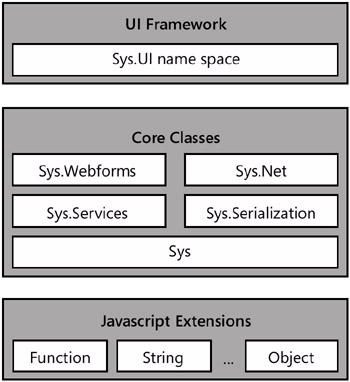
Figure 2-1: A graphical view of the AJAX client library
As mentioned in the previous sections, JavaScript extensions add new methods and capabilities to native JavaScript objects and enable registration methods to simulate object-oriented constructs such as classes, namespaces, inheritance, and interfaces. The UI framework includes base components to define client behaviors, controls, DOM elements, and input devices such as keyboard and mouse buttons. The UI framework also incorporates as private elements classes that provide the client object model for a couple of ASP.NET AJAX server controls, namely Timer and UpdateProgress. We’ll cover these controls in Chapter 4, “Partial Page Rendering.”
The core framework classes form a sort of base library that incorporates a set of commonly used classes for event handling, string manipulation, Web services, debugging, and network operations. As you saw earlier, the Microsoft AJAX library supports namespaces, so classes in the client library belong to a particular namespace. Most classes in the base framework layer of the library belong to the Sys namespace.
In the remainder of this chapter, we’ll take a look at the main functionality implemented in the Microsoft AJAX library, starting with the Application object.
The Sys Application Object
The execution of each ASP.NET AJAX page is controlled by an application object that is instantiated in the body of the library. The application object is an instance of a private class-the Sys._Application class. As mentioned, JavaScript has no notion of private members; therefore, private members are conventionally indicated by the underscore symbol (_) in their names.
Whenever an ASP.NET AJAX page is loaded in the browser, an instance of the Sys._Application class is promptly created and assigned to the Sys.Application object:
Sys.Application = new Sys._Application();
In addition, each ASP.NET AJAX page is injected with the following script code:
This code is placed immediately after the closing tag of the page’s form, and it commands the loading of any script files registered for loading with the page’s script manager. More details on script loading are unveiled in Chapter 3, “The Pulsing Heart of ASP.NET AJAX.” As a result, the Sys.Application object is the nerve center of the ASP.NET AJAX page.
Generalities of the Sys._Application Class
The Sys._Application class derives from Component and is the entry point in the page hierarchy to locate client-side components either bound to server controls or programmatically added to the application. Table 2-3 lists some of the methods available on the Sys._Application class.
|
Member |
Description |
|---|---|
|
addComponent |
Adds the specified Microsoft AJAX library component to the page hierarchy |
|
beginCreateComponents |
Starts adding new Microsoft AJAX library components to the page |
|
endCreateComponents |
Ends adding new Microsoft AJAX library components to the page |
|
findComponent |
Looks up the specified Microsoft AJAX library component in the page |
|
getComponents |
Gets the list of Microsoft AJAX library components found in the page |
|
initialize |
Ensures that all referenced script files are loaded |
|
notifyScriptLoaded |
Called by script files to notify the application object that the script has been successfully loaded |
|
queueScriptReference |
Queues a new script reference for loading |
|
removeComponent |
Removes the specified component from the page hierarchy |
The application object serves two main purposes: providing access to page components, and loading external script files registered with the page script manager. Note that each external script file registered with the script manager needs to place a notifyScriptLoaded call at the bottom of its source to notify the application of success.
Looking Up Components
The findComponent method scrolls the runtime hierarchy of components for the current page until it finds a component with a matching ID. The method has two possible prototypes:
Sys._Application.findComponent(id);
Sys._Application.findComponent(id, parent);
The former overload takes the ID of the component and uses it to look up and navigate the hierarchy all the way down from the root. When a non-null parent argument is specified, the search is restricted to the subtree rooted in the context object. The id parameter must be a string; the context parameter must be an Microsoft Client library object. The method returns the object that matches the ID, or it returns null if no such a object is found.
Microsoft Client library also supports a shortcut for retrieving runtime components-the $find method. The $find method is an alias for findComponent.
var $find = Sys.Application.findComponent;
You can use this method to locate all components created by server controls and extenders, as well as by your own JavaScript code and, if supported, by XML-Script declarations.
Events in the Page Lifetime
Table 2-4 lists the events fired by the Sys._Application class. Listeners for these events can be added via script code.
|
Event |
Description |
|---|---|
|
Init |
Occurs when the page is first initialized |
|
Load |
Occurs when the page is loaded |
|
loadTimedOut |
Occurs when the loading step takes too much time to complete |
|
scriptLoadFailed |
Occurs when one script fails to load for whatever reason |
|
Unload |
Occurs when the page is unloaded |
When an ASP.NET AJAX page first loads up, the load event is fired for the client code to perform any required initialization. Note that the event refers to the page lifetime, not the application lifetime. So whenever a classic postback occurs, you receive a new load event. You don’t receive events for any AJAX-style postback. Likewise, the unload event is fired when the page is unloaded.
The load event occurs after an ASP.NET AJAX page has been loaded and initialized completely. For such a page, the load event is preferable to the browser’s onload for initialization purposes. Only when you get the Microsoft AJAX library load event, therefore, can you be sure that the page is ready for user interaction.
The unload event occurs just before the Microsoft AJAX library runtime releases the page and all of its resources. For the sake of the application’s stability, you should use this event instead of the browser’s onunload event for clean-up tasks.
The following code shows how to add handlers to the load and unload events via script:
Sys.Application.add_load(_pageLoadHandler);
Sys.Application.add_unload(_pageUnloadHandler);
You add this code to a ...
An even easier way to define load and unload handlers is by means of predefined function names: pageLoad and pageUnload. These functions need to be global and parameterless.
Because this piece doesn’t directly call into any of the Microsoft AJAX library objects-including Sys.Application-you can safely place it everywhere, even at the top of the ASP.NET AJAX page.
The Sys Component Object
Generally, the term component denotes an object that is reusable and can interact with other objects in the context of a framework. The term control, on the other hand, denotes an object that is sort of a specialized component. The main trait that differentiates components and controls is the user interface. Components are non-UI objects; controls are primarily UI-based objects.
In the Microsoft AJAX library, the root component class is Sys.Component. The root class for controls is named Control and, guess what, lives in the Sys.UI namespace. In the Microsoft AJAX library, Sys.UI.Control derives from Sys.Component. Let’s learn more about the common properties of components; we’ll work with controls later in the chapter.
The Sys.Component Class
Derived from the JavaScript native type Object, the Sys.Component class defines a number of properties and events shared by all components. Table 2-5 lists the properties of the Sys.Component class.
|
Property |
Description |
|---|---|
|
events |
Lists all events fired by the class |
|
id |
Gets and sets the ID used to identify the component |
|
isInitialized |
Indicates whether the component has been initialized |
|
isUpdating |
Indicates whether the component is in the middle of a batch update operation |
The Sys.Component class features an initialize method that is used to start up the component. The base implementation of the method simply sets an internal flag to denote that the component has been initialized. Derived classes can further specialize the method to accomplish additional tasks. Table 2-6 lists the methods of the Sys.Component class.
|
Method |
Description |
|---|---|
|
beginUpdate |
Starts a batch operation aimed at updating the state of the component |
|
dispose |
Disposes of all resources associated with the class |
|
endUpdate |
Signals that an update operation has terminated |
|
initialize |
Performs any task required to initialize the component |
|
raisePropertyChanged |
Raises the propertyChanged event. |
In addition to the members considered so far, the class fires a couple of events: disposing and propertyChanged. The former event occurs when the component is being disposed of; the latter event occurs when the state of the component is updated. The propertyChanged event is part of the INotifyPropertyChange interface.
Detecting Property Changes
The Sys.Component class features a built-in mechanism to detect ongoing changes to the properties of a component. When this happens, the propertyChanged event is fired. The method raisePropertyChanged on the base class allows derived components to fire the propertyChanged event to notify callers that the value of a given property has been updated. Here’s a sample implementation of a component property:
this.set_MyProperty = function(value) {
 _myProperty = value;
 this.raisePropertyChanged("MyProperty");
}
Generally, derived components place a call to raisePropertyChanged in the set method of a given property. For a derived component, using the property changes mechanism is optional and not mandatory.
Batched Updates
The Sys.Component class also provides facilities when too many properties are going to be updated at the same time. To minimize screen updates, you can tell the object to perform property updates in a batch. To do so, you group updates in calls to the beginUpdate and endUpdate methods. When a batch update operation is in progress, the value of the isUpdating property is automatically set to true.
Depending on the specific component, batch updates can improve performance and minimize screen updates.
The $create Alias
The $create alias provides a concise syntax for creating an Microsoft AJAX library component. It is mapped to the static method create on the Sys.Component class with the following prototype:
var $create = Sys.Component.create = function Sys$Component$create(
 type, properties, events, references, element)
{
 ...
}
Of all the arguments just shown, only the type argument is mandatory; all others are optional. For example, the following code creates an instance of Samples.UI.Button and assigns it a click event handler, button1_Click, and ties it to the DOM element control sendDataButton:
$create(Samples.UI.Button,
 {},
 {'click':'button1_Click'},
 {}
 $get('sendDataButton')
);
The $create method defines the type to create, a list of properties, event handlers, and even an optional DOM element if any exists. The $create alias can also handle scenarios in which components have references to other components. In addition, objects are automatically registered with Sys.Application, thus allowing components to be found through $find.
Component Disposing
The Sys.Component class implements two interfaces that revolve around the disposal of any component instance: the Sys.IDisposable and Sys.INotifyDisposing interfaces. The Sys.Disposable interface features the dispose method; the Sys.INotifyDisposing interface lists the sole disposing event.
Components are required to be disposable so that you can free all of their client resources when used in the context of updatable panels. In addition, you should make sure the dispose method handles being called more than once. Here’s an example:
dispose: function()
{
 // Check whether childObject1 has been disposed of
 if (!_childObject1_disposed)
 {
 ...
 }
}
In this case, the _childObject1_disposed member is an internal member of the particular component that tracks whether or not the present component has gotten rid of its child objects and resources, including handlers. It is recommended that you use internal flags to check whether any child components (for example, event handlers) being manually disposed have already been disposed of when the whole component is destroyed.
The Network Stack
AJAX libraries in general, and ASP.NET AJAX Extensions in particular, owe their growing popularity to their ability to execute out-of-band Web requests from the client. In particular, ASP.NET AJAX Extensions allows you to invoke Web service methods as well as static methods defined on the server ASP.NET page class. This ability leverages the networking support built into the Microsoft AJAX library.
The Sys.Net.WebRequest Class
In the Microsoft AJAX library, a remote request is represented by an instance of the Sys.Net.WebRequest class. Table 2-7 lists the properties of the class.
|
Property |
Description |
|---|---|
|
body |
Gets and sets the body of the request |
|
executor |
Gets and sets the Microsoft Client library object that will take care of executing the request |
|
headers |
Gets the headers of the request |
|
httpVerb |
Gets and sets the HTTP verb for the request |
|
timeout |
Gets and sets the timeout, if any, for the request |
|
url |
Gets and sets the URL of the request |
The WebRequest class defines the url property to get and set the target URL and the headers property to add header strings to the request. If the request is going to be a POST, you set the body of the request through the body property. A request executes through the method invoke. The event completed informs you about the completion of the request.
Each Web request is executed through an internal class-the Web request manager-that employs an “executor” to open the socket and send the packet. The default executor class is XMLHttpExecutor. All executors derive from a common base class-the Sys.Net. WebRequestExecutor class.
The XML HTTP Executor
The Microsoft AJAX library defines just one HTTP executor-the Sys.Net.XMLHttpExecutor class. As the name suggests, this executor uses the popular XMLHttpRequest object to execute the HTTP request. Table 2-8 lists the properties of the class.
|
Property |
Description |
|---|---|
|
responseAvailable |
Boolean property, indicates whether the response is available |
|
responseData |
Gets the response of the request as raw text |
|
started |
Boolean property, indicates whether the request has started |
|
statusCode |
Indicates the status code of the HTTP response |
|
statusText |
Indicates the status text of the HTTP response |
|
timedOut |
Boolean property, indicates whether the request has timed out |
|
xml |
Gets the response of the request as an XML document object |
In addition, the XML HTTP executor features methods to start and abort the request. Table 2-9 lists the methods of the class.
|
Property |
Description |
|---|---|
|
abort |
Aborts the ongoing request, if any |
|
executeRequest |
Sends the request to its target URL |
|
getAllResponseHeaders |
Gets all response headers in a single collection object |
|
getResponseHeader |
Gets the value of the specified header |
Note that the abort method aborts the current XMLHttpRequest call, which simply closes the socket through which the client is expecting to receive response data, sets the aborted flag to true, and then fires the completed event. None of this affects any operation that might be executing on the server.
| Note |
AJAX libraries are associated with the XMLHttpRequest browser object. So what else could an executor be other than an instance of the XMLHttpRequest class? In general, an HTTP executor is any means you can use to carry out a Web request. An alternative executor-which was removed from the Microsoft AJAX library in the Beta stage-is based on HTTP frames. The idea is to use a dynamically created inline frame to download the response of a given request and then parse that result into usable objects. |
The Sys.WebForms.PageRequestManager Class
The Sys.Net.WebRequest class and its derivatives serve the purpose of issuing client requests to a server resource. This is the engine behind client Web service calls. ASP.NET AJAX Extensions provides a large share of its functionalities through updatable panels. (See Chapter 4.) Updatable panels are portions of the page that can be refreshed independently of others and the same page as a whole. The PageRequestManager class is the Microsoft AJAX library class in charge of controlling the update of individual panels. Table 2-10 lists the members of the class.
|
Member |
Description |
|---|---|
|
isInAsyncPostback |
Boolean property, indicates whether the class is engaged in a panel refresh (also known as, asynchronous postback). |
|
abortPostback |
Method used to abort an ongoing panel refresh. The operation closes the underlying socket and prevents any further page updates. |
|
getInstance |
Static method used to return the singleton instance of this class available in the page space. |
For reasons that will become clear in Chapter 4, only one instance of this class is allowed per page. The class defines an event model that page authors can leverage to hook up the various stages in a panel refresh. We’ll return to this point in detail in Chapter 4.
User Interface Components
The Microsoft AJAX library doesn’t define concrete user-interface components, such as classes that provide the client-side behavior of server controls. Instead, in the library you find only base classes to define three key categories of user interface components: behaviors, controls, and DOM elements. Web developers, as well as third-party vendors, can use these base classes to provide additional behaviors and client-side controls.
The Sys.UI.Behavior Class
Client behaviors are components derived from the Sys.UI.Behavior class and are triggered by client events, such as mouse movements, keystrokes, timer ticks, and DOM-based events. When triggered, behaviors can do virtually everything: update properties, run animations, implement drag-and-drop, and more. The goal of client behaviors is to enrich the behavior of an HTML element.
Multiple behaviors can be attached to the same HTML element; based on its functionality, the same behavior can be attached to distinct elements. The Microsoft AJAX library defines only the base class of client behaviors, but no built-in behaviors.
The constructor of the behavior class determines the binding between the behavior and a DOM element. The Sys.UI.Behavior class also features static methods to retrieve all behaviors attached to an element as well as look up behaviors by name and type.
The Sys.UI.Control Class
The Sys.UI.Control class derives from Sys.Component and wraps a DOM element-ideally, the DOM subtree of the matching server control. The binding between a Sys.UI.Control object and a DOM element is set in the class constructor.
Sys.UI.Control = function Sys$UI$Control(element)
{
 ...
}
The class provides methods to add, remove, and toggle the cascading style sheet (CSS) style of the control and to initialize the underlying DOM subtree. The raiseBubbleEvent method bubbles up any DOM event detected in the control’s subtree. When this happens, the onBubbleEvent event is fired.
The Sys.UI.DomElement Class
The Sys.UI.DomElement class represents a native DOM element. The class inherits from JavaScript’s Object and, as such, it’s not an Microsoft AJAX library component. The class has methods to add, remove, toggle, and check CSS styles and to locate child elements by ID. In addition, you can find methods to get and set the location of the element in the host page (x,y coordinates) and to get the bounding rectangle of the element.
Handling DOM Events
DOM events are wrapped by instances of the Sys.UI.DomEvent class. The class lists methods to add a single handler, add multiple handlers, remove one handler, and clear all handlers. Table 2-11 details all methods.
|
Method |
Alias |
Description |
|---|---|---|
|
addHandler |
$addHandler |
Adds a handler for the event on the specified DOM element |
|
addHandlers |
$addHandlers |
Adds a collection of event handlers |
|
clearHandlers |
$clearHandlers |
Removes all handlers set on a given DOM element |
|
preventDefault |
Prevents the execution of the default task for the event |
|
|
removeHandler |
$removeHandler |
Removes a given handler set on the specified DOM element |
|
stopPropagation |
Stops the propagation of the event up the DOM subtree |
As you can see, the Microsoft AJAX library provides a shorthand notation to create DOM event hookups and removal. For example, you can use the $addHandler and $removeHandler aliases to add and remove a handler. Here’s the syntax:
$addHandler(element, "eventName", handler);
$removeHandler(element, "eventName", handler);
Table 2-12 lists properties of the Sys.UI.DomEvent class.
|
Property |
Description |
|---|---|
|
altKey, ctrlKey, shiftKey |
Boolean properties denoting whether the Alt, Ctrl, and Shift keys were pressed when the event occurred. |
|
button |
Indicates the mouse button that was clicked, if any. Values are taken from the Sys.UI.MouseButton enumeration. |
|
charCode |
Gets the character code of the key that raised the associated event. |
|
clientX, clientY |
X, Y coordinates of the mouse event in the client area of the browser. |
|
keyCode |
Indicates the key that was hit, if any. Values are taken from the Sys.UI.Key enumeration. |
|
offsetX, offsetY |
X, Y offsets of the mouse position with respect to the clicked DOM element. |
|
rawEvent |
Gets the native event object as originated from the current browser. |
|
screenX, screenY |
X,Y coordinates of the mouse event in the screen. |
|
target |
Gets the DOM object that caused the event. |
|
type |
Indicates the type of event that occurred. |
In many cases, you’ll want to hook up several handlers to a DOM event for a component. Rather than manually creating all the required delegates and related handlers, you can use a condensed syntax to add and remove multiple handlers:
initialize: function()
{
 var elem = this.get_element();
 $addHandlers(
 elem,
 {[
 'mouseover': this._mouseHoverHandler,
 'mouseout': this._mouseOutHandler,
 'focus', this._focusHandler,
 'blur', this_blurHandler
 ]},
 this);
}
The $clearHandlers alias, conversely, removes all handlers set for a particular DOM element in a single shot.
| Important |
If you write a component and wire up some events, it is essential that you clear all handlers when the component is unloaded, or even earlier, if you don’t need the handler any longer. For example, you should do that from the component’s dispose method to break circular references between your JavaScript objects and the DOM. Correctly applied, this trick easily prevents nasty memory leaks. |
A Cross-Browser Model for Events
Building cross-browser compatibility for events is not an easy task. Internet Explorer has its own eventing model and so do Firefox and Safari. For this reason, the event model of the Microsoft AJAX library is a new abstract application programming interface (API) that joins together the standard W3C API and the Internet Explorer nonextensible model. The new API is closely modeled after the standard W3C API. In addition to using different method names (add/removeEventListener is for Firefox, and attach/detachEvent is for Internet Explorer), browsers differ in the way they pass event data to event handlers. In Internet Explorer, an event handler receives its data through the global window.event object; in Firefox, the event data is passed as an argument to the handler. In the Microsoft AJAX library, event handlers receive a parameter with proper event data. You use the members on the Sys.UI.DomEvent class to execute common event-related operations regardless of the host browser.
Another significant difference is in the way mouse and keyboard events are represented. The Microsoft AJAX library abstracts away any differences between browsers by providing ad hoc enumerated types, such as Sys.UI.Key and Sys.UI.MouseButton. Here’s some sample code:
function button1_Click(e)
{
 if (e.button === Sys.UI.MouseButton.leftButton)
 {
 ...
 }
}
function keyboard_EnterPressed(e)
{
 if (e.keyCode === Sys.UI.Key.enter)
 {
 ...
 }
}
From within an event handler, the this pointer represents the DOM element the event was attached to. Note that the referenced DOM element isn’t necessarily the element that triggered the event. For example, if the event is bubbled up you might catch an event from, say, a
that was fired by a child button. In this case, you reach the trigger element using the target property listed in Table 2-12. Finally, if you’re registering handlers from a component and use delegates to reference event handlers, the this keyword refers to your component, not DOM elements.
| Note |
You won’t receive any event data if you bind the handler via markup-for example, by setting the onclick attribute of an tag. Everything said here applies only to event handlers added via methods (and aliases) of the Sys.UI.DomEvent class. Events bound through attributes are still processed, but you have to resort to your knowledge of the browser’s event model to correctly grab associated information. |
Other Components and Functionalities
The Microsoft AJAX library contains a number of other miscellaneous components to provide additional facilities to ASP.NET AJAX developers. Let’s briefly focus on a few of them, starting with the script version of a popular .NET Framework managed class-the StringBuilder class.
String Manipulation
The Sys.StringBuilder class adds advanced text manipulation capabilities to ASP.NET AJAX pages. As the name suggests, the class mimics the behavior of the managed StringBuilder class defined in the .NET Framework.
When you create an instance of the builder object, you specify initial text. The builder caches the text in an internal array by using an element for each added text or line. Table 2-13 details the members of the class.
|
Member |
Description |
|---|---|
|
append |
Adds the specified text to the internal array |
|
appendLine |
Calls append, and adds a new line character |
|
clear |
Clears the text stored in the builder |
|
isEmpty |
Checks whether the builder contains any text |
|
toString |
Returns the contents of the array as a plain string of text |
The StringBuilder object doesn't accept objects other than non-null strings. The toString method composes the text by using the join method of the JavaScript array class.
The Microsoft AJAX library String class is also enriched with a format method that mimics the behavior of the Format method on the .NET Framework String class:
alert(String.format("Today is: {0}", new Date()));
You define placeholders in the format string using {n} elements. The real value for placeholders is determined by looking at the n.th argument in the format method call.
Debugging Facilities
Another class that is worth mentioning is the Sys._Debug class. An instance of this internal class is assigned to the Sys.Debug global object.:
Sys.Debug = new Sys._Debug();
In your pages, you use the Sys.Debug object to assert conditions, break into the debugger, or trace text. Table 2-14 details the methods available on the object.
|
Method |
Description |
|---|---|
|
assert |
Asserts that the specified condition parameter is true. |
|
clearTrace |
Erases the trace output. |
|
fail |
Breaks into the debugger. The method works only if the browser is Internet Explorer. |
|
trace |
Writes the text argument to the trace output. |
|
traceDump |
Displays the specified object in a readable form. |
The assert method has the following prototype:
assert(condition, message, displayCaller);
If the condition is met, the method just exits and the execution continues with the next instruction. If the condition is false, the method displays a message box with the specified message. If the displayCaller parameter is true, the method also displays information about the caller.
The clearTrace method takes no arguments and clears the portion of the page where ASP.NET AJAX-related trace messages are displayed. More precisely, the clearTrace method just hides the panel component that shows all trace messages.
The traceDump method writes the contents of the specified object in a human-readable format in the Microsoft Client library trace area. The trace area is expected to be a </i> element with an ID of <i>traceConsole</i>. You can place this element anywhere in the page:</p> <p> <pre> <textarea cols="40" rows="10" /></pre> </p> <p>The <i>traceDump</i> method accepts two parameters, as shown here:</p> <p> <pre> Sys.Debug.traceDump(object, name)</pre> </p> <p>The <i>name</i> parameter indicates descriptive text to display as the heading of the object dump. The text can contain HTML markup. Figure 2-2 shows the results.</p> <p> <span><img alt="image from book" data-cke-saved-src="books/2/369/1/html/2/images/fig81_01.jpg" src="books/2/369/1/html/2/images/fig81_01.jpg" height="261" width="350" title="click to expand" border="0"></span> <br style="line-height: 1"> <span><span>Figure 2-2: </span>The Microsoft AJAX library debugging tracer in action</span> </p> <p>Any text output through tracing is displayed in the Visual Studio 2005 Output window.</p> <p>The <i>trace</i> method writes the text argument to the trace output. It takes only one parameter-the text to render. </p> <p>The <i>fail</i> method breaks into the debugger, but only if the browser is Internet Explorer. What if you’re testing your ASP.NET AJAX application under another browser? You can’t use the Visual Studio debugger to step through client code running in Firefox or other Mozilla-based browsers. However, a Firefox debugger implemented as a Firefox extension can be downloaded from <i>http://www.mozilla.org/projects/venkman</i>.</p> </p> </p> </p> </p> </p> </p> <br><!--{cke_protected}{C}%3C!%2D%2Dpage%3D20%20end%2D%2D%3E--><!--{cke_protected}{C}%3C!%2D%2Dpage%3D21%20start%2D%2D%3E--><br><p> <p> <h2>Conclusion</h2> <p>Microsoft Client library is a set of JavaScript classes that represent the client-side engine of the ASP.NET AJAX Extensions framework. In the library, you find a bunch of functionalities to support ASP.NET AJAX server controls as well as to command client Web requests. A set of helper classes complete the Microsoft AJAX library to make it easier and more comfortable for developers to create JavaScript callbacks to update a page on demand.</p> <p>The key trait of the Microsoft AJAX library is the set of extensions to transform JavaScript into an object-oriented language. JavaScript is not a true OOP language even though it always has supported objects and also provides a rudimentary mechanism for prototyping classes and derived classes. The Microsoft AJAX library builds on top of this basic functionality to add namespace and interface support.</p> <p>The Microsoft AJAX library defines base classes for client controls, behaviors, and components, including classes that wrap DOM elements abstracting from browser differences. No concrete UI classes are defined, but all further details are left to developers and third-party vendors. Finally, the library enriches the native top objects of JavaScript (strings, dates, regular expressions, and numbers), and it has a variety of helper classes, such as debugging facilities, string builders, and the whole network stack to place remote calls. </p> </p> </p> </p> </p> <br><!--{cke_protected}{C}%3C!%2D%2Dpage%3D21%20end%2D%2D%3E--><!--{cke_protected}{C}%3C!%2D%2Dpage%3D22%20start%2D%2D%3E--><br><p> <h1>Part II Adding AJAX Capabilities to a Site</h1>
Part I - ASP.NET AJAX Building Blocks
Part II - Adding AJAX Capabilities to a Site
Part III - Client-Centric Development

EAN: 2147483647
Pages: 81
