Hack 33 Finding Your Way Back to the Desktop
|
Push that clutter of windows aside and get yourself back to your Desktop. A common complaint of new OS X users (particularly those coming from the Windows world) is the inability to get to the Desktop without having to minimize or hide applications one by one. Mac OS X sports a couple of ways to hide a handful of applications and their associated windows in one fell swoop. Mac OS 9 users will probably be familiar with Application Name Modified Dock clicks abound, providing various subtleties when switching or launching applications. Option-click (holding down the Option key while clicking on a Dock icon) hides the application previously in the foreground. Option- The second-shortest but best path I've found to the Desktop (introduced in Mac OS X 10.2, Jaguar) is to click on the Desktop and press Option- Show Desktop (http://www.everydaysoftware.net/system/), as its name suggests, is a popular piece of freeware serving to hide all applications and show your Desktop at the click of an icon. Show Desktop can live in either your menu bar or Dock, as shown in Figure 4-1. Figure 4-1. Show Desktop in action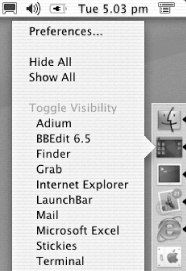 |


 Hide Others, where Application Name is the name of the currently active application. The Finder is considered an application like any other, so this works as expected. To hide everything but the Desktop and any open Finder windows, Control-click on the Desktop or Finder icon in the Dock and select Finder
  -click hides all but the selected application.
EAN: 2147483647
Pages: 161