Case Study: Creating and Using Interfaces
Case Study Creating and Using Interfaces
Our next example (Figs. 11.1111.15) reexamines the payroll system of Section 11.5. Suppose that the company involved wishes to perform several accounting operations in a single accounts-payable applicationin addition to calculating the payroll earnings that must be paid to each employee, the company must also calculate the payment due on each of several invoices (i.e., bills for goods purchased). Though applied to unrelated things (i.e., employees and invoices), both operations have to do with calculating some kind of payment amount. For an employee, the payment refers to the employee's earnings. For an invoice, the payment refers to the total cost of the goods listed on the invoice. Can we calculate such different things as the payments due for employees and invoices polymorphically in a single application? Does C# offer a capability that requires that unrelated classes implement a set of common methods (e.g., a method that calculates a payment amount)? C# interfaces offer exactly this capability.
Interfaces define and standardize the ways in which people and systems can interact with one another. For example, the controls on a radio serve as an interface between a radio's users and its internal components. The controls allow users to perform a limited set of operations (e.g., changing the station, adjusting the volume, choosing between AM and FM), and different radios may implement the controls in different ways (e.g., using push buttons, dials, voice commands). The interface specifies what operations a radio must permit users to perform but does not specify how the operations are performed. Similarly, the interface between a driver and a car with a manual transmission includes the steering wheel, the gear shift, the clutch pedal, the gas pedal and the brake pedal. This same interface is found in nearly all manual-transmission cars, enabling someone who knows how to drive one particular manual-transmission car to drive just about any manual transmission car. The components of each individual car may look a bit different, but the general purpose is the sameto allow people to drive the car.
Software objects also communicate via interfaces. A C# interface describes a set of methods that can be called on an object, to tell the object to perform some task or return some piece of information, for example. The next example introduces an interface named IPayable that describes the functionality of any object that must be capable of being paid and thus must offer a method to determine the proper payment amount due. An interface declaration begins with the keyword interface and can contain only abstract methods, properties, indexers and events (events are discussed in Chapter 13, Graphical User Interface Concepts: Part 1.) All interface members are implicitly declared both public and abstract. In addition, each interface can extend one or more other interfaces to create a more elaborate interface that other classes can implement.

To use an interface, a class must specify that it implements the interface by listing the interface after the colon (:) in the class declaration. Note that this is the same syntax used to indicate inheritance from a base class. A concrete class implementing the interface must declare each member of the interface with the signature specified in the interface declaration. A class that implements an interface but does not implement all the interface's members is an abstract classit must be declared abstract and must contain an abstract declaration for each unimplemented member of the interface. Implementing an interface is like signing a contract with the compiler that states, "I will provide an implementation for all the members specified by the interface, or I will declare them abstract."
|
An interface is typically used when disparate (i.e., unrelated) classes need to share common methods. This allows objects of unrelated classes to be processed polymorphicallyobjects of classes that implement the same interface can respond to the same method calls. Programmers can create an interface that describes the desired functionality, then implement this interface in any classes requiring that functionality. For example, in the accounts-payable application developed in this section, we implement interface IPayable in any class that must be able to calculate a payment amount (e.g., Employee, Invoice).
An interface often is used in place of an abstract class when there is no default implementation to inheritthat is, no fields and no default method implementations. Like public abstract classes, interfaces are typically public types, so they are normally declared in files by themselves with the same name as the interface and the .cs filename extension.
11.7.1. Developing an IPayable Hierarchy
To build an application that can determine payments for employees and invoices alike, we first create an interface named IPayable. Interface IPayable contains method GetPaymentAmount that returns a decimal amount that must be paid for an object of any class that implements the interface. Method GetPaymentAmount is a general purpose version of method Earnings of the Employee hierarchymethod Earnings calculates a payment amount specifically for an Employee, while GetPaymentAmount can be applied to a broad range of unrelated objects. After declaring interface IPayable, we introduce class Invoice, which implements interface IPayable. We then modify class Employee such that it also implements interface IPayable. Finally, we update Employee derived class SalariedEmployee to "fit" into the IPayable hierarchy (i.e., rename SalariedEmployee method Earnings as GetPaymentAmount).
|

|
Classes Invoice and Employee both represent things for which the company must be able to calculate a payment amount. Both classes implement IPayable, so an application can invoke method GetPaymentAmount on Invoice objects and Employee objects alike. This enables the polymorphic processing of Invoices and Employees required for our company's accounts-payable application.
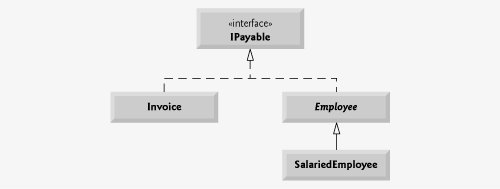
The UML class diagram in Fig. 11.10 shows the interface and class hierarchy used in our accounts-payable application. The hierarchy begins with interface IPayable. The UML distinguishes an interface from a class by placing the word "interface" in guillemets (« and ») above the interface name. The UML expresses the relationship between a class and an interface through a realization. A class is said to "realize," or implement, an interface. A class diagram models a realization as a dashed arrow with a hollow arrowhead pointing from the implementing class to the interface. The diagram in Fig. 11.10 indicates that classes Invoice and Employee each realize (i.e., implement) interface IPayable. Note that as in the class diagram of Fig. 11.2, class Employee appears in italics, indicating that it is an abstract class. Concrete class SalariedEmployee extends Employee and inherits its base class's realization relationship with interface IPayable.
Figure 11.10. IPayable interface and class hierarchy UML class diagram.
(This item is displayed on page 536 in the print version)
11.7.2. Declaring Interface IPayable
The declaration of interface IPayable begins in Fig. 11.11 at line 3. Interface IPayable contains publicabstract method GetPaymentAmount (line 5). Note that the method cannot be explicitly declared public or abstract. Interface IPayable has only one method, but interfaces can have any number of members. In addition, method GetPaymentAmount has no parameters, but interface methods can have parameters.
Figure 11.11. IPayable interface declaration.
1 // Fig. 11.11: IPayable.cs
2 // IPayable interface declaration.
3 public interface IPayable
4 {
5 decimal GetPaymentAmount(); // calculate payment; no implementation
6 } // end interface IPayable
|
11.7.3. Creating Class Invoice
We now create class Invoice (Fig. 11.12) to represent a simple invoice that contains billing information for one kind of part. The class declares private instance variables partNumber, partDescription, quantity and pricePerItem (lines 58) that indicate the part number, the description of the part, the quantity of the part ordered and the price per item. Class Invoice also contains a constructor (lines 1118), properties (lines 2170) that manipulate the class's instance variables and a ToString method (lines 7379) that returns a string representation of an Invoice object. Note that the set accessors of properties Quantity (lines 5356) and PricePerItem (lines 6669) ensure that quantity and pricePerItem are assigned only non-negative values.
Figure 11.12. Invoice class implements IPayable.
(This item is displayed on pages 537 - 538 in the print version)
 1 // Fig. 11.12: Invoice.cs
 2 // Invoice class implements IPayable.
 3 public class Invoice : IPayable
 4 {
 5 private string partNumber;
 6 private string partDescription;
 7 private int quantity;
 8 private decimal pricePerItem;
 9
10 // four-parameter constructor
11 public Invoice( string part, string description, int count,
12 decimal price )
13 {
14 PartNumber = part;
15 PartDescription = description;
16 Quantity = count; // validate quantity via property
17 PricePerItem = price; // validate price per item via property
18 } // end four-parameter Invoice constructor
19
20 // property that gets and sets the part number on the invoice
21 public string PartNumber
22 {
23 get
24 {
25 return partNumber;
26 } // end get
27 set
28 {
29 partNumber = value; // should validate
30 } // end set
31 } // end property PartNumber
32
33 // property that gets and sets the part description on the invoice
34 public string PartDescription
35 {
36 get
37 {
38 return partDescription;
39 } // end get
40 set
41 {
42 partDescription = value; // should validate
43 } // end set
44 } // end property PartDescription
45
46 // property that gets and sets the quantity on the invoice 47 public int Quantity 48 { 49 get 50 { 51 return quantity; 52 } // end get 53 set 54 { 55 quantity = ( value < 0 ) ? 0 : value; // validate quantity 56 } // end set 57 } // end property Quantity 58 59 // property that gets and sets the price per item 60 public decimal PricePerItem 61 { 62 get 63 { 64 return pricePerItem; 65 } // end get 66 set 67 { 68 pricePerItem = ( value < 0 ) ? 0 : value; // validate price 69 } // end set 70 } // end property PricePerItem 71 72 // return string representation of Invoice object 73 public override string ToString() 74 { 75 return string.Format( 76 "{0}:
{1}: {2} ({3})
{4}: {5}
{6}: {7:C}", 77 "invoice", "part number", PartNumber, PartDescription, 78 "quantity", Quantity, "price per item", PricePerItem ); 79 } // end method ToString 80 81 // method required to carry out contract with interface IPayable 82 public decimal GetPaymentAmount() 83 { 84 return Quantity * PricePerItem; // calculate total cost 85 } // end method GetPaymentAmount 86 } // end class Invoice |
Line 3 of Fig. 11.12 indicates that class Invoice implements interface IPayable. Like all classes, class Invoice also implicitly extends object. C# does not allow derived classes to inherit from more than one base class, but it does allow a class to inherit from a base class and implement any number of interfaces. All objects of a class that implement multiple interfaces have the is-a relationship with each implemented interface type. To implement more than one interface, use a comma-separated list of interface names after the colon (:) in the class declaration, as in:
public class ClassName : BaseClassName, FirstInterface, SecondInterface, ...
When a class inherits from a base class and implements one or more interfaces, the class declaration must list the base class name before any interface names.
Class Invoice implements the one method in interface IPayablemethod GetPaymentAmount is declared in lines 8285. The method calculates the amount required to pay the invoice. The method multiplies the values of quantity and pricePerItem (obtained through the appropriate properties) and returns the result (line 84). This method satisfies the implementation requirement for the method in interface IPayablewe have fulfilled the interface contract with the compiler.
11.7.4. Modifying Class Employee to Implement Interface IPayable
We now modify class Employee to implement interface IPayable. Figure 11.13 contains the modified Employee class. This class declaration is identical to that of Fig. 11.4 with two exceptions. First, line 3 of Fig. 11.13 indicates that class Employee now implements interface IPayable. Second, since Employee now implements interface IPayable, we must rename Earnings to GetPaymentAmount throughout the Employee hierarchy. As with method Earnings in the version of class Employee in Fig. 11.4, however, it does not make sense to implement method GetPaymentAmount in class Employee, because we cannot calculate the earnings payment owed to a general Employeefirst, we must know the specific type of Employee. In Fig. 11.4, we declared method Earnings as abstract for this reason, and as a result, class Employee had to be declared abstract. This forced each Employee derived class to override Earnings with a concrete implementation.
Figure 11.13. Employee abstract base class.
 1 // Fig. 11.13: Employee.cs
 2 // Employee abstract base class.
 3 public abstract class Employee : IPayable
 4 {
 5 private string firstName;
 6 private string lastName;
 7 private string socialSecurityNumber;
 8
 9 // three-parameter constructor
10 public Employee( string first, string last, string ssn )
11 {
12 firstName = first;
13 lastName = last;
14 socialSecurityNumber = ssn;
15 } // end three-parameter Employee constructor
16
17 // read-only property that gets employee's first name
18 public string FirstName
19 {
20 get
21 {
22 return firstName;
23 } // end get
24 } // end property FirstName
25
26 // read-only property that gets employee's last name
27 public string LastName
28 {
29 get
30 {
31 return lastName;
32 } // end get
33 } // end property LastName
34
35 // read-only property that gets employee's social security number
36 public string SocialSecurityNumber
37 {
38 get
39 {
40 return socialSecurityNumber;
41 } // end get
42 } // end property SocialSecurityNumber
43 44 // return string representation of Employee object 45 public override string ToString() 46 { 47 return string.Format( "{0} {1}
social security number: {2}", 48 FirstName, LastName, SocialSecurityNumber ); 49 } // end method ToString 50 51 // Note: We do not implement IPayable method GetPaymentAmount here so 52 // this class must be declared abstract to avoid a compilation error. 53 public abstract decimal GetPaymentAmount(); 54 } // end abstract class Employee |
In Fig. 11.13, we handle this situation the same way. Recall that when a class implements an interface, the class makes a contract with the compiler stating that the class either will implement each of the methods in the interface or will declare them abstract. If the latter option is chosen, we must also declare the class abstract. As we discussed in Section 11.4, any concrete derived class of the abstract class must implement the abstract methods of the base class. If the derived class does not do so, it too must be declared abstract. As indicated by the comments in lines 5152, class Employee of Fig. 11.13 does not implement method GetPaymentAmount, so the class is declared abstract.
11.7.5. Modifying Class SalariedEmployee for Use in the IPayable Hierarchy
Figure 11.14 contains a modified version of class SalariedEmployee that extends Employee and implements method GetPaymentAmount. This version of SalariedEmployee is identical to that of Fig. 11.5 with the exception that the version here implements method GetPaymentAmount (lines 2932) instead of method Earnings. The two methods contain the same functionality but have different names. Recall that the IPayable version of the method has a more general name to be applicable to possibly disparate classes. The remaining Employee derived classes (e.g., HourlyEmployee, CommissionEmployee and BasePlusCommissionEmployee) also must be modified to contain method GetPaymentAmount in place of Earnings to reflect the fact that Employee now implements IPayable. We leave these modifications as an exercise and use only SalariedEmployee in our test application in this section.
Figure 11.14. SalariedEmployee class that extends Employee.
(This item is displayed on pages 540 - 541 in the print version)
 1 // Fig. 11.14: SalariedEmployee.cs
 2 // SalariedEmployee class that extends Employee.
 3 public class SalariedEmployee : Employee
 4 {
 5 private decimal weeklySalary;
 6
 7 // four-parameter constructor
 8 public SalariedEmployee( string first, string last, string ssn,
 9 decimal salary ) : base( first, last, ssn )
10 {
11 WeeklySalary = salary; // validate salary via property
12 } // end four-parameter SalariedEmployee constructor
13
14 // property that gets and sets salaried employee's salary
15 public decimal WeeklySalary
16 {
17 get
18 {
19 return weeklySalary;
20 } // end get
21 set
22 {
23 weeklySalary = value < 0 ? 0 : value; // validation
24 } // end set
25 } // end property WeeklySalary
26 27 // calculate earnings; implement interface IPayable method 28 // that was abstract in base class Employee 29 public override decimal GetPaymentAmount() 30 { 31 return WeeklySalary; 32 } // end method GetPaymentAmount 33 34 // return string representation of SalariedEmployee object 35 public override string ToString() 36 { 37 return string.Format( "salaried employee: {0}
{1}: {2:C}", 38 base.ToString(), "weekly salary", WeeklySalary ); 39 } // end method ToString 40 } // end class SalariedEmployee |
When a class implements an interface, the same is-a relationship provided by inheritance applies. For example, class Employee implements IPayable, so we can say that an Employee is an IPayable, as are any classes that extend Employee. SalariedEmployee objects, for instance, are IPayable objects. As with inheritance relationships, an object of a class that implements an interface may be thought of as an object of the interface type. Objects of any classes derived from the class that implements the interface can also be thought of as objects of the interface type. Thus, just as we can assign the reference of a SalariedEmployee object to a base class Employee variable, we can assign the reference of a SalariedEmployee object to an interface IPayable variable. Invoice implements IPayable, so an Invoice object also is an IPayable object, and we can assign the reference of an Invoice object to an IPayable variable.
|

|
11.7.6. Using Interface IPayable to Process Invoices and Employees Polymorphically
PayableInterfaceTest (Fig. 11.15) illustrates that interface IPayable can be used to process a set of Invoices and Employees polymorphically in a single application. Line 10 declares payableObjects and assigns it an array of four IPayable variables. Lines 1314 assign the references of Invoice objects to the first two elements of payableObjects. Lines 1518 assign the references of SalariedEmployee objects to the remaining two elements of payableObjects. These assignments are allowed because an Invoice is an IPayable, a SalariedEmployee is an Employee and an Employee is an IPayable. Lines 2429 use a foreach statement to process each IPayable object in payableObjects polymorphically, printing the object as a string, along with the payment due. Note that line 27 implicitly invokes method ToString off an IPayable interface reference, even though ToString is not declared in interface IPayableall references (including those of interface types) refer to objects that extend object and therefore have a ToString method. Line 28 invokes IPayable method GetPaymentAmount to obtain the payment amount for each object in payableObjects, regardless of the actual type of the object. The output reveals that the method calls in lines 2728 invoke the appropriate class's implementation of methods ToString and GetPaymentAmount. For instance, when currentEmployee refers to an Invoice during the first iteration of the foreach loop, class Invoice's ToString and GetPaymentAmount methods execute.
|
Figure 11.15. Tests interface IPayable with disparate classes.
 1 // Fig. 11.15: PayableInterfaceTest.cs
 2 // Tests interface IPayable with disparate classes.
 3 using System;
 4
 5 public class PayableInterfaceTest
 6 {
 7 public static void Main( string[] args )
 8 {
 9 // create four-element IPayable array
 10 IPayable[] payableObjects = new IPayable[ 4 ];
11
12 // populate array with objects that implement IPayable
13 payableObjects[ 0 ] = new Invoice( "01234", "seat", 2, 375.00M );
14 payableObjects[ 1 ] = new Invoice( "56789", "tire", 4, 79.95M );
15 payableObjects[ 2 ] = new SalariedEmployee( "John", "Smith",
16 "111-11-1111", 800.00M );
17 payableObjects[ 3 ] = new SalariedEmployee( "Lisa", "Barnes",
18 "888-88-8888", 1200.00M );
19
20 Console.WriteLine(
21 "Invoices and Employees processed polymorphically:
" );
22
23 // generically process each element in array payableObjects 24 foreach ( IPayable currentPayable in payableObjects ) 25 { 26 // output currentPayable and its appropriate payment amount 27 Console.WriteLine( "{0}
{1}: {2:C}
", currentPayable, 28 "payment due", currentPayable.GetPaymentAmount() ); 29 } // end foreach 30 } // end Main 31 } // end class PayableInterfaceTest
|
11.7.7. Common Interfaces of the .NET Framework Class Library
In this section, we overview several common interfaces in the .NET Framework Class Library. These interfaces are implemented and used in the same manner as those you create (e.g., interface IPayable in Section 11.7.2). The FCL's interfaces enable you to extend many important aspects of C# with your own classes. Figure 11.16 overviews several commonly used FCL interfaces.
|
Interface |
Description |
|---|---|
|
IComparable |
As you learned in Chapter 3, C# contains several comparison operators (e.g., <, <=, >, >=, ==, !=) that allow you to compare simple-type values. In Section 11.8 you will see that these operators can be defined to compare two objects. Interface IComparable can also be used to allow objects of a class that implements the interface to be compared to one another. The interface contains one method, CompareTo, that compares the object that calls the method to the object passed as an argument to the method. Classes must implement CompareTo to return a value indicating whether the object on which it is invoked is less than (negative integer return value), equal to (0 return value) or greater than (positive integer return value) the object passed as an argument, using any criteria specified by the programmer. For example, if class Employee implements IComparable, its CompareTo method could compare Employee objects by their earnings amounts. Interface IComparable is commonly used for ordering objects in a collection such as an array. We use IComparable in Chapter 26, Generics, and Chapter 27, Collections. |
|
IComponent |
Implemented by any class that represents a component, including Graphical User Interface (GUI) controls (such as buttons or labels). Interface IComponent defines the behaviors that components must implement. We discuss IComponent and many GUI controls that implement this interface in Chapter 13, Graphical User Interface Concepts: Part 1, and Chapter 14, Graphical User Interface Concepts: Part 2. |
|
IDisposable |
Implemented by classes that must provide an explicit mechanism for releasing resources. Some resources can be used by only one program at a time. In addition, some resources, such as files on disk, are unmanaged resources that, unlike memory, cannot be released by the garbage collector. Classes that implement interface IDisposable provide a Dispose method that can be called to explicitly release resources. We discuss IDisposable briefly in Chapter 12, Exception Handling. You can learn more about this interface at msdn2.microsoft.com/en-us/library/aax125c9. The MSDN article Implementing a Dispose Method at msdn2.microsoft.com/en-us/library/fs2xkftw discusses the proper implementation of this interface in your classes. |
|
IEnumerator |
Used for iterating through the elements of a collection (such as an array) one element at a time. Interface IEnumerator contains method MoveNext to move to the next element in a collection, method Reset to move to the position before the first element and property Current to return the object at the current location. We use IEnumerator in Chapter 27, Collections. |
Preface
Index
Introduction to Computers, the Internet and Visual C#
- Introduction
- What Is a Computer?
- Computer Organization
- Early Operating Systems
- Personal Computing, Distributed Computing and Client/Server Computing
- Hardware Trends
- Microsofts Windows® Operating System
- Machine Languages, Assembly Languages and High-Level Languages
- C#
- C, C++, Java and Visual Basic
- Other High-Level Languages
- The Internet and the World Wide Web
- Extensible Markup Language (XML)
- Microsofts .NET
- The .NET Framework and the Common Language Runtime
- Test-Driving a C# Application
- Software Engineering Case Study: Introduction to Object Technology and the UML
- Wrap-Up
- Web Resources
- Summary
- Terminology
- Self-Review Exercises
- Exercises
Introduction to the Visual C# 2005 Express Edition IDE
- Introduction
- Overview of the Visual Studio 2005 IDE
- Menu Bar and Toolbar
- Navigating the Visual Studio 2005 IDE
- Using Help
- Using Visual Programming to Create a Simple Program Displaying Text and an Image
- Wrap-Up
- Web Resources
- Summary
- Terminology
- Self-Review Exercises
- Exercises
Introduction to C# Applications
- Introduction
- A Simple C# Application: Displaying a Line of Text
- Creating Your Simple Application in Visual C# Express
- Modifying Your Simple C# Application
- Formatting Text with Console.Write and Console.WriteLine
- Another C# Application: Adding Integers
- Memory Concepts
- Arithmetic
- Decision Making: Equality and Relational Operators
- (Optional) Software Engineering Case Study: Examining the ATM Requirements Document
- Wrap-Up
- Summary
- Terminology
- Self-Review Exercises
- Exercises
Introduction to Classes and Objects
- Introduction
- Classes, Objects, Methods, Properties and Instance Variables
- Declaring a Class with a Method and Instantiating an Object of a Class
- Declaring a Method with a Parameter
- Instance Variables and Properties
- UML Class Diagram with a Property
- Software Engineering with Properties and set and get Accessors
- Value Types vs. Reference Types
- Initializing Objects with Constructors
- Floating-Point Numbers and Type decimal
- (Optional) Software Engineering Case Study: Identifying the Classes in the ATM Requirements Document
- Wrap-Up
- Summary
- Terminology
- Self-Review Exercises
- Exercises
Control Statements: Part 1
- Introduction
- Algorithms
- Pseudocode
- Control Structures
- if Single-Selection Statement
- if...else Double-Selection Statement
- while Repetition Statement
- Formulating Algorithms: Counter-Controlled Repetition
- Formulating Algorithms: Sentinel-Controlled Repetition
- Formulating Algorithms: Nested Control Statements
- Compound Assignment Operators
- Increment and Decrement Operators
- Simple Types
- (Optional) Software Engineering Case Study: Identifying Class Attributes in the ATM System
- Wrap-Up
- Summary
- Terminology
- Self-Review Exercises
- Exercises
Control Statements: Part 2
- Introduction
- Essentials of Counter-Controlled Repetition
- for Repetition Statement
- Examples Using the for Statement
- do...while Repetition Statement
- switch Multiple-Selection Statement
- break and continue Statements
- Logical Operators
- Structured Programming Summary
- (Optional) Software Engineering Case Study: Identifying Objects States and Activities in the ATM System
- Wrap-Up
- Summary
- Terminology
- Self-Review Exercises
- Exercises
Methods: A Deeper Look
- Introduction
- Packaging Code in C#
- static Methods, static Variables and Class Math
- Declaring Methods with Multiple Parameters
- Notes on Declaring and Using Methods
- Method Call Stack and Activation Records
- Argument Promotion and Casting
- The Framework Class Library
- Case Study: Random-Number Generation
- Case Study: A Game of Chance (Introducing Enumerations)
- Scope of Declarations
- Method Overloading
- Recursion
- Passing Arguments: Pass-by-Value vs. Pass-by-Reference
- (Optional) Software Engineering Case Study: Identifying Class Operations in the ATM System
- Wrap-Up
- Summary
- Terminology
- Self-Review Exercises
- Exercises
Arrays
- Introduction
- Arrays
- Declaring and Creating Arrays
- Examples Using Arrays
- Case Study: Card Shuffling and Dealing Simulation
- foreach Statement
- Passing Arrays and Array Elements to Methods
- Passing Arrays by Value and by Reference
- Case Study: Class GradeBook Using an Array to Store Grades
- Multidimensional Arrays
- Case Study: Class GradeBook Using a Rectangular Array
- Variable-Length Argument Lists
- Using Command-Line Arguments
- (Optional) Software Engineering Case Study: Collaboration Among Objects in the ATM System
- Wrap-Up
- Summary
- Terminology
- Self-Review Exercises
- Exercises
- Special Section: Building Your Own Computer
Classes and Objects: A Deeper Look
- Introduction
- Time Class Case Study
- Controlling Access to Members
- Referring to the Current Objects Members with the this Reference
- Indexers
- Time Class Case Study: Overloaded Constructors
- Default and Parameterless Constructors
- Composition
- Garbage Collection and Destructors
- static Class Members
- readonly Instance Variables
- Software Reusability
- Data Abstraction and Encapsulation
- Time Class Case Study: Creating Class Libraries
- internal Access
- Class View and Object Browser
- (Optional) Software Engineering Case Study: Starting to Program the Classes of the ATM System
- Wrap-Up
- Summary
- Terminology
- Self-Review Exercises
- Exercises
Object-Oriented Programming: Inheritance
- Introduction
- Base Classes and Derived Classes
- protected Members
- Relationship between Base Classes and Derived Classes
- Constructors in Derived Classes
- Software Engineering with Inheritance
- Class object
- Wrap-Up
- Summary
- Terminology
- Self-Review Exercises
- Exercises
Polymorphism, Interfaces & Operator Overloading
- Introduction
- Polymorphism Examples
- Demonstrating Polymorphic Behavior
- Abstract Classes and Methods
- Case Study: Payroll System Using Polymorphism
- sealed Methods and Classes
- Case Study: Creating and Using Interfaces
- Operator Overloading
- (Optional) Software Engineering Case Study: Incorporating Inheritance and Polymorphism into the ATM System
- Wrap-Up
- Summary
- Terminology
- Self-Review Exercises
- Exercises
Exception Handling
- Introduction
- Exception Handling Overview
- Example: Divide by Zero Without Exception Handling
- Example: Handling DivideByZeroExceptions and FormatExceptions
- .NET Exception Hierarchy
- finally Block
- Exception Properties
- User-Defined Exception Classes
- Wrap-Up
- Summary
- Terminology
- Self-Review Exercises
- Exercises
Graphical User Interface Concepts: Part 1
- Introduction
- Windows Forms
- Event Handling
- Control Properties and Layout
- Labels, TextBoxes and Buttons
- GroupBoxes and Panels
- CheckBoxes and RadioButtons
- PictureBoxes
- ToolTips
- NumericUpDown Control
- Mouse-Event Handling
- Keyboard-Event Handling
- Wrap-Up
- Summary
- Terminology
- Self-Review Exercises
- Answers To Self-Review Exercises
- Exercises
Graphical User Interface Concepts: Part 2
- Introduction
- Menus
- MonthCalendar Control
- DateTimePicker Control
- LinkLabel Control
- ListBox Control
- CheckedListBox Control
- ComboBox Control
- TreeView Control
- ListView Control
- TabControl Control
- Multiple Document Interface (MDI) Windows
- Visual Inheritance
- User-Defined Controls
- Wrap-Up
- Summary
- Terminology
- Self-Review Exercises
- Exercises
Multithreading
- Introduction
- Thread States: Life Cycle of a Thread
- Thread Priorities and Thread Scheduling
- Creating and Executing Threads
- Thread Synchronization and Class Monitor
- Producer/Consumer Relationship without Thread Synchronization
- Producer/Consumer Relationship with Thread Synchronization
- Producer/Consumer Relationship: Circular Buffer
- Multithreading with GUIs
- Wrap-Up
- Summary
- Terminology
- Self-Review Exercises
- Exercises
Strings, Characters and Regular Expressions
- Introduction
- Fundamentals of Characters and Strings
- string Constructors
- string Indexer, Length Property and CopyTo Method
- Comparing strings
- Locating Characters and Substrings in strings
- Extracting Substrings from strings
- Concatenating strings
- Miscellaneous string Methods
- Class StringBuilder
- Length and Capacity Properties, EnsureCapacity Method and Indexer of Class StringBuilder
- Append and AppendFormat Methods of Class StringBuilder
- Insert, Remove and Replace Methods of Class StringBuilder
- Char Methods
- Card Shuffling and Dealing Simulation
- Regular Expressions and Class Regex
- Wrap-Up
- Summary
- Terminology
- Self-Review Exercises
- Exercises
Graphics and Multimedia
- Introduction
- Drawing Classes and the Coordinate System
- Graphics Contexts and Graphics Objects
- Color Control
- Font Control
- Drawing Lines, Rectangles and Ovals
- Drawing Arcs
- Drawing Polygons and Polylines
- Advanced Graphics Capabilities
- Introduction to Multimedia
- Loading, Displaying and Scaling Images
- Animating a Series of Images
- Windows Media Player
- Microsoft Agent
- Wrap-Up
- Summary
- Terminology
- Self-Review Exercises
- Exercises
Files and Streams
- Introduction
- Data Hierarchy
- Files and Streams
- Classes File and Directory
- Creating a Sequential-Access Text File
- Reading Data from a Sequential-Access Text File
- Serialization
- Creating a Sequential-Access File Using Object Serialization
- Reading and Deserializing Data from a Sequential-Access Text File
- Wrap-Up
- Summary
- Terminology
- Self-Review Exercises
- Exercises
Extensible Markup Language (XML)
- Introduction
- XML Basics
- Structuring Data
- XML Namespaces
- Document Type Definitions (DTDs)
- W3C XML Schema Documents
- (Optional) Extensible Stylesheet Language and XSL Transformations
- (Optional) Document Object Model (DOM)
- (Optional) Schema Validation with Class XmlReader
- (Optional) XSLT with Class XslCompiledTransform
- Wrap-Up
- Web Resources
- Summary
- Terminology
- Self-Review Exercises
- Exercises
Database, SQL and ADO.NET
- Introduction
- Relational Databases
- Relational Database Overview: Books Database
- SQL
- ADO.NET Object Model
- Programming with ADO.NET: Extracting Information from a Database
- Querying the Books Database
- Programming with ADO.NET: Address Book Case Study
- Using a DataSet to Read and Write XML
- Wrap-Up
- Web Resources
- Summary
- Terminology
- Self-Review Exercises
- Exercises
ASP.NET 2.0, Web Forms and Web Controls
- Introduction
- Simple HTTP Transactions
- Multitier Application Architecture
- Creating and Running a Simple Web-Form Example
- Web Controls
- Session Tracking
- Case Study: Connecting to a Database in ASP.NET
- Case Study: Secure Books Database Application
- Wrap-Up
- Web Resources
- Summary
- Terminology
- Self-Review Exercises
- Exercises
Web Services
- Introduction
- .NET Web Services Basics
- Simple Object Access Protocol (SOAP)
- Publishing and Consuming Web Services
- Session Tracking in Web Services
- Using Web Forms and Web Services
- User-Defined Types in Web Services
- Wrap-Up
- Web Resources
- Summary
- Terminology
- Self-Review Exercises
- Exercises
Networking: Streams-Based Sockets and Datagrams
- Introduction
- Connection-Oriented vs. Connectionless Communication
- Protocols for Transporting Data
- Establishing a Simple TCP Server (Using Stream Sockets)
- Establishing a Simple TCP Client (Using Stream Sockets)
- Client/Server Interaction with Stream-Socket Connections
- Connectionless Client/Server Interaction with Datagrams
- Client/Server Tic-Tac-Toe Using a Multithreaded Server
- WebBrowser Control
- .NET Remoting
- Wrap-Up
- Summary
- Terminology
- Self-Review Exercises
- Exercises
Searching and Sorting
- Introduction
- Searching Algorithms
- Sorting Algorithms
- Wrap-Up
- Summary
- Terminology
- Self-Review Exercises
- Exercises
Data Structures
- Introduction
- Simple-Type structs, Boxing and Unboxing
- Self-Referential Classes
- Linked Lists
- Stacks
- Queues
- Trees
- Wrap-Up
- Summary
- Terminology
- Self-Review Exercises
- Exercises
Generics
- Introduction
- Motivation for Generic Methods
- Generic Method Implementation
- Type Constraints
- Overloading Generic Methods
- Generic Classes
- Notes on Generics and Inheritance
- Wrap-Up
- Summary
- Terminology
- Self-Review Exercises
- Exercises
Collections
- Introduction
- Collections Overview
- Class Array and Enumerators
- Non-Generic Collections
- Generic Collections
- Synchronized Collections
- Wrap-Up
- Summary
- Terminology
- Self-Review Exercises
- Exercises
Appendix A. Operator Precedence Chart
Appendix B. Number Systems
- B.1. Introduction
- B.2. Abbreviating Binary Numbers as Octal and Hexadecimal Numbers
- B.3. Converting Octal and Hexadecimal Numbers to Binary Numbers
- B.4. Converting from Binary, Octal or Hexadecimal to Decimal
- B.5. Converting from Decimal to Binary, Octal or Hexadecimal
- B.6. Negative Binary Numbers: Twos Complement Notation
- Summary
- Terminology
- Self-Review Exercises
- Exercises
Appendix C. Using the Visual Studio 2005 Debugger
- C.1. Introduction
- C.2. Breakpoints and the Continue Command
- C.3. The Locals and Watch Windows
- C.4. Controlling Execution Using the Step Into, Step Over, Step Out and Continue Commands
- C.5. Other Features
- C.6. Wrap-Up
- Summary
- Terminology
- Self-Review Exercises
Appendix D. ASCII Character Set
Appendix E. Unicode®
- E.1. Introduction
- E.2. Unicode Transformation Formats
- E.3. Characters and Glyphs
- E.4. Advantages/Disadvantages of Unicode
- E.5. Using Unicode
- E.6. Character Ranges
- Summary
- Terminology
- Self-Review Exercises
- Answers to Self-Review exercises
- Exercises
Appendix F. Introduction to XHTML: Part 1
- F.1. Introduction
- F.2. Editing XHTML
- F.3. First XHTML Example
- F.4. W3C XHTML Validation Service
- F.5. Headers
- F.6. Linking
- F.7. Images
- F.8. Special Characters and More Line Breaks
- F.9. Unordered Lists
- F.10. Nested and Ordered Lists
- F.11. Web Resources
Appendix G. Introduction to XHTML: Part 2
- G.1. Introduction
- G.2. Basic XHTML Tables
- G.3. Intermediate XHTML Tables and Formatting
- G.4. Basic XHTML Forms
- G.5. More Complex XHTML Forms
- G.6. Internal Linking
- G.7. Creating and Using Image Maps
- G.8. meta Elements
- G.9. frameset Element
- G.10. Nested framesets
- G.11. Web Resources
Appendix H. HTML/XHTML Special Characters
Appendix I. HTML/XHTML Colors
Appendix J. ATM Case Study Code
- Appendix J. ATM Case Study Code
- J.1. ATM Case Study Implementation
- J.2. Class ATM
- J.3. Class Screen
- J.4. Class Keypad
- J.5. Class CashDispenser
- J.6. Class DepositSlot
- J.7. Class Account
- J.8. Class BankDatabase
- J.9. Class Transaction
- J.10. Class BalanceInquiry
- J.11. Class Withdrawal
- J.12. Class Deposit
- J.13. Class ATMCaseStudy
- J.14. Wrap-Up
Appendix K. UML 2: Additional Diagram Types
Appendix L. Simple Types
Index

EAN: 2147483647
Pages: 600
