3.4 Forest trust
Windows Server 2003 forest trust relationships allow administrators to securely federate two AD forests using a single trust relationship. The forest trust features can provide a seamless AD object browsing, user authentication, and access control experience between different forests. Windows Server 2003 also offers new powerful tools to define fine-grain cross-forest trust security policies. In the following sections we will explore more in detail how these new cross-forest trust features work.
The cross-forest trust features are a fundamental building block for Microsoft’s federation strategy. Windows Server 2003 cross-forest trust primarily focuses on federation between different Microsoft AD environments (e.g., to link together company forests or company partner or subsidiary forests). In the 2003–2004 time frame, the MS product range will be extended with a product that is specifically focusing on external federation between Windows forests and other organization’s Trusted Third Parties (TTPs) (that are not necessarily rooted on MS AD technology): This product was, at the time of the writing of this book, codenamed “Trustbridge.”
3.4.1 Features
Windows Server 2003 includes a set of important enhancements that facilitate the setup and administration of cross-forest trust relationships:
-
Forest trust relationships are transitive between two forests. In Windows Server 2003 it is enough to have a single trust between the two root domains of two different forests to enable interforest authentication between all domains in the two forests. This is illustrated in Figure3.9 for Domain C in the compaq.com forest: Because of the transitive forest trust between compaq.com and hp.com, domain C will automatically have a transitive trust relationship with domains D, E, and F in the hp.com forest (the same is true for the other domains). Transitive trusts greatly simplify forest trust administration and provide transparent SSO between all domains in the two forests. In Windows 2000 the same level of functionality required the definition of a trust relationship between every other domain in the two forests. Transitive forest trusts do not allow for transparent object browsing (e.g., when setting access control settings) between all domains in the two forests; this is only possible between the root domains of the two forests.
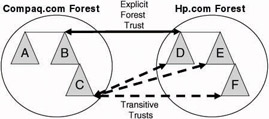
Figure 3.9: Cross-forest trust transitivity between two forests. -
Forest trusts are not transitive between multiple forests (as illustrated in Figure 3.10 for the digital.com, compaq.com, and hp.com forests). If forest trusts exist between the digital.com and the compaq.com forests and between the compaq.com and the hp.com forests, then there will not automatically be a transitive trust between digital.com and hp.com (as illustrated in the left picture of Figure3.10). If a transparent SSO experience is required between the hp.com and the digital.com forests, an explicit forest trust relation- ship would be required between those two forests (as illustrated in the right picture of Figure 3.10).
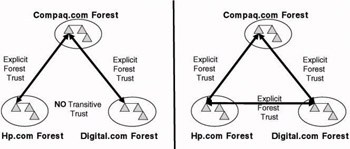
Figure 3.10: Cross-forest trust between multiple forests. -
Forest trust relationships can be defined in a very granular way. Windows Server 2003 supports three ways to restrict forest trust: SID filtering, top-level name restrictions, and selective authentication (the latter feature is also known as the authentication firewall). These three concepts will be explained in greater detail later. Remember that in Windows 2000 trust definition is very coarse-grain:[1] When you set up a trust between forests in a Windows 2000 environment, you either trust everyone or don’t trust anyone.
-
Forest trust relationships enable the use of different authentication protocols and methods for cross-forest resource access. When performing a cross-forest network logon, both Kerberos and NTLM are supported. For interactive cross-forest logon, users can use either a Kerberos PKINIT-based smart card logon feature or a User Principal Name (UPN)–based logon feature (the latter supports both the Kerberos and the NTLM authentication protocols).
-
Forest trust relationships create cross-forest visibility of universal and global groups and user accounts. For example, when you create a forest trust relationship between the root domain of resource forest hp.com (the trusting forest) and the root domain of account forest compaq.com (the trusted forest) you can
-
put universal and global groups defined in the compaq.com forest into domain local groups in the hp.com forest.
-
put user accounts defined in the in the compaq.com forest into domain local groups in the hp.com forest.
-
-
Windows Server 2003 includes a new trust wizard (accessible from the Active Directory Domains and Trusts MMC snap-in) that guides you through the different trust configuration options (illustrated in Figure 3.11). This wizard can be used to set up a forest trust and all other trust types (shortcut, external, and realm trusts). When the wizard detects that the trusted domain is a forest root domain, you can choose to set up either a forest trust or an external trust (the difference between the two is explained next). When setting up a forest trust, the wizard guides you through the following steps:
-
Specification of the DNS or NetBIOS name of the target domain
-
Specification of whether the trust will be bidirectional, one-way incoming, or one-way outgoing
-
Specification of whether you want to create the trust in both domains or just in your proper domain
-
Specification of whether the authentication firewall must be enabled
-
Specification of which DNS name suffixes should be enabled for cross-forest name suffix routing
-
Confirmation of the creation of the trust
-
An important requirement to use the Windows Server 2003 forest trust features outlined earlier (with the exception of the new trust wizard) is that both forests are in Windows Server 2003 functionality level 2. This forest functionality level is only available if all domains are at functionality level 2. The latter is only possible if all the domain controllers in a domain are running the Windows Server 2003 operating system.
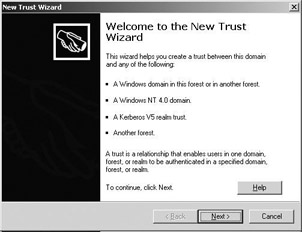
Figure 3.11: The new Windows Server 2003 Trust Wizard.
Processing of GPOs, Logon Scripts, and Profiles in an Interactive Cross- Forest Logon Feature In Windows Server 2003 you can influence whether the logon scripts, the roaming profiles, and the user portions of the GPOs in the user’s logon domain are made available to a user when logging on interactively over a forest trust link.
This can be done by modifying the “Allow Cross-Forest User Policy and Roaming User Profiles” GPO setting in the following GPO container: Computer Configuration\Administrative Templates\System\Group Policy\. By default this setting is disabled. In other words: by default user logon scripts and profiles are not applied in cross-forest logon scenarios.
This GPO setting is also available in Windows 2000 from Windows 2000 Service Pack 4 (SP4) onwards. Like in Windows Server 2003 the setting is also disabled by default. In pre- SP4 Windows 2000 setups the application of logon scripts and user profiles is enabled by default in cross-forest logon scenarios. All this is documented in the Microsoft Knowledge Base article Q823862.
3.4.2 Behind the scenes
The basic enabler behind forest trust is a new trustedDomain Active Directory object (TDO) type called “forest”. TDOs of type forest contain a new attribute called msDS-TrustForestTrustInfo that is used to store information about the domains in the trusted forest. This is basically security and NetBIOS and DNS naming information of the root domain of the trusted forest and any top-level name (TLN) restrictions (explained next) related to the other domains in the trusted forest. The information stored in the msDS-TrustForestTrustInfo object is basically used to route authentication requests and object lookups between forests. The msDS-TrustForest- TrustInfo attribute is a binary blob which can be deciphered using the LsaQueryForestTrustInformation API (this API is documented in the Windows platform SDK).
Remember that the TDOs and their attributes are replicated to the global catalog (GC). As a consequence, any machine in the forest can look up forest trust TDO objects and use their content. To take a look at a TDO’s attributes, you can use the AdsiEdit tool coming with the Windows Server 2003 support tools (as illustrated in Figure 3.12 for the hptest.net TDO).
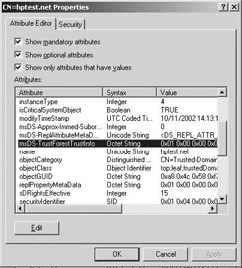
Figure 3.12: Windows Server 2003 forest trust attributes (as viewed from AdsiEdit).
Windows Server 2003 supports two ways to link forests together: using a forest or an external trust. The latter was the only way to link forests together in Windows 2000. The key difference between a forest trust and an external trust is that a forest trust contains information about all domains in the remote forest. As a consequence, it can support Kerberosbased authentication, UPN-based logon feature, and object lookups between any of the domains in the two forests. Figure 3.13 shows how two other forests “cpqtest.net” and “digitaltest.net” are displayed in the Windows object picker (used for setting access control settings) after two forest trust relationships have been defined: one between hewlettpackardtest.net and cpqtest.net and another one between hewlettpackardtest.net and digitaltest.net.
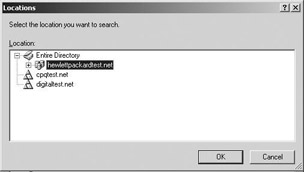
Figure 3.13: Display of other forest “hptest.net” in Object Picker.
The easiest way to find out a trust relationship’s type is to use the AD Domains and Trusts MMC snap-in and open the properties of a domain container. In the Trusts tab you can find the domain name of the trust relationship, the trust type, and whether the trust is transitive (as illustrated in Figure 3.4).
3.4.3 Restricting forest trust
Windows Server 2003 includes several ways to restrict forest trust: top-level name restrictions, selective authentication, and SID filtering. These will be explained in the following sections.
Name suffix routing and top-level name restrictions
Windows Server 2003 uses a mechanism called name suffix routing to provide name resolution between forests linked together using a forest trust. As explained earlier, name resolution is needed to route cross-forest authentication and object query requests. The Windows Server 2003 cross-forest routing mechanism is rooted on a list of DNS domain suffixes that is stored in the TDO of the root domain of a forest. The suffixes can be disabled, enabled, or excluded to modify the cross-forest routing behavior. How to do this will be explained next. Name suffix routing modifications in the first place only affect Kerberos authentication behaviour. NTLM authentication messages passed between domains that are not requiring routing logic bypass the name suffix routing restrictions.
In the example in Figure 3.14, a one-way forest trust has been defined between the cpqtest.net and the hewlettpackardtest.net Windows forests. The hewlettpackardtest.net domain is the root domain of the forest with the same name. The hewlettpackardtest.net forest is made up of a second domain tree called hp.com. In this scenario, cpqtest.net is the trusting domain containing the resources and hewlettpackardtest.net is the trusted domain containing the users. The administrator in the cpqtest.net domain decides that he or she does not want to trust the authentication requests or object query requests that are coming in from accounts in the hp.com domain. To do so, he or she can disable the “hp.com” namespace in the msDS-TrustForestTrustInfo attribute of the TDO for the hewlettpackardtest.net domain in the cpqtest.net AD naming context, which is on the outgoing side of the trust.
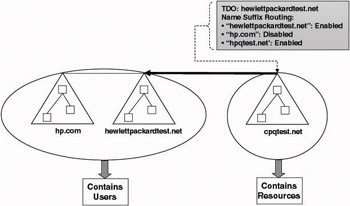
Figure 3.14: TLN restrictions example: disabling DNS namespaces.
DNS namespaces can be disabled when running the new Windows Server 2003 Trust Wizard. The page where this is done is illustrated in Figure 3.15. The wizard displays all the DNS suffixes of the top-level domains in a forest (with the exception of the DNS suffix of the root domain itself) and all UPN suffixes that have been defined on the forest level. In the example of Figure 3.15, there is one additional top-level DNS suffix “hp.com” and one UPN suffix has been defined “hptest.net.” To disable the routing of all incoming requests with a *.hp.com suffix in the cpqtest.net forest, simply uncheck the box—as illustrated in Figure 3.15. To enable routing (in the example, routing is enabled for *.hptest.net), simply leave the checkbox checked.
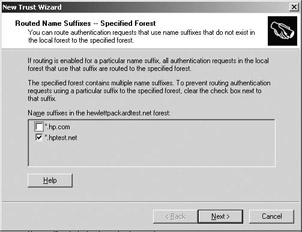
Figure 3.15: TLN restrictions example: enabling DNS namespaces when running the Trust Wizard.
Remember that forest UPN suffixes are defined from the AD Domains and Trusts MMC snap-in. To add or delete additional UPN suffixes, right-click the Active Directory Domains and Trusts container and select properties.
DNS namespaces can also be disabled from the “Name Suffix Routing” tab in the properties of a trust object (available from the AD Domains and Trusts MMC snap-in). This is illustrated in Figure 3.16 for the hp.com suffix in the properties of the hewlettpackardtest.net trust object. To disable or enable a suffix, select them and click the “Enable” or “Disable” pushbuttons as needed. Note that the dialog box also shows another DNS suffix called “hewlettpackard.net” that is set to disable and marked as “New.” This is a UPN suffix that was added to the “hewlettpackardtest.net” forest after the Trust Wizard was run. By default, Windows Server 2003 disables these newly added suffixes.
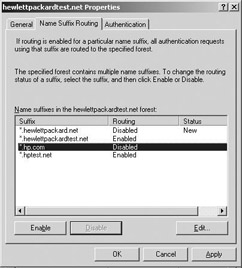
Figure 3.16: TLN restrictions example: disabling DNS namespaces from the Trust Properties.
Disabling a namespace in the properties of forest trust relationship fully disables the routing of requests from that namespace and all its subordinate namespace. For example, disabling the hp.com namespace will disable the routing from all subordinate namespaces, including emea.hp.com, americas.hp.com, and asiapac.hp.com. Top-level name (TLN) restrictions also allow you to exclude the routing of only certain subordinate namespaces. For example, if routing from the hp.com namespace was enabled, you could exclude just the routing from the emea.hp.com subordinate namespace. A key thing to remember is that TLN restrictions always modify the authentication routing behaviour for traffic coming from a particular namespace. They are always configured on the incoming side of a trust relationship.
TLN restrictions can also be used to avoid DNS namespace collisions during the routing of cross-forest authentication requests. A DNS namespace collision occurs when the Windows security software can follow two or more different DNS paths to get to a target domain or forest.
In the example in Figure 3.17, a bidirectional forest trust relationship has been set up between the hewlettpackardtest.net and hr.hewlettpackardtest.net forests. A one-way forest trust relationship exists both between the hewlettpackardtest.net and the cpqtest.net forests and between the hr.hewlettpackardtest.net and the cpqtest.net forests. Both the hewlettpackardtest.net and the hr.hewlettpackardtest.net forests contain resources; the cpqtest.net forest contains users.
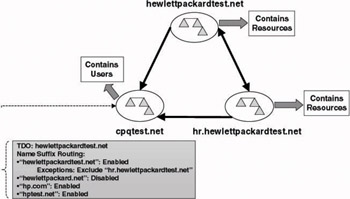
Figure 3.17: TLN restrictions example.
By default, the forest trust between hewlettpackardtest.net and cpqtest.net routes all authentication traffic for the *.hewlettpackardtest.net DNS suffix to the hewlettpackardtest.net forest. *.hewlettpackardtest.net includes both the hewlettpackardtest.net and hr.hewlettpackardtest.net DNS domains. Because of the lack of trust transitivity between multiple forests, this may lead to problems. An authentication request coming from the cpqtest.net forest for a service in hr.hewlettpackardtest.net—that is routed to hewlettpackardtest.net—cannot be forwarded by the DCs in the hewlettpackardtest.net forest to the hr.hewlettpackardtest.net forest.
In order to avoid these DNS namespace collisions, a TLN restriction should be set in the cpqtest.net forest on the hewlettpackardtest.net TDO to exclude the hr.hewlettpackardtest.net namespace from the forest trust with hewlettpackardtest.net.
TLN restrictions that exclude DNS namespaces are also defined on the “Name Suffix Routing” tab of the properties of a trust object (available from the AD Domains and Trusts MMC snap-in). This is illustrated in Figures 3.17 and 3.18 for the TLN restriction for the hr.hewlettpackardtest.net domain on the hewlettpackardtest.net trust. Note that the Status of the*.hr.hewlettpackardtest.net suffix in the name suffix routing tab says “Exceptions” (Figure 3.18). Switching to the Edit view (after selecting the*.hr.hewlettpackardtest.net entry in Figure 3.18) allows you to define the TLN restrictions (Figure 3.19). Contrary to the disabling and enabling of DNS namespaces, TLN restrictions cannot be set from the new Windows Server 2003 Trust Wizard.
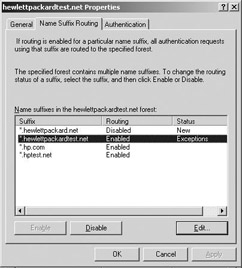
Figure 3.18: TLN restriction for *.hr.hewlettpackardtest.net: main view.
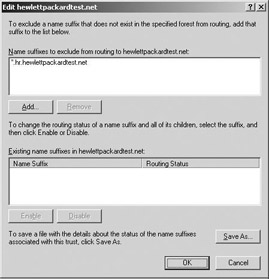
Figure 3.19: TLN restriction for *.hr.hewlettpackardtest.net: edit view.
Selective authentication
When the selective authentication feature (this feature was previously known as the authentication firewall) of a forest trust[2] relationship is enabled, users accessing cross-forest resources will not be allowed to authenticate to a domain controller or resource server (file, print server, and so forth) in the other forest unless they are explicitly allowed to do so. The reason why Microsoft added this feature is to allow for a more granular cross- forest trust definition. Without selective authentication enabled, all users from the foreign forest become almost perfect peers of the local forest users from an access control point of view. This is because they are added to the Authenticated Users group of the local forest when they cross the trust. Even though foreign forest users will still be members of the Authenticated Users group when the selective authentication option is enabled, they will only be allowed to authenticate to the forest after they pass an additional access control check (that will be explained next). Note that contrary to TLN restrictions, selective authentication is always configured on the outgoing side of a trust relationship.
A forest trust relationship’s selective authentication function can be enabled from the Trust Wizard or from the properties of the trust relation- ship. To enable it from the trust properties, select the authentication tab and select the “allow authentication only for selected resources in the local forest…” (as illustrated in Figure 3.20). When you try to access a resource in a forest for which the selective authentication has been enabled from a machine in the other forest, the following error will be displayed: “Logon Failure: The machine you are logging onto is protected by an authentication firewall. The specified account is not allowed to authenticate to the machine.”
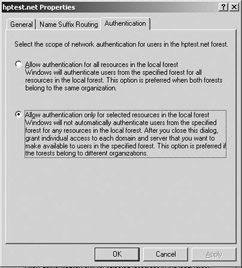
Figure 3.20: Enabling the selective authentication feature of a forest trust relationship.
For example, to enable users to authenticate to domain controllers in forests that have the selective authentication option enabled, the forest administrator must change the access control settings of the AD domain controller objects. To do so, use the Advanced Features view of the Active Directory Users and Computers MMC snap-in, open the properties of the appropriate domain controllers, and give the user the “Allowed to Authenticate” permission (as illustrated in Figure 3.21). Another example is if users wanted to access resources on a file server in a forest with the selective authentication option enabled, you would change the access control settings of the file server’s machine account.
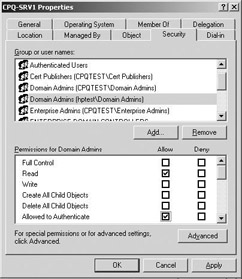
Figure 3.21: Setting the “Allowed to Authenticate” permission for a foreign security principal.
The additional access control check for the “Allowed to Authenticate” permission is triggered by a special security identity that is added to a user’s access token when he tries to access a resource using a forest trust that has the selective authentication option enabled. This SID is called the “Other Organization” (SID Value S-1-5-1000). You can easily check for its presence in a user’s access token using the whoami command-line tool and the / groups switch.
SID filtering
The idea behind SID filtering is that security identifiers for which the domain controllers in a forest are not authoritative should not be included in the access control information that is sent to other forests in cross-forest scenarios. When a user tries to authenticate to a DC of another forest, its authorization data (e.g., group memberships) are sent along with the authentication request. To make sure that only authorization data from the user’s home forest are stored in the user’s security token, the DC of the remote forest validating the authentication request will filter out all SIDs that are not local to the user’s home forest.
SID filtering protects against attempts to add foreign SIDs to authorization data in order to elevate a user’s privileges (these threats are also known as elevation of privilege attacks). For example, if a user would succeed in adding the SID of the Enterprise Administrators group of the other forest to its access control data, he or she could gain enterprise administrator–level access to the other forest.
Figure 3.22 shows the effect of using SID filtering between two forests [the Microsoft (MS) forest and the HP forest]. In this example a user that is defined in and logged into the Microsoft forest wants to access a resource in the HP forest. In the first step his authorization data are sent along with his authentication request to a DC in the HP forest. In the second step the DC in HP forest filters out all SIDs that are not linked to the user’s home forest (which is the Microsoft forest). In the example the DC automatically removes all SIDs referring to the HP forest and another forest called the Sun forest.
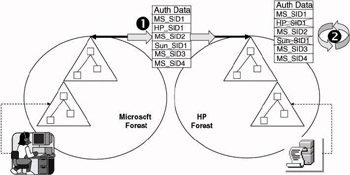
Figure 3.22: SID filtering between two forests.
SID filtering is enabled automatically when you set up a Windows Server 2003 forest trust relationship. You can turn SID filtering on or off using the netdom command line utility. To turn SID filtering on, use “netdom /filtersids yes <FQDN>”. To turn SID filtering off replace the yes in the previous command by a no. It is not recommended to use it for trust relationships between domains in the same forest—enabling SID filtering may break certain AD features. A good example is the use of SIDHistory in migration scenarios (see also Chapter 10). SID filtering was first introduced in Windows 2000 Service Pack 2. How to set up in Windows 2000 is explained in the Microsoft Knowledge Base article Q289243 available from http://support.microsoft.com/default.aspx?scid=kb;en-us;289243. Note that SID filtering is the only trust property that is not dependent on the availability of Windows Server 2003 functionality level 2.
Setting Forest Trust Properties from the Command Line Most forest trust restrictions explained in this chapter can be set from the command line. To do so you must use the netdom.exe utility: The most important forest trust–related switches are explained next.
General Netdom command:
Netdom trust <trusting_domain_name> /domain:<trusted_domain_name>
Specific Netdom command switches:
/NameSuffixes
Lists the routed name suffixes for trust_name on the domain named by trusting_domain_name.
/ToggleSuffix
Use with /NameSuffixes to change the status of a name suffix.
/SelectiveAUTH
Specifying “yes” enables selective authentication across this trust. Specifying “no” disables selective authentication across this trust. Specifying /SelectiveAUTH without yes or no will display the current state of this trust attribute.
/AddTLN
Adds the specified top-level name to the forest trust information for the specified trust.
/AddTLNEX
Adds the specified top-level name exclusion to the forest trust information for the specified trust.
/RemoveTLN
Removes the specified top-level name from the forest trust information from the specified trust.
/RemoveTLNEX
Removes the specified top-level name exclusion from the forest trust information from the specified trust.
3.4.4 Synchronizing forest data
Setting up a forest trust relationship between two Windows forests creates Windows authentication and authorization interoperability between the two environments. From a user and administrator perspective, it is also very useful to provide directory object visibility across the two forests. A user may, for example, want to connect to a printer (an AD printQueue object) or a file share (an AD volume object) in the other forest.
This basically means that resources like printers and file shares that are published in the Active Directory of one forest should be published in the Active Directory of the other forest. This can be done using an LDAP synchronization tool. Examples of tools providing this kind of functionality are HP’s LDAP Directory Synchronization Utility (LDSU) and metadirectory tools such as Microsoft Identity Integration Server 2003 (MIIS 2003—for- merly known as MMS).
[1]Note that Windows 2000 supports SID filtering between domains from Service Pack 2 (SP2) onward.
[2]Selective authentication can also be set on external trust relationships.

EAN: 2147483647
Pages: 137