Killer Game Programming in Java
Authors: Davison A.
Published year: 2006
Pages: 231-232/340
Buy this book on amazon.com >>

Class Diagrams for Maze3D

Figure 25-2 gives the class diagrams for the Maze3D application, including the class names and public methods .

Maze3D is the usual top-level JFrame but does a bit more than in previous examples since it builds the GUI interface for the three views of the game.

Figure 25-2. Class diagrams for Maze3D
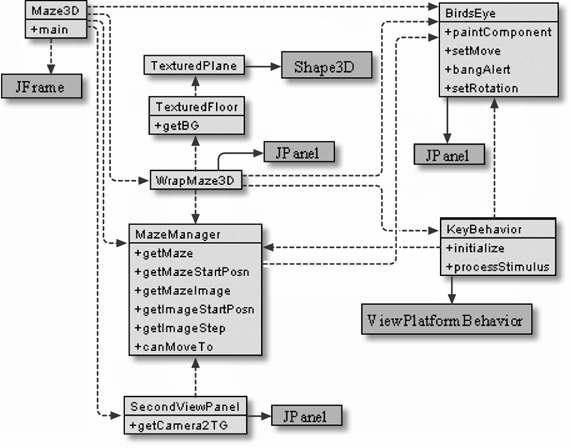
WrapMaze3D is a JPanel that creates the 3D scene including the background, lighting, and the main camera viewpoint. It utilizes maze and floor subgraphs made by other objects, and it invokes a KeyBehavior object. The TexturedFloor and TexturedPlane classes are used to create the floor.

MazeManager reads in the maze plan (a text file) prepared outside of Maze3D and generates two representations: a Java 3D subgraph that is added to the scene and a Java 2D image of the maze passed to the BirdsEye object. BirdsEye draws a 2D overview of the maze and represents the user by moving and rotating an arrow over the top of the maze image. This bird's-eye view is displayed in the bottom righthand JPanel in the GUI. SecondViewPanel creates a second view branch subgraph showing the view behind the user's current position (the back facing camera). The subgraph is added to the main scene, and its Canvas3D object is linked to the top righthand JPanel in the GUI.

KeyBehavior converts key presses into moves and rotations of the two cameras , and it updates to the bird's-eye view.

The example code for this application can be found in the Maze3D/ directory.


Making a Maze Plan

The 3D and 2D maze representations employed in Maze3D are created by the MazeManager object after reading in a maze plan from a text file. Here is the plan in maze1.txt :

s
    bbbbb bbbbb bbbbb bbbbb
    b                     b
    b                     b
    bbbb  ccccc ccccc  bbbb
       b
       b
       b

Figure 25-3 shows that plan realized in Maze3D (via the call java Maze3D maze1.txt ).

Figure 25-3. Maze3D using maze1.txt

The s character in the text plan specifies the user 's starting position in the maze. By default, the viewpoint is set to point along the positive z-axis in the scene, corresponding to downward in the bird's-eye view. The b characters in the maze plan become blue textured blocks, and the c characters are drawn as green textured cylinders .

Generating a Maze Using Software

A maze plan, like the one in maze1.txt , can be prepared in various ways, the simplest being to type one manually using a text editor. As an alternative, one of my students, Nawapoom Lohajarernvanich, and I wrote a maze generation application, called MazeGen.java (stored in Maze3D/MazeGen/ ). It utilizes a recursive, depth-first search with backtracking to create a maze.

The program generates a maze in a 2D character array. It assumes the array has an even number of rows and columns, and it creates the outer walls of the maze offset by one cell from the left, right, top, and bottom (see Figure 25-4). This means that the maze boundaries are in the odd rows and columns of the array. These restrictions ensure that the maze will have a solid outer wall after the maze has been created. The program adjusts the user's supplied maze width and height values to ensure that these restrictions are enforced.

Figure 25-4. The maze's outer walls

A b is placed in every cell on the grid, and the program removes some of them to create the maze. The generated maze is a single, winding path with no disconnected areas (e.g., secret corridors or bricked-up rooms).

The cutting away of the b s to form the maze starts at a randomly chosen even coordinate in the array (e.g., (4, 4)). Then another cell is randomly chosen from the four cells that are two units away in the x- or y-directions. For example, if the current cell is (4, 4), then the next cell could be (2, 4), (6, 4), (4, 6), or (4, 2). The path is made by connecting the cells with spaces, deleting the b s. This process is illustrated in Figure 25-5.

Figure 25-5. Path generation in MazeGen

The path-making process is repeated at the new cell, except that a path cannot return to a cell that's been used or to a position on or outside the maze's outer walls. For example, from (6, 4) the algorithm can use (8, 4), (6, 6), and (6, 2), but not (4, 4). The path cannot revisit a cell that's been visited, so it's not possible to create a maze with loops .

The path is made by joining up cells at even coordinates. Since the outer maze wall is made from cells at odd coordinates, a cell from the outer wall will never be selected to join the maze. This means that the path cannot cut into the maze wall.

The algorithm continues until it reaches a cell that cannot be connected to any further cells. This occurs when all the possible next cells have been utilized or are on or outside the outer walls. At this stage, the algorithm backtracks to the previous cell and looks at it again. Backtracking will continue until a cell has a possible next cell or there is no previous cell to go to (i.e., execution has returned to the starting cell).

The relevant code inside MazeGen is contained in createPath( ) :

private void createPath(Point cell)
    { RandomInRange rr = new RandomInRange(NUM_DIRS);
      int dir;
      while((dir = rr.getNumber(  )) != -1){
        Point nextCell = nextPos(cell, dir);
        if( !beenVisited(nextCell) ){
          visit(nextCell, dir);
          createPath(nextCell);  // recursive creation
        }
      }
    }

The RandomInRange constructor creates a sequence between and one less than the supplied value, and each call to getNumber( ) randomly selects a number from that sequence. For this application, NUM_DIRS is 4 , so getNumber( ) can choose from { , 1 , 2 , 3 }, which represent the four directions leaving a cell (up, down, left, or right).

createPath( ) passes this number to nextPos( ) to select the next cell. If the next cell hasn't been visited, then visit( ) extends the path and the recursive call to createPath( ) continues the path generation. Backtracking from the recursive call will return to this loop, which will try another direction. getNumber( ) returns -1 when its sequence is exhausted, causing createPath( ) to return to an earlier createPath( ) call. The generated path is remembered by visit( ) modifying a global maze[][] array, so backtracking won't undo its creation.

The program finishes by randomly changing about 20 percent of the maze's b s to c s, and adds an exit to the top row of the maze. Changing the letter corresponds to replacing some of the 3D maze's blocks with cylinders to make the maze look a bit more interesting.

The starting cell used for path creation is assigned an s to become the starting point for the user. Since the maze has no disconnected parts , we know that it's possible for the player to get from the starting point to the maze's exit.

A typical call to MazeGen , and its output, is shown below:

> java MazeGen 21 13
    Width: 23; Height: 15 (2 added for borders)
    Saving maze to file: maze.txt
    Starting point: (2, 20)
   
     bbbbcbbbcb bbbbbbcbcc
     b           b   b  sb
     b bbbbbccbc b bbb ccb
     b       c     b   b b
     b bcbbb bbbcbbb cbc b
     b   b   c       b   b
     b bbb bbb bcbbbbb cbb
     b b   b   b     b   b
     b c b b bbbbb b b b b
     b b b b       b b c b
     c b bbccccbbbbb cbb b
     b c                 b
     cbbbbbbbcbbbbbbbbbccb
   
    Maze written to file maze.txt

Killer Game Programming in Java
Authors: Davison A.
Published year: 2006
Pages: 231-232/340
Buy this book on amazon.com >>

Similar books on Amazon