Flylib.com

Books Software


VPN Server Between Two Firewalls


VPN Server Between Two Firewalls

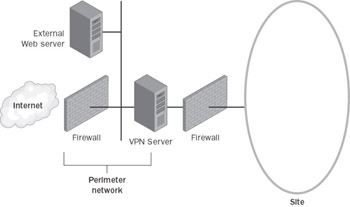
Another configuration is when the VPN server computer is placed on the perimeter network between two firewalls. The Internet firewall, which is the firewall between the Internet and the VPN server, filters all Internet traffic from all Internet clients. The intranet firewall, which is the firewall between the VPN server and the intranet, filters intranet traffic from VPN clients .

Figure B-3 shows the VPN server on the perimeter network, between two firewalls.
click to expand
Figure B-3: The VPN server on the perimeter network, between two firewalls.

In this configuration:

  • Configure your Internet firewall and VPN server with the packet filters as described in the “VPN Server Behind the Firewall” section.

  • Configure your intranet firewall for the appropriate rules for intranet traffic to and from VPN clients according to your network security policies.


Appendix C: Deploying a Certificate Infrastructure

Overview

In a typical enterprise deployment, the certificate infrastructure is configured using single-root certification authority (CA) in a three-level hierarchy consisting of a root CA, intermediate CAs, and issuing CAs. Medium- sized organizations should use a two-level hierarchy consisting of a root CA and issuing CAs. Small organizations can use a single CA that is both the root CA and the issuing CA.

For virtual private network (VPN) connections, issuing CAs are configured to issue computer certificates or user certificates. When the computer or user certificate is installed on the VPN client, the issuing CA certificate, intermediate CA certificates, and the root CA certificate are also installed. When the computer certificate is installed on the authenticating server, the issuing CA certificate, intermediate CA certificates, and the root CA certificate are also installed. The issuing CA for the computer certificate installed on the authenticating server can be different than the issuing CA for the VPN client certificates. In this case, both the VPN client and the authenticating server computer have all the required certificates to perform certificate validation for both Internet Protocol Security (IPSec) and Extensible Authentication Protocol-Transport Layer Security (EAP-TLS) authentication.

When deploying a certificate infrastructure, use the following best practices:

  • Plan your certificate infrastructure before deploying CAs.

  • The root CA should be offline, and its signing key should be secured by a Hardware Security Module (HSM) and kept in a vault to minimize potential for key compromise.

  • Enterprise organizations should not issue certificates to users or computers directly from the root CA, but rather should deploy the following:

    • An offline root CA

    • Offline intermediate CAs

    • Online issuing Cas

    This CA infrastructure provides flexibility and insulates the root CA and intermediate CAs from attempts by malicious users to compromise its private key. The offline root and intermediate CAs do not have to be Microsoft Windows 2000 or Windows Server 2003 CAs. Issuing CAs can be subordinates of a third-party intermediate CA.

  • Back up the CA database, the CA certificate, and the CA keys. This is essential to protect against the loss of critical data. The CA should be backed up on a regular basis (daily, weekly, or monthly), based on the number of certificates issued over the same interval. The more certificates issued, the more frequently you should back up the CA.

  • Review the concepts of security permissions and access control in Windows, because enterprise certification authorities issue certificates based on the security permissions of the certificate requester.

If you want to take advantage of auto-enrollment for computer certificates and the requesting of certificates using the Certificates snap-in, use Windows 2000 or Windows Server 2003 Certificate Services and create an enterprise CA at the issuer CA level. For more information, see the “Deploying Certificate Infrastructure” section in Chapter 6, “Deploying Remote Access VPNs” for a remote access VPN installation, or Chapter 9, “Deploying Site-to-Site VPNs” for a site-to-site installation.

If you want to take advantage of auto-enrollment for user certificates by computers running Windows XP or Windows Server 2003, use Windows Server 2003, Enterprise Edition, or Windows Server 2003, Datacenter Edition, Certificate Services and create an enterprise CA at the issuer CA level. For more information, see “Deploying Certificate Infrastructure” in Chapter 6 or Chapter 9.

More Info  

For more information about certificates and security, see Windows Server 2003 Help And Support, the Microsoft Windows 2000 Security Services Web site at http://www.microsoft.com/windows2000/technologies/security/default.asp , and the Windows Server 2003 Security Services Web site at http://www.microsoft.com/windowsserver2003/technologies/security/default.mspx .