Dial-Up and VPNs with RADIUS Authentication
In our sample scenario, in addition to VPN-based remote access, the network administrator for Contoso, LTD. wants to provide modem-based dial-up remote access for employees of the New York office. All employees of the New York office belong to an Active Directory group named NY_Employees. A separate remote access server running Windows Server 2003 provides dial-up remote access at the phone number 555-0111. Rather than administer the remote access policies of both the VPN server and the remote access server separately, the network administrator is using a computer running Windows Server 2003 with the Internet Authentication Service (IAS) as a RADIUS server. The IAS server has an IP address of 172.31.0.9 on the Contoso, LTD. intranet and provides centralized remote access authentication, authorization, and accounting for both the remote access server and the VPN server.
Figure 10-6 shows the Contoso, LTD. RADIUS server that provides authentication and accounting for the VPN server and the remote access server.
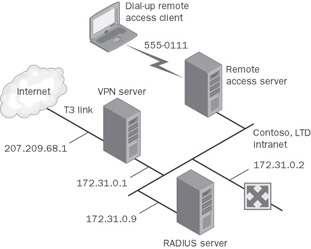
Figure 10-6: The Contoso, LTD. RADIUS server that provides authentication and accounting for the VPN server and the remote access server.
Domain Configuration
For each New York office employee who is allowed dial-up access, the remote access permission for the dial-in properties of the user account is set to Control Access Through Remote Access Policy.
Remote Access Policy Configuration
Remote access policies must be modified in two ways:
-
The existing remote access policies that are configured on the VPN server must be copied to the IAS server.
-
A new remote access policy is added for dial-up remote access clients on the IAS server.
Copying the remote access policies
Once the VPN server is configured to use RADIUS authentication, the remote access policies stored on the VPN server are no longer used. Instead, the remote access policies stored on the IAS server are used. Therefore, the current set of remote access policies is copied to the IAS server.
To copy the configuration of the VPN server to the IAS server, the following steps need to be completed:
-
On the VPN server computer, type netsh aaaa show config > path\file.txt at a command prompt. This stores the configuration settings, including registry settings, in a text file. The path can be a relative, absolute, or network path.
-
Copy the file created in step 1 to the IAS server.
-
On the IAS server computer, type netsh exec path\file.txt at a command prompt. This command imports all the settings configured on the VPN server into the IAS server.
Creating a new remote access policy for dial-up remote access clients
To define the authentication and encryption settings for dial-up connections by employees of the New York office, the following remote access policy is created on the IAS server:
-
Policy Name: Dial-Up for New York Employees
-
Access Method: Dial-up
-
User Or Group Access: Group, with the EXAMPLE\NY_Employees group selected
-
Authentication Methods: Extensible Authentication Protocol (EAP), with the Smart Card Or Other Certificate type, Microsoft Encrypted Authentication (MS-CHAP), and Microsoft Encrypted Authentication Version 2 (MS-CHAP v2) selected
-
Policy Encryption Level: All options selected
RADIUS Configuration
To configure RADIUS authentication and accounting, the network administrator for Contoso, LTD. uses the following configuration:
-
The RADIUS server is a computer running Windows Server 2003 with the IAS networking component installed. IAS is configured for two RADIUS clients: the remote access server and the VPN server. For more information about configuring RADIUS clients, see Chapter 5.
-
The remote access server is configured to use RADIUS authentication and accounting at the IP address of 172.31.0.9 and with a shared secret. For more information, see Chapter 5.
-
The VPN server is configured to use RADIUS authentication and accounting at the IP address of 172.31.0.9 and with a shared secret.
Dial-Up Remote Access Client Configuration
On the Windows XP remote access client computers, the New Connection Wizard is used to create a dial-up connection with the following settings:
-
Network Connection Type: Connect To The Network At My Workplace
-
Network Connection: Dial-Up Connection
-
Connection Name: Contoso, LTD.
-
Phone Number: 555-0111
-
Connection Availability: Anyone’s Use

EAN: 2147483647
Pages: 128
- Chapter II Information Search on the Internet: A Causal Model
- Chapter V Consumer Complaint Behavior in the Online Environment
- Chapter X Converting Browsers to Buyers: Key Considerations in Designing Business-to-Consumer Web Sites
- Chapter XI User Satisfaction with Web Portals: An Empirical Study
- Chapter XII Web Design and E-Commerce