Encrypting Stored Procedures
Even after we've locked down an application, by tightly securing permissions and doing all data access and modifications through stored procedures, it's still advisable to disguise any business rules used in our stored procedures. The best way to do this is by encrypting our stored procedures.
We can encrypt our stored procedures by using the WITH ENCRYPTION clause, immediately before the AS clause of the procedure creation. Doing so will cause the procedure definition to be passed through the CRYPTO API on both read and write.
Why are we dwelling on stored procedure encryption here? It's because we've seen some interesting effort going into encrypted stored procedures. It is important for many DBAs to realize just who can and cannot see this stuff.
The syscomments Table
While talking about stored procedure encryption, we need to know how Microsoft stores the descriptions for stored procedure objects. While the name of the stored procedure is stored in the SYSOBJECTS table, the actual definition of the stored procedure (as well as all functions, constraints, calculated columns, and views) are stored in the SYSCOMMENTS tables, and cross-referenced by their object ID. Let's take a look at the definition of this table, in SQL Server 2000:
CREATE TABLE [dbo].[syscomments] ( [id] [INT] NOT NULL , [number] [SMALLINT] NOT NULL , [colid] [SMALLINT] NOT NULL , [status] [SMALLINT] NOT NULL , [ctext] [VARBINARY] (8000) NOT NULL , [texttype] AS (CONVERT(SMALLINT, (2 + 4 * ([status] & 1)))) , [language] AS (CONVERT(SMALLINT ,0)) , [encrypted] AS (CONVERT(BIT,([status] & 1))) , [compressed] AS (CONVERT(BIT,([status] & 2))) , [text] AS (CONVERT(NVARCHAR(4000), case IF ([status] & 2 = 2) THEN (uncompress([ctext])) ELSE [ctext] END)) ) ON [PRIMARY]
The primary key for this table is the combination of the ID (representing the object ID) and number columns. Essentially, every stored procedure will have at least one record in this table with the number 1. If the stored procedure is longer than either 4000 or 8000 characters, it will have a second record with the number 2, and so on. Note that it could go up to 32,768 records or 250 megabytes. You may not want a stored procedure this large, since your server might have performance issues from the procedure cache being so large, but that's beyond the scope of this discussion.
The key storage area is the 8000 byte VARBINARYCTEXT column. You can see that the human -readable TEXT column is actually a calculated column, based on the CTEXT column. During the CREATEPROCESS function, Microsoft does a quick scan of the data that you want to store in CTEXT. If all the data is in the ASCII 256-character code set, Microsoft will flip the status column 21 bit and stored the data as ASCII. Microsoft calls this as "compressed".
If it has characters outside the 256-character code set, Microsoft will leave the status column 21 bit un-flipped and store the data with a UNICODE 2-byte-per-character representation. This means that when the data is compressed (that is in ASCII), there are up to 8000 characters per record in SYSCOMMENTS. When it is uncompressed (that is in UNICODE), there are only 4000 characters per record.
When Microsoft encrypts the stored procedure, each single character in the definition is represented by one of the 65536 Unicode 2-byte characters; obviously it is uncompressed in the CTEXT column. At the same time, Microsoft flips the encrypted bit in the status column, which is the 20 bit. Although, we haven't been able to completely figure it out, we're convinced that there is an expanding symmetric key that takes an initial seed from a combination of the database name and the object ID and probably some other machine information.
In expanding symmetric key the first Unicode character is encrypted with the seed key. Then the second character's seed key depends upon the seed key and the value of the first character. This an improvement over SQL 7.0, which was easily vulnerable to a brute force attack. However, even in SQL Server 2000, the encryption can be easily broken under certain conditions.
Breaking Object Encryption in SQL 2000
The condition for breaking the encryption is that you should be able to modify the description for the stored procedure definition. In other words, you have to use the ALTER PROCEDURE statement on the existing stored procedure and replace it with something totally different. However, in doing this, there is a risk that you might end up losing the original definition, thereby messing up the stored procedure and your application.
| Important | Never try to decrypt a stored procedure on a production implementation. Rather, copy the implementation to a development environment and try there. |
A demo of the process to XOR the encrypted definition with a known definition is readily available after a search on the Internet. The demos that I've seen don't break past the single SYSCOMMENTS record of 4000 characters. However, using the theory behind this demo, we've been able to write a decrypting stored procedure that will decrypt a 40,000-byte (10 SYSCOMMENTS records) stored procedure in about three seconds, on an average server.
As we discussed, when a user could alter an encrypted stored procedure in a database, they can break the encryption rather easily. However, the usage of ALTER PROCEDURE is generally limited to highly trusted users. Nevertheless, it is fairly common for even a limited user to be able to read the SYSOBJECTS and SYSCOMMENTS tables. This gives rise to a question – could a limited user copy the SYSOBJECTS and SYSCOMMENTS records for an encrypted stored procedure to another server, where they have DDL control and crack open your stored procedure encryption in their spare time?
Our testing tells us that this is not going to work. Somehow, the encryption is built into the implementation of the particular database. Obviously, if a limited-rights user can get a backup of the database and restore it to another server, then they could easily reverse your encryption. However, if a limited-rights user can get a copy of your backup tapes or files, you will probably have more serious problems than whether or not she can decrypt your stored procedures.
A Strategy For Encrypting Your Data
One of the most important data that should generally be stored in an encrypted form is the information pertaining to credit cards. We can think of nothing more damaging or embarrassing for a company than having to go out and explain to its customers that it compromised their credit card information. Now let's look at a strategy for securing vital information, such as credit card information.
We will assume that our regular database is called as SalesOrder, which will hold the encrypted credit card number. Next to it is a very small database, called SalesOrderEncryption.
The SalesOrder and SalesOrderEncryption tables have the same database owner login ID as the master database. Remember, this is a production implementation and there shouldn't be much else on this server, such as the pubs or Northwind database. The SalesOrderEnryption database only has one or more stored procedures; no user tables. These stored procedures use the OLE Automation extended stored procedures to access encryption DLLs on the operating system.
Now, here's the trick. The seed value for the encryption algorithm is encrypted in the stored procedure in SalesOrderEncryption. This seed value is analogous to the PIN for an ATM card – it is not stored anywhere on the server.
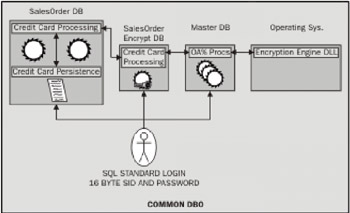
Only users who have a right to access or change the credit card numbers can access the SalesOrderEnryption database and execute the applicable stored procedures. This is very tightly controlled by cross-database EXECUTE permissions. Obviously, you have to trust your DBAs. We suppose you could lock the SalesOrderEncryption database a little more tightly away from your DBAs, but we haven't shown a business need for this. All of this stresses on that fact that your server is properly secured in every respect, especially physical security.
The back up solution, though, is particularly elegant. Since the SalesOrderEnryption is so small and unchanging, all we do is backup the database to disk, write the backup to two CDs, give one to the client/owner of the application for safekeeping, and one to a custodian in our company for offsite storage. After deleting this one-time backup, we never backup the SalesOrder and SalesOrderEnryption database to the same media. Thus, if the media is compromised, it's like your ATM card being stolen. They don't have the PIN, or in our case, the symmetric key encryption seed. In the event of a catastrophic failure of the server, we can rebuild the SalesOrder database from backup tapes and the SalesOrderEnryption from one of the CD-burned backup copies.
Taking the SalesOrder database to a development server is also elegant. We know that development environments are notably less secure than production environments. However, since the production SalesOrderEnryption database is not duplicated in the development environment with the same seed value, the production credit card numbers are still secure.
We also recommend that in your environment you also audit all object creation and deletions. Thus, if someone were to try and alter an encryption procedure in the SalesOrderEncryption database, this can be recorded and pursued with vengeance.
SQL Buffer Overflow
Repeatedly, we come across instances where experts will ask us to drop one or the other system stored procedure or system extended stored procedure. This usually happens with an extended stored procedure and is in response to a buffer overflow. A buffer overflow allows a malicious user to execute "code of their choice" on the operating system. This "code of their choice" is usually a privilege elevation, where they give themselves administrator rights on the server.
Generally, the culprit function involved is a non-removable in-built function, such as the PWDENCRYPT function or a DBCC feature. Rather than trying to remove them, you should apply fixes. Microsoft is extremely quick to fix these types of buffer overflow problems when they appear.
In the C2 Administrator's and User's Security Guide, Microsoft does recommend removing stored procedure functionality. It is an excellent document to read. However, remember that when this document was prepared, certain elements of Microsoft functionality were not ready for prime time. Among other things, this includes the Windows 2000 Server operating system.
The C2 Guide recommends that two sets of stored procedures be removed. The first set is the Meta Data Services stored procedures found in the msdb database. They can be readily identified by the r_i prefix. The other set of stored procedures that you might consider removing are the Merge Replication Stored Procedures. These are any stored procedure with merge in the name, and the large percentage of the undocumented stored procedures that begin with SP_MS. There are ten pages of these stored procedures documented in the C2 Guide, so we will not repeat them here.
Remember that you only need to remove these procedures if you need to meet the C2 requirements.
Installing a SSL Certificate for SQL Server
When SQL Server 2000 first shipped out, it didn't support SSL encryption. We need to have Service Pack 1 installed, to use it. The notes about its use are sparse at best, in SQL Server Books Online. Instead, Microsoft buried this functionality and the SetCert tool necessary for its setup in the SQL Server 2000 Resource Kit.
To set up SSL encryption, you will need to buy the SQL Server 2000 Resource Kit. Alternatively, it is available in a TechNet subscription (which often also has to be bought). Before you get a certificate, you need to know two things:
-
Every client machine that is going to connect to the server must recognize the certificate authority (CA) that issues the certificate to the server. This is usually a default configuration for such mainline CAs as Verisign or Thawte. If you run your own CA, you will need to make sure that clients recognize it.
-
The name field on the certificate needs to be the fully qualified DNS name of the SQL Server, for example, server.division.corp.company.com. If you change the server name later on, you'll need to get a new certificate issued.
Installing the certificate and setting up SSL encryption for a SSL server involves two steps:
-
Importing the certificate into the server certificate store
-
Using the SetCert utility to designate the imported certificate for use by SQL Server
Importing the certificate:
To import the certificate, we need to perform the following steps:
-
Obtain a certificate from a CA. It is usually a single file. Place it in a secure location on the server.
-
Start Microsoft Management Console (MMC) by typing MMC.EXE at the command prompt.
-
Using the Console | Add-Remove Snap-in… choice, add the Certificate snap-in for the Local Computer.
-
Expand the options under Certificate (Local Computer). Right-click on Personal. Click the Import choice.
-
Follow the Import wizard to select the file that we saved in step 1 and import it into the server.
Using the SetCert utility
To designate the imported certificate for use by SQL Server, follow these steps:
-
Ensure that Service Pack 1 for SQL 2000 is installed
-
Start the SetCert utility from the SQL Server 2000 Resource Kit
-
From the Instance Grid, select the instance of SQL Server you want to modify and click Set
-
From the Select Certificate dialog box, select the certificate you wish to designate for use by the SQL Server instance
-
Click OK and then click Close
This will enable SSL support for your SQL 2000 server.

EAN: 2147483647
Pages: 100