Section 4.3. I Need My Microsoft Office
4.3. I Need My Microsoft OfficeMicrosoft Word is only the most commonly used (and, in my opinion, the most annoying) of the Microsoft Office applications. While there are different Microsoft Office suites, they generally include a series of integrated applications, including Excel for spreadsheets, PowerPoint for presentations, Access for databases, and Outlook for email/personal information management. For more information on helping users convert from Microsoft Outlook to Evolution on Linux, see "I'm Drowning in Good Email" in Chapter 3. This annoyance is focused on the other components of Microsoft Office, and the Linux applications that can replace them. To evaluate each of these applications, follow the selection criteria listed in "So Many Options for Applications," earlier in this chapter, I evaluate the components of the OpenOffice.org suite as alternatives to Microsoft Office. 4.3.1. Evaluating the OpenOffice.org AlternativeUsing the selection criteria described in "So Many Options for Applications," here are some general comments on the OpenOffice.org suite:
Naturally, if OpenOffice.org (or another Linux-based alternative) is not satisfactory, you can install Microsoft Office on Linux, with any or all of the associated applications, using one of the techniques described in the previous annoyance. 4.3.2. Excel Spreadsheets Are Not ReadableSpreadsheets often incorporate complex calculations, normally implemented with the help of macros. Spreadsheets are often published with document templates. Both macros and templates are customized on Microsoft Excel. From the previous annoyance, this may sound familiar; these are the same factors that make Microsoft Word documents difficult for alternative word processors. However, OpenOffice.org Calc is highly compatible with Microsoft Excel. While Calc works well with templates, it does not yet work with macros developed for Microsoft Excel. Once installed, start it in your system by clicking KDE K menu (or GNOME Applications)
OpenOffice.org Calc works with spreadsheets from Microsoft Excel, as well as a number of other spreadsheet programs, including StarOffice Calc, Lotus 123, comma-separated text files, and more. However, as with any application, you should test it with your users' spreadsheets. Make sure it is compatible with the templates and macros that are run in their files. Don't introduce OpenOffice.org Calc until you're confident that it won't create undue hardship for your users. 4.3.3. I Need My Microsoft AccessWhile Linux works with several excellent database managers, including MySQL and PostgreSQL, it has been lacking a database client, specifically one with features familiar to those who use Microsoft Access. OpenOffice.org 2.0 is the first version of this suite with a database tool, known simply as OpenOffice.org Base. If you've installed OpenOffice.org 2.0, Base is available in the same GUI menus as other OpenOffice.org applications (except in SUSE, where it's available in the Database submenu). As of this writing, when you try to start OpenOffice.org Base, you may get an error message associated with installing the Java Runtime Environment (JRE). To address this issue, take the following steps:
You may have already installed JRE for Firefox, as described in "Firefox Plug-ins" in Chapter 3. 4.3.4. I Want My PowerPointOne staple of the office is the screen presentation. While many just use bullet points with OpenOffice.org Writer (or Microsoft Word), there are a number of high-powered professionals who are dependent on Microsoft PowerPoint. Fortunately, OpenOffice.org Impress is a great alternative to Microsoft PowerPoint. It can import PowerPoint presentations, and can help your users create the presentations they need to impress their managers with a variety of innovative tools. In our target distributions, including SUSE Linux, OpenOffice.org Impress can be started from the Office menu. 4.3.5. I Miss My Front PageWith the focus of the Linux geek on the command-line interface, there has been less demand for a GUI web page developer. Many Linux geeks are comfortable writing pages directly in HTML. But that's too much for many regular users to handle. Conditioned by Microsoft Front Page, they expect a GUI web page developer for their web sites. Fortunately, OpenOffice.org has its Writer/Web tool, which can help users develop their web pages in a GUI, with a second screen available for users who want to see the HTML code, similar to what's available in Front Page. However, OpenOffice.org Writer/Web does not include the same level of functionality as Microsoft's Front Page with respect to links. Yes, you can include hyperlinks with the HTML code; however, with Front Page, it's easy to create links in the properties of an item, such as highlighted text or an image. Alternatives to OpenOffice.org Writer/Web include:
Another advantage to Mozilla Composer and Nvu is that both applications are available for Microsoft Windows, which can help you ease your users' transition to Linux. Depending on your Linux distribution, you may be able to start these tools from the Office or Internet menus. |
 Office
 Options to open the Options - OpenOffice.org window. In the lefthand pane, under OpenOffice.org, select Java.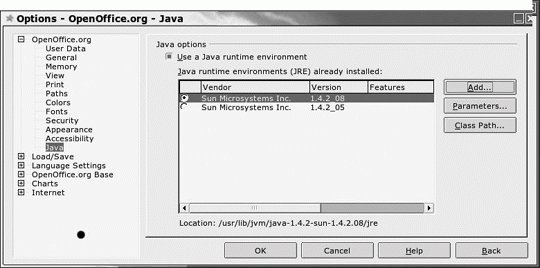

EAN: 2147483647
Pages: 144