Incrementing and Decrementing
| A common thing to do in PHP scripts, especially in the loops we'll see later in this chapter, is to increment the value in a variable by adding one or to decrement the value in a variable by subtracting one. In PHP, the incrementing operator is ++, and the decrementing operator is --. For example, if $bananas holds 0, then using the ++ operator like this: $bananas++ leaves a result of 1 in $bananas. If $apples holds 11, then $apples-- leaves 10 in $apples. You can use ++ and -- before or after a variable name, such as ++$bananas (this is using it as a prefix operator) or $bananas++ (this is using it as a postfix operator). If you use ++$bananas, the value in $bananas is incremented, and that incremented value is then used in the rest of the statement. If you use $bananas++, then the original value in $bananas is used in the rest of the statement, and then the value in $bananas is incremented. Here's an overview of the difference:
In other words, if you use ++$bananas, the value in $bananas is incremented before that value is passed on for use in the rest of the current statement. If you use $bananas++, the current value in $bananas is passed on for use in the rest of the statement, and only then is the value incremented. You can see this difference in Example 2-2, phpincrementing.php, which works through the various possibilities, using ++ and -- as both a prefix and postfix operator. Example 2-2. Incrementing and Decrementing, phpincrementing.php<HTML> <HEAD> <TITLE> Incrementing and Decrementing </TITLE> </HEAD> <BODY> <H1> Incrementing and Decrementing </H1> <?php $a = $b = $c = $d = 1; echo "\$a++ gives ", $a++, "<BR>"; echo "++\$b gives ", ++$b, "<BR>"; echo "\$c- - gives ", $c--, "<BR>"; echo "- -\$d gives ", --$d, "<BR>"; ?> </BODY> </HTML> The results appear in Figure 2-2. As you can see, it makes a difference whether you use ++ and -- as prefix operators or postfix operators. Figure 2-2. Using the increment and decrement operators.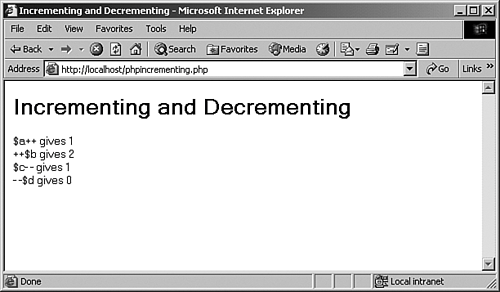 If you just want to make sure you increment or decrement the value in a variable without worrying about whether the value will be incremented or decremented before being used in the rest of the statement, use ++ and -- as prefix operators. |
