WebSphere Studio Application Developer Integration Edition
|
WebSphere Studio Application Developer Integration Edition includes the complete function of Application Developer, as well as a new set of tools and wizards collectively referred to as the Enterprise Services Toolkit. The Enterprise Services Toolkit is a fully service-oriented development environment for business and enterprise application integration. A service is a very generic concept, and the Enterprise Services Toolkit uses services to represent various enterprise resources and functions. A web service is a single type of service, which uses Simple Object Access Protocol (SOAP) for its transport protocol. The services toolkit provides support for assembling services of many types, including web services, and services wrapping many other enterprise functions. A comprehensive discussion of the service-oriented architecture is provided in Chapter 7.
The toolkit itself allows you to consume and choreograph existing services, such as SOAP, JavaBeans, Stateless Session EJBs, and J2EE Connector Architecture (JCA) services (for example, EIS services, CICS, IMS, HOD, and others). Features like flow composition can be used to compose a new service out of other services. Transformations allow you to map the data from one service to another in a flow composition. Services deployed into the Integration Server can be provided as SOAP services, and via the EJB programming model.
At the heart of the toolkit is the service definition. The tools allow you to create and edit the different aspects of service definitions. They also allow you to create the run-time artifacts for the WebSphere Integration Server and for a service client. The Enterprise Service Perspective customizes the layout of the workbench to facilitate the development of Enterprise Services. The perspective contains views of workbench resources that you would typically use when you develop services.
The Service view contained in the perspective provides you with a view of your service resources. The view presents three folders:
-
Service Projects
This contains your service definitions -
Deployed Services
This contains the services you have deployed -
Resource Adapters
These contain the JCA resource adapters added to the workbench
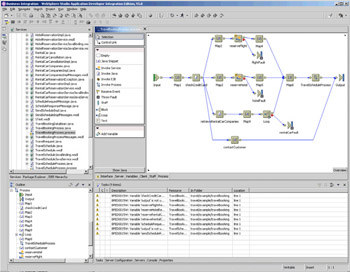
The Flow wizard and editor let you create a service implementation by composing it out of other services. The Flow editor is a graphical composition tool that allows you to script services visually. To use services in your flow composition, simply drag and drop them from the Service view into the Flow editor. The flow of control between the services is expressed by control links, the flow of data by data links, and can contain data mappings when necessary, as shown overleaf:
The Transformer wizard lets you create message transformations. You use the Transformer editor to define mappings between service messages. Actually, you can transform (map) multiple input messages to a single output message. The resulting Transformer is itself a service and its operation is implemented using the XSLT specification. The major use of Transformer services is for the data mapping function in the Flow editor.
|

EAN: N/A
Pages: 135