A Practical Metadata Approach

| | ||
| | ||
| | ||
This brings us to the question youve all been asking: What do we do about metadata to support data warehousing and business intelligence in the SQL Server 2005 environment? In the long term, we expect Microsoft to tackle the metadata management problem. Meanwhile, you have to figure out what you are going to do about metadata in the short to medium term . Its easy to get trapped in the metadata morass (as the authors can certainly attest). Its a major effort to figure out what metadata to capture, where to capture it, how to integrate it, how it should be used in the warehouse processes, and how to keep it synchronized and maintained . Vendors have been building metadata repositories and maintenance utilities for decades, and companies (some companies) have been trying to use these tools, or tools of their own creation, to tame the metadata beast for just as long. Even so, there are very few examples of large-scale, robust, successful metadata systems. Its a really hard problem.
Again you ask, So what am I supposed to do? Well, first, you need to appoint someone on the team to the role of metadata manager. If no one owns the problem, it will not be addressed. The metadata manager is responsible for creating and implementing the metadata strategy. The ideal candidate has to know everything. No joke. If one person has to do the whole thing, he or she will need to have SQL and DBA skills. The metadata manager needs to know how to program in the Visual Studio environment and how to create and publish reports , and needs to understand the business, at a detailed level. Okay, so the metadata manager doesnt need to know everything. If you also have a security manager and a data modeler, they can help, too.
Creating the Metadata Strategy
We believe the following approach is a good compromise between having little or no managed metadata and building an enterprise metadata system. Our main recommendation is to concentrate on business metadata first. Make sure it is correct, complete, and maintained. Also, make sure it is accessible to the business users. Once thats done, provide a way to view the other major metadata stores. We often see a tendency to over-engineer metadata. The key to making this strategy work is to not overdo it. Heres the basic outline:
-
You need to know whats out there. Survey the landscape to identify the various locations, formats, and uses of metadata in SQL Server 2005. The previous section and Table 13.1 give you a starting point. Use the tools described to explore the system for metadata locations. Where there arent any tools, you will need to create query or programmatic access to the rest of the sources so you can explore and track them. Create a list of the metadata elements you find, including where they are, where they came from, who owns them, how you view and change them, and where and how you might use them.
-
Identify and/or define metadata that needs to be captured and managed. These are the elements you will use more broadly and therefore need to keep updated and distributed throughout the system. What you need to manage depends on a lot of factors: your organizational predisposition to actively manage metadata, the level of support for actively managing metadata on the DW/BI team, and the resources available to address the problem. At the very least, you must manage a basic level of business metadata. We will describe alternative approaches to this later in this section.
-
While youre at it, decide on the definitive location for each metadata element to be managed. This is the location where the element will be stored and edited. It is the source for any copies that are needed by other parts of the system. It might be in the relational database for some elements, in Analysis Services for others, and so on. For some elements, you might decide to keep it in a third-party tool, like ERwin, or Visio, or even your organizations repository tool. In the Adventure Works example, we are using extended properties in the relational database to capture several useful metadata fields. We discussed a rudimentary method for transferring the description, but it would be nice to be able to make all these fields accessible in Analysis Services as well.
-
Create systems to capture any business or process metadata that does not have a home. Try to use all available pre-existing metadata structures, like description fields, before you add your own metadata tables. However, you will likely identify many fields that need a place to live; the comment field in the data model spreadsheet and the Usage History table are good examples of this. If the users are the owners of these elements, they should be responsible for maintaining them. Many of our clients have created a separate metadata database that holds these metadata tables along with any value-added content tables that are maintained by the business users. Its not too difficult to create a .NET front end to let users manage the contents of these tables.
-
Create programs or tools to share and synchronize metadata as needed. This primarily involves copying the metadata from its master location to whatever subsystem needs it. Fill in the description fields, the source fields, and the business name fields in all the tables, extended properties, and object models from the initial database all the way out to the front-end tools. If these are populated right from the start as part of the design and development process, they will be easier to maintain on an ongoing basis. You will also be able to more easily see what surfaces in the browsers and front-end tools as you move through the process. Note that moving data from one location to another sounds like an ideal task for Integration Services.
-
Educate the DW/BI team and key business users about the importance of metadata and the metadata strategy. Assign metadata creation and updating responsibilities.
-
Design and implement the delivery approach for getting business metadata out to the user community. Typically, this involves creating metadata access tools, like reports and browsers. Often, you need to create a simple metadata repository for business metadata and provide users with a way to browse the repository to find out whats available in the BI system. While you may actually use several reporting tools to provide access to the metadata, this should appear as seamless as possible to the users. The different metadata access tools can all be linked to from a single page in the Navigation Portal. We describe a simple business metadata catalog in detail in the next section.
-
Manage the metadata and monitor usage and compliance. Make sure people know the information is out there and are able to use it. Make sure the metadata is complete and current. Being able to view the metadata is the hardest part of monitoring especially in the SQL Server 2005 environmentbecause there are a lot of different metadata sources. A large part of the baseline metadata effort is spent building reports and browsers to provide access to the metadata. Monitoring means you have to actually look at those reports on a regular basis.
Even though this is the balanced strategy between nothing and too much, it is still a fair amount of work. Make sure you include time in your project plan in all development tasks to capture and manage metadata, and that you include separate tasks for the preceding steps.
Business Metadata Reporting
Business metadata is the most important area to address because it supports the largest and most important segment of BI stakeholdersthe userswho cant get this information any other way. In other words, the technical folks can usually dig around and find the information they need in order to understand the contents of the data warehouse. The user community, for the most part, doesnt have this skill set (thats why youre here, remember). You must provide them with an easy, accessible way to explore the contents of the DW/BI system if you want them to know whats available. Well approach the task of providing business metadata to the users from the best case to the worst case.
Analysis Services as Primary Query Platform
If your organizations data and analytical needs are such that Analysis Services can meet them, and you have chosen Analysis Services as your primary user access platform, delivering basic business metadata can be relatively easy. Start with your front-end tool. See what kind of metadata layer it offers. The major front-end tool vendors offer rich metadata layers that can serve as the business metadata catalog. At the very least, this catalog needs a Subject Areas layer that allows individual business process schemas to be viewed separately from the rest of the database and ties related schemas (cubes) together. It helps simplify the data access process for the users if they can see the Orders schema, with its fact table and associated dimensions, without having to wade through all the other tables in the warehouse. The perspectives feature in Analysis Services Enterprise Edition provides this sub-setting capability.
Most of the major front-end tools either provide business metadata fields in their own metadata layer, or pull directly from the metadata fields found in Analysis Services. This would include the descriptions of cubes, dimensions, and attributes, often shown to the user right in the tools interface. Therefore, filling in the few metadata fields found in Analysis Services is a critical first step to improving users understanding of the database contents.
If youre using a third-party front-end tool, you need to explore the metadata structures offered by that tool and proceed accordingly . If youre building a complete Microsoft solution, you will need to do a bit more work. The Microsoft tools do provide limited metadata support. For example, a user creating a new report in Report Builder must first select a modelReport Builders predefined metadata layer. The model selection dialog box in Figure 13.2 shows how Report Builder presents the model along with the metadata description of the model and, if the source is Analysis Services, each cube and perspective in the Analysis Services database from which the model was generated.
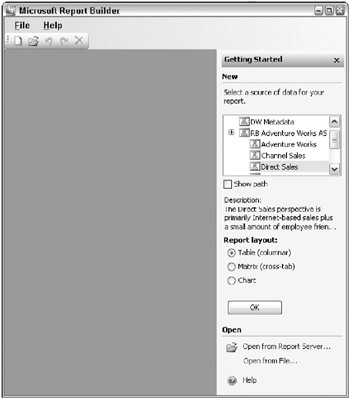
Figure 13.2: Analysis Services metadata in the Report Builder model selection
Figure 13.3 shows another Analysis Services metadata feature called the AttributeHierarchyDisplayFolder property that is used in Report Builder. As we described in Chapter 7, you can use this feature to group related attributes in a hierarchy used for display purposes. In Figure 13.3, a Report Builder user has selected the Customer dimension in the entities pane in the upper left of the window and is presented with three folders that categorize customer attributes into subgroups.
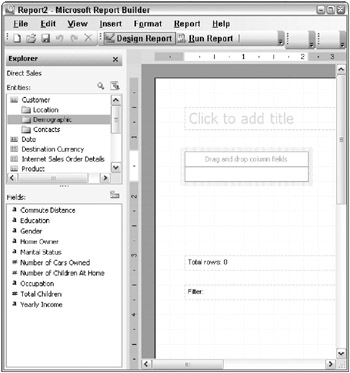
Figure 13.3: Analysis Services display folders in the Report Builder designer
By selecting the Demographic folder, the user sees only those attributes in the Fields: pane in the lower-left portion of the window that are relevant to customer demographics . It is much easier for the user to navigate these display folders to find the attribute they are looking for than it is to search through a single long list of dozens (or hundreds) of attributes.
Beyond this initial display of descriptions and the use of the display folders, Report Builder does a poor job of presenting the limited metadata thats available in the Analysis Services object model. For example, none of the additional dimension, attribute, or measure group descriptions are surfaced in the tool. If Report Builder is your primary end user ad hoc access tool, you will need to provide your users with the ability to explore the contents of the warehouse so they can learn what it contains and how to work with it.
Analysis Services Metadata Browser
Perhaps youve decided your query and reporting tool doesnt do an adequate job of publishing Analysis Services metadata. There are several approaches to bridging this gap; some are more work than others. If Analysis Services is your primary user database, the easiest approach is to build a simple browser that allows the user to navigate the Analysis Services object model. The Samples that ship with SQL Server 2005 include a program called the AMO Browser, shown in Figure 13.4, which allows the user to browse the Analysis Services object model.
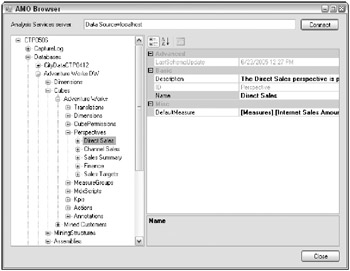
Figure 13.4: The sample Analysis Management Objects browser
Notice that the browser is opened to the same perspective shown in Figure 13.2. The description shown in Report Builder comes from the Description property. This sample program illustrates how to retrieve the properties of various Analysis Services objects. It would be fairly easy for a C# programmer to modify (or a VB programmer to replicate) this program to limit its output to strictly those objects and properties, like name and description, that are interesting to business users. Because this approach is based on the actual Analysis Services database and its contents, it has the advantage of never being out of sync with what users will see in their tools. This makes Analysis Services (and the VS projects that build it) the system of record for these few metadata elements. However, it is limited to the metadata properties provided in Analysis Services: name, friendly-name, and description. Perhaps in the next release, Analysis Services will accommodate the concept of extended properties that can be found in the relational database. This would allow you to add on metadata fields as needed, much like you did when you created your original business process dimensional model in the relational database using the design spreadsheet.
Relational Engine Extended Properties
If your primary user access platform is the relational engine, or if you feel like the Analysis Services properties are too limiting, you can always go back to the relational model and provide a simple set of reports that allows users to explore the metadata in the extended properties that was created from the original business process dimensional modeling spreadsheet back in Chapter 3. Figure 13.5 shows what a simple metadata exploration report for the extended properties of the DimCustomer dimension might look like.
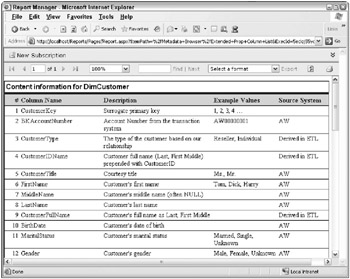
Figure 13.5: Exploring the relational databases extended properties
The problem with this approach is its limited to the relational structures as defined in the relational system tables. Theres no intermediate layer that lets you group subsets of tables into business process dimensional models and no display folders to group similar attributes to simplify the user view. And, it doesnt include any other user access platforms like Analysis Services.
Business Metadata Schema
If the extended properties browser still isnt enough, you can create a simple business metadata schema that will support both relational and Analysis Services databases, accommodate multiple subject areas, and allow for additional metadata fields that may not exist elsewhere. Figure 13.6 shows a basic business metadata schema.
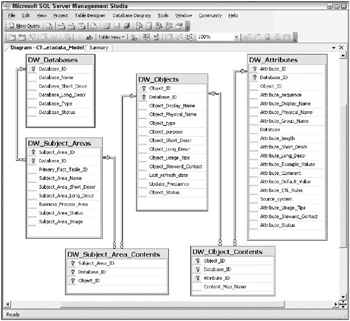
Figure 13.6: An example Business Metadata schema
| Note | The metadata schema is essentially a transaction model meant to keep track of the relationships among the various data elements in the warehouse, and to allow maintaining and updating that data. This is not a dimensional model. |
The schema is essentially a hierarchy that starts at the database level in the upper-left corner (with servers and instances collapsed into the database table). Each database can contain zero to many subject areas, each of which contains zero to many objects, each of which contains zero to many attributes. Subject areas are groupings of objects, like business process dimensional models or Analysis Services perspectives or measure groups. The three Contents tables allow you to map the same subject areas into several databases, the same objects into several subject areas, and the same attributes (or columns ) into several objects. Your Product dimension will probably participate in several subject areas, like Sales, Customer Care, and Returns.
Figures 13.7 through 13.10 show a series of drill-down reports based on the metadata from the MDWT_AdventureWorksDW data warehouse database. These reports show the Adventure Works metadata as it would appear in the business metadata schema.
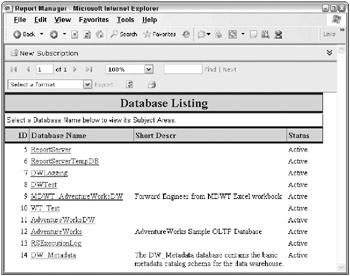
Figure 13.7: Example databases from the Business Metadata schema
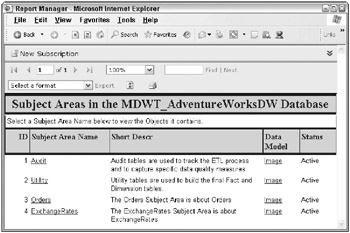
Figure 13.8: Subject areas in the MDWT_AdventureWorksDW database
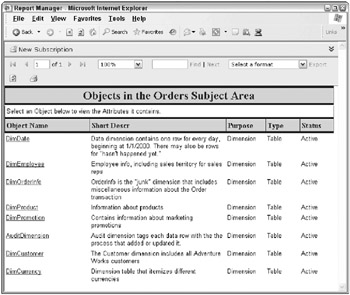
Figure 13.9: Objects in the Orders subject area
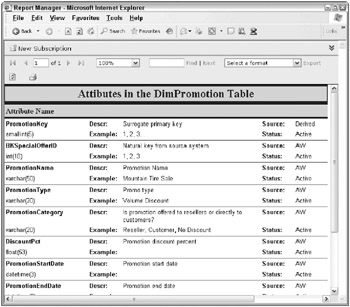
Figure 13.10: Attributes of the Promotion dimension table
Figure 13.7 shows the list of databases on the machine, only a few of which have descriptions in their extended properties. Clicking on one of the databases allows the user to drill down to the next level in the Business Metadata schema.
Figure 13.8 shows the subject areas in the MDWT_AdventureWorksDW database. Note that there are two maintenance subject areas, Audit and Utility, along with the two business process dimensional models, Orders and Exchange Rates. Continuing with the drill-down, Figure 13.9 shows the objects in the Orders subject area.
A subject area essentially corresponds to the dimensions that join to a particular fact table. Finally, Figure 13.10 shows the attributes of the Promotion dimension object.
The metadata properties of the attributes shown in Figure 13.10 are just a few of the potential properties available. These reports constitute an analytical application. Like any analytical application, creating the reports so they flow well and formatting them so they communicate well is a learned skill. Test your efforts on some of the users. Get their feedback on what works and what might be improved. A good metadata browser can help users learn faster and thus accelerate the overall acceptance of the BI system.
The Business Metadata schema is generally as far as we go in terms of creating, managing, and providing access to business metadata and it is meant to be a Pretty Good Practice. We believe the metadata schema is a great example of the 80-20 rule: you get 80 percent of the value of a sophisticated metadata management system with 20 percent of the effort. The four levels in this schema can be used to accommodate a range of designs, platforms, and product editions. There are plenty of enhancements that would make it more detailed and flexible. There are probably a few additional enhancements that will be important for your environment, but beyond that, the return on increased sophistication is pretty low.
| |
You can find scripts to create the example business metadata schema on the books web site ( www.MsftDWToolkit.com ). There are also scripts to do the initial population of the schema based on the relational model. If you used the data model design spreadsheet described in Chapter 3 , and if you populated the metadata columns as you were supposed to, this script sweeps all that information into the metadata schema.
If you chose to use the schema and find you need to enhance it, we encourage you to share those enhancements by submitting them as indicated on the books web site. Well do our best to make them available to the MDWT community in an open source style, (but without committing to open source standards).
| |
Process Metadata Reporting
There is more metadata work to do beyond business metadata. You will need to create a suite of reports to provide quick, easy insight into whats going on across the BI system right now, and how it is changing over time. These process metadata reports often serve as a starting point for technical folks to assess the status of the system and investigate any problems. Savvy business users want to see if their queries are running and why the system is so slow. Weve seen users use these reports to identify the culprit amongst their co-workers and call them up and request that they kill their queries. The data warehouse team and the DBAs will most likely turn to more sophisticated tools, like SQL Server Profiler, to get a better sense of whats really happening and to be able to respond to the situation appropriately.
The process metadata reports include:
-
Reports on active processes in SQL Server: You can report information on current user activity directly from the SQL Server system views or system stored procedures. You can also set up SQL Profiler trace logs to capture current activity and create a historical log file.
-
Reports on active processes in Analysis Services (provided through object model in the SQL Server 2005 samples directory: Administrator/ ActivityViewer): You can also set up SQL Profiler trace logs to capture current activity and create a historical log file.
-
Reports on currently running and historical ETL processes: These can be based on log files and audit tables as described in Table 13.1. You can also view current Integration Services activity in the SQL Server Management Studio.
-
Reports on Reporting Services activity: You can view history using the Reporting Services execution log schema described in Table 13.1. You can monitor current activity by adding Reporting Services events to the Performance tool.
Publish these reports on the BI web site for all to see. This supports the idea of a single place to go for business information, even for the DW/BI team.
Whats interesting in the here-and-now is even more interesting over time. Each of these real-time monitoring tools has a historical counterpart . The data warehouse team should set up systems to capture performance and usage data over time, as we describe in Chapter 15. These logs are the input data to warehouse management, performance tuning, long-term capacity planning, and educating management about the use and prevalence of the BI system.
Technical Metadata Reporting
Technical metadata reporting is not the first priority for the warehouse team because most of the development tools are already built with the technical user in mind. That is, they provide the developer or operations person with direct access to the technical metadata. Much of the functionality of SQL Server Management Studio is essentially creating, browsing, and managing technical metadata. The SQL Server team has also created some add-on tools that provide extended metadata browsing capabilities. These are listed in Table 13.1 and were discussed earlier in this chapter.
Ongoing Metadata Management
A metadata system is more than just a set of table or cube definitionsit is also a set of processes that allow you to manage those tables and cubes, obtain and distribute their contents, and keep them current. If you build a separate metadata repository, nightly refreshes of the metadata are typically acceptable. The safest approach would be to trigger a refresh whenever any of the metadata values is changed.
You will also need to build processes, most likely Integration Services packages, to extract key metadata values from the systems of record and copy them to wherever they are needed. These targets could be the business metadata schema, Analysis Services cubes, or even a Report Builder model. You will likely need to create an interface to allow the DW/BI team and business users to edit the business metadata values. This then ties in with assigning maintenance responsibility and monitoring and notification reports. Bottom line, you are building a metadata system, not just filling in a few columns as part of the initial data load.
| | ||
| | ||
| | ||

EAN: N/A
Pages: 125