| < Day Day Up > |
The RECOVER Utility
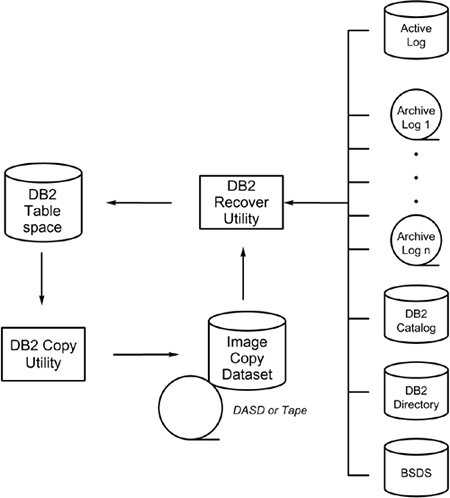
The recovery of DB2 data is an automated process rigorously controlled by the database management system. Figure 32.1 shows the flow of normal DB2 recovery. The standard unit of recovery for DB2 is the table space. As of DB2 V6, indexes can be
Figure 32.1. DB2 recovery.
DB2 is also responsible for keeping a log of all changes made to table spaces. With a few exceptions, all updates are recorded in the DB2 active log . When an active log is full, DB2 creates an archive log . Many archive logs are created during normal DB2 application processing. All this information is stored in the DB2 Directory's SYSIBM.SYSLGRNX table and the Boot Strap Data Set (BSDS). Refer to Chapter 22, "The Table-Based Infrastructure of DB2," for a complete description of the internal DB2 tables and data sets. The DB2 RECOVER utility reads all control information pertaining to data recovery and applies the recorded changes contained in the copies and logs, as instructed by the DBMS and the RECOVER utility control parameters. Basically, the RECOVER utility is used to restore DB2 table spaces and indexes to a specific point in time. You can run two forms of the RECOVER utility: RECOVER TABLESPACE and RECOVER INDEX . Both are discussed in the following sections. |
| < Day Day Up > |
| < Day Day Up > |
The RECOVER Utility
RECOVER
can be used to recover table spaces or indexes by restoring data from an image copy data set and then applying
The RECOVER TABLESPACE Utility
The
RECOVER TABLESPACE
utility
Data can be recovered for a single page, pages that contain I/O errors, a single partition of a partitioned table space, or a complete table space.
Recovery to a previous point can be accomplished by specifying a full image copy or a specific log RBA. Recovery to the current point can be accomplished by simply specifying only the table space
Listing 32.6 shows an example of full recovery to the current point for a table space. Listing 32.7 shows the recovery of the same table space to a previous point using the TOCOPY option to specify an image copy, and the recovery of a different table space to a previous point using the TORBA option to specify a log RBA. This applies the log records only up to, not including, the specified RBA. Note that when using the TOCOPY option with GDG datasets, the relative GDG reference is not allowed. Listing 32.6. JCL for Full Recovery
//DB2JOBU JOB (UTILITY),'FULL RECOVERY',CLASS=X,MSGCLASS=X,
//NOTIFY=USER
//*
//****************************************************************
//*
//* DB2 RECOVER UTILITY :: FULL RECOVERY
//*
//****************************************************************
//*
//RCVR EXEC DSNUPROC,SYSTEM=DSN,UID='FULLRECV',UTPROC="
//*
//* UTILITY INPUT CONTROL STATEMENTS
//* 1. The first RECOVER statement recovers the
//* DSN8D81A.DSN8S81C table space to the current point
//* in time.
//* 2. The second RECOVER statement recovers all indexes
//* in the table space.
//*
//DSNUPROC.SYSIN DD *
RECOVER TABLESPACE DSN8D81A.DSN8S81C DSNUM ALL
REBUILD INDEX(ALL) TABLESPACE DSN8D81A.DSN8S81C
/*
//
Listing 32.7. JCL for Partial Recovery
//DB2JOBU JOB (UTILITY),'PRTL RECOVERY',CLASS=X,MSGCLASS=X,
// NOTIFY=USER
//*
//****************************************************************
//*
//* DB2 RECOVER UTILITY :: PARTIAL RECOVERY
//*
//****************************************************************
//*
//RCVR EXEC DSNUPROC,SYSTEM=DSN,UID='PRTLRECV',UTPROC="
//*
//* UTILITY INPUT CONTROL STATEMENTS
//* 1. The first RECOVER statement recovers the
//* DSN8D81A.DSN8S81D table space to the named
//* image copy data set.
//* 2. The second RECOVER statement recovers the
//* DSN8D81A.DSN8S81C table space to the specified
//* log RBA.
//*
//DSNUPROC.SYSIN DD *
RECOVER TABLESPACE DSN8D81A.DSN8S81D
TOCOPY CAT.FULLCOPY.DATASETD.G0001V00
RECOVER TABLESPACE DSN8D81A.DSN8S81C
TORBA X'0000EF2C66F4'
/*
//
The RECOVER INDEX (or RECOVER INDEXSPACE ) UtilityRECOVER INDEX (or alternatively RECOVER INDEXSPACE ) is executed to restore DB2 indexes to a current or previous state. The utility first reads the DB2 Catalog to determine the availability of image copies, and then reads the DB2 logs to determine interim modifications. The utility then applies the image copies and the log modifications to the index space data set of the index being recovered. RECOVER INDEXSPACE is similar to RECOVER TABLESPACE , except that it operates on DB2 indexes instead of DB2 table spaces. DB2 V6 is the first release of DB2 that enabled recovery of indexes from image copy data sets. The JCL to run the RECOVER INDEXSPACE utility is provided in Listing 32.8. Listing 32.8. RECOVER INDEXSPACE JCL
//DB2JOBU JOB (UTILITY),'DB2 RECVR INDEX',MSGCLASS=X,CLASS=X,
// NOTIFY=USER
//*
//****************************************************************
//*
//* DB2 RECOVER INDEXSPACE UTILITY
//*
//****************************************************************
//*
//UTIL EXEC DSNUPROC,SYSTEM=DSN,UID='RCVRINDX',UTPROC="
//*
//* UTILITY WORK DATASETS
//*
//*
//* UTILITY INPUT CONTROL STATEMENTS
//* Recovers the XPROJ1 index from an image copy.
//*
//DSNUPROC.SYSIN DD *
RECOVER INDEXSPACE DSN8D81A.XPROJ1
/*
//
NOTE Prior to V6, all indexes had to be rebuilt from the data, not an image copy. Additionally, prior to DB2 V6, the RECOVER utility performed this index rebuilding. But as of V6, the REBUILD INDEX utility is used to rebuild indexes from table data, not the RECOVER utility. RECOVER PhasesThe RECOVER utility has up to six phases:
The RESTORE phase is bypassed if the LOGAPPLY option is specified. RECOVER Locking ConsiderationsThe RECOVER utility can run concurrently with the following utilities:
Additionally, unless RECOVER TOCOPY or TORBA is specified, RECOVER can run concurrently with REORG INDEX and REPAIR LOCATE INDEX . The RECOVER utility drains all claim classes for the table space, partition, or index being recovered, regardless of the options specified. However, if the ERROR-RANGE option is specified, the locking level is downgraded to a write claim during the UTILINIT phase.
If either the
TORBA
or
TOCOPY
option is specified,
RECOVER
will drain all claim classes for the index or index partition, as well as any
RECOVER GuidelinesBe sure to implement the following guidelines when you are recovering table spaces. Retain Tape Mounts
When using
RECOVER
with image copies on one or more tape
Do Not Specify Work Data SetsThe RECOVER utility does not require work data sets to recover DB2 table spaces and indexes. Improve Recovery Performance by Avoiding SHRLEVEL CHANGE Copies
If
RECOVER TABLESPACE
is used for a table space in which an image copy data set was created with the
SHRLEVEL CHANGE
specification, the performance of the
RECOVER
utility degrades. The log RBA stored for an image copy taken with
SHRLEVEL CHANGE
is at an earlier portion of the log because the table space can be modified during the execution of the
COPY
utility. Therefore, the
RECOVER
utility reads the log RBA recorded with the image copy in the
SYSIBM.SYSCOPY
table and
Recover SHRLEVEL CHANGE Copies AppropriatelyImage copies taken using SHRLEVEL CHANGE must be recovered to the current point in time or to a specific point in time using TORBA (not TOCOPY ). If a SHRLEVEL CHANGE image copy is recovered using the TOCOPY option, it will be in an indeterminate stage. Be Aware of Underlying VSAM Data Set DeletionsThe underlying VSAM data sets for STOGROUP -defined table spaces are deleted and defined by the RECOVER TABLESPACE utility. If the table space has been user-defined, the corresponding VSAM data set is not deleted. Recover Multiple Objects with a Single RECOVERWhen multiple table spaces must be recovered, code the utility control cards with multiple table spaces assigned to one RECOVER keyword. For example, code this
RECOVER TABLESPACE DSN8D81A.DSN8S81C
TABLESPACE DSN8D81A.DSN8S81D
TABLESPACE DSN8D81A.DSN8S81E
instead of RECOVER TABLESPACE DSN8D81A.DSN8S81C RECOVER TABLESPACE DSN8D81A.DSN8S81D RECOVER TABLESPACE DSN8D81A.DSN8S81E
Coding the control cards the first way ensures that the archive and active logs are read only once. If the control cards are coded as shown in the second example, the
RECOVER TABLESPACE
utility runs three times, causing the archive and active logs to be read separately for each invocation of the utility. This
Consider Restoring in ParallelIf multiple objects are to be recovered, consider using the PARALLEL parameter to restore the objects concurrently. When the PARALLEL option is specified, the RECOVER utility will perform parallel processing during the RESTORE phase. Additionally, you can specify a limit for the number of objects to restore in parallel ”for example, PARALLEL(4) indicates that four objects should be restored at a time.
NOTE
If you specify
PARALLEL(0)
or do not
Consider Explicitly Allocating Image Copy Data Sets
DB2 dynamically
If image copy data sets are explicitly allocated as just described, the
UNIT=AFF
parameter can be coded to
Use DB2's Capability to Fall Back to Previous Image Copies
Current point-in-time recovery attempts to allocate the most recent full image copy for processing. If an error is
If a tape image copy data set is unavailable, the operator can reply NO to the tape mount message to cause DB2 to use a previous image copy. Take Incremental Image Copies to Reduce Log Reading
If incremental image copies exist, the
RECOVER TABLESPACE
utility attempts to use them to reduce the number of log data sets and records that must be
It is not possible to use
COPY
to make incremental image copies for indexes, so this guideline is not
Remember to Recover IndexesExecute the REBUILD INDEX utility for all table spaces recovered using the partial recovery options TOCOPY or TORBA . For indexes defined using COPY YES , execute the RECOVER INDEX utility to bring the indexes up to the same point as the table spaces. Failure to REBUILD or RECOVER indexes results in invalid indexes. Avoid Relative Generation Numbers for GDG Image CopiesThe TOCOPY option of the RECOVER TABLESPACE utility is used to explicitly name an image copy data set to which the named table space will be recovered. If the image copy data set is a GDG, the fully qualified data set name must be specified, including the absolute generation and version number. Relative generation number specification is not supported by the RECOVER utility. Specify a Valid Image Copy Data SetWhen the TOCOPY option is used, the image copy data set specified must be recorded in the SYSIBM.SYSCOPY table. If it is not, the recovery fails. Recover Table Spaces As Appropriate for the Image Copy
Recovery must be processed according to the type of image copy available. For example, if image copies were taken for a partitioned table space at the
DSNUM
level,
RECOVER TABLESPACE
must
Recover Only Complete Units of Work
Avoid recovering table spaces to an RBA other than an RBA recorded in the
SYSIBM.SYSCOPY
table as a result of the
Recover Only Consistent Image CopiesAvoid using the TOCOPY option to recover table spaces to an image copy created with SHRLEVEL CHANGE . Doing so can cause data integrity problems because the image copy may reflect partial unit of work changes. Because the table space might have been modified during the execution of the COPY utility, the image copy without the corresponding log changes represents data in an inconsistent state. Consider Using RECOVER with DFSMS CopiesDB2 provides the capability to recover from backup copies of DB2 data sets taken using the concurrent copy feature of DFSMS. Follow these steps to accomplish this:
Consider Using CURRENTCOPYONLY with Concurrent Copies
The
CURRENTCOPYONLY
parameter can be used to improve the performance of
RECOVER
while restoring concurrent copies. It specifies that
RECOVER
should use only the most recent primary copy for each object in the list. The
RECOVER
utility will build a
DFSMSdss RESTORE
command for each
Restart the RECOVER Utility As NeededRECOVER TABLESPACE is a re-startable utility. No special consideration is necessary because work data sets are not required when recovering a table space alone. The utility can be restarted by changing the DSNUTILB JCL parameter to UTPROC=RESTART . Consult the IBM Manual When Recovering System Table SpacesThe DB2 Catalog and DB2 Directory table spaces can be recovered using the RECOVER TABLESPACE utility, but the recovery must be performed in a specific order. Consult the DB2 Database Administration Guide for details. |
| < Day Day Up > |