Code coloring
| < Day Day Up > |
| Dreamweaver lets you customize or extend the code coloring schemes that you see in Code view so that you can add new keywords to a scheme or add code coloring schemes for new document types. If you develop JavaScript functions to use in your client-side script, for example, you can add the names of these functions to the keywords section so that they display in the color that is specified in Preferences. Likewise, if you develop a new programming language for an application server and you want to distribute a new document type to help Dreamweaver users build pages with it, you could add a code coloring scheme for the document type. Dreamweaver provides the JavaScript function dreamweaver.reloadCodeColoring(), which enables you to reload code coloring XML files that might have been edited manually. For more information on this function, see the Dreamweaver API Reference. To update a code coloring scheme or add a new scheme, you must modify the code coloring definition files. Code coloring filesDreamweaver defines code coloring styles and schemes in XML files that reside in the Configuration/CodeColoring folder. A code coloring style file defines styles for fields that are defined in syntax definitions. It has a root node of <codeColors>. A code coloring scheme file defines code coloring syntax and has a root node of <codeColoring>. The code coloring style file that Dreamweaver provides is Colors.xml. The code coloring syntax files that Dreamweaver provides are CodeColoring.xml, ASP JavaScript.xml, ASP VBScript.xml, ASP.NET CSharp.xml, and ASP.NET VB.xml. NOTE The code coloring in the following examples does not appear on a black and white printed page. To see the code coloring in these examples, see Dreamweaver Help > Extensions > Extending Dreamweaver or see the PDF file for Extending Dreamweaver in the Documentation folder on your installation CD. The following excerpt from the Colors.xml file illustrates the hierarchy of tags in a code coloring style file: <codeColors> <colorGroup> <syntaxColor bold="true" italic="true" /> <syntaxColor text="#009999" /> <syntaxColor text="#FF0000" /> ... <tagColor text="#990099" /> <tagColor text="#009999" /> <syntaxColor text="#999999" italic="true" /> ... </colorGroup> </codeColors> Colors are specified in red-green-blue (RGB) hexadecimal values. For example, the statement text="009999" in the preceding XML code assigns a blue-green (teal) color to the ID "CodeColor_JavascriptNative". The following excerpt from the codeColoring.xml file illustrates the hierarchy of tags in a code coloring scheme file, and it also illustrates the relationship between the styles file and the scheme file: <codeColoring> <scheme name="Text" doctypes="Text" priority="1"> <ignoreTags>Yes</ignoreTags> <defaultText name="Text" /> <sampleText doctypes="Text"> <![CDATA[Default file syntax highlighting. The quick brown fox jumped over the lazy dog. ]]> </sampleText> </scheme> <scheme name="HTML" doctypes="ASP.NET_VB,ASP.NET_CSharp,ASP-JS,ASP-VB,ColdFusion Notice that the syntaxColor and tagColor tags in the Colors.xml file assign color and style values to an id string value. The id value is then used in the codeColoring.xml file to assign a style to a scheme tag. For example, the defaultTag tag in the codeColoring.xml excerpt has an id of "CodeColor_HTMLComment". In the Colors.xml file, the id value of "CodeColor_HTMLComment" is assigned a text= value of "#999999", which is gray. Dreamweaver includes the following code coloring schemes: Default, HTML, JavaScript, ASP_JavaScript, ASP_VBScript, JSP, and ColdFusion. The Default scheme has an id value equal to "Text". Dreamweaver uses the Default scheme for document types that do not have a defined code coloring scheme. A code coloring file contains the following tags. <scheme>Description The scheme tag specifies code coloring for a block of code text. You can have multiple schemes within a file to specify different coloring for different scripting or tag languages. Each scheme has a priority that lets you nest a block of text with one scheme inside a block of text with a different scheme. Attributes name, id, priority, doctypes
Contents blockEnd, blockStart, brackets, charStart, charEnd, charEsc, commentStart, commentEnd, cssProperty, cssSelector, cssValue, defaultAttribute, defaultText, endOfLineComment, entity, functionKeyword, idChar1, idCharrest, ignoreCase, ignoreMMTParam, ignoreTags, keywords, numbers, operators, regexp, sampletext, searchPattern, stringStart, stringEnd, stringEsc, urlProtocol, urlProtocols Container The codeColoring tag. Example <scheme name="Text" doctypes="Text" priority="1"> <blockEnd>Description Optional. Text values that delimit the end of the text block for this scheme. The blockEnd and blockStart tags must be paired and the combination must be unique. Values are not evaluated as case-sensitive. The blockEnd value can be one character. Multiple instances of this tag are allowed. For more information on blockEnd strings, see "Wildcard characters" on page 84. Attributes None. Example <blockEnd><![CDATA[--->]]></blockEnd> <blockStart>Description Optional. Specified only if the coloring scheme can be embedded inside a different coloring scheme. The blockStart and blockEnd tags must be paired, and the combination must be unique. Values are not evaluated as case-sensitive. The blockStart value must be two or more characters in length. Multiple instances of this tag are allowed. For more information on blockStart strings, see "Wildcard characters" on page 84. For information on the blockStart scheme attribute, see "Scheme block delimiter coloring" on page 80. Attributes canNest, doctypes, id, name, scheme
Example <blockStart doctypes="ColdFusion,CFC" scheme="innerText" canNest="Yes"><![CDATA[<!---]]>< <brackets>Description A list of characters that represent brackets. Attributes name, id
Example <brackets name="Bracket" ><![CDATA[{[()]}]]></brackets> <charStart>Description Contains a text string that represents the delimiter of the start of a character. You must specify the charStart and charEnd tags in pairs. Multiple charStart … charEnd pairs are allowed. Attributes None. Example <charStart><![CDATA[']]></charStart> <charEnd>Description Contains a text string that represents the delimiter of the end of a character. You must specify the charStart and charEnd tags in pairs. Multiple charStart … charEnd pairs are allowed. Attributes None. Example <charEnd><![CDATA[']]></charEnd> <charEsc>Description Contains a text string that represents an escape character. Multiple charEsc tags are allowed. Attributes None. Example <charEsc><![CDATA[\]]></charEsc> <commentStart>Description A text string that delimits the start of a comment block. You must specify the commentStart and commentEnd tags in pairs. Multiple commentStart…/commentEnd pairs are allowed. Attributes None. Example <commentStart><![CDATA[<%--]]></commentStart> <commentEnd>Description A text string that delimits the end of a comment block. You must specify the commentStart and commentEnd tags in pairs. Multiple commentStart…/commentEnd pairs are allowed. Attributes None. Example <commentEnd><![CDATA[--%>]]></commentEnd> <cssImport/>Description An empty tag that indicates the code coloring rule for the @import function of the style element in a CSS. Attributes name, id name="cssImport_name" A string that assigns a name to the CSS @import function. docEmphasis">id_string" Required. An identifier string that maps color and style to this syntax item. Example <cssImport name="@import" /> <cssMedia/>Description An empty tag that indicates the code coloring rule for the @media function of the style element in a CSS. Attributes name, id
Example <cssMedia name="@media" /> <cssProperty/>Description An empty tag that indicates CSS rules and holds code coloring attributes. Attributes name, id
Code Color Preference CSS Property Example <cssProperty name="Property" /> <cssSelector/>Description An empty tag that indicates CSS rules and holds code coloring attributes. Attributes name, id
Example <cssSelector name="Selector" /> <cssValue/>Description An empty tag that indicates CSS rules and holds code coloring attributes. Attributes name, id
Example <cssValue name="Value" /> <defaultAttribute>Description Optional. This tag applies only to tag-based syntax (that is, where ignoreTags="No"). If this tag is present, then all tag attributes are colored according to the style assigned to this tag. If this tag is omitted, then attributes are colored the same as the tag. Attributes name
Example <defaultAttribute name="Attribute"/> <defaultTag>Description This tag is used to specify the default color and style for tags in a scheme. Attributes name, id
Example <defaultTag name="Other Tags" /> <defaultText/>Description Optional. If this tag is present, all text that is not defined by any other tag is colored according to the style assigned to this tag. If this tag is omitted, black text is used. Attributes name, id
Example <defaultText name="Text" /> <endOfLineComment>Description A text string that delimits the start of a comment that continues until the end of the current line. Multiple endOfLineComment…/endOfLineComment tags are allowed. Attributes None. Example <endOfLineComment><![CDATA[//]]></endOfLineComment> <entity/>Description An empty tag that indicates that HTML special characters should be recognized and hold coloring attributes. Attributes name, id
Example <entity name="Special Characters" /> <functionKeyword>Description Identifies keywords that define a function. Dreamweaver uses these keywords to perform code navigation. Multiple functionKeyword tags are allowed. Attributes name, id
Example <functionKeyword name="Function Keyword" >function< <idChar1>Description A list of characters, each of which Dreamweaver can recognize as the first character in an identifier. Attributes name, id
Example <idChar1>_$abcdefghijklmnopqrstuvwxyzABCDEFGHIJKLMNOPQRSTUVWXYZ</idChar1> <idCharRest>Description A list of characters that are to be recognized as the remaining characters in an identifier. If idChar1 is not specified, all characters of the identifier are validated against this list. Attributes name, id
Example <idCharRest name="Identifier" <ignoreCase>Description Specifies whether case should be ignored when comparing tokens to keywords. Values are Yes or No. The default is Yes. Attributes None. Example <ignoreCase>Yes</ignoreCase> <ignoreMMTParams>Description Specifies whether the MMTInstance:Param, <!-- InstanceParam, or <!-- #InstanceParam tags should be colored specially. Values are Yes and No; the default is Yes. This handles proper coloring in pages that use Templates. Attributes None. Example <ignoreMMTParams>No</ignoreMMTParams> <ignoreTags>Description Specifies whether markup tags should be ignored. Values are Yes and No; the default is Yes. Set to No when syntax is for tag markup language that is delimited by < and >. Set to Yes when syntax is for a programming language. Attributes None. Example <ignoreTags>No</ignoreTags> <isLocked>Description Specifies whether the text that is matched by this scheme is locked from being edited in the Code view. Values are Yes and No. Default is No. Attributes None. Example <isLocked>Yes</isLocked> <keyword>Description A string of text that defines a keyword. Multiple keyword tags are allowed. A keyword may start with any character, but subsequent characters may only be a-z, A-Z, 0-9, _, $, or @. The code color is specified by the containing keyword tags. Attributes None. Example <keyword>.getdate</keyword> <keywords>Description List of keywords for type specified in category attribute. Multiple keywords tags are allowed. Attributes name, id
Contents <keyword></keyword> Example <keywords name="Reserved Keywords" > <keyword>break</keyword> <keyword>case</keyword> </keywords> <numbers/>Description An empty tag that specifies numbers that should be recognized and also holds color attributes. Attributes name, id
Example <numbers name="Number" /> <operators>Description A list of characters to be recognized as operators. Attributes name, id
Example <operators name="Operator" ><![CDATA[+-*/%<>!?:=&|^~]]></operators> <regexp>Description Specifies a list of searchPattern tags. Attributes name, id, delimiter, escape
Contents <searchPattern></searchPattern> Example <regexp name="RegExp" delimiter="/" escape="\\"> <searchPattern><![CDATA[(\s*/\e*\\/]]></searchPattern> <searchPattern><![CDATA[=\s*/\e*\\/]]></searchPattern> </regexp> <sampleText>Description Representative text that appears in the Preview window of the Edit Coloring Scheme dialog box. For more information on the Edit Coloring Scheme dialog box, see "Editing schemes" on page 87. Attributes doctypes
Example <sampleText doctypes="JavaScript"><![CDATA[/* JavaScript */ function displayWords(arrayWords) { for (i=0; i < arrayWords.length(); i++) { // inline comment alert("Word " + i + " is " + arrayWords[i]); } } var tokens = new Array("Hello", "world"); displayWords(tokens); ]]></sampleText> <searchPattern>Description A string of characters that define a regular search pattern using supported wildcard characters. Multiple searchPattern tags are allowed. Attributes None. Container The regexp tag. Example <searchPattern><![CDATA[(\s*/\e*\\/]]></searchPattern> <stringStart>Description These tags contain a text string that represents the delimiter of the start of a string. You must specify the stringStart and stringEnd tags in pairs. Multiple stringStart … stringEnd pairs are allowed. Attributes name, id, wrap
Example <stringStart name="Attribute Value" ><![CDATA["]]></stringStart> <stringEnd>Description Contains a text string that represents the delimiter of the end of a code string. You must specify the stringStart and stringEnd tags in pairs. Multiple stringStart … stringEnd pairs are allowed. Attributes None. Example <stringEnd><![CDATA["]]></stringEnd> <stringEsc>Description Contains a text string that represents the delimiter of a string escape character. Multiple stringEsc tags are allowed. Attributes None. Example <stringEsc><![CDATA[\]]></stringEsc> <tagGroup>Description This tag groups one or more tags to which you can assign a unique color and style. Attributes id, name, taglibrary, tags
Example <tagGroup name="HTML Table Tags" taglibrary="DWTagLibrary_html" Scheme block delimiter coloringThe blockStart scheme attribute controls the coloring of block opening and closing strings or block delimiters. The following values are valid values for the blockStart attribute. NOTE Do not confuse the blockStart.scheme attribute with the scheme tag. innerTextThis value tells Dreamweaver to color the block delimiters the same as the default text of the scheme inside them. The Template scheme provides an example of the effect of this scheme. The Template scheme matches blocks of read-only code that are colored gray because you cannot edit them. The block delimiters, which are the <!-- #EndEditable --> and <!-- #BeginEditable "..." --> strings, are also colored gray because they also are not editable. Sample code <!-- #EndEditable --> <p><b><font size="+2">header</font></b></p> <!-- #BeginEditable "test" --> <p>Here's some editable text </p> <p> </p> <!-- #EndEditable --> Example <blockStart doctypes="ASP-JS,ASP-VB, ASP.NET_CSharp, ASP.NET_VB, ColdFusion,CFC, HTML, JSP customTextThis value tells Dreamweaver to use custom colors to color the block delimiters. Sample code The delimiters for blocks of PHP script, which appear in red, provide an example of the effect of the customText value: <?php if ($loginMsg <> "") echo $loginMsg; ?> Example <blockStart name="Block Delimiter" doctypes="JSP" outerTagThe outerTag value specifies that both the blockStart and blockEnd tags are complete tags and that Dreamweaver should color them as tags would be colored in the scheme that surrounds them. The JavaScript scheme, in which <script> and </script> strings are the blockStart and blockEnd tags, provides an example of this value. This scheme matches blocks of JavaScript code, which does not recognize tags, so the delimiters need to be colored by the scheme that surrounds them. Sample code <script language="JavaScript"> // comment if (true) window.alert("Hello, World"); </script> Example <blockStart doctypes="PHP_MySQL" scheme="outerTag"><![CDATA[<script\s+language="php">]]>< innerTagThis value is identical to the outerTag value, except that the tag coloring is taken from the scheme inside the delimiters. This is currently used for the html tag. nameTagThis value specifies that the blockStart string is the opening of a tag and blockEnd string is the closing of a tag, and these delimiters are to be colored based on the tag settings of the scheme. This type of scheme displays tags that can be embedded inside other tags, such as the cfoutput tag. Sample code <input type="text" name="zip" <cfif newRecord IS "no"> <cfoutput query="employee"> Value="#zip#" </cfoutput> </cfif> > Example <blockStart doctypes="ColdFusion,CFC" scheme="nameTag"><![CDATA[<cfoutput\n]]></blockStart> nameTagScriptThis value is identical to the nameTag scheme; however, the content is script, such as assignment statements or expressions, as opposed to attribute name=value pairs. This type of scheme displays a unique type of tag that contains script inside the tag itself, such as the ColdFusion cfset, cfif, and cfifelse tags, and can be embedded inside other tags. Sample Code See the sample text for nameTag. Example <blockStart doctypes="ColdFusion,CFC" scheme="nameTagScript"><![CDATA[<cfset\n]]></blockStart> Scheme processingDreamweaver has three basic code coloring modes: CSS mode, Script mode, and Tags mode. In each mode, Dreamweaver applies code coloring only to particular fields. The following chart indicates which fields are subject to code coloring in each mode.
To make the process of defining schemes more flexible, Dreamweaver lets you specify wildcard and escape characters. Wildcard charactersThe following is a list of wildcard characters that Dreamweaver supports, along with the strings to specify them and descriptions of their usage.
Escape charactersThe following is a list of escape characters that Dreamweaver supports, along with the strings to specify them and descriptions of their usage.
Maximum string lengthThe maximum length allowed for a data string is 100 characters. For example, the following blockEnd tag contains a wildcard character. <blockEnd><![CDATA[<!--\s*#BeginEditable\s*"\*"\s*-->]]></blockEnd> Assuming the optional white space wildcard strings (\s*) are a single space character, which Dreamweaver generates automatically, then the data string is 26 characters long, plus a wildcard string (\*) for the name. <!-- #BeginEditable "\*" --> This leaves an editable region name that can be as man y as 74 characters, which is the maximum of 100 characters minus 26. Scheme precedenceDreamweaver uses the following algorithm to color text syntax in Code view:
Editing schemesYou can edit the styles for a code coloring scheme either by editing the code coloring file or by selecting the Code Coloring category in the Dreamweaver Preferences dialog box, as shown in the following figure: 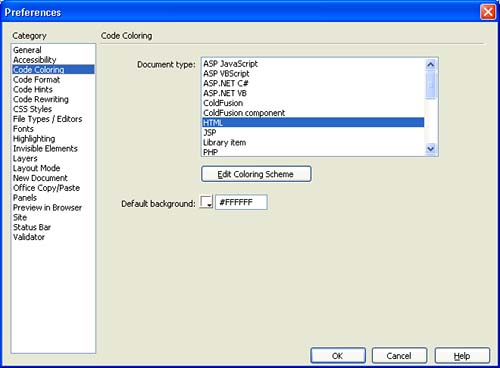 For fields that you can specify more than once, such as stringStart, specify color and style settings only on the first tag. Data will be lost when you split color and style settings across tags and you later edit the colors or styles by using the Preferences dialog box. NOTE Macromedia recommends that you create backup copies of all XML files before you make changes. You should verify all manual changes before you edit color and style settings using the Preferences dialog box. Data will be lost if you edit an invalid XML file using the Preferences dialog box. To edit styles for a scheme using the Code Coloring category in the Preferences dialog box, double-click a document type, or click the Edit Coloring Scheme button, to open the Edit Coloring Scheme dialog box. 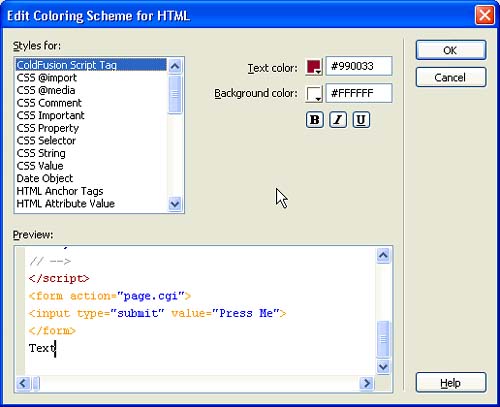 To edit the style for a particular element, select it in the Styles For list. The items listed in the Styles For pane include the fields for the scheme being edited and also the schemes that might appear as blocks within this scheme. For example, if you edit the HTML scheme, the fields for CSS and JavaScript blocks are also listed. The fields listed for a scheme correspond to the fields defined in the XML file. The value of the scheme.name attribute precedes each field listed in the Styles For pane. Fields that do not have a name are not listed. The style for a particular element includes bold, italic, underline, and background color in addition to code coloring. After you select an element in the Styles For pane, you can change any of these style characteristics. The Preview area displays how sample text would appear with the current settings. The sample text is taken from the sampleText setting for the scheme. Select an element in the Preview area to change the selection in the Styles For list. If you change the setting for an element of a scheme, Dreamweaver stores the value in the code coloring file and overrides the original setting. When you click OK, Dreamweaver reloads all code coloring changes automatically. Code coloring examplesThe following code coloring examples illustrate the code coloring schemes for a cascading style document and a JavaScript document. The lists of keywords in the JavaScript example are abbreviated for the sake of keeping the example short. CSS code coloring <scheme name="CSS" doctypes="CSS" priority="50"> <ignoreCase>Yes</ignoreCase> <ignoreTags>Yes</ignoreTags> <blockStart doctypes="ASP-JS,ASP-VB,ASP.NET_CSharp,ASP.NET_VB,ColdFusion,CFC,HTML,JSP CSS sample text The following sample text for the CSS scheme illustrates the CSS code coloring scheme: /* Comment */ H2, .head2 { font-family : 'Sans-Serif'; font-weight : bold; color : #339999; } The following lines from the Colors.xml file provide the color and style values that are seen in the sample text and were assigned by the code coloring scheme: <syntaxColor text="#FF00FF" /> <syntaxColor text="#000099" /> <syntaxColor text="#0000FF" /> JavaScript code coloring <scheme name="JavaScript" doctypes="JavaScript" priority="50"> <ignoreCase>No</ignoreCase> <ignoreTags>Yes</ignoreTags> <blockStart doctypes="ASP-JS,ASP-VB,ASP.NET_CSharp,ASP.NET_VB,ColdFusion,CFC,HTML,JSP JavaScript sample text The sample text for the JavaScript scheme illustrates the JavaScript code coloring scheme as follows: * JavaScript */ function displayWords(arrayWords) { for (i=0; i < arrayWords.length(); i++) { // inline comment alert("Word " + i + " is " + arrayWords[i]); } } var tokens = new Array("Hello", "world"); displayWords(tokens); The following lines from the Colors.xml file provide the color and style values that are seen in the sample text and were assigned by the code coloring scheme: <syntaxColor text="#999999" italic="true" /> <syntaxColor text="#000000" bold="true" /> <syntaxColor text="#000099" bold="true" /> <syntaxColor text="#FF0000" /> <syntaxColor text="#990099" /> <syntaxColor text="#009999" /> |
 ,CFC,HTML,JSP,EDML,PHP_MySQL,DWTemplate,LibraryItem,WML" priority="50"> <ignoreCase>Yes</ignoreCase> <ignoreTags>No</ignoreTags> <defaultText name="Text" /> <defaultTag name="Other Tags" /> <defaultAttribute /> <commentStart name="Comment" ><![CDATA[<!--]]></commentStart> . . . <tagGroup name="HTML Anchor Tags"
 | < Day Day Up > |

EAN: 2147483647
Pages: 282