Understanding the System.Security. Cryptography Namespace
|
Understanding the System.Security. Cryptography Namespace
Security at the most basic level performs two tasks—it protects data and secures resources. Any security feature you build into a program will perform one of these two tasks. Keeping a cracker at bay by denying entrance to your Web site is a method of protecting data and resources. Given this definition of security, the System.Security.Cryptography namespace takes on special importance because it’s the only namespace that directly targets data protection. Most of the other namespaces emphasize data and resource protection through other, indirect, methods.
| Tip | You can find a complete description of the System.Security.Cryptography namespace at http://msdn.microsoft.com/library/en-us/cpref/html/frlrfSystemSecurityCryptography.asp. Don’t let the large number of classes in this namespace surprise you. Many of the classes perform essentially the same task, such as decryption, using different methodologies. For example, the RSACryptoServiceProvider and SHA1CryptoServiceProvider perform the same task using different encryption methods. |
Cryptography Namespace Structure Overview
Some people take one look at all of the classes in this namespace and immediately think that cryptography is difficult. The .NET Framework makes cryptography easy compared to earlier technologies such as the CryptoAPI (see the article entitled, “The Cryptography API, or How to Keep a Secret” at http://msdn.microsoft.com/library/en-us/dncapi/html/msdn_cryptapi.asp for a good overview of this topic). The best way to approach this namespace is to use a divide and conquer approach. You can break the System.Security .Cryptography namespace down into the following distinct areas.
Algorithms Some classes, such as AsymmetricAlgorithm, define algorithms used to create encryption methodologies. You could theoretically create a class based on one of these algorithms to design your own encryption method. However, it’s usually best to leave this task to the experts. Other classes in this category, such as Data Encryption Standard (DES), are used within your application to perform encryption and decryption services based on a particular algorithm. (The example later in this section demonstrates how an algorithm works.) The overall idea is that these classes define an algorithm used to encrypt and decrypt data.
Assistant or Utility The System.Security.Cryptography namespace includes a number of assistant classes. For example, the CryptographicException class provides help in catching error conditions so you can handle them within your program. The RandomNumberGenerator class generates the random numbers used in all cryptographic calculations.
Data Formatters and Deformatters The overall goal of these classes is verification. A formatter creates a signature on the sending end that’s deformatted (or verified) on the receiving end of a data transmission. For example, the AsymmetricSignatureDeformatter and AsymmetricSignatureFormatter classes act as the base classes for classes that verify signatures. Currently, the Digital Signature Algorithm (DSA) and Rivest, Shamir, and Adleman (RSA) encryption methodologies rely on these classes.
Service Provider These classes provide a convenient wrapper for using many of the cryptographic algorithm classes. They provide a wrapper that makes using the algorithm easier. For example, the DESCryptoServiceProvider class provides a wrapper around the DES algorithm class.
Transforms A few of the classes provide data transformation functionality. The two common transforms are FromBase64Transform and ToBase64Transform, which transform data to and from the Base64 format.
Cryptography Namespace Structure Example
Cryptography, the act of making data unreadable to someone else and then converting it back to something readable, is one of the most ancient arts in the world for keeping a secret.
Of course, ancient cryptographic methods can’t compete with the modern equivalent, but the idea has been the same since those early times.
One of the ways in which .NET has greatly improved the life of developers is using cryptography to keep data safe. Unlike the CryptoAPI provided with previous versions of Windows, the .NET method is actually easy to understand and use. Listing 2.3 shows an example of the encryption portion of the process. The decryption portion is almost the same with a few minor differences. (You can find this code in the \Chapter 02\C#\Crypto or \Chapter 02\VB\Crypto folder of the source code located on the Sybex Web site.)
Listing 2.3 Encrypting and Decrypting a File Requires Similar Code
 |
private void btnEncrypt_Click(object sender, System.EventArgs e) { FileStream FIn; // Input file. FileStream FOut; // Output file. Byte[] Data = new Byte[100]; // Temporary buffer. int Counter = 0; // Total converted. int ReadByte = 0; // Currently read counter. CryptoStream CryptStream; // Cryptographic stream. RijndaelManaged RM; // Encryption Algorithm. byte[] Key = {0x01, 0x02, 0x03, 0x04, // Encryption Key. 0x05, 0x06, 0x07, 0x08, 0x09, 0x10, 0x11, 0x12, 0x13, 0x14, 0x15, 0x16}; byte[] IV = {0x01, 0x02, 0x03, 0x04, // Initialization vector. 0x05, 0x06, 0x07, 0x08, 0x09, 0x10, 0x11, 0x12, 0x13, 0x14, 0x15, 0x16}; // Open the input and output files. FIn = new FileStream(txtInput.Text, FileMode.Open, FileAccess.Read); FOut = new FileStream(txtEncrypt.Text, FileMode.OpenOrCreate, FileAccess.Write); // Create the cryptographic stream. RM = new RijndaelManaged(); CryptStream = new CryptoStream(FOut, RM.CreateEncryptor(Key, IV), CryptoStreamMode.Write); // Encrypt the file. while(Counter < FIn.Length) { ReadByte = FIn.Read(Data, 0, 100); CryptStream.Write(Data, 0, ReadByte); Counter = Counter + ReadByte; } // Close the open stream and files. CryptStream.Close(); FIn.Close(); FOut.Close(); } |
As you can see from the example code, the idea is to open input and output files. The input file contains the plain text that you want to encrypt. After you open the two files, you need to create an algorithm object to encrypt the data and a stream for handling the encryption. Notice the CreateEncryptor() method call in the CryptoStream() constructor. You would replace this with a CreateDecryptor() call in the decryption portion of the code.
After the code creates the required stream, it simply reads from the input file, encrypts the data, and sends the data to the output file. It’s important to track how many bytes the input file actually contained or you’ll obtain some odd results from the encryption portion of the program. Once the output is complete, you close the stream first, and then the two files. Make sure you follow this order or you’ll receive an error from the application. The output file will also lose data because CLR doesn’t flush the CryptoStream object until you close it. Figure 2.3 shows the interface for this program.
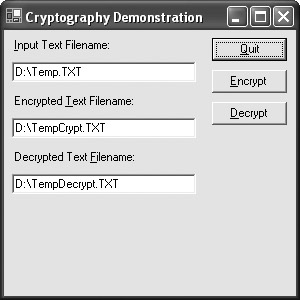
Figure 2.3: The sample program can encrypt and decrypt files using the Rijndael algorithm.
The interface is straightforward, but you need to observe a few rules. First, you must supply three unique filenames or the program will fail. The input and output streams must remain separate. When you click Encrypt, the program encrypts the original input file and places the data in the encrypted file. Figure 2.4 shows typical output from this task. The original text file has a simple statement, “This is some simple text to encrypt.” It’s unreadable now. Click Decrypt and the program will decrypt the information into its original state. You can theoretically use this simple program for any encryption needs you have, but other techniques are examined later in the book.
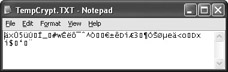
Figure 2.4: Although the encrypted file looks like garbage, it really does contain data.
|

EAN: 2147483647
Pages: 168