Flylib.com

Books Software


Chapter 3: Designing a Data Warehouse

 < Day Day Up > 


Chapter 3: Designing a Data Warehouse

Overview of Warehouse Design

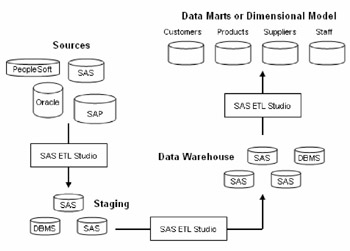
The following figure shows how SAS ETL Studio is used to flow data into and out of a central data warehouse.
click to expand
Figure 3.1: Best Practice Data Warehouse

In this model, SAS ETL Studio jobs are used to perform the following tasks :

  1. Extract enterprise data into a staging area.

  2. Cleanse and validate data and load a central data warehouse.

  3. Populate a data mart or dimensional model that provides collections of data from across the enterprise.

Each step of the enterprise data model is implemented by multiple jobs in SAS ETL Studio. Each job in each step can be scheduled to run at the time or event that best fits your business needs and network performance requirements.


 < Day Day Up > 
 < Day Day Up > 


Data Warehousing with SAS ETL Studio

SAS ETL Studio helps you build dimensional data from across your enterprise in three steps:

  • Extract source data into a staging area (see "Step 1: Extract and Denormalize Source Data" on page 24).

  • Cleanse extracted data and populate a central data warehouse (see "Step 2: Cleanse , Validate, and Load" on page 24).

  • Create dimensional data that reflects important business needs (see "Step 3: Create Data Marts or Dimensional Data" on page 25).

The three-step enterprise model represents best practices for large enterprises . Smaller models can be developed from the enterprise model. For example, you can easily create one job in SAS ETL Studio that extracts , transforms, and loads data for a specific purpose.

Step 1: Extract and Denormalize Source Data

The extraction step consists of a series of SAS ETL Studio jobs that capture data from across your enterprise for storage in a staging area. SAS data access capabilities in the jobs enable you to extract data without changing your existing systems.

The extraction jobs denormalize enterprise data for central storage. Normalized data (many tables, few connections) is efficient for data collection. Denormalized data (few tables, more connections) is more efficient for a central data warehouse, where efficiency is needed for the population of data marts.

Step 2: Cleanse, Validate, and Load

After loading the staging area, a second set of SAS ETL Studio jobs cleanse the data in the staging area, validate the data prior to loading, and load the data into the data warehouse.

Data quality jobs remove redundancies, deal with missing data, and standardize inconsistent data. They transform data as needed so that the data fits the data model. For more information on available data cleansing capabilities, see the SAS Data Quality Server: Reference .

Data validation ensures that the data meets established standards of integrity. Tests show that the data is fully denormalized and cleansed, and that primary, user , and foreign keys are correctly assigned.

When the data in the staging area is valid, SAS ETL Studio jobs load that data into the central data warehouse.

Step 3: Create Data Marts or Dimensional Data

After the data has been loaded into the data warehouse, SAS ETL Studio jobs extract data from the warehouse into smaller data marts, OLAP structures, or star schemas that are dedicated to specific business dimensions, such as products, customers, suppliers, financials, and employees . From these smaller structures, additional SAS ETL Studio jobs generate, format, and publish reports throughout the enterprise.


 < Day Day Up >