2.4 The software lifecycle
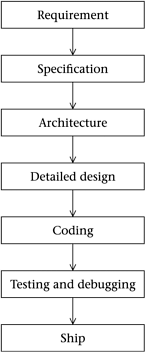
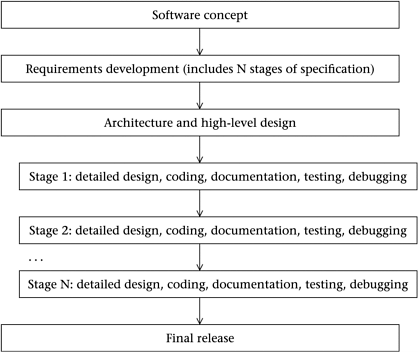
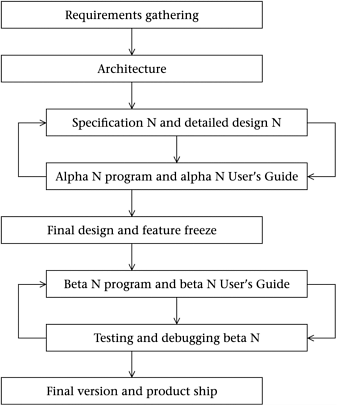
| Whether you're working alone or working as part of a large team, there will be a plan of action for how to design, code, test, debug, and document the software. A plan like this is usually called a software lifecycle . In this next section we'll discuss a couple of possible lifecyles and then describe an Inventor lifecycle to use for the kind of exploratory, time-constrained project that we'll do in this book. If you do not consciously choose a particular software lifecycle, you end up in fact using a scenario known as 'code and fix.' It means making no plan at all, but instead simply diving in, writing code, and trying to fix each new problem as it develops. Code and fix is considered one of the most inefficient ways of developing software. You should always take some time before starting a project to try and figure out what you are going to do. A good rule of thumb is to estimate how much time you should spend planning “ and then plan for three times this long. One well-spent hour of planning can save hundreds of hours in coding and fixing further down the line. When you have a really clear vision of what you want to do, writing the code to do it does not in fact take all that long. The hard part is in getting the vision. There are a number of tried and true software lifecycles which involve a good measure of planning. The most traditional model is called the 'Waterfall' software lifecycle. This model describes a straight-through process: completely plan what you want, specify how the program will behave, nail down the architecture, work out the detailed design, and only then begin coding, finally testing and debugging. The stages of the Waterfall are given in Figure 2.3. Figure 2.3. The Waterfall lifecycle In practice, people tend not to use a pure Waterfall approach, because it is difficult if not impossible to completely specify and plan your program in advance of writing any code. It's more common to see a lifecycle that resembles the linear Waterfall approach but which allows for the possibility of 'swimming upstream' and revisiting the earlier stages. It would be quite reasonable, in other words, to draw additional upwards arrows from the specification, architecture, detailed design, coding, and testing and debugging boxes. Another popular lifecycle is known as the Staged Delivery model. In this lifecycle we organize the requirement phase so as to break the program into several stages of functionality. The plan is that at the end of each stage the program should be fully releasable. But stage one might include only basic functionality, stage two a richer set of features, and perhaps stage three will have lots of bells and whistles, while stage four will be incredibly deluxe. So as to be sure of being able to deliver some kind of product when the time runs out, the Staged Delivery method completely finishes stage one, then stage two, and so on. The sketch for this lifecycle is given in Figure 2.4. Note that here we try and fix the architecture early in the process, but we allow for changing the detailed design at each stage. Note also that we try and figure out all of the features that we want right at the start so that then our architecture will be roomy enough to accommodate all of our planned functionality. Figure 2.4. The Staged Delivery lifecycle Names and descriptions for many other software lifecycles can be found, for instance, in Steve McConnell, Rapid Development (Microsoft Press, 1996), from which our description of the Staged Delivery model is taken. In this book we're going to use a somewhat exploratory software development process where we tend to be occasionally groping in the dark. For this we'll use a model which is a linear process with two repetitive loops in the middle. Just to have a name for it, we call it the Inventor lifecycle, to suggest that it's a reasonable lifecycle to use when you're exploring an area that's new to you and are planning to discover new things about how to use your tools and your framework, possibly developing some entirely new features as well. The name isn't meant to rule out the possibility that you might use the Inventor lifecycle to make a highly polished final product. The Inventor lifecycle goes as shown in Figure 2.5. Figure 2.5. The Inventor lifecycle We expect to develop our program though a number of builds. The builds break into the alpha and the beta stage. In the alpha stage we still don't know exactly what features we're going to have, so we allow for the possibility of changing our specification several times. When we see our deadline coming into sight, we switch into beta mode by freezing our feature set and focusing on testing, and debugging. Now let's discuss each stage of our Inventor lifecycle. Requirements gatheringAs discussed above, in the requirement phase you start with one or more software concepts and try them out on the other stakeholders, who will be your professor and your other team members in a classroom situation. If you're using this book for self-study, you might try and involve at least two other people as stakeholders “ if only in the role of interested on-lookers. After several cycles of requirements gathering you arrive at a basic plan for how the program will behave. You get a specification sketch describing the program and including some drawings of how the screens will look. The specification sketch should have the four components (S1) concept, (S2) appearance, (S3) controls, and (S4) behavior. ArchitectureBefore doing any coding, you need to figure out what classes you are going to use. It is likely that your class structures will change somewhat as time goes on, but it is important at the outset to make an honest effort to separate out your classes and, above all, to think about how they will inherit from existing classes. The most common design mistake that beginning programmers make is to block copy an existing class's code for a new class when it would be so much cleaner and easier to have the new class be a child of the existing class. UML class diagrams are a good tool for working out the high-level design. Once you have a high-level design and a specification that's been honed by requirements gathering, you can put these together into a document sometimes called the 'RAD' for 'requirements and design'. (Presumably by the end of the requirements gathering, the requirement and the specification match.) Of course, in an exploratory classroom or individual project, we can expect the specification to get more detailed and feature-rich as time goes on. Specification NOnce your requirement and basic architecture has the go-ahead, you need to figure out what members and methods go into your classes. You will also need to work out a more detailed draft of the User 's Guide so that you know exactly what you want your program to do. The specification N is a list of the features you expect the program to have, and the detailed design includes all the methods you need to implement them. When you get into the low-level design, what you will often be doing is to write out C++ headers for your classes. You can start the process informally, but given that you must eventually write the code, it's not a bad idea to simply do the low-level design by actually writing real headers. New inspirations will come as you try and implement the methods, get them to compile, and make them work in the program. As time goes by, you will of course think of new features to add to your program “ and this is why we talk about specification N and detailed design 'N', where N is a number that starts at 1 and usually ranges between ten and several hundred. In practice you will end up cycling through steps specification and detailed design N and alpha N many times. As you develop your program, more and more new features will suggest themselves , and it would be foolish not to include the good ones simply because they aren't on some list you made up before you really knew what you were doing. Conversely, you may also find that some features you'd planned to include will be too difficult or time-consuming ; reduce your risk by throwing them out. It seems odd to admit that it's not possible to fully control the development process, but this is a reality of contemporary software development. There seems to be no way around it. A completed program is such a large and complex object that it's impossible to fully predict the form of the finished object when you start. It seems likely that software engineering is intrinsically chaotic in the formal sense of not being entirely predictable. It's entirely possible that software engineering never will become an exact science. [There's an interesting book about this notion: David Olson, Exploiting Chaos: Closing in on the Realities of Software Development (Van Nostrand Reinhold, 1993).] This fact leads some people to question if we should really call it engineering . If you ask a mechanical engineer to build a bridge, he or she can tell you precisely how long it will take, how much it will cost, and what the finished bridge will look like; but thanks to the chaos of complex systems, it's hard to make firm predictions about a software project. Of course your managers will ask for predictions anyway. Try and buy yourself as much time as you can, and if there's still not enough time, remember the Constraint Triangle, and negotiate to reduce the feature set or to add programmers to your team. Alpha N programThe nearly-finished version of a program is usually called the beta version, and the alpha versions are the ones that come before that. An alpha version of a program is normally somewhat rough and unfinished . The very first version of the program “ the alpha 1 “ is sometimes more of a 'prototype', which is a quick and dirty version of the program simply to prove that your concepts will work. Very commonly there will be some existing program that you use as a kind of 'seed' or 'starter dough' to get your program going. These are prototypes of a kind. But for your real alpha 1, you need to make the program show at least some minimal functionality in implementing your required features. If there are several possible approaches, you will sometimes want to prototype all of them so that you can compare. So in some situations you may have several competing alpha 1 programs. But, by the time you get to alpha 2, there should be only one version of the program. As mentioned above, you can expect to run through at least ten or 20, and more typically over 100 alpha versions of your program while developing it. One thing to be careful about is that you don't get stuck with some sloppy design that happened to get into the alpha 1. During the early stages of alpha development you should keep thinking about your class structures. If anything is crude or awkward , now is the time to fix it, before the program goes on and gets a lot more complicated. Usually you'll run through two or three alphas before going back and changing the design, so it's more like you'll do a specification and detailed design step, a couple of alpha programs, then another specification and detailed design, then a few alpha programs, and so on. The most important practical thing of all when doing multiple versions of a program is to keep the versions straight. There is so much to say about this issue that there is a File Names and Directory Structure section in Chapter 21: Tools for Software Engineering. Alpha N User's GuideJust as there is a distinction between a detailed design and actual code, there is a distinction between a specification and actual User's Guide documentation. While doing new versions of the program, be sure and keep your documentation current. Put your documentation in a handy text file, and every time you change a feature in your program, write this change down in your documentation. At the early stages, you do not want to be involved with a technical writer or an expensive technical publications division. The alpha documentations should be quick and light, preferably written by the programmers. The alpha documentation doesn't need to be anything fancy, but it does need to clearly state what the controls are and what the ranges of the control parameters are. Otherwise you're likely to forget. This is particularly important if some of your controls are still in the popup or hot-key stage. In a way, the ongoing documentation acts as notes for the next specification. It's also a good idea to keep a separate document listing known bugs and desired features. The User's Guide should include an explanation of why your program is interesting, a guide to installation and quick start, and a feature by feature explanation of all of the menu and dialog controls. Often working on the documentation will give you ideas on how to improve the user interface. You should make your documentation as tight and neat as your code. Use good clear English sentences, and always be sure to use a spell-checker on your documentation. Avoid repeating obvious things over and over, and avoid uninformative statements like 'The Change Size control changes the size.' Instead explain what size is being changed, what the allowable range of size values is, why someone might want to change size, and give examples of relevant behavior at the lower and higher ends of the range. As well as the User's Guide, there is another kind of documentation which you can create: the programmer's documentation. Most of the programmer's documentation appears inside your code: as dated logs at the beginning of the main program files, as short comments on individual lines of code, and as extensive comments next to the 'tricky' parts of the code. In addition there might be a short overview document that explains to a new programmer how all of your project files fit together. Final design and feature freezeIn developing software, you are usually faced with some kind of temporal deadline. You can't go on changing and adding to the program forever if you are going to hit your ship date. Polishing up the program and getting the final bugs out is usually going to take more time than you expected. In fact there's a saying among software engineers : 'The first 90% of the program takes the first 90% of the time, and the last 10% takes the second 90% of the time.' The final design has a set-in-concrete nature that the alpha N designs do not. Once you get to this point, this is what you are going to finish, and nothing more or less. 'Feature freeze' means, of course, that you are not going to be adding any more features, no matter how enticing they may seem. Regarding how long it takes add things to a program, the author often thinks of a fractal such as a coastline. Standing on one rocky outcropping of a coast, you might look along the coast towards the next promontory and think it's an easy walk. But coasts and programs are fractals, and you're likely to find inlets blocking your way, inlets with further smaller inlets along them. Beta N Program and Beta N User's GuideAt this point you know exactly what the program is supposed to do. The problem is to make this really true. So now you alternate making new versions of the beta N release with testing and debugging the release. This phase is also when you get really serious about your User's Guide. In software companies, the creation of the documentation is often farmed out to a technical writing division within the company. The final specification and detailed design acts as a good starting point for the tech writers; although it is easier for them if you have been dutiful about your alpha N documentations. In general it is not a good idea to let the tech writers get started before you have done your feature freeze and gotten your final design together, otherwise they may waste a lot of time working on documentation for features which are still subject to change. What's wrong with that? The problem is that your company will account the cost of the tech writers' time as part of your project's expense, making your work appear much less cost-effective . Testing Beta NIt's hard to anticipate all of the bugs that a program may contain. The more people you can get testing it the better. Often the writers working on the documentation function as a kind of testing staff; they try writing down what the specification says the program does, and they see if this is true as they write it. While testing your program, always run it in debug mode (by pressing the F5 key) so that if and when it crashes, you will be able to use the debugger information. It's a good idea to develop an 'autorun' mode for your program under which it will run and do things without any user input. This is a type of automated testing that can be pushed pretty far; you can, for instance, have your automated test periodically change values of the program parameters as if a user were doing things. Larger companies will have a special group devoted to testing the software; this is sometimes called the QA group . The fact is, developers don't want their code to break. Whether consciously or not, they know which kinds of tests to avoid. Only a dispassionate QA tester can really find the problems in your code. By way of testing the Pop program, the author has let successive waves of students try to find bugs in it, with extra homework points going to those who succeed. If a lot of people are interested in your program, you may be able to hand out beta versions to them and have them try the program out. As with the sequential alpha versions, you need to be careful to keep the successive beta versions distinct. Another issue is that of bug tracking. You should have a big document (or data base file) which includes a brief description of each bug and how to reproduce the bug, along with a record of what has been done to fix the bug. For the purposes of a student project, a simple text document with a name like bugs.txt can do the job. You might keep such a file in with your source code and revise it as time goes on. Debugging Beta NThere are a lot of special techniques software engineers use to try and keep bugs out of their code. Using the object-oriented language C++ instead of C is one good way for avoiding bugs. C++ allows you to encapsulate closely related variables and functions into the special kinds of types we call classes . (The instances of your classes are your objects .) With the object-oriented approach, your code becomes simpler to read and to understand, and this means it is less likely to have major bugs in its logic. The use of 'operator overloading', for instance, enables you to write something like a = b + c to stand for, say, vector addition just like you would want it to. Another good thing about object-oriented programming (called OOP for short) is that it allows you to code up some frequently used routine only once, and to provide interfaces so this same piece of code can be used over and over. It is much easier to perfect and maintain a piece of code if it lives only in one place instead of having variant versions copied all over the place. OOP also provides a kind of access-protection for the member variables of objects, which makes it harder to carelessly alter a variable without taking into account the side-effects that this change may have. Instead of arbitrarily changing member variables, you use special 'mutator' functions that you have written so as (hopefully) to nail down all side-effects once and for all. Still another gain from OOP is the use of constructor and destructor functions. These functions, which you write yourself for each class you define, take care of initializing the fields of your objects to default values, allocating necessary memory and resources for your objects, and freeing up memory and resources when you are through with an object. A final benefit to C++ is the availability of template libraries which include, for instance, templates which encapsulate the notion of a linked list, a map (also known as a hash table) and an array. The MFC templates for these useful classes are called CList , CMap , and CArray , respectively. A CArray template class, for instance, takes care of the memory management issues involved with allocating and deallocating space for an array. It should go without saying that learning how to use the debugger is all-important. Beginning and intermediate programmers tend to avoid the debugger, as it seems too confusing. But really and truly, the debugger is your friend . While developing a program you should primarily be building the ' Debug ' version of the program as opposed to the ' Release ' version “ there is a switch for selecting between the two in the Microsoft Visual Studio compiler (see Appendix C for the control sequence). See Chapter 21: Tools for Software Engineering in Part II for more detailed information about using the debugger. Final version and product shipPutting together the final version can involve figuring out things like how to fit it all on the required number of disks, and how the users are going to install the software from the disks. Lots of issues relating to the documentation will arise as well. Often you will want to provide screen-shots for use in the documentation. In a truly Staged Delivery cycle, it's conceivable that after you reach this level you jump all the way back to the specification and detailed design N stage, and implement a new layer of features. Note, however, that this is time-consuming, as once you start adding new features, you need to take them through the repeated alphas to get them working, and then take them through multiple betas to get them tested and debugged . Trying to add new features late in the lifecycle is risky, but sometimes the pressure is irresistible. The urge is known as feature creep . Unless you know that you're going to have enough time to fully test the new features after implementing them, resist feature creep. The development spiralWe mentioned above that there's a kind of software lifecycle known as the Spiral lifecycle. This means thinking in terms of spiraling clockwise around and around through four stages: analysis, design, implementation, and maintenance.
The analysis phase involves figuring out what you want the program to do. This is similar to making a software requirement. In reality, we don't immediately know all the things we want the software to do, so actually we pass back through this stage numerous times. The design phase involves several things. One part is the object-oriented design: figuring out which classes to use, and what the class methods should be. Another part is the program design, figuring out how to break your code into modules, and how to hook the modules together with global variables and function calls. A third part of the design means figuring out your user interface. All this is too much to do at once; what you do is to keep extending and improving the designs as you pass through the design phase over and over. The implementation phase means writing the code. As with design there are at least three types of coding you need to do: the class method coding, the program flow code, and the user interface code. As used here, the maintenance phase includes the debugging and tweaking that goes into the program to make it work properly. The first time you implement something it rarely works just as you wanted it to. You may need to fix a bug, alter a function's behavior, or change a dialog box design. After each cycle through the four phases, you look at what you have and try and document it. The documentation is itself a kind of analysis, and as you get a deeper understanding of your program you're ready to alter the design, implement the new design, do some maintenance on the new implementation, analyze what you've done, and so on. Like most lifecycles, our Inventor lifecyle is a kind of cross between the Waterfall and the Spiral lifecyles. Some students are disappointed when they take a course in software engineering. They had hoped to learn a clear and simple series of steps to follow so as to build a program. But the process turns out to be neither clear nor simple. Like it or not, software engineering is a fuzzy discipline which involves a certain amount of creativity. A main design methodology we're going to be using in this book is the object-oriented approach described in Chapter 4: Object-Oriented Software Engineering. To begin with, we're using the object-oriented language C++, but we need to do more than write in C++ to make our design and our code truly object-oriented. More than anything else, doing object-oriented software engineering involves iteration and successive levels of refinement. Here's a relevant passage from a classic book on object-oriented software engineering:
 |