Duplicating a Photoshop Document
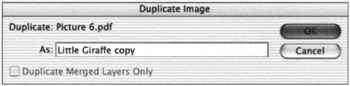
You can duplicate a document on the fly. The Image
’
Duplicate function will produce an exact copy of the document along with its
layers
and alpha channels. It is useful for quick experimentation when you don t want to affect the original image. The new file, which by default is given the original filename plus the word
copy
, is unsaved and exists only in memory. If you plan to keep the duplicate file, it is wise to save it immediately. Click on the Duplicate Merged Layers Only check box if you want to combine the visible layers into one merged layer in the new document.
Understanding File Formats
Different file formats serve different purposes. Some formats compress data to make the file
size
smaller on the disk, whereas others are used to make a file compatible with another software program or the World Wide Web. The format you choose will depend on how the image will ultimately be used. It is important to know what saving an image to a specific format will do. At worst, saving a file to the wrong format can damage it; at the very least, it will inconvenience you by losing the ability to place the document into another program.
Photoshop CS can
open
29 file formats on the Mac and 26 on Windows, and save to 18 file formats on the Mac and 16 on Windows. With the addition of plug-ins that attach to the Import and Export submenus, Photoshop supports even more, which means it is a great program for converting files to make them compatible with other software programs. A complete list of file formats, what they do, and how they
operate
can be found in Appendix B.
Platform Compatibility
In ancient computer times (less than a
decade
ago), a battle raged between Macintosh and Windows users. Amazingly, the passion and prejudice generated by proponents of one platform or the other bordered on religious fervor. What is it about a computer platform that generates such divisiveness in its adherents? I think it s because a personal computer is, in essence, an auxiliary brain. It stores information and ideas that can t fit into the limited storage capacity of our own gray matter and extends our ability to make calculations and perform complex
tasks
. A platform simulates the way we think and organize our reality. We can personalize the way each interface behaves and how it looks, to a certain extent, which
increases
our attachment to it.
The
phenomenon
of platform prejudice will, I m sure, be a topic for social theorists to thoroughly investigate in the future. The battle has died down because of the capability of the different computers to read each other s data. The latest Macintosh operating system, Mac OS X, has a program called PC Exchange bundled into the system, which gives the computer the capability to read Windows disks. If you install a program such as MacOpener 2000 by DataViz (www.dataviz.com) on your Windows PC, it will read Macintosh disks. With the same data now readily accessible by both platforms, the barriers have come down.
|
Note
|
The one area of disparity between platforms remains the distinction between Mac and PC fonts, which has graphic designers and computer
artists
cringing when they have to work on more than one platform.
|
The platform issue has also diminished because of programs such as Photoshop that, for the most part, ignore platform differences. Photoshop is designed to be cross-platform compatible and to perform comparably in Windows and Macintosh environments. Photoshop will open documents from either platform, providing they have been saved in a format that supports cross-platform compatibility. The native Photoshop format is probably your best bet, because it supports layers. Photoshop PDF and TIFF (which also supports
layers
in recent versions), PICT, and EPS are good alternatives for flattened images, providing they are saved with cross-compatibility in mind. You can use JPEG or JPEG 2000 formats with their efficient compression scheme to archive images to CD and
open
them in either platform.
Photoshop
performs
equally well on Macintosh and Windows computers. For the most part, the Photoshop interface is similar for both versions of the software, with minor differences in appearance. Because Macintosh and Windows keyboards
differ
slightly, keyboard commands are different. Table 3.1 lists the parallel command keys of the two systems.
Table 3.1:
Macintosh and Windows Keyboard Equivalents
|
MACINTOSH
|
WINDOWS
|
|
|
Ctrl
|
|
Option
|
Alt
|
|
Delete
|
Backspace
|
|
Return
|
Enter
|