Utility Classes
 | |||||||||||
| Chapter 20 - Accessing the Internet | |
| bySimon Robinsonet al. | |
| Wrox Press 2002 | |
In this section we will cover a couple of utility classes to make web programming easier when dealing with URIs and IP addresses.
URIs
Uri and UriBuilder are two classes in the System (note: not System.Net ) namespace, and they are both intended to represent a URI. UriBuilder allows you to build a URI given the strings for the component parts , while the Uri class allows you to parse, combine, and compare URIs.
For the Uri class, the constructor requires a completed URI string.
Uri MSPage = new Uri("http://www.Microsoft.com/SomeFolder/SomeFile.htm?Order=true");
The class exposes a large number of read-only properties. A Uri object is not intended to be modified once it has been constructed .
string Query = MSPage.Query; // Order=true; string AbsolutePath = MSPage.AbsolutePath; // SomeFolder/SomeFile.htm string Scheme = MSPage.Scheme; // http int Port = MSPage.Port; // 80 (the default for http) string Host = MSPage.Host; // www.Microsoft.com bool IsDefaultPort = MSPage.IsDefaultPort; // true since 80 is default
URIBuilder , on the other hand, implements fewer properties: just enough to allow you to build up a complete URI. These properties are read-write.
You can supply the components to build up a URI to the constructor:
Uri MSPage = new UriBuilder("http", "www.Microsoft.com", 80, "SomeFolder/SomeFile.htm")
Or you can build the components up by assigning values to the properties:
UriBuilder MSPage = new UriBuilder(); MSPage.Scheme ="http"; MSPage.Host = "www.Microsoft.com"; MSPage.Port = 80; MSPage.Path = "SomeFolder/SomeFile.htm";
Once you have completed initializing the UriBuilder , you can obtain the corresponding Uri object with the Uri property:
Uri CompletedUri = MSPage.Uri; The Display Page Example
We will illustrate the use of UriBuilder along with creating an Internet Explorer process with an example: DisplayPage . This example allows the user to type in the component parts of a URL. Note that we mean URL, not URI, since this is an HTTP request. The user can then click a button marked View Page and the application will display the completed URL in a textbox, and display the page using the web browser ActiveX control.
The example is a standard C# Windows application and looks as follows :
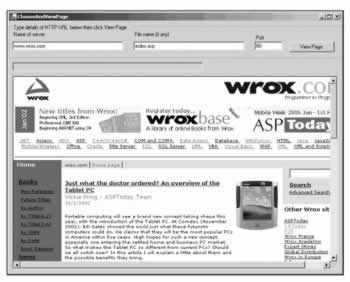
The textbox names are txtBoxServer , txtBoxPath , txtBoxPort , and txtBoxURI respectively. The code to add to the example is entirely in the ViewPage button event handler:
private void ViewPage_Click (object sender, System.EventArgs e) { UriBuilder Address = new UriBuilder(); Address.Host = txtBoxServer.Text; Address.Port = int.Parse(txtBoxPort.Text); Address.Scheme = Uri.UriSchemeHttp; Address.Path = txtBoxPath.Text; Uri AddressUri = Address.Uri; Process myProcess = new Process(); myProcess.StartInfo.FileName = "iexplore.exe"; txtBoxURI.Text = AddressUri.ToString(); myProcess.StartInfo.Arguments = AddressUri.ToString(); myProcess.Start(); }
IP Addresses and DNS Names
On the Internet we identify servers as well as clients by IP address or hostname (also referred to as a DNS name). Generally speaking, the hostname is the human-friendly name that you type in a web browser window, such as www.wrox.com or www.microsoft.com . An IP address, on the other hand, is the identifier computers use to identify each other. IP addresses are the identifiers used to ensure web requests and responses reach the appropriate machines. It is even possible for a computer to have more than one IP address.
Most human beings prefer the friendly host names like http://www.wrox.com over the direct use of IP addresses. For these names to work we must first send a network request to translate the hostname into an IP address, a task carried out by one or more DNS servers.
A DNS server stores a table mapping hostnames to IP addresses for all the computers it knows about, as well as the IP addresses of other DNS servers to look up the hostnames it does not know about. Your local computer should always know about at least one DNS server. Network administrators configure this information when a computer is set up.
Before sending out a request, your computer will first ask the DNS server to tell it the IP address corresponding to the host name you have typed in. Once armed with the correct IP address, the computer can address the request and send it over the network. All of this work normally happens behind the scenes to the user simply browsing the web.
.NET Classes for IP Addresses
The .NET Framework supplies a number of classes that are able to assist with the process of looking up IP addresses and finding out information about host computers.
IPAddress
IPAddress represents an IP address. The address itself is available as the Address property, and may be converted to dotted decimal format with the ToString() method. IPAddress also implements a static Parse() method, which effectively performs the reverse conversion of ToString() - converting from a dotted decimal string to an IPAddress .
IPAddress ipAddress = IPAddress.Parse("234.56.78.9"); long address = ipAddress.Address; string ipString = ipAddress.ToString();
In the above example, the long integer address will be assigned 156121322 , and the string ipString will be assigned the text " 234.56.78.9 " .
IPAddress also provides a number of constant static fields to return special addresses. For example, the Loopback address allows a machine to send messages to itself, while the Broadcast address allows multicasting to the local network.
// The following line will set loopback to "127.0.0.1". // the loopback address indicates the local host. string loopback = IPAddress.Loopback.ToString(); // The following line will set broadcast address to "255.255.255.255". // the broadcast address is used to send a message to all machines on // the local network. string broadcast = IPAddress.Broadcast.ToString();
IPHostEntry
The IPHostEntry class encapsulates information relating to a particular host computer. This class makes the hostname available via the HostName property (which returns a string), and the AddressList property returns an array of IPAddress objects. We are going to use the IPHostEntry class in the in next example: DNSLookupResolver .
Dns
The Dns class is able to communicate with your default DNS server in order to retrieve IP addresses. The two important (static) methods are Resolve() , which uses the DNS server to obtain the details of a host with a given host name, and GetHostByAddress() , which also returns details of the host, but this time using the IP address. Both methods return an IPHostEntry object.
IPHostEntry wroxHost = Dns.Resolve("www.wrox.com"); IPHostEntry wroxHostCopy = Dns.GetHostByAddress("204.148.170.161");
In this code both IPHostEntry objects will contain details of the Wrox.com servers.
The Dns class differs from the IPAddress and IPHostEntry classes since it has the ability to actually communicate with servers to obtain information. In contrast, IPAddress and IPHostEntry are more along the lines of simple data structures with convenient properties to allow access to the underlying data.
DnsLookup Example
We will illustrate the DNS and IP- related classes with an example that looks up DNS names. This screenshot shows the DnsLookup example in action:
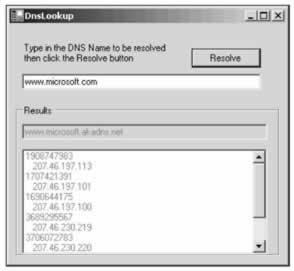
The sample application simply invites the user to type in a DNS name using the main textbox. When the user clicks the Resolve button, the sample uses the Dns.Resolve() method to retrieve an IPHostEntry reference and display the hostname and IP addresses. Note how the hostname displayed may be different from the name typed in. This can occur if one DNS name ( www.microsoft.com ) simply acts as a proxy for another DNS name ( www.microsoft.akadns.net ).
The DnsLookup application is a standard C# Windows application, with the controls added as shown in the screenshot, giving them the names txtBoxInput , btnResolve , txtBoxHostName , and listBoxIPs respectively. Then we simply add the following method to the Form1 class as the event handler for the buttonResolve click event.
void btnResolve_Click (object sender, EventArgs e) { try { IPHostEntry iphost = Dns.Resolve(txtBoxInput.Text); foreach (IPAddress ip in iphost.AddressList) { long ipaddress = ip.Address; listBoxIPs.Items.Add(ipaddress); listBoxIPs.Items.Add(" " + ip.ToString()); } txtBoxHostName.Text = iphost.HostName; } catch(Exception ex) { MessageBox.Show("Unable to process the request because " + "the following problem occurred:\n" + ex.Message, "Exception occurred"); } }
Notice how in this code we are careful to trap any exceptions. An exception may occur if the user types in an invalid DNS name, or if the network is down.
After retrieving the IPHostEntry instance, we use the AddressList property to obtain an array containing the IP addresses, which we then iterate through with a foreach loop. For each entry we display the IP address as an integer and as a string, using the IPAddress.ToString() method.

EAN: 2147483647
Pages: 244