Section 8.6. Monitoring
|
8.6. MonitoringThe key to running a successful project is to be in control. System information must be regularly collected for historical and statistical purposes and allow real-time notification when something goes wrong. 8.6.1. File IntegrityOne of the system security best practices demands that every machine makes use of an integrity checker, such as Tripwire, to monitor file integrity. The purpose of an integrity checker is to detect an intruder early, so you can act quickly and contain the intrusion. As a special case, integrity checkers can be applied against the user files in the web server tree. I believe Tripwire was among the first to offer such a product, in the form of an Apache module. The product was discontinued, and the problem was probably due to the frequent changes that take place on most web sites. Of what use is a security measure that triggers the alarm daily? Besides, many web sites construct pages dynamically, with the content stored in databases, so the files on disk are not that relevant any more. Still, in a few cases where reputation is extremely important (e.g., for governments), this approach has some merit. 8.6.2. Event MonitoringThe first thing to consider when it comes to event monitoring is whether to implement real-time monitoring. Real-time monitoring sounds fancy, but unless an effort is made to turn it into a useful tool, it can do more harm than good. Imagine the following scenario:
This is real-time monitoring gone bad. Real problems often go undetected because of too many false positives. A similar lesson can be learned from the next example, too:
The two cases I have just described are not something I invented to prove a point. There are numerous administrative and development teams suffering like that. These problems can be resolved by following four rules:
8.6.2.1 Periodic reportingOne way to implement periodic monitoring is to use the concept of Artificial Ignorance invented by Marcus J. Ranum. (The original email message on the subject is at http://www.ranum.com/security/computer_security/papers/ai/.) The process starts with raw logs and goes along the following lines:
The idea is to uncover a specific type of event, but without the specifics. The numerical value is used to assess the seriousness of the situation. Here is the same logic implemented as a Perl script (I call it error_log_ai) that you can use: #!/usr/bin/perl -w # loop through the lines that are fed to us while (defined($line = <STDIN>)) { # ignore "noisy" lines if (!( ($line =~ /Processing config/) || ($line =~ /Server built/) || ($line =~ /suEXEC/) )) { # remove unique features of log entries $line =~ s/^\[[^]]*\] //; $line =~ s/\[client [^]]*\] //; $line =~ s/\[unique_id [^]]*\]//; $line =~ s/child pid [0-9]*/child pid X/; $line =~ s/child process [0-9]*/child process X/; # add to the list for later push(@lines, $line); } } @lines = sort @lines; # replace multiple occurences of the same line $count = 0; $prevline = ""; foreach $line (@lines) { next if ($line =~ /^$/); if (!($line eq $prevline)) { if ($count != 0) { $prefix = sprintf("%5i", $count); push @outlines, "$prefix $prevline"; } $count = 1; $prevline = $line; } else { $count++; } } undef @lines; @outlines = sort @outlines; print "--httpd begin------\n"; print reverse @outlines; print "--httpd end--------\n";The script is designed to take input from stdin and send output to stdout, so it is easy to use it on the command line with any other script: # cat error_log | error_log_ai.pl | mail ivanr@webkreator.com From the following example of daily output, you can see how a long error log file was condensed into a few lines that can tell you what happened: --httpd begin------ 38 [notice] child pid X exit signal Segmentation fault (11) 32 [info] read request line timed out 24 [error] File does not exist: /var/www/html/403.php 19 [warn] child process X did not exit, sending another SIGHUP 6 [notice] Microsoft-IIS/5.0 configured -- resuming normal operations 5 [notice] SIGHUP received. Attempting to restart 4 [error] File does not exist: /var/www/html/test/imagetest.GIF 1 [info] read request headers timed out --httpd end ------ 8.6.2.2 SwatchSwatch (http://swatch.sourceforge.net) is a program designed around Perl and regular expressions. It monitors log files for events and evaluates them against expressions in its configuration file. Incoming events are evaluated against positive (take action on event) and negative (ignore event) regular expressions. Positive matches result in one or more actions taking place. A Swatch configuration file designed to detect DoS attacks by examining the error log could look like this: # Ignore requests with 404 responses ignore /File not found/ # Notify me by email about mod_security events # but not more than once every hour watchfor /mod_security/ throttle 1:00:00 mail ivanr@webkreator.com,subject=Application attack # Notify me by email whenever the server # runs out of processes - could be a DoS attack watchfor /MaxClients reached/ mail ivanr@webkreator.com,subject=DOS attack Swatch is easy to learn and use. It does not offer event correlation, but it does offer the throttle keyword (used in the previous example), which prevents too many actions from taking place. 8.6.2.3 Simple Event CorrelatorSimple Event Correlator (SEC, available from http://www.estpak.ee/~risto/sec/) is the tool to use when you want to implement a really secure system. Do not let the word "simple" in the name fool you; SEC is a very powerful tool. Consequently, it can be a bit difficult to configure. It works on the same principles as Swatch, but it keeps track of events and uses that information when evaluating future events. I will give a few examples of SEC to demonstrate its capabilities. SEC is based around several types of rules, which are applied to events. The rule types and their meanings are:
Do not worry if this looks confusing. Read it a couple of times and it will start to make sense. I have prepared a couple of examples to put the rules above in the context of what we do here. The following two rules cause SEC to wait for a nightly backup and alert the administrator if it does not happen: # At 01:59 start waiting for the backup operation # that takes place at 02:00 every night. The time is # in a standard cron schedule format. type = Calendar time = 59 1 * * * desc = WAITING FOR BACKUP action = event %s # This rule will be triggered by the previous rule # it will wait for 31 minutes for the backup to # arrive, and notify the administrator if it doesn't type = PairWithWindow ptype = SubStr pattern = WAITING FOR BACKUP desc = BACKUP FAILED action = shellcmd notify.pl "%s" ptype2 = SubStr pattern2 = BACKUP COMPLETED desc2 = BACKUP COMPLETED action2 = none window = 1860 The following rule counts the number of failed login attempts and notifies the administrator should the number of attempts become greater than six in the last hour. The shell script could also be used to disable login completely from that IP address. type = SingleWithThreshold ptype = RegExp pattern = LOGIN FAILED, IP=([0-9.]+) window = 3600 thresh = 6 desc = Login failed from IP: $1 action = shellcmd notify.pl "Too many login attempts from: $1" SEC uses the description of the event to distinguish between series of events. Because I have included the IP address in the preceding description, the rule, in practice, monitors each IP address. Therefore, it may be a good idea to add another rule to watch the total number of failed login attempts during a time interval: type = SingleWithThreshold ptype = RegExp pattern = LOGIN FAILED, IP=([0-9.]+) window = 3600 thresh = 24 desc = Login failed (overall) action = shellcmd notify.pl "Too many login attempts" This rule would detect a distributed brute-force hacking attempt. 8.6.3. Web Server StatusIn an ideal world, you would monitor your Apache installations via a Network Management System (NMS) as you would monitor other network devices and applications. However, Apache does not support Simple Network Management Protocol (SNMP). (There is a commercial version of the server, Covalent Apache, that does.) There are two third-party modules that implement limited SNMP functionality:
My experiences with these modules are mixed. The last time I tried mod_snmp, it turned out the patch did not work well when applied to recent Apache versions. In the absence of reliable SNMP support, we will have to use the built-in module mod_status for server monitoring. Though this module helps, it comes at a cost of us having to build our own tools to automate monitoring. The good news is that I have built the tools, which you can download from the book's web site. The configuration code for mod_status is probably present in your httpd.conf file (unless you have created the configuration file from scratch). Find and uncomment the code, replacing the YOUR_IP_ADDRESS placeholder with the IP address (or range) from which you will be monitoring the server: # increase information presented ExtendedStatus On <Location /server-status> SetHandler server-status Order Deny,Allow Deny from all # you don't want everyone to see what # the web server is doing Allow from YOUR_IP_ADDRESS </Location> When the location specified above is opened in a browser from a machine that works from the allowed range you get the details of the server status. The Apache Foundation has made their server status public (via http://www.apache.org/server-status/), and since their activity is more interesting than anything I have, I used it for the screenshot shown in Figure 8-1. Figure 8-1. mod_status gives server status information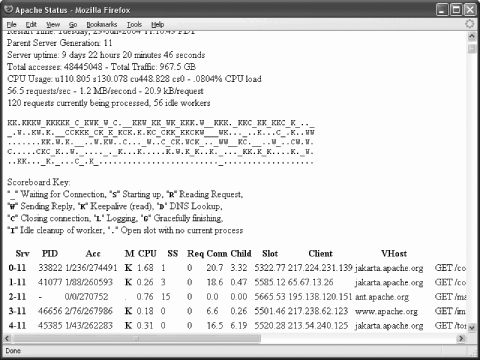 There is plenty of information available; you can even see which requests are being executed at that moment. This type of output can be very useful for troubleshooting, but it does not help us with our primary requirement, which is monitoring. Fortunately, if the string ?auto is appended to the URL, a different type of output is produced. The example screenshot is given in Figure 8-2. This type of output is easy to parse with a computer program. Figure 8-2. Machine-parsable mod_status output variant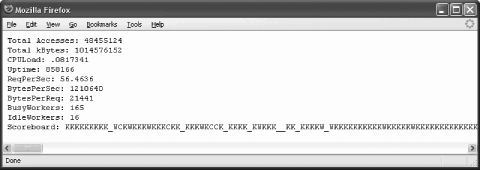 In the following sections, we will build a Perl program that collects information from a web server and stores the information in an RRD file. We will discuss another Perl program that can produce fancy activity graphs. Both programs are available from the web site for this book.
8.6.3.1 Fetching and storing statisticsWe need to understand what data we have available. Looking at the screenshot (Figure 8-2), the first nine fields are easy to spot since each is presented on its own line. Then comes the scoreboard, which lists all processes (or threads) and tells us what each process is doing. The legend can be seen in the first screenshot, Figure 8-1. The scoreboard is not useful to us in the given format but we can count how many times each activity occurs in the scoreboard and create 10 more variables for storing this information. Therefore, we have a total of 19 variables that contain information obtained from the mod_status machine-parsable output. First, we write the part of the Perl program that fetches and parses the mod_status output. By relying on existing Perl libraries for HTTP communication, our script can work with proxies, support authentication, and even access SSL-protected pages. The following code fetches the page specified by $url: # fetch the page my $ua = new LWP::UserAgent; $ua->timeout(30); $ua->agent("apache-monitor/1.0"); my $request = HTTP::Request->new(GET => $url); my $response = $ua->request($request);Parsing the output is fairly simple. Watch out for the incompatibility between the mod_status output in Apache 1 and Apache 2. # Fetch the named fields first # Set the results associative array. Each line in the file # results in an element in the array. Each element # has a key that is the text preceding the colon in a line # of the file, and a value that is whatever appears after # any whitespace after the colon on that line. my %results = split/:\s*|\n/, $response->content; # There is a slight incompatibility between # Apache 1 and Apache 2, so the following makes # the results consistent between the versions. Apache 2 uses # the term "BusyWorkers" where Apache 1 uses "BusyServers". if ($results{"BusyServers"}) { $results{"BusyWorkers"} = $results{"BusyServers"}; $results{"IdleWorkers"} = $results{"IdleServers"}; } # Count the occurrences of certain characters in the scoreboard # by using the translation operator to find and replace each # particular character (with itself) and return the number of # replacements. $results{"s_ _"} = $results{"Scoreboard"} =~ tr/_/_/; $results{"s_s"} = $results{"Scoreboard"} =~ tr/S/S/; $results{"s_r"} = $results{"Scoreboard"} =~ tr/R/R/; $results{"s_w"} = $results{"Scoreboard"} =~ tr/W/W/; $results{"s_k"} = $results{"Scoreboard"} =~ tr/K/K/; $results{"s_d"} = $results{"Scoreboard"} =~ tr/D/D/; $results{"s_c"} = $results{"Scoreboard"} =~ tr/C/C/; $results{"s_l"} = $results{"Scoreboard"} =~ tr/L/L/; $results{"s_g"} = $results{"Scoreboard"} =~ tr/G/G/; $results{"s_i"} = $results{"Scoreboard"} =~ tr/I/I/;After writing this code, I realized some of the fields mod_status gave me were not very useful. ReqPerSec, BytesPerSec, and BytesPerReq are calculated over the lifetime of the server and practically remain constant after a certain time period elapses. To get around this problem, I decided to keep the output from the previous run and manually create the statistics by comparing the values of the Total Accesses and Total kBytes fields, as appropriate, in relation to the amount of time between runs. The code for doing this can be seen in the program (apache-monitor) on the book's web site. Next, we store the data into an RRD file so that it can be processed by an RRD tool. We need to test to see if the desired RRD file (specified by $rrd_name in the following) exists and create it if it does not: if (! -e $rrd_name) { # create the RRD file since it does not exist RRDs::create($rrd_name, # store data at 60 second intervals "-s 60", # data fields. Each line defines one data source (DS) # that stores the measured value (GAUGE) at maximum 10 minute # intervals (600 seconds), and takes values from zero. # to infinity (U). "DS:totalAccesses:GAUGE:600:0:U", "DS:totalKbytes:GAUGE:600:0:U", "DS:cpuLoad:GAUGE:600:0:U", "DS:uptime:GAUGE:600:0:U", "DS:reqPerSec:GAUGE:600:0:U", "DS:bytesPerSec:GAUGE:600:0:U", "DS:bytesPerReq:GAUGE:600:0:U", "DS:busyWorkers:GAUGE:600:0:U", "DS:idleWorkers:GAUGE:600:0:U", "DS:sc_ _:GAUGE:600:0:U", "DS:sc_s:GAUGE:600:0:U", "DS:sc_r:GAUGE:600:0:U", "DS:sc_w:GAUGE:600:0:U", "DS:sc_k:GAUGE:600:0:U", "DS:sc_d:GAUGE:600:0:U", "DS:sc_c:GAUGE:600:0:U", "DS:sc_l:GAUGE:600:0:U", "DS:sc_g:GAUGE:600:0:U", "DS:sc_i:GAUGE:600:0:U", # keep 10080 original samples (one week of data, # since one sample is made every minute) "RRA:AVERAGE:0.5:1:10080", # keep 8760 values calculated by averaging every # 60 original samples (Each calculated value is one # day so that comes to one year.) "RRA:AVERAGE:0.5:60:8760" } );Finally, we add the data to the RRD file: RRDs::update($rrd_name, $time . ":" . $results{"Total Accesses"} . ":" . $results{"Total kBytes"} . ":" . $results{"CPULoad"} . ":" . $results{"Uptime"} . ":" . $results{"ReqPerSec"} . ":" . $results{"BytesPerSec"} . ":" . $results{"BytesPerReq"} . ":" . $results{"BusyWorkers"} . ":" . $results{"IdleWorkers"} . ":" . $results{"s_ _"} . ":" . $results{"s_s"} . ":" . $results{"s_r"} . ":" . $results{"s_w"} . ":" . $results{"s_k"} . ":" . $results{"s_d"} . ":" . $results{"s_c"} . ":" . $results{"s_l"} . ":" . $results{"s_g"} . ":" . $results{"s_i"} );8.6.3.2 GraphingCreating graphs from the information stored in the RRD file is the really fun part of the operation. Everyone loves the RRDtool because no skills are required to produce fabulous graphs. For example, the Perl code below creates a graph of the number of active and idle servers throughout a designated time period, such as the third graph shown in Figure 8-3. The graph is stored in a file specified by $pic_name. RRDs::graph($pic_name, "-v Servers", "-s $start_time", "-e $end_time", # extracts the busyWorkers field from the RRD file "DEF:busy=$rrd_name:busyWorkers:AVERAGE", # extracts the idleWorkers field from the RRD file "DEF:idle=$rrd_name:idleWorkers:AVERAGE", # draws a filled area in blue "AREA:busy#0000ff:Busy servers", # draws a line in green "LINE2:idle#00ff00:Idle servers" ); Figure 8-3. Graphs representing web server activity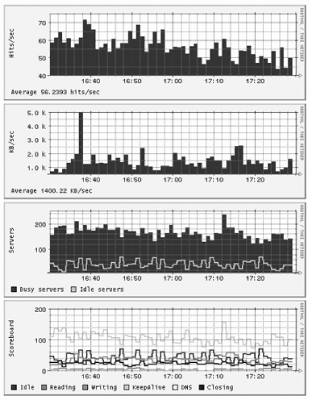 I decided to create four graphs out of the available data:
The graphs are shown in Figure 8-3. You may want to create other graphs, such as ones showing the uptime and the CPU load. Note: The live view of the web server statistics for apache.org are available at http://www.apachesecurity.net/stats/, where they will remain for as long as the Apache Foundation keeps their mod_status output public. 8.6.3.3 Using the scriptsTwo scripts, parts of which were shown above, are used to record the statistics and create graphs. Both are available from the web site for this book. One script, apache-monitor, fetches statistics from a server and stores them. It expects two parameters. The first specifies the (RRD) file in which the results should be stored, and the second specifies the web page from which server statistics are obtained. Here is a sample invocation: $ apache-monitor /var/www/stats/apache.org http://www.apache.org/server-status/ For a web page that requires a username and password, you can embed these directly in the URL (e.g., http://username:password@www.example.com/server-status/). The script is smart enough to create a new RRD file if one does not exist. To get detailed statistics of the web server activity, configure cron to execute this script once a minute. The second script, apache-monitor-graph, draws graphs for a given RRD file. It needs to know the path to the RRD file (given as the first parameter), the output folder (the second parameter), and the duration in seconds for the time period the graphs need to cover (the third parameter). The script calculates the starting time by deducting the given duration from the present time. The following invocation will create graphs for the last six hours: $ apache-monitor-graph /var/www/stats/apache.org /var/www/stats/ 21600 Four files will be created and stored in the output folder, each showing a single graph: $ cd /var/www/stats $ ls apache.org_servers-21600.gif apache.org_hits-21600.gif apache.org_transfer-21600.gif apache.org_scoreboard-21600.gif You will probably want to create several graphs to monitor the activity over different time periods. Use the values in seconds from Table 8-9.
Calling the graphing script every five minutes is sufficient. Having created the graphs, you only need to create some HTML code to glue them together if you want to show multiple graphs on a single page (see Figure 8-3).
8.6.3.4 mod_watchmod_status was designed to allow for web server monitoring. If you need more granularity, you will have to turn to mod_watch, a third-party module available from http://www.snert.com/mod_watch/. This module can provide information for an unlimited number of contexts, where each context can be one of the following:
For each context, mod_watch provides the following values:
Since this module comes with utility scripts to integrate it with MRTG (a monitoring and graphing tool described at http://people.ee.ethz.ch/~oetiker/webtools/mrtg/), it can be of great value if MRTG has been deployed. |


|
