Example SOAP Structure
Supporting a SOAP server can be a bit more complex. The incoming requests are going to encapsulate the data within an XML document, which can make accessing the data a bit more difficult. Fortunately, tools like NuSOAP provide an easy framework to work with. Because the NuSOAP modules provide a lot of the functionality for you, the processes used when developing a server are slightly different.
First, create your SOAP server and register your methods:
$server = new soap_server(); $server->configureWSDL('basicwsdl', 'urn:ratingwsdl'); $server->register('movieRating', // Service Method array('name' => 'xsd:string'), // Expected parameters array('return' => 'xsd:string'), // Returned parameters 'urn:ratingwsdl', // Namespace 'urn:ratingwsdl#movieRate', // Soap Action 'rpc', // Style 'encoded', // Use 'Returns a rating for the movie specified' // Description of the service );
Here the server is configured to present a wsdl document if requested, and a movieRating method is added. This is the name of the operation the client will call, as well as the name of the function that will receive the parameters sent with the request. Both the expected and returned parameters are arrays, so any number of values can be entered.
Second, create the functions that will receive the requests. These functions will only receive the parameters, not the entire request.
function movieRating($name) { return "$name was great!"; }
The functions must return data in the format indicated earlier (xsd:string in this example). More complicated data types are introduced shortly.
NuSOAP can also generate documentation pages for the various methods offered; to offer this, you will need to add a bit more code at the end of the file:
$HTTP_RAW_POST_DATA = isset($HTTP_RAW_POST_DATA) ? $HTTP_RAW_POST_DATA : ''; $server->service($HTTP_RAW_POST_DATA);
With that in place, pointing your web browser at the SOAP server, you should see something as shown in Figure 12-1.
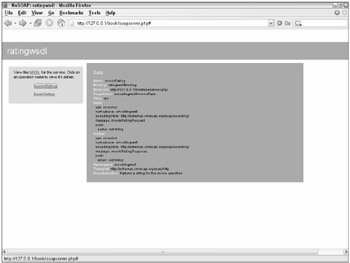
Figure 12-1
Clicking the wsdl link presented on that page will yield the wsdl document for the service:
<?xml version="1.0" encoding=" ISO-8859-1"?> <definitions xmlns:SOAP-ENV="http://schemas.xmlsoap.org/soap/envelope/" xmlns:xsd="http://www.w3.org/2001/XMLSchema" xmlns:xsi="http://www.w3.org/2001/XMLSchema-instance" xmlns:SOAP-ENC="http://schemas.xmlsoap.org/soap/encoding/" xmlns:si="http://soapinterop.org/xsd" xmlns:tns="urn:ratingwsdl" xmlns:soap="http://schemas.xmlsoap.org/wsdl/soap/" xmlns:wsdl="http://schemas.xmlsoap.org/wsdl/" xmlns="http://schemas.xmlsoap.org/wsdl/" targetNamespace=" urn:ratingwsdl"> <types> <xsd:schema targetNamespace="urn:ratingwsdl"> <xsd:import namespace="http://schemas.xmlsoap.org/soap/encoding/" /> <xsd:import namespace="http://schemas.xmlsoap.org/wsdl/" /> </xsd:schema> </types> <message name="movieRatingRequest"> <part name="name" type="xsd:string" /> </message> <message name="movieRatingResponse"> <part name="return" type="xsd:string" /> </message> <message name="bookRatingRequest"> <part name="name" type="xsd:string" /> </message> <message name="bookRatingResponse"> <part name="return" type="xsd:string" /> </message> <portType name="ratingwsdlPortType"> <operation name="movieRating"> <documentation>Returns a rating for the movie specified</documentation> <input message="tns:movieRatingRequest"/> <output message="tns:movieRatingResponse"/> </operation> <operation name="bookRating"> <documentation>Returns a rating for the book specified</documentation> <input message="tns:bookRatingRequest"/> <output message="tns:bookRatingResponse"/> </operation> </portType> <binding name="ratingwsdlBinding" type="tns:ratingwsdlPortType"> <soap:binding style="rpc" transport="http://schemas.xmlsoap.org/soap/http"/> <operation name="movieRating"> <soap:operation soapAction="urn:ratingwsdl#movieRate" style=" rpc"/> <input> <soap:body use="encoded" namespace="urn:ratingwsdl" encodingStyle="http://schemas.xmlsoap.org/soap/encoding/"/> </input> <output> <soap:body use="encoded" namespace="urn:ratingwsdl" encodingStyle="http://schemas.xmlsoap.org/soap/encoding/"/> </output> </operation> <operation name="bookRating"> <soap:operation soapAction="urn:ratingwsdl#bookRate" style="rpc"/> <input> <soap:body use="encoded" namespace="urn:ratingwsdl" encodingStyle="http://schemas.xmlsoap.org/soap/encoding/"/> </input> <output> <soap:body use="encoded" namespace="urn:ratingwsdl" encodingStyle="http://schemas.xmlsoap.org/soap/encoding/"/> </output> </operation> </binding> <service name="ratingwsdl"> <port name="ratingwsdlPort" binding="tns:ratingwsdlBinding"> <soap:address location="http://127.0.0.1/book/soapserver.php"/> </port> </service> </definitions>
Considering the small amount of code required to generate it, the WSDL document looks quite impressive.
| Note | Although it may not take much code on your part to generate the WSDL document and the human-readable documentation, it took a lot of work on NuSOAP's part. As such, these are excellent candidates for caching. |
Complex Data Types
The previous example works great as long as you're satisfied receiving only basic data types and returning single values, but it isn't really feasible for a production API. Complex data types can be created to allow different structures to be passed to and from the server.
Here a more complex data type is created to return a more detailed movie review:
$server->wsdl->addComplexType( 'MovieReview', // Type Name 'complexType', // What we are adding 'struct', // Given 'all', // Given '', // array( 'rating' => array('name' => 'rating', 'type' => 'xsd:string'), 'reviewer' => array('name' => 'reviewer', 'type' => 'xsd:string'), 'stars' => array('name' => 'stars', 'type' => 'xsd:int') ) );
Only the MovieReview item and the array are of interest. MovieReview is the name of the complex type; this will be referred to later in the chapter. The array defines all the elements that will combine to form the MovieReview type. In this case, each of the items is a basic type, but you can nest complex types within each other, or use more advanced types like arrays.
A small change is required to the definition of the MovieRating function to make use of this new data type:
$server->register('movieRating', array('name' => 'xsd:string'), array('return' => ‘tns:MovieReview'), 'urn:ratingwsdl', 'urn:ratingwsdl#movieRate', 'rpc', 'encoded', 'Returns a rating for the movie specified' ); The only change here is to the return type, your new complex type. Within the function itself, the appropriate type must be returned:
function movieRating($name) { $review = array( 'rating' => "It was great!", 'reviewer' => "Paul", 'stars' => "5"); return $review; }
The format of the response looks quite similar to the definition; an associative array containing three elements, the names here must match the names used earlier. Because PHP is loosely typed, you must be careful to ensure you return the appropriate data type. You may want to look into the ctype_*() functions to ensure this.
Though this example used the complex type to return data, it could have just as easily required a different type. Just make the complex type the required element when the function is registered.
SOAP Conclusions
SOAP's more robust protocol and encapsulation can make it appear intimidating, but fortunately tools like NuSOAP take the pain out of implementation. This section provided an example SOAP server using the NuSOAP toolkit. By adding your own complex types to the service, you can require or return data in a format of your choosing.

EAN: N/A
Pages: 130