| < Day Day Up > |
3.11 System backup
In this section, we discuss backup solutions available for Linux on pseries. We describe the installation of Tivoli Storage Manager (TSM) in 8.3, "Tivoli Storage Manager (TSM)" on page 406. In addition to commercial solutions, there are many UNIX
For network backups, we can also use rsync . It transfers data compressed and through ssh, it can be used to make incremental and rotating backups. Some generic examples for using rsync as a backup tool can be found at: http://rsync.samba.org/examples.html There are also many scripts that utilize rsync to do more comfortable and sophisticated network backups: RIBS is available at: http://rustyparts.com/scripts.php rsync-backup is available at:
http://
duplicity is available at: http://www.nongnu.org/duplicity/ Using amanda for backup
The amanda (or Advanced Maryland Automatic Network Disk Archiver) backup system, allows the administrator of a LAN to set up a single master backup server to back up multiple
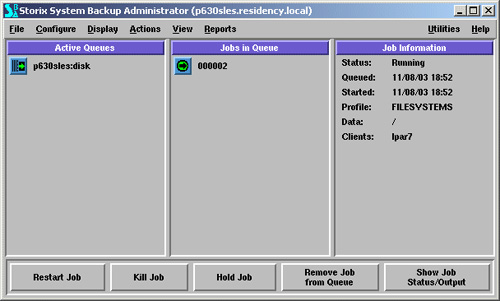
The home page of amanda is: http://www.amanda.org Despite the lack of a sophisticated graphical interface, amanda is a competitive product widely used in Linux environments. Using storix for backupOne of the commercial backup solutions available for 64-bit PowerPC Linux is storix. You can visit the storix homepage and download an evaluation version of the software: http://www.storix.com It worked fine on our test system, except that we were not able to create bootable rescue CDs, which is an outstanding feature from this software. Figure 3-14. storix running a backup job
|
| < Day Day Up > |

| < Day Day Up > |
3.12 sshAfter default installation of any SuSE or Red Hat system, the only way to access it remotely is by using ssh. The telnet port is closed by default and we strongly recommend, for security reasons, that you do not change it. If you are accessing the system from another Linux box, you will usually have the openssh client installed. For AIX 5L, you can install it from: http://www-124.ibm.com/developerworks/projects/opensshi For AIX 4.3, you can install it from: http://www-1.ibm.com/servers/aix/products/aixos/linux/download.html
On Windows, you can use one of three ssh
http://www.putty.nl/download.html
For the same security reason, we did not want to use .rhosts file and rsh. In order to be able to run unattended remote commands or file copies, we need to set up ssh for
In a test environment, this can be done in both ways, but in a production environment, we recommend that you enable login from a central management server to the nodes only, not from every node to every node. 3.12.1 Exchanging ssh keysIn this example, we enable passwordless login from serverA (lpar7) to serverB (lpar1). This requires two steps: generating a public key on serverB, and placing this key in .ssh/authorized_keys2 file on serverA. In order to generate a public key on serverB, we run following command: lpar7:~# ssh-keygen -t rsa -b 1024 -N "" As a result, two files are created in /root/.ssh directory: id_rsa and id_rsa.pub.
In the
lpar7:~# scp id_rsa.pub lpar1:/tmp We add its content to the /root/.ssh/authorized_keys2: lpar1:~ # cat /tmp/id_rsa.pub >> /root/.ssh/authorized_keys2 Now we can go back to serverA (lpar7) and try ssh login to serverB (lpar1). If everything is correct, we will not be prompted for a password: lpar7:~/.ssh # ssh lpar1 Last login: Mon Nov 3 18:17:41 2003 from lpar7 lpar1:~ # If your public key authentication does not work, then look in /var/log/messages for the reason and check the permissions (0655 for public key and 600 for id.rsa). A world readable home directory will prevent this authentication from working, as well.
Important If you are going to implement CSM, then do not exchange root keys manually; CSM will take care of this. You can exchange keys for other users. |
| < Day Day Up > |